A data agent is one of the easiest ways to make business data feel more accessible. Instead of opening dashboards, writing SQL, or asking an analyst for help, you can ask a question in plain language and get an answer based on your actual data.
For beginners, that is the big appeal. A data agent aims to bridge the gap between people and the systems where information lives. It can help users ask better questions, find the right data faster, and in some cases even trigger follow-up actions.
This guide explains what a data agent is, how it works, where it is useful, and what to watch out for before relying on one.
What Is a Data Agent?
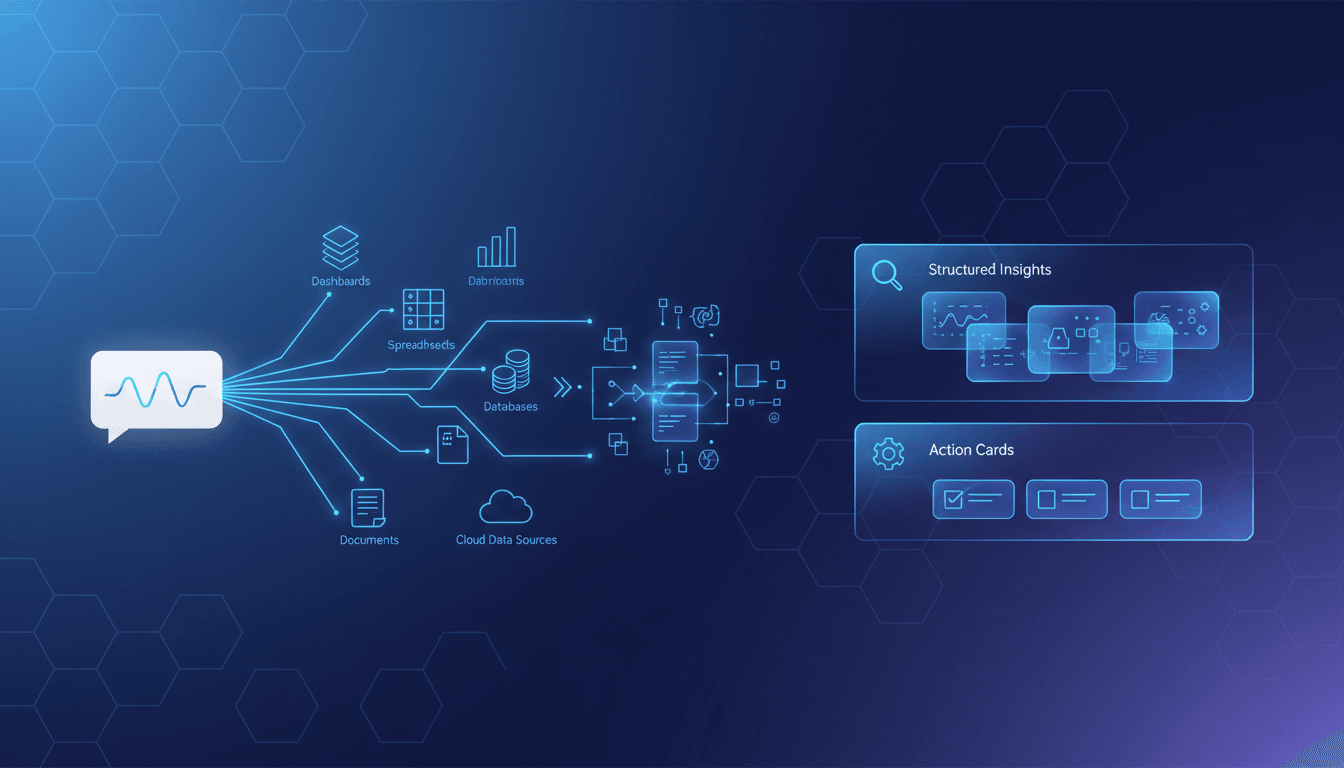
A data agent is an AI-powered system that helps people interact with data using natural language. In simple terms, it acts like a smart layer between a user and one or more data sources. You ask a question such as, “Why did sales drop last month?” or “Show me support ticket trends by region,” and the agent tries to retrieve the right context and return a useful response.
Unlike a static dashboard, a data agent is not limited to prebuilt charts and filters. Unlike a general chatbot, it is meant to work with connected business data rather than only generate generic text. And unlike a traditional analytics tool, it tries to reduce the technical work required to get answers.
Return an answer, summary, recommendation, or action
That makes a data agent feel more conversational than classic business intelligence tools. Instead of navigating menus and reports, users can ask direct questions in everyday language.
Beginners are hearing more about data agents now because AI systems have become better at language understanding, while modern data platforms are making it easier to connect governed data to these interfaces. As a result, accessing data is starting to feel less like querying a database and more like having a guided conversation.
How a Data Agent Works Behind the Scenes
A data agent may look simple from the outside, but several steps happen behind the scenes before it responds.
The basic workflow
The process usually starts when a user asks a question or gives a task in natural language. For example:
“What were our top-performing campaigns last quarter?”
“Summarize refund trends this month.”
“Find accounts with rising support volume.”
The data agent then tries to identify the user’s intent. It figures out what the person is asking, what kind of answer is needed, and which data source or sources may contain the relevant information.
Next, it decides what steps to take. That might include:
Choosing a sales database
Looking at a semantic model
Searching documents or notes
Combining multiple sources
Applying filters such as date range, region, or product line
After that, the agent retrieves the data, filters it, and structures it into a form it can work with. Finally, it generates an answer, summary, recommendation, or next step suggestion.
In stronger implementations, the answer is grounded in real data the system just accessed, not only in language model guesses.
Key building blocks
Most data agent systems depend on a few core components.
Data connections allow the agent to reach sources such as warehouses, lakehouses, BI models, CRM systems, support tools, spreadsheets, or document repositories.
Permissions control what each user is allowed to see. A good data agent should respect existing access rules instead of exposing everything to everyone.
Semantic understanding helps the agent interpret what a question means. For example, it may need to recognize that “revenue,” “bookings,” and “closed-won amount” are not always the same metric.
Memory can help the agent keep track of context across multiple turns in a conversation. If a user asks a follow-up question like “Now break that down by region,” memory helps the agent understand what “that” refers to.
Orchestration is the logic that coordinates the full workflow. It determines which model, tool, or retrieval step should run in what order.
Behind many data agents are combinations of:
Large language models for interpreting requests
Retrieval systems for pulling relevant records or text
Query generation tools for SQL, DAX, KQL, or similar languages
Ranking and filtering logic
Workflow tools for alerts, tasks, or downstream actions
These building blocks let a data agent reason over both structured data such as tables and unstructured data such as documents, tickets, call notes, or knowledge articles.
What makes it different from a simple chatbot
A simple chatbot can sound helpful even when it is not connected to any real business context. It may generate fluent answers, but those answers can be vague, outdated, or invented.
A data agent is different because its value comes from being grounded in actual organizational data. Ideally, it does not just “talk well.” It finds the right data, applies business logic, and responds within the boundaries of your systems and permissions.
Another key difference is that some data agents can do more than reply. Depending on the platform, they may also:
Trigger alerts
Route a case
Create a task
Recommend follow-up actions
Start a workflow based on detected conditions
That moves the experience beyond question answering into practical decision support.
Common Use Cases for Beginners in Data Agent
For beginners, the most useful way to understand a data agent is to see where it helps in everyday work.
Business questions and self-service analytics
One of the most common use cases is self-service analytics. Instead of relying on technical teams for every request, business users can ask plain-language questions about:
“Which products had the highest growth this month?”
“Why did conversion rates fall after the last campaign launch?”
“What are the main drivers of longer ticket resolution times?”
“Which region is missing its revenue target?”
A data agent can help surface summaries, trends, anomalies, and possible next steps without requiring the user to manually write queries or navigate multiple reports.
This lowers the barrier to entry for people who understand the business problem but not the technical details of the underlying data systems.
Data agent for chat-like communication with your data
A major reason interest is growing is that a data agent enables chat-like communication with your data. That is powerful for non-technical users because it removes a lot of the friction that usually comes with analytics tools.
Instead of learning query syntax or report design, users can simply ask for what they need. This is especially helpful when:
The user needs a quick answer
The question is straightforward
The person does not know where the data lives
The team wants easier access across many tools
However, conversational access is not a complete replacement for deeper analysis. A chat interface is excellent for exploration and quick insight, but it may not be enough when you need:
Formal reporting
Complex modeling
Detailed root-cause analysis
Regulatory review
High-stakes financial decisions
In those cases, the data agent can be a starting point, not the final word.
Team-specific examples
Different departments can use a data agent in different ways.
Marketing and revenue teams might explore campaign performance, lead quality, funnel conversion, pipeline changes, and attribution patterns. Instead of switching between dashboards and spreadsheets, they can ask direct questions and get summaries faster.
Sales teams may use a data agent to spot stalled deals, compare rep performance, or identify accounts showing buying signals.
Service teams can review support case patterns, average response times, escalation drivers, and customer sentiment. That helps them identify recurring problems and prioritize action.
Operations teams may ask about delays, process bottlenecks, inventory issues, or service-level performance.
The common pattern is simple: a data agent helps each team reach relevant answers faster with less technical friction.
Real-World Examples and Data Agent Platforms to Know
The term data agent can mean slightly different things depending on the platform, so it helps to look at a few examples.
Fabric data agent concepts (preview)
Microsoft Fabric has introduced data agent concepts as part of a broader analytics ecosystem. This is a useful example because it shows how modern platforms are building conversational experiences directly into data environments.
In this kind of setup, a data agent can sit on top of governed sources such as semantic models, warehouses, lakehouses, and other connected assets. The goal is to let users ask plain-language questions and receive responses based on approved enterprise data.
This matters for beginners because it shows where the market is heading: data access is becoming more conversational, but still tied to governance, permissions, and platform rules.
That said, preview features should be evaluated carefully. Early-stage capabilities can change quickly in terms of functionality, usability, limits, and reliability. If you are considering this type of data agent in a real business setting, test it with controlled use cases before expanding access.
AI Data Agent for Marketing, Sales & Service
Another useful example is the idea of an AI Data Agent for Marketing, Sales & Service. This represents a more role-based approach, where the agent is designed around the workflows of a specific business function rather than as a general-purpose analytics layer.
That can be especially effective for beginners. A specialized data agent can answer common departmental questions faster because it is tuned for a narrower set of tasks, terms, and data sources.
For example:
A marketing-focused agent may surface campaign performance and audience trends
A sales-focused agent may summarize pipeline movement and account signals
A service-focused agent may highlight case spikes and satisfaction issues
The advantage of specialized agents is speed and relevance. Instead of trying to handle every kind of data question equally well, they focus on the workflows users actually care about.
SAS Data Agent
SAS Data Agent is another example worth noting, especially for organizations that care about enterprise analytics and decision support.
In an enterprise context, a data agent is not just about convenience. It also needs to fit into larger requirements such as:
Security
Governance
Data quality
Auditability
Integration with existing analytics workflows
That is why vendor evaluation matters. If you are comparing options, do not focus only on how impressive the demo looks. Compare how each data agent handles:
The best choice is often the platform that aligns with your current data environment and operating model, not the one with the flashiest conversational interface.
Benefits, Limitations, and What to Evaluate First in Data Agent
Like most AI tools, a data agent can be extremely useful and still require careful oversight.
Benefits
A well-designed data agent can offer several practical benefits.
Faster access to answers is the most obvious one. Instead of waiting for someone to build a report or write a query, users can ask directly.
Lower technical barriers make data more usable across the organization. People who are not analysts can still explore trends and get value from internal information.
More consistent use of organizational data can also help. When people have an easier way to access trusted data, they are less likely to rely on guesswork, disconnected spreadsheets, or outdated copies.
Over time, this can improve decision-making because more teams are able to participate in analysis and ask better questions earlier.
Limitations and risks
A data agent is not automatically reliable just because it sounds confident.
One risk is hallucination, where the system produces an answer that seems plausible but is not supported by the data.
Another issue is incomplete context. If the agent does not understand the business definition of a metric, or if it selects the wrong data source, the answer may be misleading even when the query technically runs.
Weak data quality is another common problem. If the underlying systems contain missing, stale, duplicated, or inconsistent data, the agent will reflect those problems.
There are also permission and governance risks. If controls are poorly designed, users may see data they should not access, or they may get partial results without realizing why.
In short, a data agent is only as reliable as the data, rules, context, and governance behind it.
Beginner checklist for evaluation
If you are new to the category, start small and evaluate carefully.
Check whether the agent explains how it reached the answer
Test with both simple and ambiguous questions
Measure usefulness by accuracy, speed, transparency, and ease of adoption
It is also smart to involve both business users and data owners in the evaluation. Business users can judge whether the answers are useful, while data owners can verify whether the logic, metrics, and access rules are correct.
How to Start Learning More About Data Agents
If you want to go beyond the basics, the next step is to explore how real tools and communities describe and use the concept.
Where to explore examples and community discussions
A good way to learn is to read practical explainers from platforms and builders working on these systems. Articles such as Data Agents - LlamaIndex Blog can help you understand common terminology, implementation patterns, and how retrieval plus tools can support agent behavior.
It is also useful to browse community discussions such as Data Agent : r/MicrosoftFabric. These conversations often reveal what official product pages do not: common beginner questions, real-world expectations, limitations, setup pain points, and confusion around permissions or data scope.
That mix of vendor examples and community feedback gives you a more realistic picture of what a data agent can actually do today.
A simple next step for beginners
If you want a practical starting point, do this:
Pick one business question
Map the data needed to answer it
Identify where that data currently lives
Test how a data agent would retrieve, interpret, and explain the answer
Review the result with someone who knows the data well
For example, you might start with a low-risk question such as, “Which support categories increased most this month?” or “Which campaigns generated the most qualified leads last quarter?”
This approach helps you learn the real strengths and weaknesses of a data agent without overcommitting too early.
Most importantly, keep expectations realistic. Start with low-risk tasks, use trusted datasets, and treat the agent as an assistant rather than an unquestioned authority. That is the best way to build confidence while avoiding costly mistakes.
A data agent can be a powerful entry point into modern analytics, especially for beginners who want faster, simpler access to business information. Used well, it can turn data from something hidden behind tools and specialists into something more conversational, useful, and actionable.
FAQs
A data agent lets people ask questions about business data in plain language and get answers without writing SQL or digging through dashboards. It acts as a conversational layer between users and connected data sources.
A regular chatbot may generate fluent answers without checking real company data. A data agent is designed to retrieve and use actual business data, ideally within your existing systems, rules, and permissions.
It interprets the user’s request, identifies the right data source, retrieves relevant records or context, and then returns an answer or summary. In some setups, it can also trigger follow-up actions or workflows.
Common starting points include self-service analytics, trend summaries, support or sales insights, and quick answers from internal documents or operational systems. These use cases help non-technical teams access information faster.
You should check data quality, permissions, governance, and whether answers are grounded in current data rather than guesses. It is also important to review how the agent handles sensitive information and ambiguous questions.
Product Trial
FineReport
Pixel-perfect reports · Interactive dashboards · Easy data entry · Digital twins
See how Dora turns trusted BI data into chat-based answers, scheduled briefings, and automated follow-up — built for real enterprise workflows, not just chat.