通过循环创建线程进行数据分析的方法包括:使用 threading 模块、定义线程函数、创建并启动线程。其中,使用 threading 模块是关键步骤。threading 模块是 Python 标准库中的一个模块,提供了创建和管理线程的功能。通过 threading 模块,我们可以轻松地创建和管理多个线程,从而提高数据分析的效率。具体来说,我们可以定义一个线程函数,该函数负责执行数据分析任务,然后通过循环创建多个线程并启动这些线程,每个线程都会执行该线程函数,从而实现并行数据分析。这样可以充分利用多核处理器的计算能力,提高数据分析的速度和效率。
一、使用 threading 模块
Python 的 threading 模块是标准库中的一个模块,提供了创建和管理线程的功能。通过 threading 模块,我们可以轻松地创建和管理多个线程,从而提高数据分析的效率。threading 模块的主要功能包括创建线程、启动线程、等待线程结束等。
import threading
import time
def thread_function(name):
    print(f"Thread {name} starting")
    time.sleep(2)
    print(f"Thread {name} finished")
创建并启动线程
threads = []
for i in range(5):
    x = threading.Thread(target=thread_function, args=(i,))
    threads.append(x)
    x.start()
等待所有线程结束
for thread in threads:
    thread.join()
在上面的示例中,我们定义了一个名为 thread_function 的函数,该函数负责执行数据分析任务。然后,我们通过循环创建了多个线程,并启动这些线程。每个线程都会执行 thread_function 函数,从而实现并行数据分析。
二、定义线程函数
定义线程函数是创建和管理线程的关键步骤。线程函数是一个普通的 Python 函数,但它将在单独的线程中执行。我们可以在线程函数中执行数据分析任务,从而实现并行数据分析。
import threading
import time
def analyze_data(data_chunk):
    print(f"Analyzing data chunk: {data_chunk}")
    time.sleep(2)
    print(f"Finished analyzing data chunk: {data_chunk}")
data = [1, 2, 3, 4, 5]
创建并启动线程
threads = []
for chunk in data:
    x = threading.Thread(target=analyze_data, args=(chunk,))
    threads.append(x)
    x.start()
等待所有线程结束
for thread in threads:
    thread.join()
在上面的示例中,我们定义了一个名为 analyze_data 的函数,该函数负责分析数据块。然后,我们通过循环创建了多个线程,每个线程都会执行 analyze_data 函数,从而实现并行数据分析。
三、创建并启动线程
创建并启动线程是实现并行数据分析的关键步骤。通过循环创建多个线程,并启动这些线程,我们可以实现并行数据分析。每个线程都会执行线程函数,从而实现并行数据分析。
import threading
import time
def analyze_data(data_chunk):
    print(f"Analyzing data chunk: {data_chunk}")
    time.sleep(2)
    print(f"Finished analyzing data chunk: {data_chunk}")
data = [1, 2, 3, 4, 5]
创建并启动线程
threads = []
for chunk in data:
    x = threading.Thread(target=analyze_data, args=(chunk,))
    threads.append(x)
    x.start()
等待所有线程结束
for thread in threads:
    thread.join()
在上面的示例中,我们通过循环创建了多个线程,每个线程都会执行 analyze_data 函数,从而实现并行数据分析。通过线程的 join 方法,我们可以等待所有线程结束,从而确保数据分析任务完成。
四、并行数据分析的优点
并行数据分析具有许多优点,包括提高数据分析的效率、充分利用多核处理器的计算能力、提高数据分析的速度等。通过并行数据分析,我们可以显著提高数据分析的效率,从而更快地获得数据分析结果。
import threading
import time
def analyze_data(data_chunk):
    print(f"Analyzing data chunk: {data_chunk}")
    time.sleep(2)
    print(f"Finished analyzing data chunk: {data_chunk}")
data = [1, 2, 3, 4, 5]
创建并启动线程
threads = []
start_time = time.time()
for chunk in data:
    x = threading.Thread(target=analyze_data, args=(chunk,))
    threads.append(x)
    x.start()
等待所有线程结束
for thread in threads:
    thread.join()
end_time = time.time()
print(f"Data analysis completed in {end_time - start_time} seconds")
在上面的示例中,我们通过记录数据分析的开始时间和结束时间,计算了数据分析的总时间。通过并行数据分析,我们可以显著减少数据分析的总时间,从而提高数据分析的效率。
五、注意事项
在进行并行数据分析时,有一些注意事项需要我们关注。首先,确保线程函数是线程安全的,避免多个线程同时访问共享资源导致数据不一致。其次,合理规划线程的数量,避免线程过多导致系统资源耗尽。最后,确保所有线程结束后再继续后续操作,避免数据分析任务未完成导致数据不完整。
import threading
import time
def analyze_data(data_chunk, lock):
    with lock:
        print(f"Analyzing data chunk: {data_chunk}")
        time.sleep(2)
        print(f"Finished analyzing data chunk: {data_chunk}")
data = [1, 2, 3, 4, 5]
创建并启动线程
threads = []
lock = threading.Lock()
start_time = time.time()
for chunk in data:
    x = threading.Thread(target=analyze_data, args=(chunk, lock))
    threads.append(x)
    x.start()
等待所有线程结束
for thread in threads:
    thread.join()
end_time = time.time()
print(f"Data analysis completed in {end_time - start_time} seconds")
在上面的示例中,我们使用了 threading.Lock 来确保线程函数是线程安全的。通过合理规划线程的数量和确保所有线程结束后再继续后续操作,我们可以避免数据分析过程中出现的问题。
六、使用 FineBI 进行数据分析
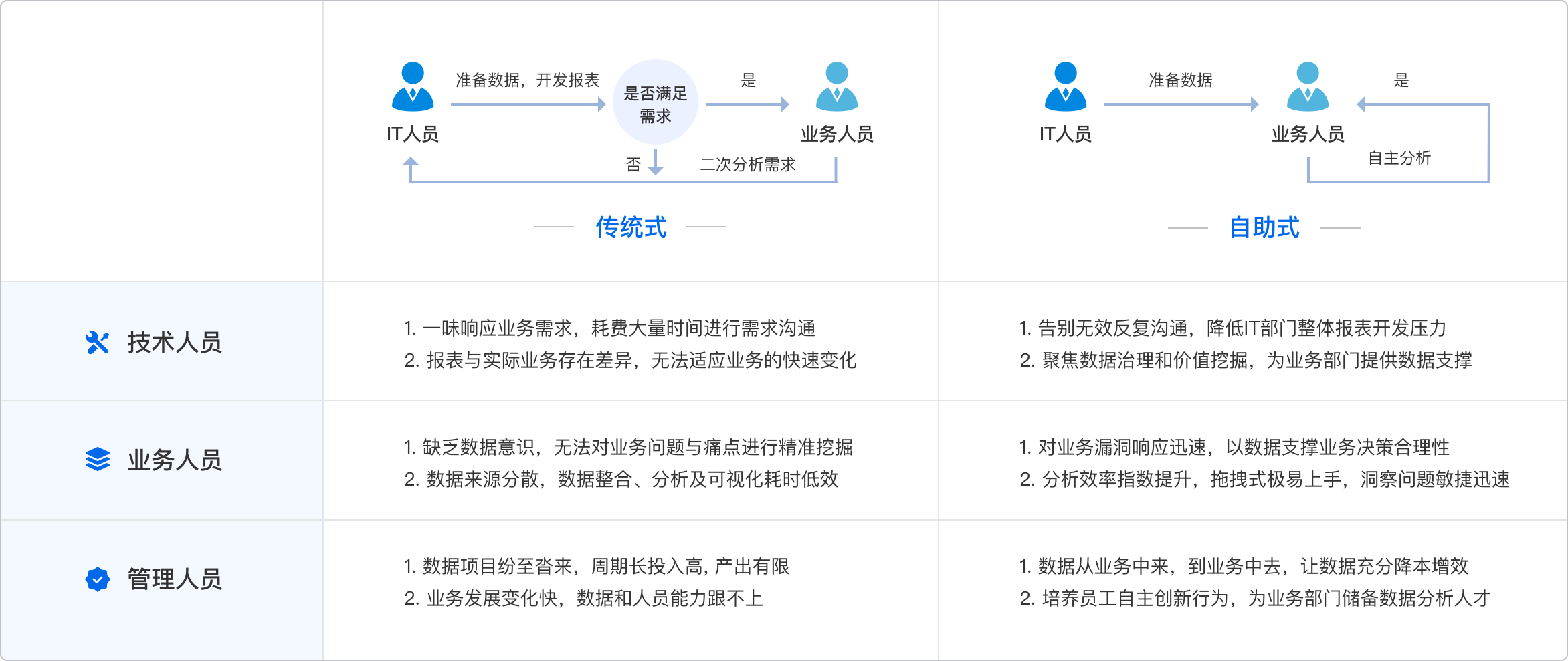
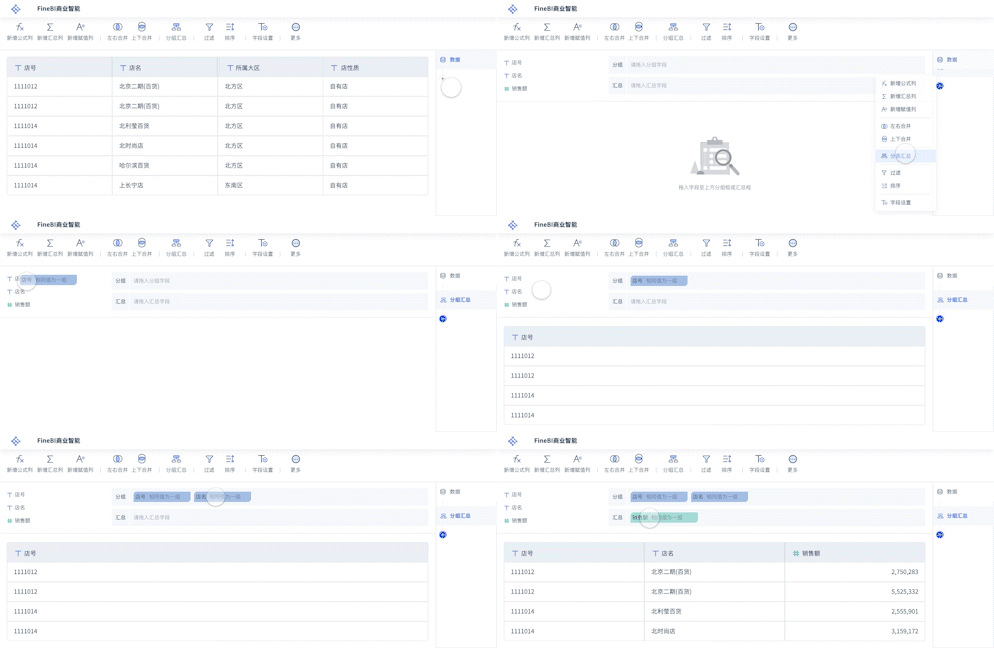
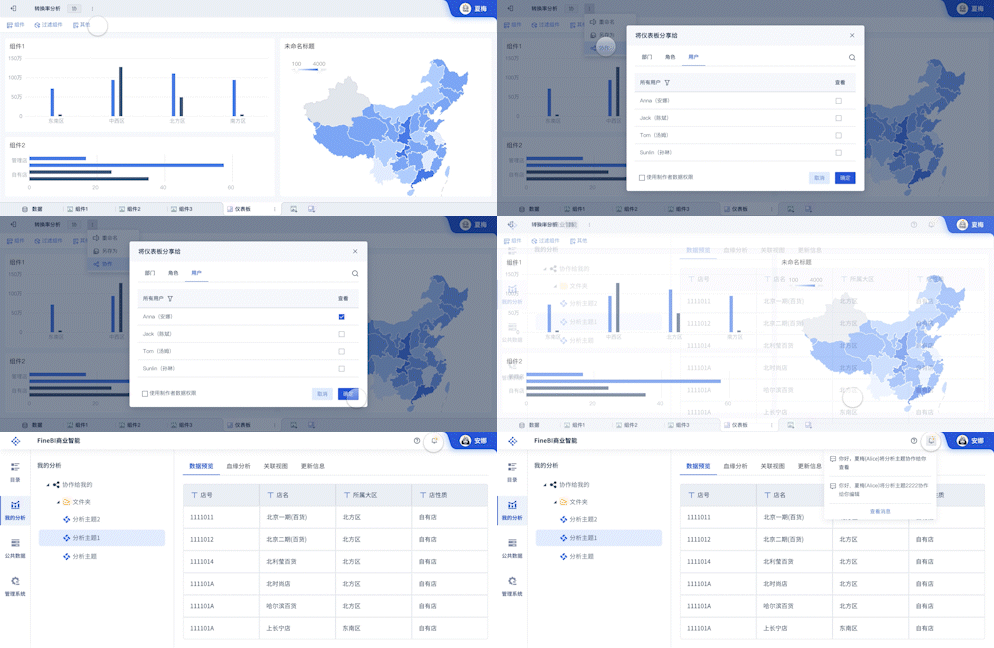
除了使用 Python 进行并行数据分析外,我们还可以使用 FineBI 进行数据分析。FineBI 是帆软旗下的一款专业数据分析工具,提供了丰富的数据分析功能和良好的用户体验。通过 FineBI,我们可以轻松地进行数据分析和可视化,提升数据分析的效率和效果。
FineBI官网: https://s.fanruan.com/f459r;
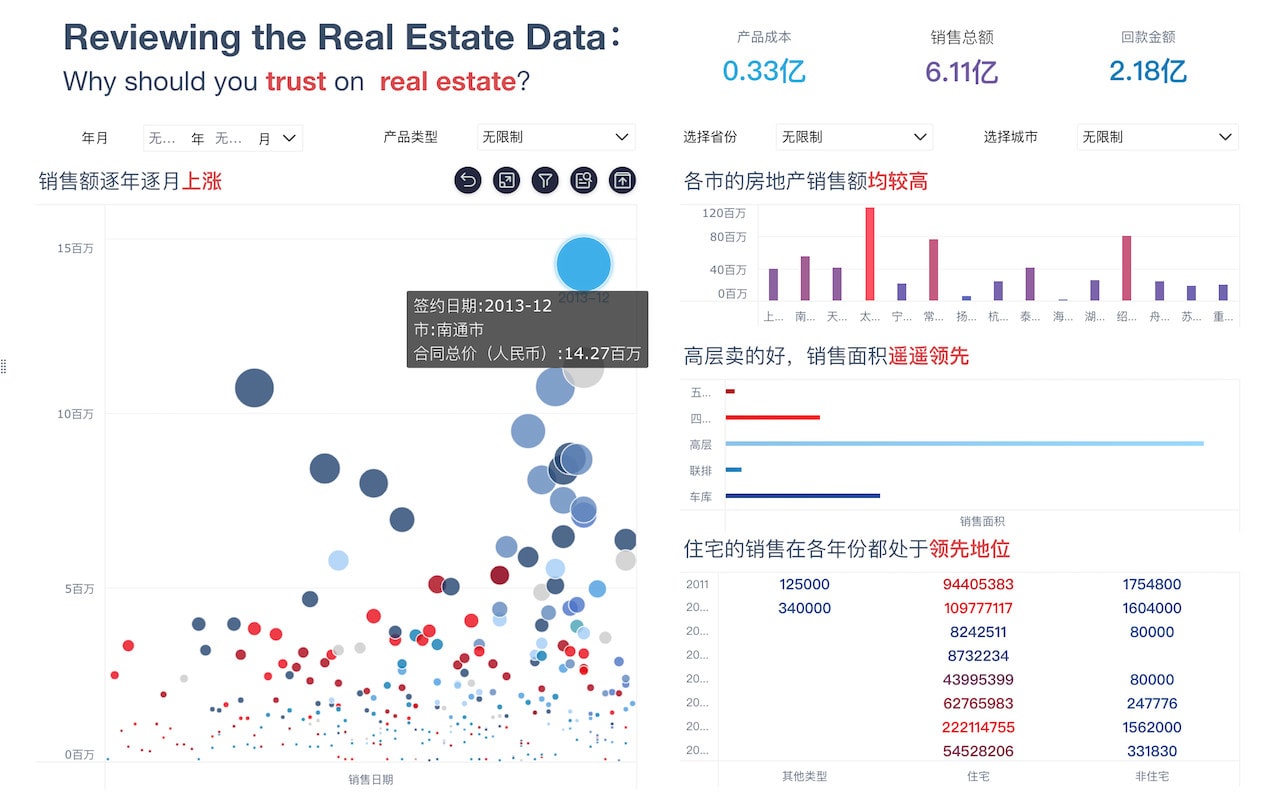
FineBI 提供了强大的数据分析和可视化功能,支持多种数据源接入和多种数据分析方法。通过 FineBI,我们可以快速进行数据分析,生成丰富的数据报告和图表,从而更好地理解数据,做出数据驱动的决策。
通过上述方法,我们可以使用 Python 的 threading 模块创建和管理线程,从而实现并行数据分析。同时,我们也可以使用 FineBI 进行数据分析,提升数据分析的效率和效果。通过合理使用线程和专业的数据分析工具,我们可以显著提高数据分析的效率,从而更快地获得数据分析结果。
相关问答FAQs:
Python怎么通过循环创建线程进行数据分析?
在Python中,通过循环创建线程是一种有效的方式来并行处理数据分析任务。利用Python内置的threading模块,可以简单地实现多线程处理。多线程能够显著提高数据处理的效率,特别是在I/O密集型的任务中。以下是如何使用循环创建线程进行数据分析的详细步骤和示例。
1. 理解线程的基本概念
线程是操作系统能够进行调度的最小单位,它是比进程更小的独立运行的基本单位。多线程使得程序能够同时执行多个任务,从而提高资源的利用率和程序的执行效率。在数据分析中,特别是在处理大量数据时,多线程可以帮助我们更快地完成数据的读取、处理和分析。
2. 安装必要的库
在进行数据分析时,通常需要使用一些第三方库,比如pandas和numpy。确保在你的环境中已经安装了这些库。可以通过以下命令安装:
pip install pandas numpy
3. 创建线程的基础
在Python中,可以通过继承threading.Thread类或使用threading.Thread的实例来创建一个线程。定义线程时,需要实现run方法,在线程启动时会自动调用这个方法。
4. 通过循环创建多个线程
以下是一个使用循环创建多个线程的示例。假设我们要对一组数据进行平方运算:
import threading
import time

# 定义线程要执行的任务
def calculate_square(n):
    time.sleep(1)  # 模拟耗时操作
    print(f'Square of {n} is {n * n}')

# 创建线程的数量和要处理的数据
data = [1, 2, 3, 4, 5]
threads = []

for number in data:
    thread = threading.Thread(target=calculate_square, args=(number,))
    threads.append(thread)
    thread.start()  # 启动线程

# 等待所有线程完成
for thread in threads:
    thread.join()

print("All threads have finished execution.")
5. 示例代码解析
在上述代码中,calculate_square函数是线程要执行的任务。使用threading.Thread创建线程时,指定目标函数和参数。通过循环,我们为每一个数据项创建了一个线程,并启动它们。最后,使用join方法确保主线程等待所有子线程完成。
6. 数据分析示例
在实际数据分析中,通常需要处理更复杂的数据。以下是一个使用多线程进行数据读取和简单分析的例子:
import pandas as pd
import threading

# 定义读取和分析数据的函数
def analyze_data(file_path):
    data = pd.read_csv(file_path)
    print(f'Data from {file_path} has {len(data)} rows and {data.describe()}')

# 假设我们有多个CSV文件
file_paths = ['data1.csv', 'data2.csv', 'data3.csv']
threads = []

for file_path in file_paths:
    thread = threading.Thread(target=analyze_data, args=(file_path,))
    threads.append(thread)
    thread.start()

for thread in threads:
    thread.join()

print("All data analysis threads have completed.")
7. 注意事项
在使用多线程进行数据分析时,有一些注意事项需要考虑:
- 全局解释器锁(GIL): Python的GIL限制了多个线程同时执行Python字节码的能力。因此,在CPU密集型任务中,使用多进程可能更加高效。
- 数据共享和同步: 多线程之间可能会共享数据,确保在访问共享数据时使用锁(如
threading.Lock)来防止数据竞争。 - 错误处理: 在线程中执行的代码可能会引发异常,确保在线程中适当处理这些异常。
8. 结论
通过循环创建线程,Python能够实现高效的数据分析。多线程的使用可以显著提高I/O密集型任务的执行效率。然而,在选择使用线程还是进程时,开发者应根据具体任务的性质来判断,确保选择最合适的并发模型。充分利用Python的多线程能力,可以加速数据分析的整个过程,提升工作效率。
Python中如何监控和管理线程的状态?
在进行多线程数据分析时,监控和管理线程的状态是确保程序稳定性和高效性的关键。了解线程的状态变化能够帮助开发者及时发现问题并进行调试。
1. 线程的状态
线程的状态主要包括以下几种:
- 新建(New): 线程被创建但尚未启动。
- 就绪(Runnable): 线程已启动,等待操作系统分配 CPU 时间。
- 运行(Running): 线程正在执行。
- 阻塞(Blocked): 线程因等待锁或资源而暂时挂起。
- 死亡(Terminated): 线程执行完毕,无法重启。
2. 监控线程状态的方法
可以通过threading模块的is_alive方法来监控线程的状态。以下是一个示例:
import threading
import time

def worker():
    print("Thread starting")
    time.sleep(2)
    print("Thread ending")

threads = []
for i in range(5):
    thread = threading.Thread(target=worker)
    threads.append(thread)
    thread.start()

for index, thread in enumerate(threads):
    print(f"Thread {index} is alive: {thread.is_alive()}")

# 等待所有线程完成
for thread in threads:
    thread.join()

print("All threads have finished execution.")
3. 使用队列管理线程
在处理数据时,使用queue.Queue可以有效地管理和协调线程之间的工作。队列可以用来存储待处理的数据,并让线程从队列中获取任务。
import threading
import queue
import time

def worker(q):
    while not q.empty():
        item = q.get()
        print(f'Processing {item}')
        time.sleep(1)
        q.task_done()

data_queue = queue.Queue()

# 将数据放入队列
for item in range(10):
    data_queue.put(item)

threads = []
for _ in range(3):  # 创建3个线程
    thread = threading.Thread(target=worker, args=(data_queue,))
    threads.append(thread)
    thread.start()

# 等待所有任务完成
data_queue.join()

for thread in threads:
    thread.join()

print("All tasks have been processed.")
4. 线程的优雅退出
在某些情况下,可能需要优雅地终止线程。可以使用标志变量来指示线程何时退出:
import threading
import time

stop_thread = False

def worker():
    while not stop_thread:
        print("Thread is running...")
        time.sleep(1)
    print("Thread is stopping...")

thread = threading.Thread(target=worker)
thread.start()

time.sleep(5)  # 让线程运行5秒
stop_thread = True
thread.join()
print("Thread has exited gracefully.")
5. 结论
通过有效的监控和管理线程状态,开发者可以确保程序的稳定性和高效性。在进行多线程数据分析时,合理使用队列管理任务并控制线程的生命周期,能够显著提高数据处理的效率,同时降低潜在的错误风险。
本文内容通过AI工具匹配关键字智能整合而成,仅供参考,帆软不对内容的真实、准确或完整作任何形式的承诺。具体产品功能请以帆软官方帮助文档为准,或联系您的对接销售进行咨询。如有其他问题,您可以通过联系blog@fanruan.com进行反馈,帆软收到您的反馈后将及时答复和处理。