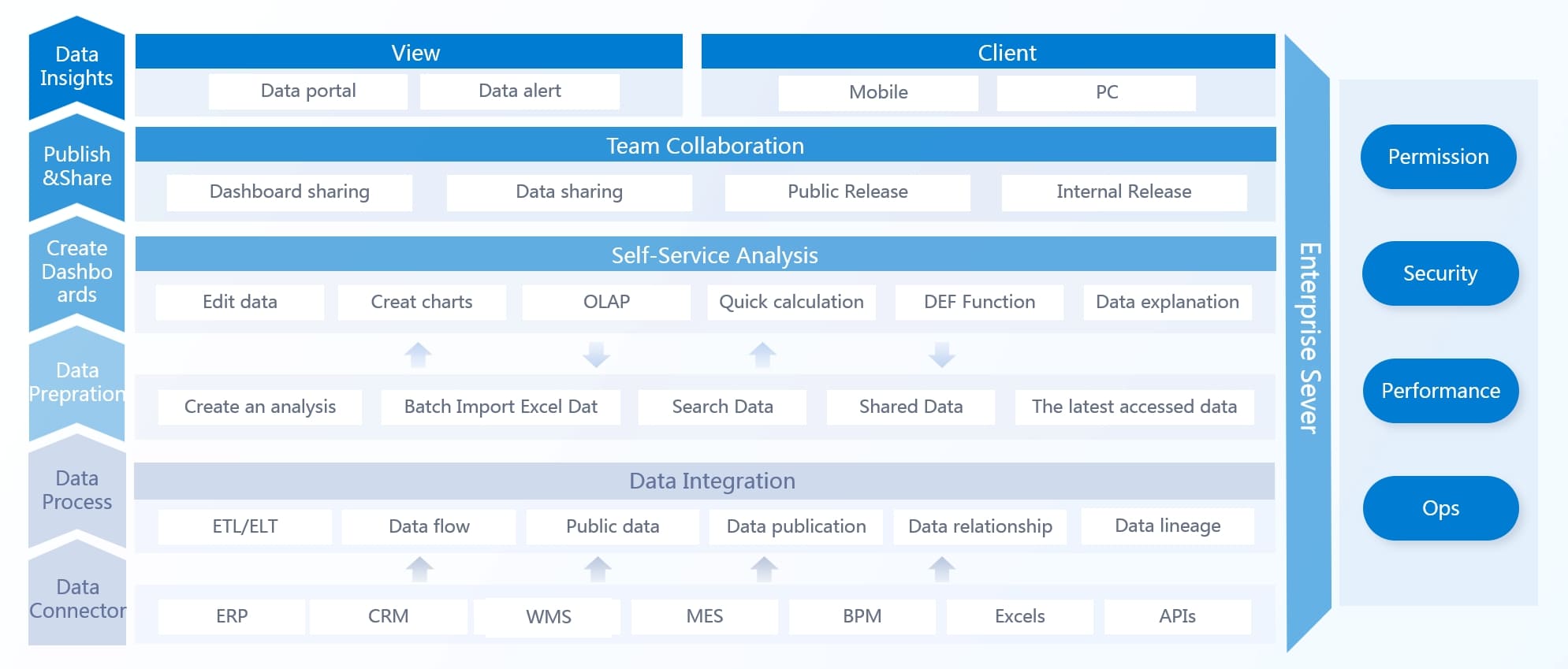
Enterprise BI solutions help you turn complex data from across your organization into clear insights. When you use unified data and analytics, you reduce the risk of conflicting information and support better decision-making. Companies like Amazon and Netflix rely on business intelligence to personalize experiences and improve results. Modern enterprise business intelligence solutions, such as FanRuan’s FineBI, combine AI, cloud capabilities, and strong data governance. The global market for enterprise business intelligence is expected to reach $72.1 billion soon, showing how vital these tools have become for every enterprise.
Business analytics serves as a powerful catalyst for organizational transformation by revealing hidden patterns and opportunities within vast datasets.
Trend
Description
AI Integration
Predictive analytics now help non-technical users make sense of data.
Cloud Migration
Cloud-native BI tools support collaboration and scale across the enterprise.
Data Governance
Strong frameworks ensure compliance and reliable analytics.
Key Features of Enterprise BI Solutions
Enterprise BI solutions give you powerful tools to manage and understand your organization’s data. You can use these platforms to connect, analyze, and share information across departments. Let’s explore the main features you should expect from modern enterprise business intelligence platforms like FanRuan’s FineBI.
Data Integration and Connectivity
You need to bring together data from many sources. FineBI makes this easy with support for over 100 data sources, including big data platforms, SQL databases, and Excel files. You can connect quickly and synchronize data in real-time. The low-code interface helps you set up connections without advanced technical skills.
Connects with big data platforms, SQL databases, and Excel datasets
Real-time data sync
Synchronizes data instantly across systems
Advanced ETL and ELT
Enables complex data integration and transformation
Fast API connections
Shares data between systems and SaaS apps
Advanced Analytics and Reporting
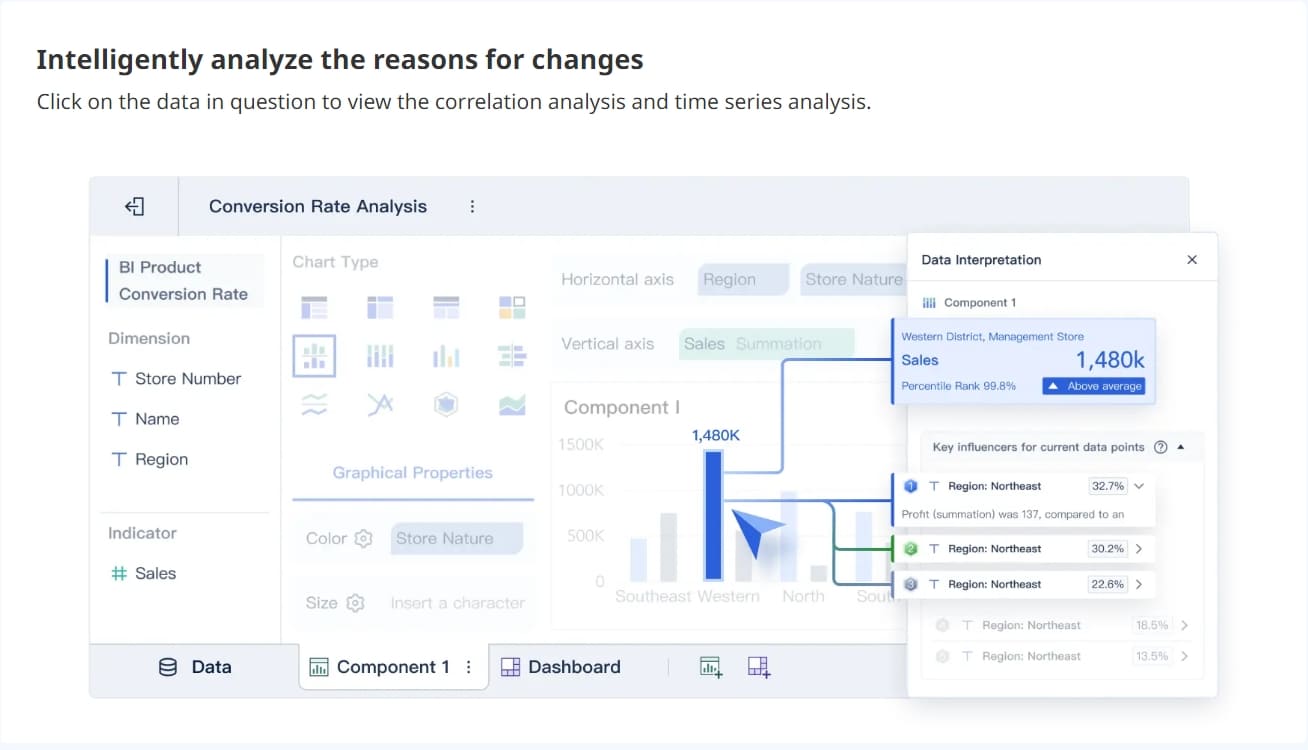
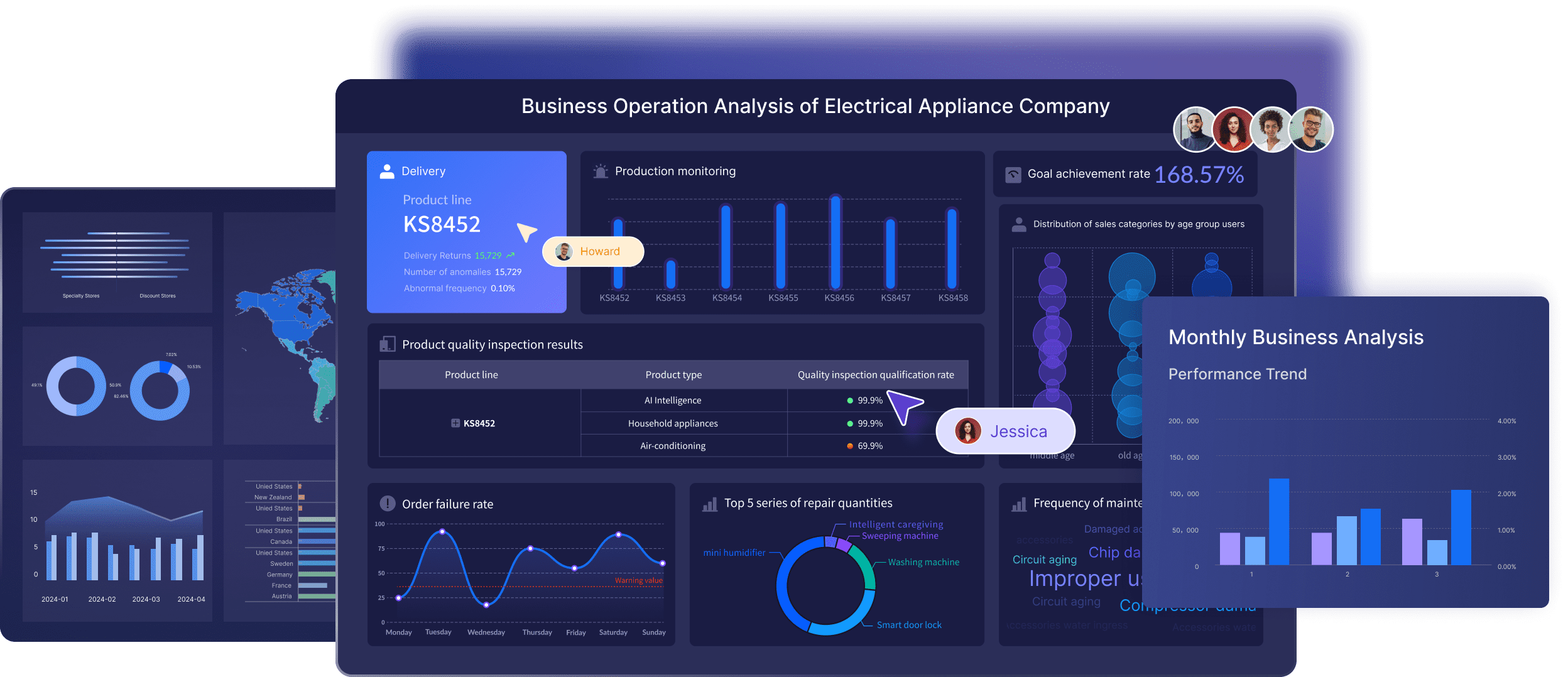
Enterprise BI solutions help you turn raw data into actionable insights. FineBI lets you create interactive dashboards and visualizations with drag-and-drop tools. You can use AI-powered analytics for anomaly detection and predictive modeling.
“We no longer need to rely on hunches or best guesses to manage all the links in the supply chain. Our managers all have quick, easy access to the latest operational data via detailed reports that help them make better-informed decisions to improve the efficiency of the entire supply chain,” says Homarjun Agrahari, Director of Advanced Analytics at FleetPride.
You can automate repetitive tasks and use machine learning to uncover patterns. This helps you make faster, smarter decisions.
Security and Governance
Protecting your enterprise data is essential. FineBI uses strong security features like cookie enhancement, HSTS settings, file upload verification, and XSS attack protection. You can control access with role-based permissions and monitor usage for compliance.
Security Feature
Description
Cookie Enhancement
Improves cookie management for security
HSTS Settings
Ensures encrypted data transmission
File Upload Verification
Validates files before upload
XSS Attack Protection
Blocks cross-site scripting threats
Click Attack Protection
Prevents clickjacking
Referer Validation
Checks the source of requests
An integrated approach ensures that data is used in line with statutory and regulatory reporting requirements.
You can respond to audits and demonstrate compliance with data regulations through proper reporting and documentation.
Collaboration Tools
Enterprise BI solutions support teamwork and information sharing. FineBI provides a centralized platform for sharing dashboards and reports. You can collaborate with colleagues, even in remote work environments. Cloud-based BI platforms let you access data from anywhere.
FineBI collaboration
Evidence Description
Benefit
Centralized platform for financial data
Improves communication and decision-making between departments
BI tools provide access to employees at all levels
Enhances teamwork and information sharing in remote work
BI platforms built in the cloud
Supports remote collaboration among teams
You can work together to analyze data, share insights, and drive better results for your enterprise.
How Enterprise BI Solutions Work in Organizations
Enterprise BI solutions help you unlock the full value of your business data. You can use these platforms to collect, prepare, and analyze information from across your organization. FineBI provides a clear workflow that guides you through each step, making it easier to achieve data-driven decision-making.
Data Collection and Preparation
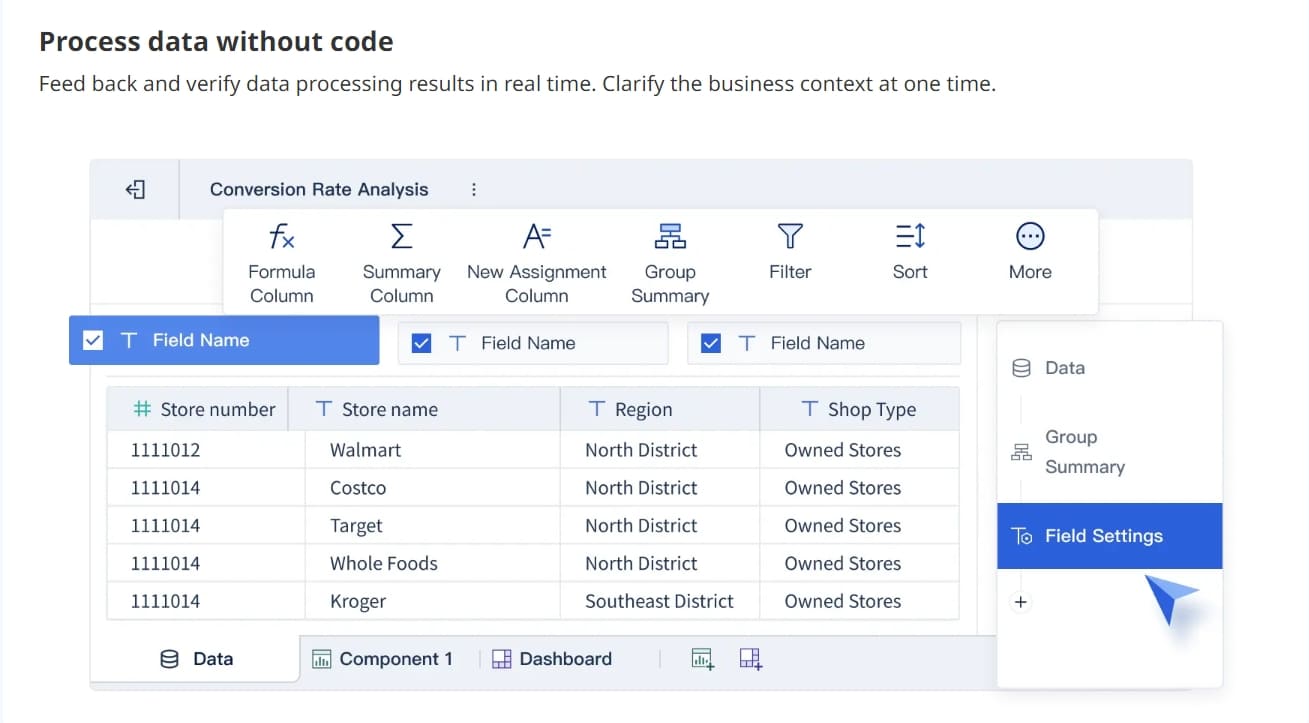
You start by connecting to your business data sources. FineBI lets you manage data connections and create business packages that standardize access for users. Administrators set up these connections before anyone begins analysis. You can choose real-time access or extract data for deeper analysis, ensuring your information stays up-to-date and relevant.
FineBI streamlines this process, helping you move from raw business data to actionable insights. You can create self-service datasets, clean and refine your data, and build visualizations that support analysis and reporting.
Tip: When you standardize data access and preparation, you reduce errors and improve the quality of your analytics.
Real-Time Insights and Automation
You need real-time insights to make fast, informed decisions. FineBI uses in-memory computing to process data quickly, allowing you to analyze streaming information and respond to changes as they happen. You can schedule automated reports and set alerts based on data thresholds, keeping your team informed without manual effort.
Feature
Description
Real-time data processing
Enabled by in-memory computing, this feature allows for quick query responses and analysis of streaming data.
Automated reporting and alerts
Scheduling reports and setting alerts based on data thresholds saves time and keeps stakeholders informed.
AI and advanced analytics
Integration of AI and machine learning for predictive analytics and natural language processing capabilities.
Real-time insights are crucial for making informed decisions quickly.
Immediate access to data allows for fast action and strategy adjustments.
Platforms like FineBI provide real-time reporting and analytics for timely decision-making.
You can use AI-driven analytics to detect anomalies, forecast trends, and automate repetitive tasks. This helps you focus on strategic analysis instead of manual data management. Real-time access to business data ensures you never miss important changes.
Note: Automated alerts and real-time reporting help you stay ahead of risks and opportunities.
User Roles and Access Control
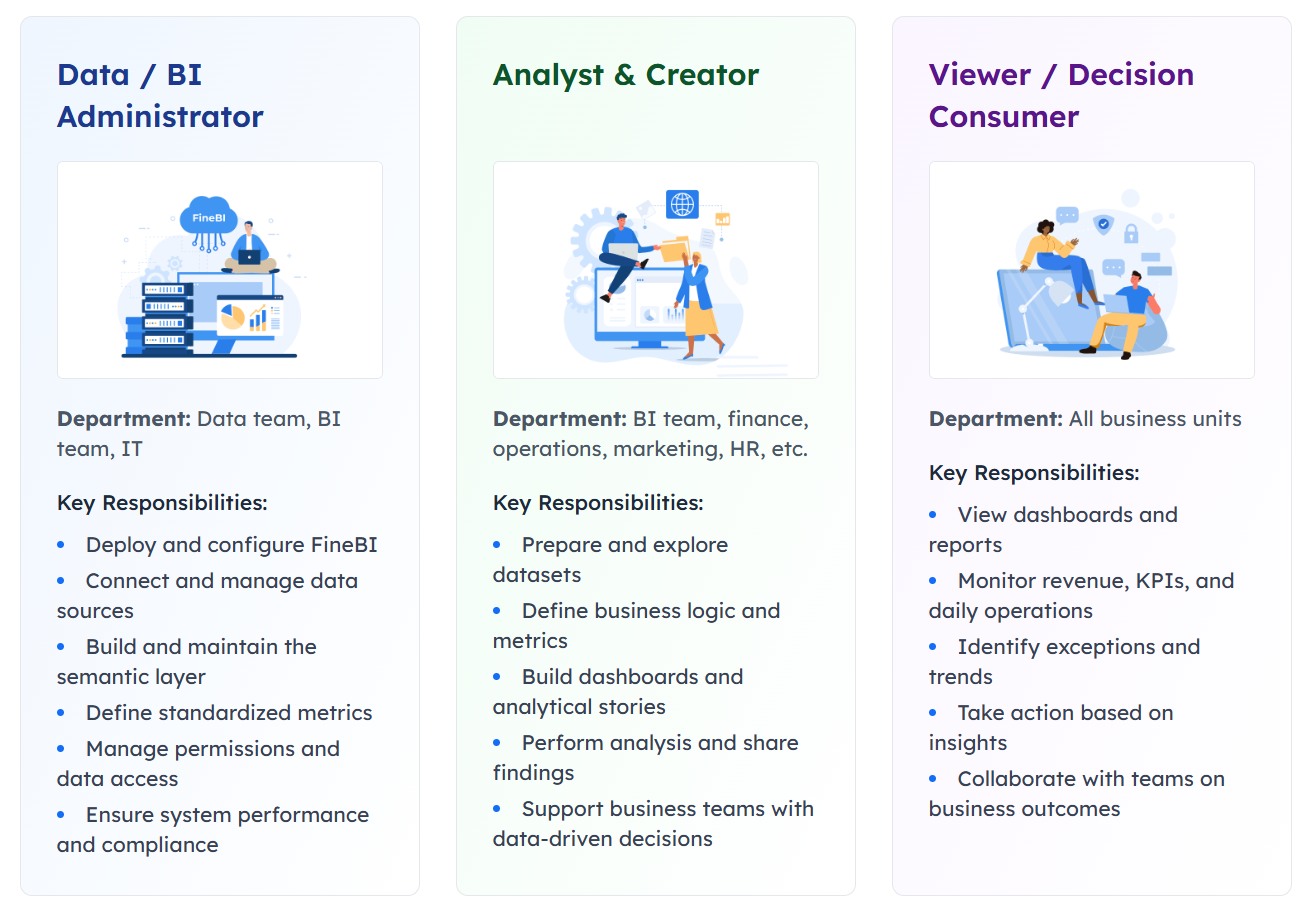
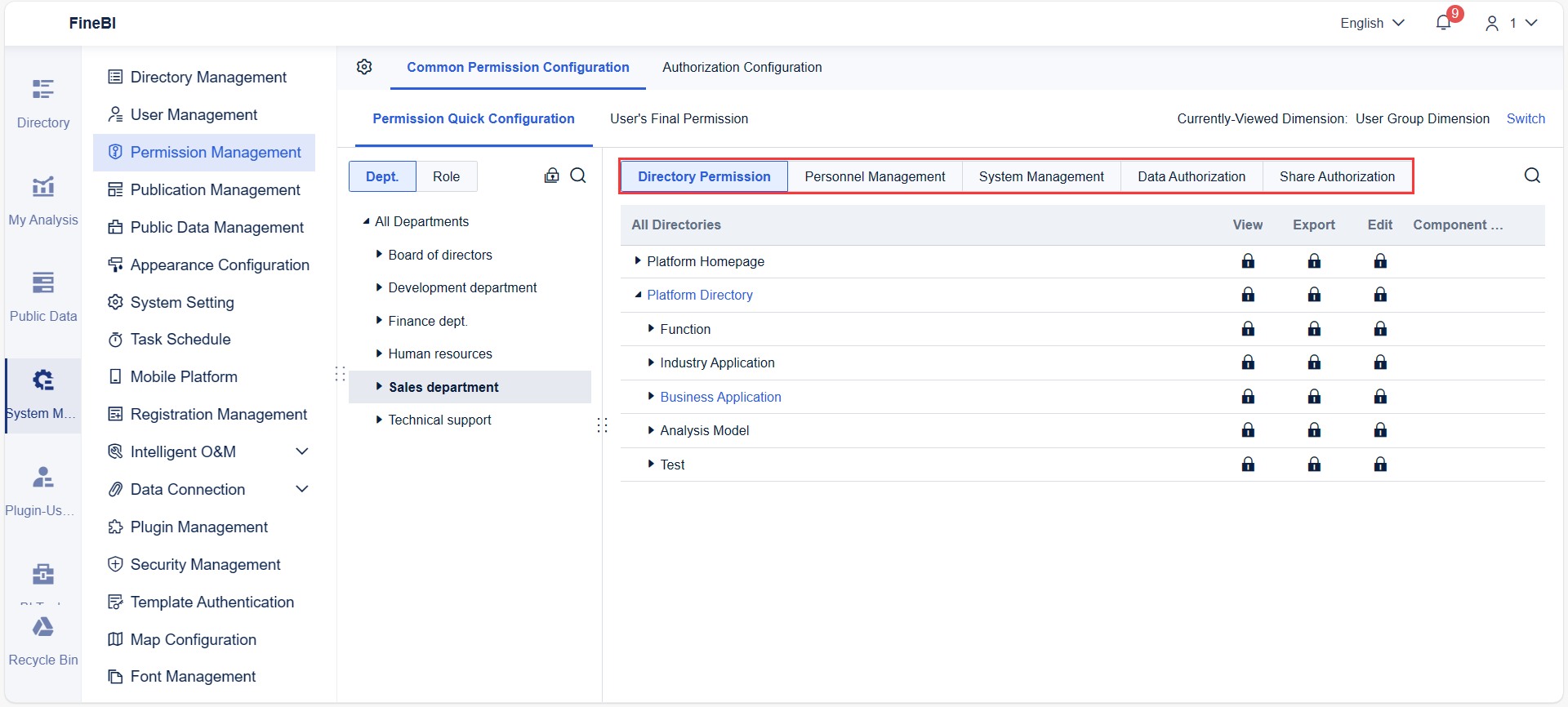
You must protect sensitive business data while enabling collaboration. FineBI uses role-based access control (RBAC) to group users by roles and assign permissions. This approach simplifies management and enforces the principle of least privilege, minimizing risks as your enterprise grows.
RBAC simplifies access management by grouping users into roles.
It enforces least privilege, reducing the chance of unauthorized access.
The system scales easily as your organization changes.
Transparent access controls help you meet regulatory compliance.
You can conduct regular permissions audits to identify vulnerabilities and prevent permission creep. Automating these reviews saves time and improves accuracy. FineBI supports row-level and column-level security, letting you restrict access to specific data fields or records.
Row-Level Security (RLS) limits access to specific rows of data based on user roles.
Column-Level Security (CLS) restricts access to certain fields, enhancing data protection.
You can define clear roles based on your workflows and automate role management. This ensures that only authorized users can view or modify sensitive information. These features support enterprise BI use cases across industries, from finance to manufacturing.
Tip: Regular access audits and automated role management help you maintain strong data security and compliance.
Enterprise business intelligence platforms like FineBI empower you to make data-driven decisions, collaborate securely, and respond quickly to changing business needs. You can use these tools to transform business intelligence into a strategic advantage for your organization.
Benefits and Impact of Business Intelligence
Improved Decision-Making
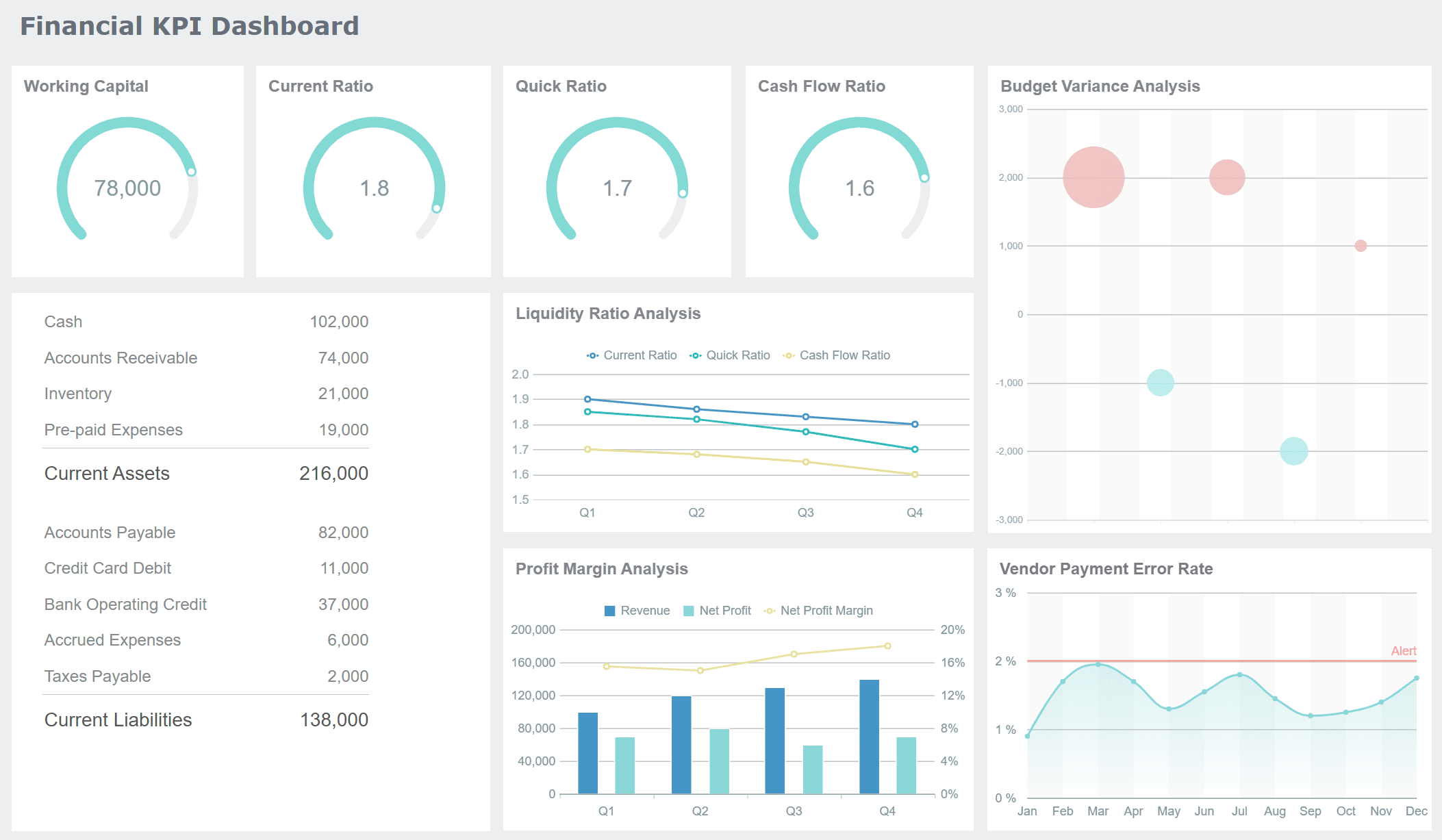
You can make better decisions when you have access to accurate and timely data. Enterprise BI solutions gather information from many sources, including IoT devices and social media. These platforms organize your data and deliver real-time insights, so you understand what is happening in your enterprise right now. For example, BOE Technology Group used enterprise business intelligence to unify their metrics and build KPI dashboards. This helped them reduce inventory costs by 5% and increase operational efficiency by 50%. When you use business intelligence platforms, you get a clear view of your operations and can respond quickly to changes.
Business intelligence tools help you forecast trends and identify opportunities. You can act on current information instead of waiting for reports.
Evidence
Description
Diverse Data Sources
BI tools aggregate data from many sources for comprehensive insights.
Real-Time Insights
BI platforms provide instant analysis for faster decision-making.
Improved Efficiency
BI tools help you understand large datasets quickly.
Enhanced Efficiency and Productivity
Enterprise BI solutions automate data collection, analysis, and reporting. You save time and reduce manual work. Teams can focus on strategic tasks instead of searching for information. You also gain faster reporting capabilities and access to data from mobile devices. The table below shows measurable impacts reported by organizations:
Benefit Description
Measurable Impact
Reduction in time spent searching for information
Up to 46%
Likelihood of exceeding objectives and key results
4x more likely
Increase in call-center efficiency
12.5% increase
You get accurate and high-quality data.
You can automate data gathering for faster insights.
You track KPIs and respond quickly to business needs.
Competitive Advantage
Enterprise business intelligence gives you an edge in a fast-changing market. You can identify patterns in customer behavior and improve service. Higher data quality means you can trust your analytics and make informed decisions. When you use enterprise BI solutions, you position your enterprise for growth and profitability.
You gain in-depth insights on productivity, revenue, and performance.
You streamline processes and identify operational issues.
You increase customer satisfaction by understanding their needs.
Enterprise BI solutions help you measure return on investment by tracking performance indicators and assigning value to benefits. You can optimize resource allocation and foster a data-driven culture. These advantages support long-term success for your enterprise.
Comparing Modern Enterprise Business Intelligence Solutions
Enterprise BI vs. Traditional BI
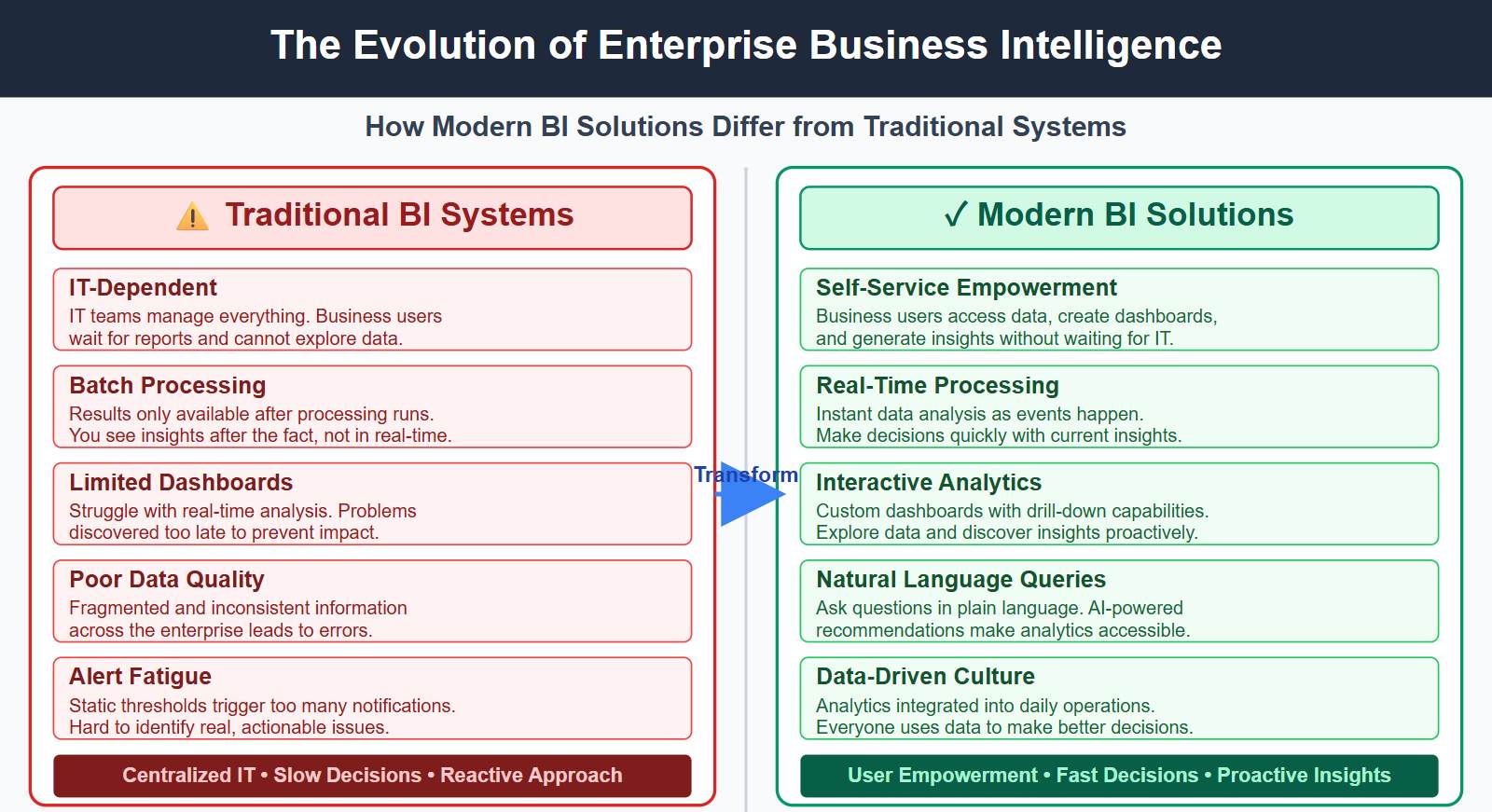
You may wonder how modern enterprise BI solutions differ from older systems. Traditional BI tools often required IT teams to manage everything. Business users had to wait for reports and could not explore data on their own. These systems relied on batch processing, so you only saw results after the fact. Legacy dashboards struggled with real-time analysis, which meant you discovered problems too late. Data quality was often poor, leading to fragmented and inconsistent information across your enterprise. Users also faced alert fatigue because static thresholds triggered too many notifications, making it hard to spot real issues.
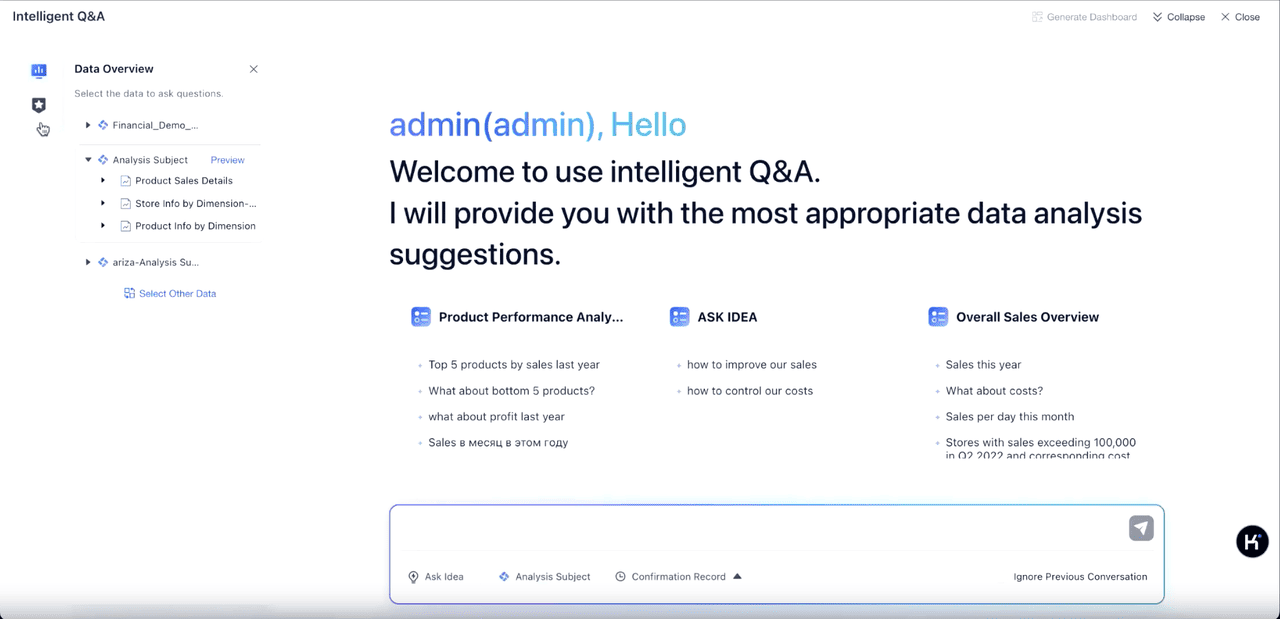
Modern enterprise business intelligence platforms change this experience. You get real-time data processing and self-service features. You can access data, create custom dashboards, and generate insights without waiting for IT. Modern BI tools support natural language queries and auto-recommendations, making analytics easier for everyone. This shift helps you build a data-driven culture, where you use analytics in daily operations and make decisions quickly.
Traditional BI systems rely on batch processing and centralized IT teams.
Modern BI solutions support real-time data processing and empower business users with self-service capabilities.
FineBI’s Unique Advantages
FineBI, from FanRuan, stands out among enterprise BI solutions. You can connect to over 100 data sources, including cloud platforms and big data systems. FineBI’s drag-and-drop interface lets you build dashboards and reports with ease. You do not need coding skills to explore data or create visualizations. The platform uses AI to help you detect anomalies and forecast trends. You can set up automated alerts and schedule reports, so your team stays informed. FineBI also offers strong security, with role-based access and data governance tools. This ensures only the right people see sensitive information.
FineBI supports collaboration across your enterprise. Teams can share dashboards, comment on findings, and work together from anywhere. You can access analytics on any device, which helps you stay connected and make decisions on the go.
Use Cases Across Industries
Enterprise BI solutions like FineBI and FanRuan work in many industries. You can see how these tools help organizations achieve better results:
Industry
Use Case Description
Benefits
Finance
Reduced monthly reporting cycles from three weeks to a few days.
Near-real-time visibility for leadership.
Retail
Embedded analytics into daily operations.
Improved decision-making and operational efficiency.
Manufacturing
Achieved measurable improvements through data-driven strategies.
You can use enterprise BI to reduce reporting time, improve efficiency, and gain real-time insights. These benefits help your enterprise stay competitive and responsive in a fast-changing world.
Selecting and Implementing Enterprise BI Solutions
Key Considerations for Selection
When you choose an enterprise BI platform, you need to look at several important factors. You want seamless data integration and compatibility with your existing systems. Make sure the solution supports self-service capabilities so non-technical users can create interactive dashboards and visualizations. Consider these points:
Integration: The platform should offer partial or full integration for better data security.
Customization: Select a vendor that can tailor the solution to your needs and adjust as your enterprise grows.
Mobility: Mobile access lets users view real-time insights off-site.
Training: Look for strong training resources for both technical and business users.
Pricing: Understand the total cost, including subscriptions and hidden fees.
IT Support: Reliable support and self-service features help users solve problems quickly.
Compatibility: The platform must work with your current data sources.
User Experience: A user-friendly interface encourages adoption.
Embedded Analytics: Seamless integration with other business intelligence platforms is key.
Branding: White-labeling options help maintain consistency.
Implementation Best Practices
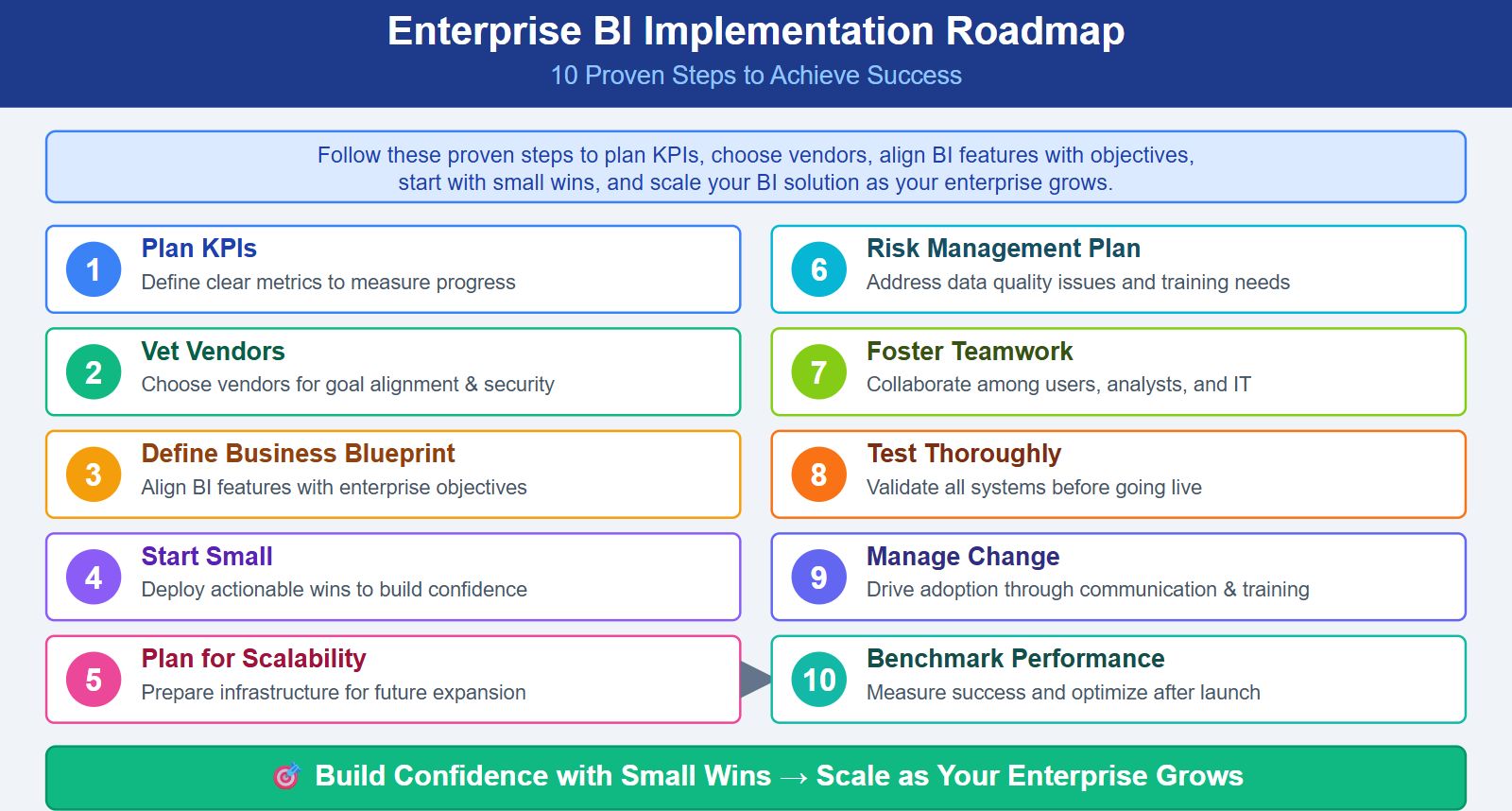
You can achieve success with enterprise BI solutions by following proven steps. Start by planning your KPIs to measure progress. Choose a vendor that matches your goals and data security standards. Create a business blueprint that aligns BI features with your enterprise objectives. Focus on small wins first to build confidence. Always plan for scalability so your BI solution grows with your enterprise.
Plan KPIs for clear measurement.
Vet vendors for alignment and security.
Define business needs and blueprint.
Start with small, actionable deployments.
Prepare for future expansion.
Develop a risk management plan for data quality and training.
Foster teamwork among users, analysts, and IT.
Test thoroughly before going live.
Manage organizational change with communication and training.
Benchmark performance after launch.
Tip: Use example demos and learning videos to train your team. FineBI offers a learning path, certifications, and scenario demos to help users master the platform.
Resource Type
Description
Duration
Learning Path
Comprehensive guide from beginner to advanced in FineBI and FineReport.
Varies
Certification (FCA-FineReport)
Demonstrates basic understanding of FineReport operations.
30 minutes
Certification (FCP-FineReport)
Indicates proficiency in report development operations.
2 days
Learning Videos
Series of tutorials for basic and advanced functionalities.
Varies
Example DEMO for Business Scenarios
Best practice examples for different business scenarios.
N/A
Overcoming Common Challenges
You may face challenges when you implement enterprise business intelligence. User adoption can be slow if people resist change. Involve stakeholders early and provide training to empower users. Developers sometimes build generic solutions that do not fit specific needs. Focus on KPIs for each group to ensure the BI solution supports real enterprise bi use cases. You might struggle to justify the investment in BI. Show real-time improvements and use interactive visualizations to highlight value.
Drive user adoption with tailored training and clear communication.
Align BI solutions with business objectives through measurable goals and regular reviews.
Make BI accessible to all skill levels by offering multiple dashboard options and easy-to-understand information.
Note: When you address these challenges, you unlock the full potential of enterprise BI solutions and support better decision-making across your enterprise.
You can use enterprise BI solutions to turn data into clear insights for your enterprise. These BI platforms help you make better decisions and improve business intelligence across your organization. Modern BI tools like FineBI from FanRuan give you real-time analytics, strong security, and easy collaboration. The BI market is growing fast, with new trends shaping the future:
Trend
Description
AI-driven self-service BI
Empowers teams to run queries without needing analysts.
Natural-language queries
Makes BI more conversational and intuitive for users.
Predictive + prescriptive analytics
Provides actionable recommendations based on insights.
Embedded BI within enterprise apps
Integrates insights directly into workflows for better accessibility.
Real-time decision intelligence
Enables organizations to make strategic responses in real-time.
The global BI software market is expected to exceed US$ 106 billion by 2033.
Enterprises are moving to cloud and AI-powered analytics for faster decision-making.
BI is evolving beyond reporting to include predictive insights and automation.
You can start by reviewing your enterprise needs and exploring solutions like FineBI. Try a demo, involve your team, and see how BI can transform your business intelligence. FanRuan offers tools that help your enterprise grow and succeed.
Access a wealth of case studies, industry insights, and solution guides to accelerate digital transformation.
FAQ
What types of data sources can you connect with FineBI?
You can connect to over 100 data sources. These include SQL databases, cloud platforms, big data systems, Excel files, and APIs. FineBI makes integration simple for business users.
How does FineBI help you keep your data secure?
FineBI uses role-based access control, row-level and column-level security, and strong encryption. You can manage permissions and monitor user activity to protect sensitive information.
Can you analyze data in real time with FineBI?
Yes, you can. FineBI processes data instantly using in-memory computing. You get real-time dashboards and alerts, so you always see the latest information.
Who can use FineBI in your organization?
Business users, analysts, and IT professionals can use FineBI. The platform supports self-service analytics, so you do not need coding skills to create dashboards or reports.