Choosing the best dashboard local solution for your small business comes down to a few key things. You want something easy to use, quick to set up, and packed with features that match your daily needs. Look for strong integration with your current tools, fair pricing, and reliable support. Make sure the dashboard fits your business goals. Mobile access and real-time insights matter too. With a dashboard that works on any device, you can check reports, get alerts, and make decisions wherever you are.
A smart choice like FineReport helps you work smarter and boosts your business efficiency.
A dashboard local solution is a tool you put on your own computers or servers. Your business data stays close to you, right in your office or store. This way, you have more control over your information and how you keep it safe. Many small businesses like this because it feels safer and more private.
You might wonder how dashboard local compares to cloud dashboards. Here’s a quick look at the main differences:
| Aspect | Cloud Dashboard Solutions | On-Premise Dashboard Solutions (Dashboard Local) |
|---|---|---|
| Data Control | Third-party providers manage your data | You control your data and security |
| Accessibility | Use it anywhere with internet | Usually only at your place, unless you set up remote |
| Physical Security | Data is kept in secure centers | You keep data safe at your own location |
| Infrastructure Needs | Just need internet and devices | Need your own computers and network |
| Storage Capacity | Almost unlimited | Limited by your own equipment |
A dashboard local solution lets you keep access inside your business and set your own security rules. Cloud dashboards are easier to start and grow, but you trust someone else with your data. With dashboard local, you choose who can see your data and when.
Dashboards help you see what is happening in your business fast. You can check sales, watch your money, and spot problems early. A dashboard local solution puts all your important numbers together, so you don’t have to search through spreadsheets or emails.
Here are some ways dashboards help small businesses:
Tip: A dashboard local solution helps you make quick choices because you see real-time data when you need it.
When you use a dashboard local tool, you get a clear look at your business. You can act fast, fix problems, and plan for growth. That’s why many small businesses pick dashboard local solutions to stay ahead.
When you pick a dashboard tool, you want it to help you. The right dashboard puts all your data in one place. It shows what is important and helps you act fast. Let’s look at the features that matter most.
You do not want to spend a long time learning a dashboard tool. You want to start quickly and see your data right away. FineReport has a drag-and-drop interface. It feels like using a spreadsheet. You can make dashboards without coding or special lessons. This dashboard tool is easy to set up. You can focus on your business.

Here is why ease of use matters:
Tip: A dashboard tool that is easy to use helps your team learn it faster and keeps everyone interested.
Check out this table to see what small business owners want:
| Feature | Description |
|---|---|
| Ease of use | Dashboard tools should have a simple user interface and a smooth experience. |
| Flexibility | Tools must let you change things and work with other software. |
| Support and training | Good support and training should be there to help users use the tool well. |

Your business uses many tools like Excel or a database. You need a dashboard tool that connects with all of them. FineReport makes it easy to bring data together. You can pull data from different places and see everything in one dashboard. This dashboard tool works with over 500 data sources, so you do not miss anything.

Why does integration matter?
FineReport’s dashboard tool lets you connect to databases, files, and cloud services. You do not have to switch between apps. Everything is in your dashboard.
Here is how integration helps your dashboard tool:
Every business is different. You want a dashboard tool that fits your needs. FineReport gives you lots of ways to customize. You can pick what data to show, how to display it, and which charts work best for you.
Let’s look at some top customization features:
| Customization Option | Description |
|---|---|
| Custom KPI Tracking | Lets you set up the dashboard for your business goals and success. |
| Real-Time Performance Monitoring | Gives instant updates on business numbers for quick decisions. |
| Interactive and User-Friendly Design | Makes it easy to use and helps everyone understand the data. |
| Team Collaboration Tools | Helps your team share ideas and work together for business growth. |
With FineReport, you can make dashboards that match your workflow. You pick the charts that make sense for your team. You set up alerts for important changes. You create dashboards for sales, finance, HR, or any part of your business.
Note: Customization lets you track what matters most. You see your business goals and measure success your way.
You are not always at your desk. Sometimes you need to check your dashboard tool from your phone or tablet. FineReport’s dashboard tool works on any device. You get the same data, the same charts, and the same updates wherever you are.
Here is why mobile access matters:
FineReport’s dashboard tool gives you mobile dashboards that look good and work fast. You can look at data, see trends, and act quickly. The dashboard tool fits your screen, so you do not miss anything important.
Tip: Mobile dashboards keep you connected to your business. You stay informed and ready to act, no matter where you are.
When you pick a dashboard tool like FineReport, you get strong features, easy setup, good integration, flexible customization, and mobile access. These features help you manage your data, track your goals, and make smart choices every day.


You want your dashboard solution to fit your small business like a glove. Start by asking what your team needs to see every day. Think about your goals. Do you want to track sales, customer service, or marketing? Make a list of the most important numbers for your business. These are your key performance indicators, or KPIs.
Here’s a simple way to match features to your business needs:
A good dashboard solution should offer connectivity to many data sources. This means you can pull in numbers from your sales, marketing, and finance tools. With business oriented products like FineReport, you get dashboards that work for every part of your small business.
Every small business wants to save money and stay safe. When you look at dashboard solutions, check the price first. Some off-the-shelf dashboards cost between $5,000 and $50,000 each year. Custom dashboards can start at $19,000. Make sure the cost fits your budget.
Support is another big deal. You need help fast if something goes wrong. Look for a dashboard solution with web chat, review tools, and payment options. These features help you run your small business smoothly.
Security keeps your data safe. The best dashboard solutions protect your devices, block malware, and stop phishing. They also keep your business data from leaking out. You want a solution that offers complete protection and is easy for your team to use.
When you compare dashboard solutions, use a checklist. This helps you pick the right one for your small business.
Tip: Keep your dashboard simple. Focus on the numbers that matter most. Too much information can make things confusing.
Here’s a quick table to help you spot common mistakes and how to fix them:
| Mistake | Problem | How to Fix |
|---|---|---|
| Too much data | Hard to find key info | Use only important KPIs |
| Outdated numbers | Bad decisions | Set up automatic updates |
| Hard to use | Team avoids the dashboard | Test for easy navigation |
| Poor connectivity | Missed data | Choose strong connectivity to many data sources |
Keep these items to consider in mind. The right dashboard solution will help your small business grow and make smarter choices every day.
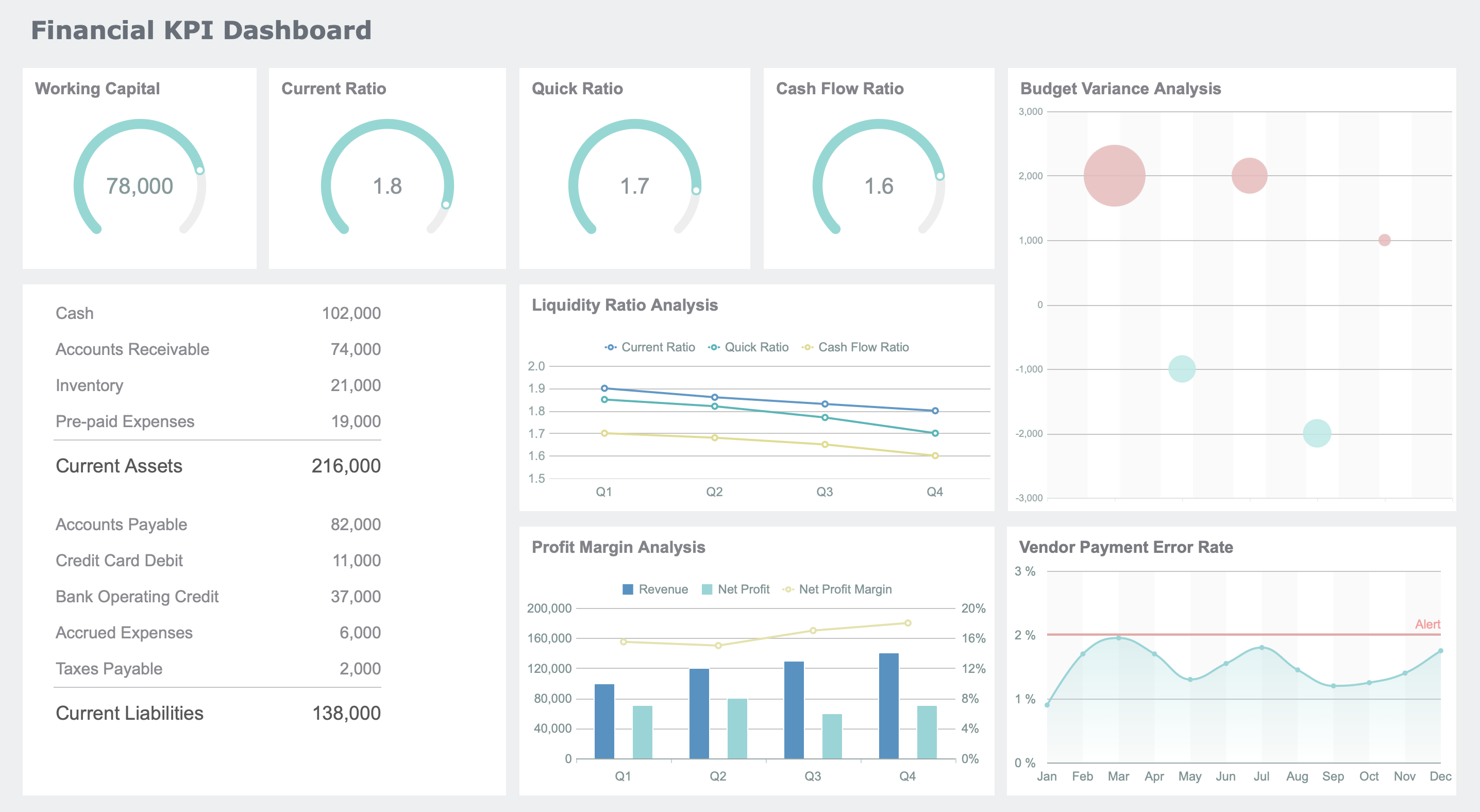
When you pick a dashboard local solution, think about what your business needs most. Scalability means you can start small and add more later. Flexibility lets you change things as your business grows. Easy setup and good support help you get started fast. Customization and integration make sure your data stays together. Reports and dashboards show you everything in one place. Make sure your dashboard matches your goals. This helps you decide quickly and keeps your team working well. Try out demos, ask your team what they think, and use your checklist before picking one.
Tip: FineReport is easy to use with drag-and-drop tools, real-time reports, and works on your phone. Many people like its simple design and how well it connects to data.
| Feature | FineReport | Others |
|---|---|---|
| User Interface | Intuitive | Varies |
| Mobile App | Available | Varies |
Want to help your business do better? Try FineReport and see if it works for you.

The Author
Lewis
Senior Data Analyst at FanRuan
Related Articles
Payment Analytics Dashboard: 12 KPIs Every Operations Leader Should Track to Cut Revenue Leakage
Losing revenue to declines? Discover 12 essential KPIs to track in your payment analytics dashboard to stop leakage and manage disputes.

Lewis Chou
May 05, 2026
SOC Dashboard Explained: 12 Essential KPIs, Views, and Workflows Security Teams Use
Learn about SOC dashboards, the 12 essential KPIs for security teams, and how they centralize alerts and workflows for faster threat detection and response.
Lewis Chou
May 05, 2026

EMR Dashboard Guide: 12 Metrics to Track for Faster Clinical and Operational Decisions
Learn the 12 essential EMR dashboard metrics to track for faster clinical and operational decisions, improving patient flow and revenue cycle management.
Lewis Chou
May 05, 2026