A data warehouse dashboard is the business-facing layer that turns centralized, modeled data into decisions. For IT managers, analytics leaders, finance teams, and operations directors, its value is straightforward: it replaces fragmented spreadsheets, conflicting KPI definitions, and delayed reporting with one governed view of performance.
If your teams are asking why revenue in finance does not match revenue in sales, why yesterday’s report changed today, or why dashboards are slow and no one trusts them, the issue is rarely just visualization. The issue is usually architecture, metric governance, and delivery discipline. A strong data warehouse dashboard solves all three.
What a data warehouse dashboard is and why it matters
A data warehouse dashboard is a visual interface built on top of a central data warehouse. It presents curated KPIs, trends, comparisons, and drill-down views so business users can act on trusted data without querying raw tables.
In plain language, the dashboard is the final mile of your analytics stack. The warehouse stores and organizes data from systems like ERP, CRM, finance, ecommerce, support, and spreadsheets. The dashboard transforms that centralized data into decision-ready views for leaders and teams.
This matters because centralized data alone does not create business value. Value appears when the right people can see the right numbers, in the right format, at the right time.
How dashboards differ from reports, ad hoc analysis, and monitoring tools
A data warehouse dashboard is often confused with other analytics assets, but each serves a different purpose:
Raw reports show rows, tables, or fixed-format summaries. They are useful for record-level review, compliance, or exports, but less effective for fast executive decisions.
Ad hoc analysis is exploratory. Analysts use it to answer new questions, test hypotheses, and find root causes.
Operational monitoring tools focus on live system states, alerts, and event streams, often for application or infrastructure health.
Data warehouse dashboards sit between strategy and action. They standardize KPI tracking, summarize performance, and support drill-down into business issues.
The key distinction is governance. A dashboard built on the warehouse should reflect approved business definitions, not one-off calculations living in isolated spreadsheets.
Who uses a data warehouse dashboard
A mature data warehouse dashboard serves multiple audiences, each with different needs:
Executives: high-level revenue, margin, growth, and forecast views
Finance teams: profitability, cash flow, variance, and budgeting performance
Operations leaders: throughput, SLA adherence, inventory, and service delivery
Sales teams: pipeline, win rates, bookings, and account performance
Marketing teams: campaign ROI, lead conversion, CAC, and channel efficiency
Customer success and support: retention, ticket volume, response time, and churn risk
Analysts: drill-down access, segmentation, and exception analysis
The most effective dashboards are not one-size-fits-all. They are role-based, governed, and designed around business actions.
Core architecture behind a data warehouse dashboard
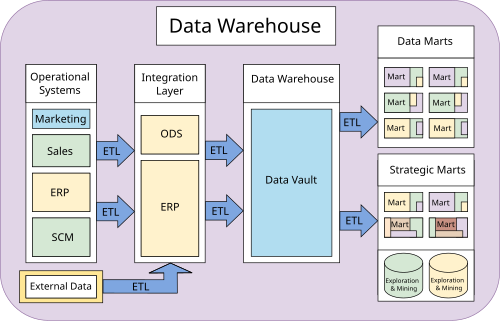
A reliable data warehouse dashboard depends on much more than a BI front end. It rests on a full stack that moves data from source systems to trusted metrics on screen.
Key layers in the stack
Most enterprise-grade dashboard architectures include these layers:
Data source layer: ERP, CRM, accounting systems, marketing tools, support platforms, spreadsheets, APIs, and external data
Ingestion layer: ETL or ELT pipelines that collect, sync, and move data into the analytics environment
Storage layer: the cloud or on-prem data warehouse where centralized data lives
Transformation layer: modeling logic that cleans, joins, aggregates, and standardizes raw data
Semantic layer: approved metric definitions, business rules, dimensions, and naming conventions
Visualization layer: the dashboard interface where end users consume KPIs and insights
Application layer: alerts, mobile access, automated distribution, and embedded analytics for decision workflows
When these layers are well designed, teams stop arguing over definitions and start discussing action. That is the business impact of governed architecture.
Key metrics architecture teams should govern
For a data warehouse dashboard to be trusted, these core elements must be defined and managed:
Metric definition consistency: One agreed formula for each KPI so finance, sales, and operations see the same number.
Data freshness: How current the data is, based on refresh schedules or streaming logic.
Completeness: Whether expected records and fields have arrived for the reporting period.
Lineage: The traceable path from dashboard metric back to source systems and transformations.
Access control: Role-based permissions that determine who can view, edit, or distribute dashboard content.
Performance latency: How quickly the dashboard loads and queries return results.
Drill-down logic: The governed path from summary KPI to transaction, region, product, or customer detail.
Ownership: A named team or stakeholder responsible for maintaining each dashboard and metric domain.
These are not technical extras. They are the foundation of trust.
How dashboard data flows from source to screen
The typical data flow looks like this:
Data is extracted from systems such as CRM, ERP, billing, support, ecommerce, or files.
Data is ingested through scheduled or event-driven pipelines.
Data is cleaned and standardized to handle nulls, duplicates, type mismatches, and naming inconsistencies.
Data is modeled into analytics-ready tables, often with fact and dimension structures or layered warehouse zones.
Business rules are applied so KPIs like revenue, margin, churn, or fulfillment rate match agreed definitions.
Queries are executed by the BI or dashboard layer against warehouse tables, aggregates, or semantic models.
Metrics are visualized as scorecards, charts, tables, filters, and drill-down views for end users.
This source-to-screen chain is where many dashboard initiatives fail. If upstream logic is weak, the front-end design cannot fix it.
Batch refreshes vs. near-real-time updates
Not every data warehouse dashboard needs second-by-second updates. Choosing the right refresh model depends on the decision cycle.
Batch refresh is best when:
Data changes on a daily or hourly basis
Teams review scheduled reports or executive scorecards
Cost control matters more than instant visibility
Source systems do not expose event streams
Near-real-time updates are best when:
Teams need rapid operational visibility
SLA breaches, order flow, or support queues require immediate response
Agencies or multi-client teams must monitor changing performance throughout the day
Business value justifies the added architectural complexity
For most organizations, the right answer is mixed cadence: executive views may refresh daily, while operational dashboards refresh every few minutes.
Common tools and platform choices
A modern data warehouse dashboard stack often includes a blend of tools:
Warehouse platforms: Snowflake, BigQuery, Redshift, Databricks, SQL Server, and similar platforms
Transformation tools: dbt, SQL-based modeling frameworks, or internal transformation pipelines
Orchestration tools: Airflow, Dagster, native schedulers, or cloud workflow services
Data integration tools: connectors, ELT pipelines, API ingestion, and synchronization services
If a business is starting from scratch, the priority is simplicity: choose fewer tools, define KPI ownership early, and avoid over-engineering.
If a business is improving an existing setup, the priority is usually standardization: reduce duplicated metrics, improve refresh reliability, and consolidate dashboard sprawl.
KPIs and metrics a data warehouse dashboard should include
A high-value data warehouse dashboard should not be packed with every metric available. It should present the metrics that reflect business outcomes, operational health, and data trust.
Executive and company-level KPIs
These are the metrics leadership teams expect to see consistently:
Operating margin: Efficiency after operating expenses
Growth rate: Period-over-period or year-over-year expansion
Customer retention: Ability to keep customers over time
Churn rate: Customer or revenue loss rate
Forecast accuracy: How actual performance compares with projections
Cash flow indicators: Liquidity and financial stability
Average order value or contract value: Deal quality and monetization strength
Return on investment: Efficiency of strategic initiatives or spend categories
For enterprise environments, executive dashboards should show targets, actuals, variances, and trend context on the same page.
Operational and departmental metrics
Departmental dashboards should connect daily activity to business outcomes.
Sales metrics
Pipeline coverage
Win rate
Sales cycle length
Bookings
Quota attainment
Lead-to-opportunity conversion
Marketing metrics
Campaign performance
Customer acquisition cost
Cost per lead
Marketing-sourced pipeline
Return on ad spend
Conversion by channel
Customer support metrics
Ticket volume
First response time
Resolution time
Backlog
CSAT or NPS
Escalation rate
Operations and supply chain metrics
Inventory turnover
Fill rate
On-time delivery
Order cycle time
Throughput
Back-order rate
Service delivery metrics
SLA attainment
Utilization rate
Project margin
Delivery backlog
Rework rate
Client health score
The rule is simple: every metric should support a decision. If a team cannot explain what action a KPI should trigger, it likely does not belong on the dashboard.
Data quality and trust indicators
This is the most overlooked part of a data warehouse dashboard, and one of the most important. If teams rely on the same dashboard for decisions, they need proof that the data is reliable.
Key Metrics (KPIs) for data trust
Freshness: Time since the last successful data update
Completeness: Percentage of expected records loaded
Accuracy checks: Validation of totals, reconciliations, and rule-based thresholds
Anomaly alerts: Detection of unexpected spikes, drops, or pattern breaks
Schema stability: Tracking source structure changes that may break models
Metric definition consistency: Confirmation that approved formulas are being used across views
Pipeline success rate: Reliability of ingestion and transformation jobs
Dashboard query performance: Speed of dashboard load and interaction
Metadata and governance matter because dashboards become shared operational language. Without documented definitions, lineage, update frequency, and ownership, even attractive dashboards create confusion.
Business use cases across teams and industries
A data warehouse dashboard is not limited to executive reporting. It supports a broad range of business scenarios, especially when teams need one trusted view across systems, regions, or clients.
Enterprise decision-making and visualization
Large organizations use data warehouse dashboards to align leadership around common performance signals. This is especially valuable when business units operate across different regions, products, or subsidiaries.
Financial, sales, and operations alignment in monthly reviews
Exception-based management with threshold alerts
Drill-down from group-level metrics into business-unit performance
In practice, this reduces manual presentation work, shortens review cycles, and improves accountability.
Multi-client and real-time visibility scenarios
Some organizations need dashboards that go beyond internal reporting. Agencies, logistics providers, SaaS firms, and service businesses often manage many clients, accounts, or locations at once.
Common scenarios include:
Agencies: live campaign dashboards by client, channel, and region
Logistics providers: shipment status, fulfillment performance, and SLA adherence across multiple sites
SaaS companies: customer usage, retention risk, support trends, and account health
Field service businesses: technician utilization, open work orders, response times, and service quality
Franchise or multi-location operations: sales, staffing, inventory, and local performance rollups
These scenarios often require near-real-time visibility, role-based access, and client-specific views. They also demand strong governance so one platform can support many stakeholders without exposing the wrong data.
Common examples for growing businesses
For growing companies, the data warehouse dashboard is often the first step toward a real analytics foundation. Common early-stage use cases include:
Budgeting and variance tracking: compare actuals to plan by department or cost center
Sales tracking: monitor pipeline, bookings, and rep performance
Operations planning: track workload, fulfillment, staffing, or inventory capacity
Customer reporting: provide account managers and customers with performance summaries
Leadership scorecards: centralize business health metrics in one dashboard
These dashboards help companies move from reactive reporting to proactive management. Even a modest dashboard can save hours of manual work if the KPI logic is consistent and the refresh process is automated.
Best practices for building and improving dashboards
A high-performing data warehouse dashboard is not just technically correct. It is usable, trusted, and maintained over time.
How to design for clarity and adoption
Good dashboard design starts with the audience, not the chart type.
Best practices from a consultant’s playbook
Build role-specific views first
Create separate executive, manager, and analyst views instead of forcing every user into one page. This improves adoption and reduces clutter.
Define every KPI in business language
Add clear metric labels, definitions, and context. Users should know exactly what “gross margin,” “active customer,” or “on-time delivery” means.
Design a drill-down path before building visuals
Start with summary KPIs, then map how users will investigate exceptions by region, product, customer, rep, or transaction.
Use visual hierarchy to direct attention
Put headline KPIs at the top, trends in the middle, and diagnostic detail below. Highlight exceptions, not decoration.
Link metrics to action thresholds
A dashboard should tell users when to investigate, escalate, or intervene. Static numbers without action logic lead to passive viewing.
Governance, performance, and maintenance
Even a well-designed dashboard fails if governance is weak.
Critical operating practices include:
Access controls: enforce row-level, role-based, and domain-based permissions
Refresh schedules: align update frequency with actual decision needs
Testing: validate calculations, filters, and edge cases before release
Documentation: maintain metric definitions, lineage notes, and owner details
Lifecycle ownership: assign responsibility for support, updates, and retirement
Performance optimization: reduce slow queries with aggregation, caching, and modeling improvements
Change management: communicate KPI logic changes before users discover them in production
A dashboard is a product, not a one-time deliverable. It needs ownership and ongoing care.
Common mistakes to avoid
These mistakes consistently undermine dashboard value:
Putting too many metrics on one page
Mixing strategic and operational views without clear separation
Using inconsistent KPI logic across teams
Ignoring data freshness and completeness indicators
Building slow dashboards on poorly modeled queries
Failing to document metric definitions
Launching dashboards without stakeholder training
Creating dashboards that show problems but not next actions
If the dashboard does not help a user decide what to do next, it is only reporting, not decision support.
How to choose the right approach for your business
The right data warehouse dashboard approach depends on your business goals, data maturity, internal skills, and reporting complexity.
You need to prove adoption and business value before scaling
A phased rollout is often the best enterprise strategy. Start with one business domain, stabilize the definitions, then expand.
Practical checklist for planning next steps
Use this checklist to plan a successful data warehouse dashboard initiative:
Clarify the business objective
Identify priority users and decisions
List required source systems
Define KPI formulas and owners
Set refresh frequency by use case
Choose the warehouse, transformation, and dashboard stack
Document access and governance rules
Design drill-down paths
Test for trust, performance, and usability
Assign long-term dashboard ownership
From methodology to execution: build smarter with FineReport
At this point, the pattern should be clear: a strong data warehouse dashboard requires data integration, modeling, governance, role-based design, and dependable delivery. Building this manually is complex; use FineReport to utilize ready-made templates and automate this entire workflow.
FineReport is a strong fit for organizations that need enterprise-grade dashboards, fixed-format reporting, KPI scorecards, mobile delivery, scheduled distribution, and management-ready visualization in one platform. It helps teams turn warehouse data into dashboards that are easier to publish, govern, and scale across departments.
For businesses building or upgrading a data warehouse dashboard, FineReport enables you to:
Connect dashboard delivery to centralized warehouse data
Standardize KPI presentation for management and departmental use
Support drill-down analysis, scheduled reports, and mobile access
Reduce manual reporting effort and improve consistency across the organization
In practical terms, this means less time stitching together disconnected tools and more time delivering a trusted analytics layer the business will actually use. If your goal is to move from raw warehouse data to repeatable decision workflows, FineReport is the faster and more scalable path.
A data warehouse dashboard turns centralized warehouse data into trusted, decision-ready KPIs and visual insights. Its main purpose is to give business users a consistent view of performance without relying on raw tables or disconnected spreadsheets.
A regular report usually presents fixed tables or summaries, while a data warehouse dashboard is interactive, KPI-focused, and built for ongoing monitoring and drill-down analysis. It also depends more heavily on governed metric definitions and shared business logic.
Teams should track both business KPIs and trust-related metrics such as data freshness, completeness, lineage, dashboard load speed, and access permissions. The exact mix depends on the audience, such as executives, finance, operations, or sales.
Trust usually breaks down when KPI definitions are inconsistent, data refreshes are unclear, dashboards perform poorly, or users cannot trace numbers back to source systems. In most cases, the root problem is weak architecture or governance rather than the charts themselves.
Yes, but only if the underlying ingestion, transformation, and serving layers are designed for low-latency updates. A dashboard can refresh in near real time when the warehouse architecture supports fast pipelines and responsive query performance.
Product Trial
FineReport
Pixel-perfect reports · Interactive dashboards · Easy data entry · Digital twins