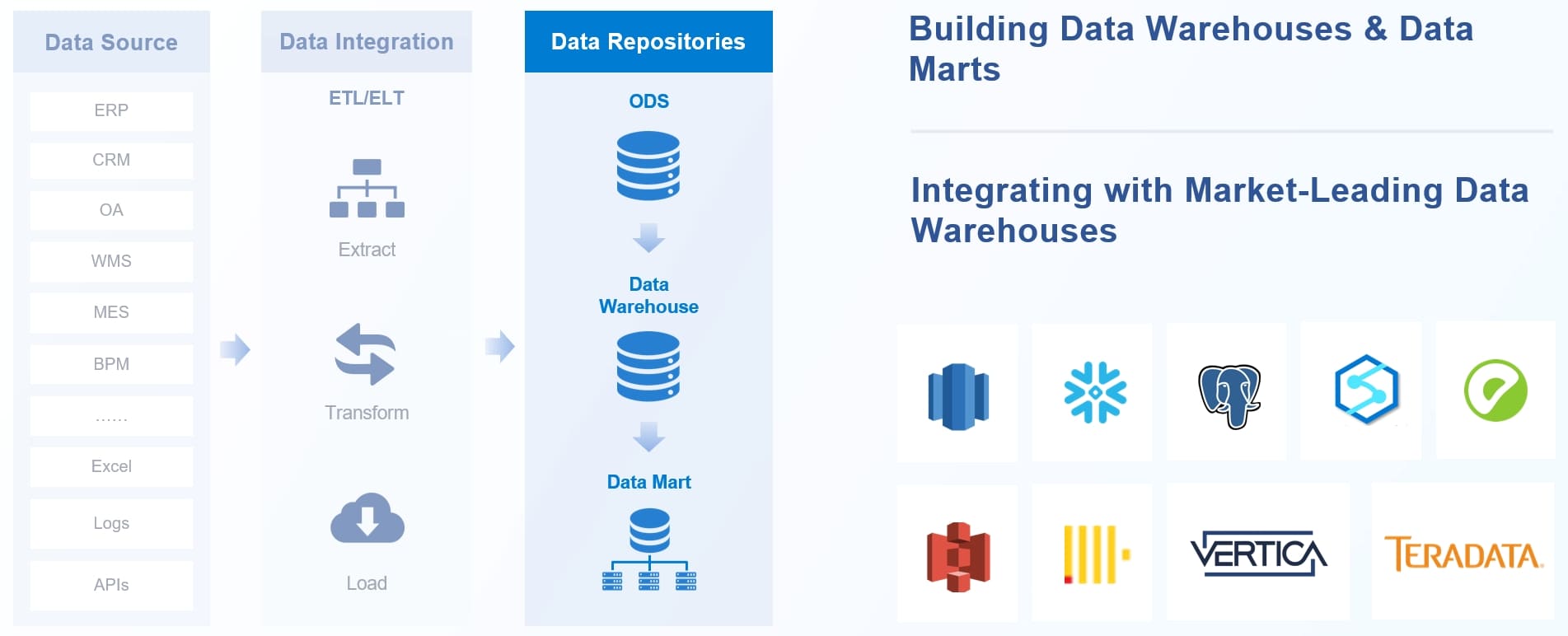
You need a clear data migration plan to move your business data without problems. Many companies struggle because they do not plan well. More than 80% of migrations fail or go over budget. You can use tools like FineDataLink to make the process easier. Careful planning helps you save time and money.
A data migration plan is a guide for moving data. It helps you move data from one system to another. This plan keeps your data safe and correct during the move. If you follow the plan, you can stop mistakes. Your business will keep working well. Many companies use a data migration plan for every step. They use it from the beginning to the end.
Key Elements of a Data Migration Plan
Your data migration plan needs some important parts. These parts help you stay organized and lower risks. Here are the main things to include:
Each part helps your migration work better. Data discovery lets you know what data you have. Data mapping helps you move data from old to new systems. Testing and validation check if your data is still correct.
Organizations with documented cloud strategies achieve 46% higher migration success rates than those without formal plans.
Data-Related Incidents
Organizations implementing robust data validation processes during migration experience 43% fewer data-related incidents post-migration.
You can also:
Spot and handle problems before they happen
Lower the chance of losing or messing up data
Stay away from rules trouble and long downtime
If you use a strong plan, your migration will go well. Your data stays safe and your business keeps moving forward.
Define Objectives and Scope of Data Migration Plan
Setting Migration Goals
You must set clear goals before you begin. Goals help you stay on track and see if you succeed. Big companies set goals to keep things running during migration. Here are some common goals in the table below:
Objective
Description
Minimize Downtime
Stop delays in key jobs like payroll or customer service.
Ensure Business Continuity
Keep workers busy and keep things going during the move.
Conduct Detailed Audits
Find all data sources and links to lower risks and plan well.
You should decide on scope and goals early. This helps you know what data to move, which systems to use, and what needs to change. You can set SMART goals, like making data better or following rules. When you check your target system, you make sure it fits your needs.
Tip: Write your goals down and share them with your team. This helps everyone know what you want to do.
Identifying Stakeholders
You need to find out who will help with the migration. Stakeholders are business users, compliance teams, and leaders. Getting these people involved early helps you avoid trouble and build trust. You get new ideas and spot problems before they get big.
Get stakeholders involved early to gather ideas and avoid missing things.
Make clear what data you will move, like source and target systems, old data, and changes needed.
Make sure your goals fit your company’s main plans.
When you work with stakeholders, you make better choices. Everyone knows the migration steps and supports your plan. This teamwork makes migration smoother and brings better results.
Assess and Analyze the Source Data
You need to check your data before you move it. This step helps you know what data you have and where it is. You also learn if your data is in good shape. If you skip this, you might have trouble later. You want your data ready to move and to work well in the new system.
Data Inventory and Mapping
Start by making a full list of your data sources. These can be databases, files, or apps. You must know what data you will move. This is called data inventory. It helps you not miss anything important.
Next, you need to map your data. Data mapping means you match old fields to new fields. You decide how each piece of data will move and change. This keeps your data neat and correct.
Here is a table with ways to check your data before you move it:
Method
Description
Identify Data Sources
Make a list of all data sources, including databases, applications, and files involved in migration.
Check how much data you need to move and plan for storage and speed.
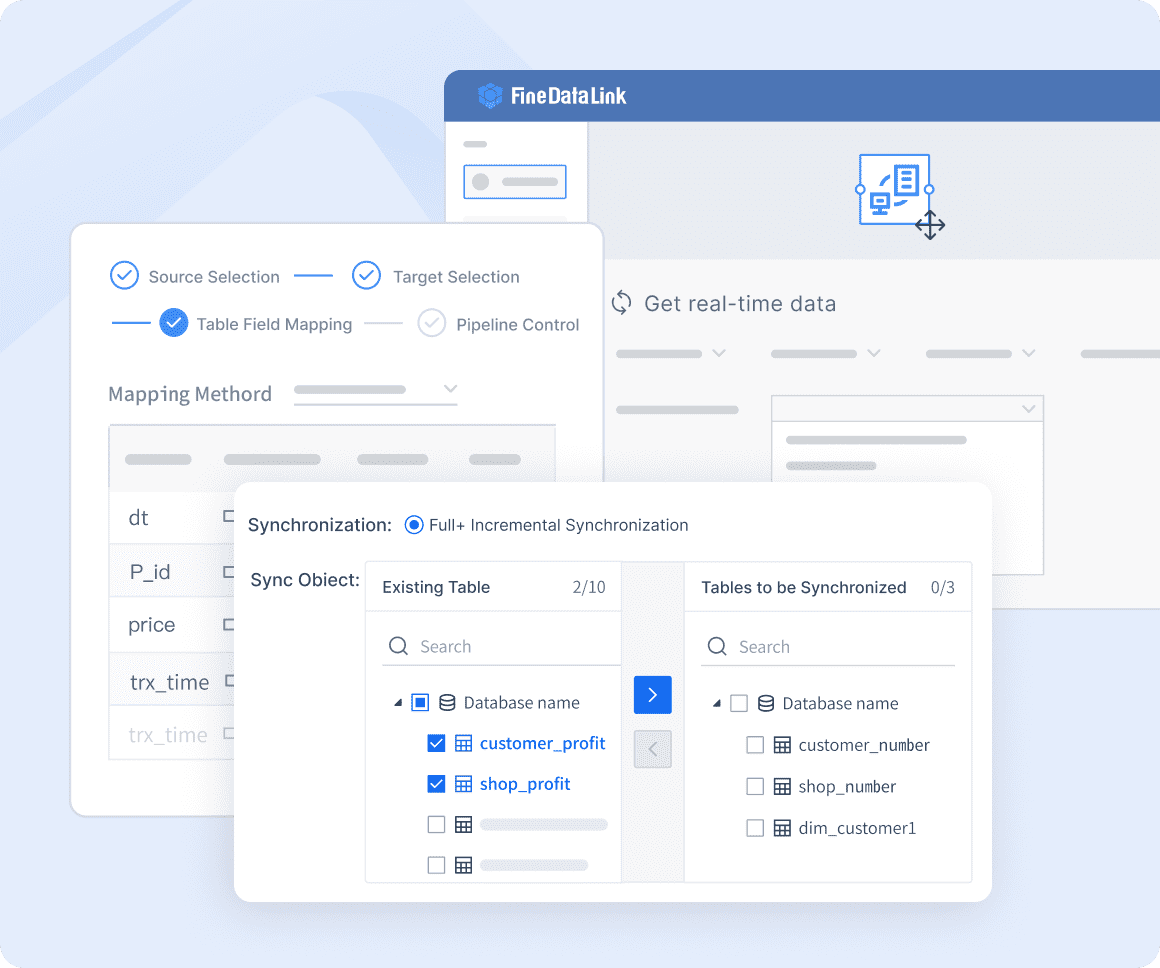
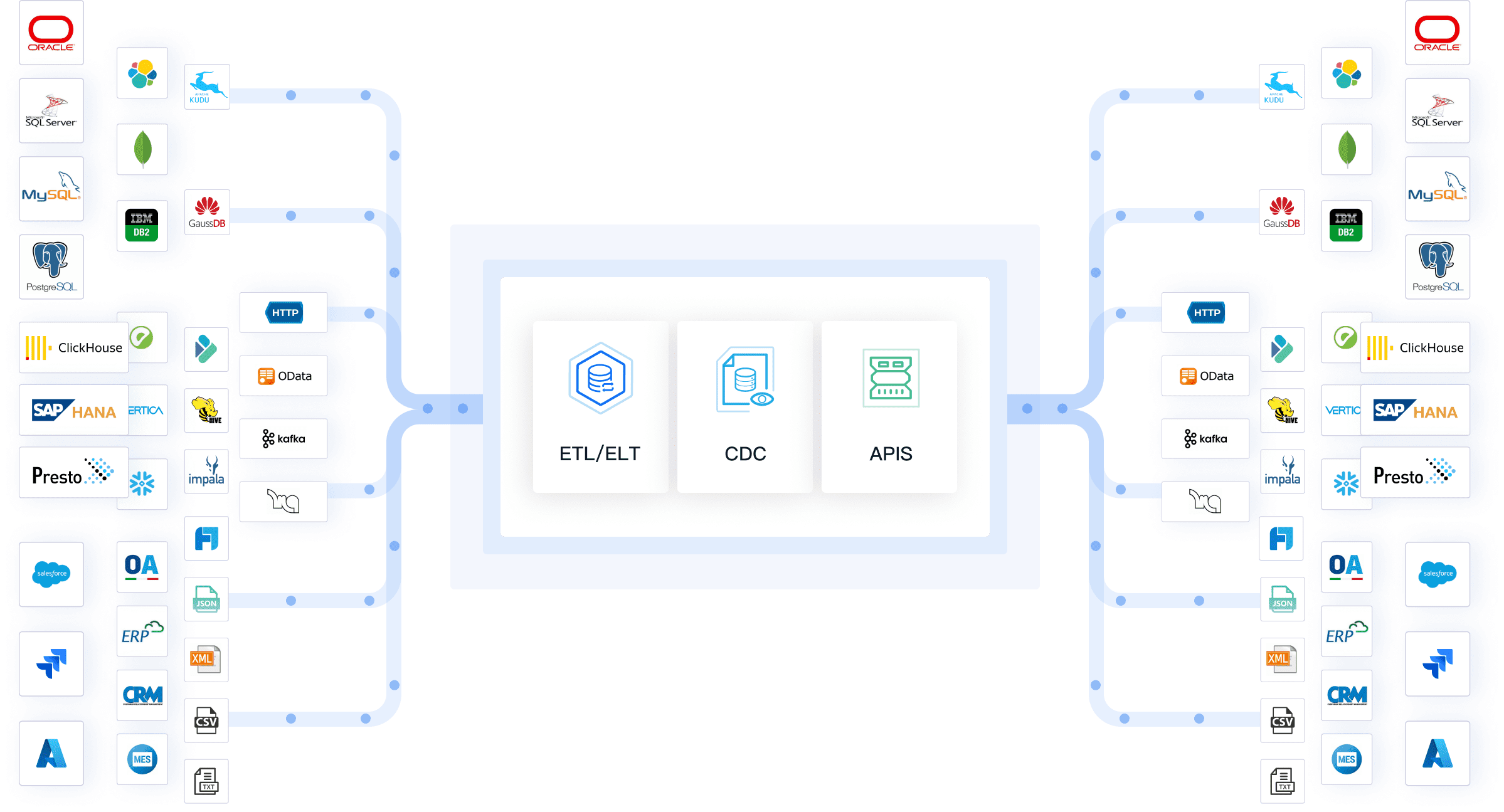
FineDataLink helps make this step easier. You can connect to over 100 data sources in one place. FineDataLink lets you set up real-time data pipelines. You can sync one table, many tables, or whole databases. The platform helps you map fields and manage changes. You can set rules for mapping fields for each task. This saves time and lowers mistakes.
Tip: Use a visual tool like FineDataLink to see your data and mapping. This helps you find problems early and keeps your migration on track.
Evaluating Data Quality
After you finish your data list and mapping, check your data quality. Good data quality means your data is right, complete, and ready to move. If you move bad data, you will have trouble in the new system.
You may find some common data quality problems when you check your data:
You should look for these problems and fix them before you move your data. Data profiling tools help you find mistakes and patterns. Cleaning your data means removing copies, fixing errors, and filling in missing parts. You also need to check for hidden or messy data that may not fit in the new system.
FineDataLink helps you with this step. The platform gives you real-time sync and data profiling. You can see problems as they happen and fix them fast. This keeps your migration smooth and your data safe.
Note: Always check your data quality before you move it. Clean data helps your migration plan work and stops problems later.
When you take time to check and study your data, you help your migration succeed. You know what data you have, how to move it, and how to keep it clean. This step is very important for a strong data migration plan.
Choose Tools and Resources for Data Migration Plan
Strategy support: The tool should work with many migration strategies.
Future-proof connectivity: It must connect with your systems now and later.
Scalability: The software should handle more or less data as you need.
Security: It should follow rules like GDPR and CCPA to keep data safe.
Speed: The tool should move lots of data quickly.
Transformation: It must help you change structured and unstructured data.
Low-code platforms make migration easier for everyone. You can use drag-and-drop and ready-made parts. This saves time and helps you make fewer mistakes. You do not need to write much code. Even if you are not a developer, you can help with migration. The visual interface lets you see each step, so you know what is happening.
Low-code tools also help teams work together. People with different skills can join the migration. This teamwork makes your project faster and better.
FineDataLink for Seamless Data Migration
FineDataLink gives you a new way to do data migration. You can connect to over 100 data sources like databases, files, and cloud apps. The platform supports real-time data sync, so your data stays up to date. You can use ETL and ELT features to clean, change, and load your data.
The drag-and-drop interface makes things simple. You can build data pipelines without writing code. FineDataLink helps you see your data flow and fix problems early. The platform also supports API integration, so you can share data between systems in minutes.
Tip: Pick a tool like FineDataLink if you want an easy migration with less stress and fewer mistakes.
FineDataLink helps you finish your migration faster and with better results. You can trust your data will move safely and work well in the new system.
Develop Your Data Migration Plan Strategy
Data Migration Steps and Approaches
You need to follow clear steps for data migration. Each step helps you move data safely. This keeps your business working. Here are the main steps you should use:
Check your results and write them down after you finish.
You can use data replication to keep a copy of your data in the new system. ETL is good if you need to change data for the new system. Testing each step helps you find problems early. Always check your data after you move it to make sure it is right.
Tip: Ask your IT team to help with every step. They fix tech problems and keep your data safe.
Big Bang, Phased, and Parallel Strategies
You can pick from different data migration strategies. Each one has its own risks and needs. Here is a table to help you compare them:
Big bang migration moves all data at once. This works if you can handle downtime and have clean data. Phased migration moves data in smaller steps. You can fix problems as you go. Parallel migration lets you use old and new systems together. You can test both and compare results. This lowers risk but needs more work.
Pick a strategy that fits your business needs. If you want to move data to the cloud, phased or parallel strategies are often better. Always check your data and team before you choose. Good planning and testing make your migration plan strong.
Prepare, Cleanse, and Transform Data
Getting data ready is very important. You must clean and organize your data first. This stops problems and helps your new system work well.
Data Cleansing Techniques
You should clean your data to make it correct and useful. Many companies use special tools for this job. SAS Data Quality and IBM Infosphere Information Server are good choices. These tools clean data at the source and work for many projects.
Some common ways to clean data are:
Find and delete copies to remove duplicate data. Use direct ways or fit-form-function checks.
Only move the data you need. Do not migrate old or bad data. Bad data can cause problems in your new system.
Set up taxonomies and attributes. Sort master records so you can find and report on them easily.
Use SAS Data Quality for deduplication, fixing mistakes, and finding entities.
Try IBM Infosphere Information Server for making data standard, checking data, and sorting records.
Tip: Clean data helps you stop mistakes and saves time when you move it.
Data Transformation and Standardization
After cleaning, you must change and standardize your data. This means you make your data fit the new system. You also make sure all data looks the same and follows rules.
Changing data makes it better by cleaning and checking it. This makes your data more trustworthy for analysis. Standardization helps your data work with different apps and systems. This makes joining systems easier.
When you organize data, your team finds things faster. It also helps people use data for reports and decisions.
Changing data makes it more correct and ready to use.
Standardization makes sure your data fits the new system.
Organized data helps everyone work faster and smarter.
Note: FineDataLink has strong ETL and ELT features. It makes cleaning and changing data easy. You can use drag-and-drop to set up rules and workflows for migration.
Execute the Data Migration Process
Running the Migration
Get ready before you start moving data. Check each step in your migration plan. Make sure your team knows what to do. Always make a backup of all your data first. This keeps your business safe if something goes wrong.
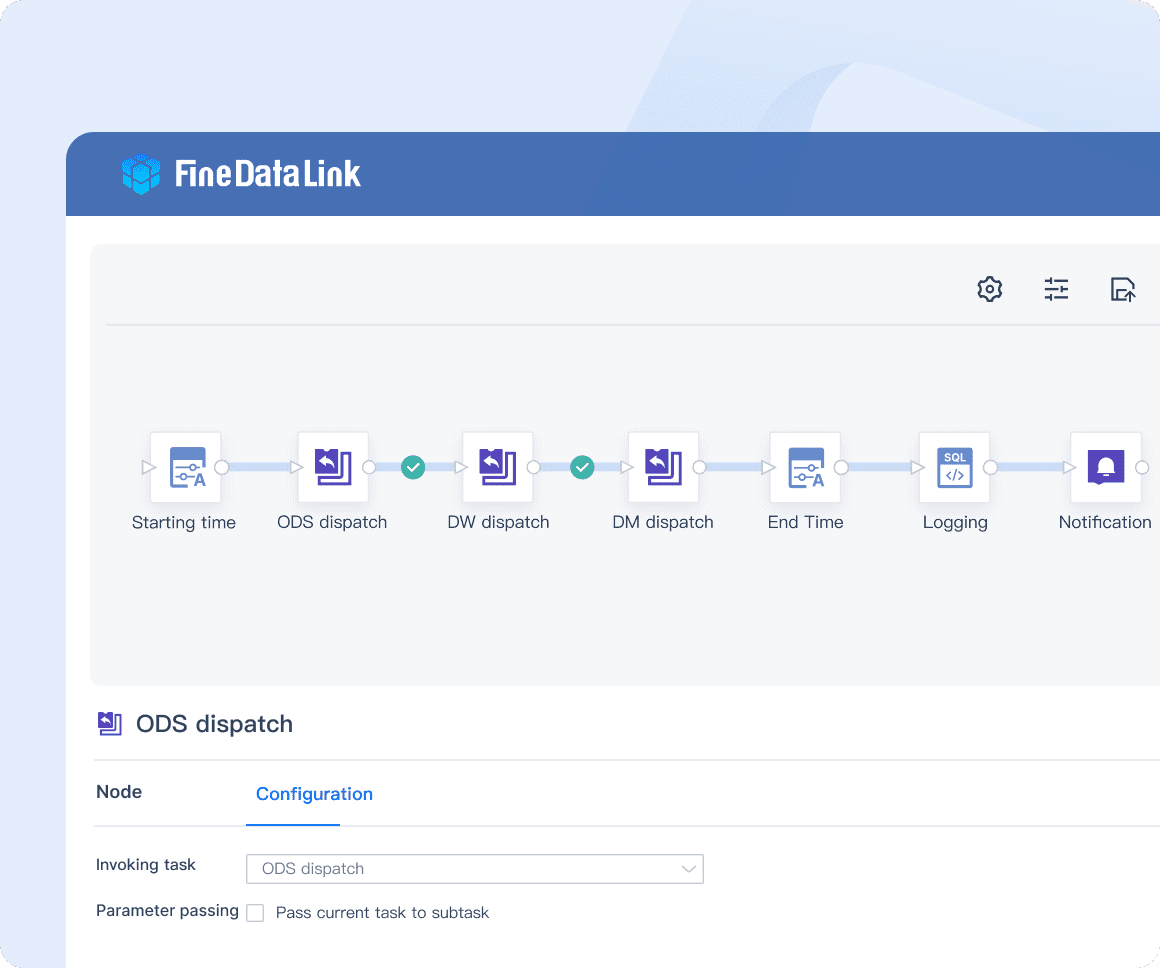
Use a tool that updates data right away. FineDataLink helps you move data fast and safely. You can connect many data sources and keep them updated. The platform lets you build data pipelines with drag-and-drop. You can watch your data flow and fix problems quickly.
Keep your data neat while you move it. Clean and sort your data before migration. Label every record so you know where it belongs. Use end-to-end encryption to keep your data safe as it moves. After you finish, check that your data matches the original. This helps you find mistakes and keep your data safe.
Managing Downtime and Risks
Downtime can cause problems for your business. You need to lower risks during migration. Big databases take longer to move and may stop services. Network problems can slow down the process. Changes in data structure may need more time.
Here are ways to lower downtime:
Move small groups of data first.
Test your plan before moving everything.
Use a platform that can handle many tasks at once.
FineDataLink helps with disaster recovery and hot backup. Your data stays safe even if something fails. The system can work on many tasks at the same time. This makes things faster and stops slowdowns. The management platform makes setup and care easy. You can lower risks and keep your migration working well.
Tip: Always check your data after migration. Compare new data with the old to make sure it is correct.
Benefit
Description
High availability
Disaster recovery and hot backup keep data safe during migration.
High concurrency
Parallel processing improves speed and lowers risk.
Easy management
Simple deployment and maintenance reduce migration risks.
If you follow these steps, you can move your data with confidence. Your migration will go smoothly, and your business will stay safe.
Validate and Test Migration Results
You need to make sure your data migration works as planned. This step helps you catch mistakes before they cause problems. You want to check that your data moved safely and that your new system works well. When you validate and test the target system, you protect your business from data loss and errors.
Data Verification Methods
You have many ways to check your data after migration. Each method has strengths and weaknesses. You should pick the right one for your project. Here is a table to help you choose:
Method
Pros
Cons
Use Case
Full Document-by-Document Comparison
Finds every mistake; very accurate
Slow; not good for real-time migration
Important data like financial records
Collection Hash
Fast; checks all data at once
Cannot find small errors
Big data sets
Document Counts
Quick; easy to use
Only checks number, not content
First check for big problems
Data Size
Fast; simple check
Size match does not mean data is correct
Quick check with other methods
Spot Checks
Focuses on key records; faster than full check
May miss some errors
Medium importance migrations
Statistical Sampling
Good balance of speed and accuracy
Needs math skills; only checks samples
Large migrations with time limits
You can also use automated tools to compare your old and new systems. Some tools check your data structure and match your data fields. You should watch your results in real time during migration. This helps you fix problems right away.
Tip: Use more than one method to make sure your data is safe and correct.
User Acceptance Testing
After you check your data, you need to see if your new system works for real users. User acceptance testing helps you find problems that only show up in real work. You want your team to feel confident using the new system after migration.
Create a clear plan for testing. This helps you keep track of every test.
Link each test to a real business need. This makes sure you do not miss anything important.
Set up a test system that looks just like your real system. This helps you spot problems before you go live.
Use real data in your tests. This shows how the system will work in daily life.
You should ask users from different teams to try the new system. They can give feedback and help you find issues. If you fix these problems now, you will save time and money later. Good user acceptance testing makes your data migration a success.
Train Teams and Support Users
Training for New Systems
You need to prepare your team for new systems after data migration. Training helps everyone feel ready and confident. When you move data, people must learn new ways to work. You can use different training approaches to make learning easier.
Here is a table with successful training methods:
Training Approach
Description
Hands-On, Role-Based Training
Create sessions for each role. Let users practice their new tasks in a safe test system before you go live.
Support Resources
Give users help desk support, guides, and FAQs. These resources help users solve problems during migration.
Hands-on training lets users try new workflows with real data. Role-based sessions show each person what they need to know. Support resources give answers when users get stuck. You can use guides and FAQs to explain common data migration steps. When you train your team, you lower mistakes and make the migration smoother.
Tip: Start training early. Give users time to ask questions and practice with sample data.
Supporting End Users
After migration, you must help users adjust to the new system. Support keeps everyone happy and productive. You can use several ways to support end users:
Send a "Week One Update" email to thank users and share a status report about the data migration.
Ask for feedback through surveys or email. You learn what users need and how they feel about the migration.
Check in with champions or pilot users. They can tell you about problems with data or workflows.
Foster a culture of learning. Encourage users to explore new tools and features in the data system.
Tackle issues quickly with a triage system. Sort support requests by urgency and fix data problems fast.
Keep communication ongoing. Regular updates help users stay engaged and informed about migration progress.
You build trust when you listen to users and solve problems quickly. Good support helps users use data in new ways. You make the migration a success when everyone feels supported.
Note: Keep your help desk ready. Fast answers to data questions make users feel confident after migration.
Monitor and Optimize Post-Migration
Ongoing Monitoring
You need to watch your systems after data migration. This helps you find problems early and make sure your data works right. You should check important numbers to see how well your migration went. Here is a table with some common numbers you can use:
Metric Type
Description
Example
Downtime Minimization
Shows how long your system was down during migration.
Cutting downtime from 24 to 12 hours means better results.
Using checksums to make sure data is the same after moving.
Performance
Looks at how fast your system works before and after migration.
A 20% jump in data speed means your system works better.
Cost
Checks how much money you spent on migration.
Comparing costs before and after shows if you saved money.
You should use these numbers to keep your data safe and your business running well. If you see a problem, you can fix it before it gets worse.
Tip: Set up alerts for important numbers. This helps you act fast if something goes wrong with your data.
Continuous Improvement
You should keep working on your data migration even after you finish moving data. You need to watch and improve things after migration to get the best results. Start by checking how your system works every few months. Compare your new numbers with your old ones to see what needs fixing. Test your system and check costs to find slow spots or extra spending.
Here are some steps you can follow to keep getting better:
Check your data speed and costs often.
Use tools that help you manage and improve your system.
Test your system often to keep it working well.
Fix problems as soon as you find them.
Make improvement a regular part of your data migration plan.
When you keep checking and making things better, your data stays strong and your migration keeps helping your business grow.
Common Challenges in Data Migration
You can run into many problems when you move data. Knowing these problems helps you get ready and avoid mistakes. You have to keep your data safe and correct the whole time.
Data Loss and Corruption
If you do not plan well, you can lose data. Sometimes files break or go missing during migration. You should check your data before and after you move it. Many companies use backups and run checks to stay safe. Testing your steps helps you find mistakes early. Good rules and team training also help stop errors. If you use strong networks and write down recovery plans, you lower the chance of losing data.
TSB Bank lost data because they did not test enough. You can learn from this and always check your data.
Security and Compliance
You need to keep your data safe when you move it. If you do not use good security, private data can leak. You should encrypt your data when you move it and when it is stored. Role-based access controls help limit who can see or change data. Watching for compliance keeps you following the law. Marriott International had to pay fines after a data breach during migration. You must follow rules like GDPR to stay out of trouble.
Challenge
Description
Impact
Solution
Security & Compliance
Sensitive data exposure during transfer
Legal fines, brand damage
Encrypt data, use access controls, monitor
Integration Issues
You might have trouble connecting old systems to new ones. Old file types and custom scripts can slow things down. You should check if your systems work together before you start. Middleware platforms help link different systems. Testing your connections helps you avoid downtime. Capio Healthcare had downtime because they did not test enough. You can use phased migration and real-time replication to keep things running.
Challenge
Description
Impact
Solution
Compatibility & Legacy Complexity
Old formats and scripts slow migration
Higher costs, longer timelines
Use middleware, test for compatibility
Tip: Meet with your team often and share notes. Good communication helps you not repeat work or miss steps.
You need to watch for these data migration problems. If you plan, test, and talk with your team, you keep your data safe and your migration goes well.
Best Practices and Pitfalls to Avoid
Planning for Contingencies
You should get ready for surprises during data migration. Problems can show up even if you plan well. Always make a backup before you start moving data. Try your migration steps with small data sets first. This helps you catch mistakes early. Make a recovery plan so you can fix problems fast. Use validation at every step. Check your data after you extract, change, and load it. Ask business users and experts to help find errors. Automate checks with scripts, but also check important records by hand. Do not hurry through validation. Give yourself enough time to fix problems before you finish.
Tip: FineDataLink has guides and support. Use these to solve problems fast and keep your migration going.
Communication and Documentation
Talking with your team helps your migration work well. Get all stakeholders involved from the start. Give clear jobs to everyone on your team. Make sure each person knows their role. Use special channels so people can ask questions and share news. Give updates often so everyone knows what is happening. Make a central place for migration info, like timelines and team roles. This helps everyone find what they need quickly.
A good communication and change plan helps you get support and lowers pushback during migration.
Communication Best Practice
Why It Matters
Set clear roles
Everyone knows what to do
Share updates often
Stakeholders stay informed
Use a central hub
Easy access to migration details
Avoiding Common Mistakes
You can dodge many problems by following best practices. Never skip validation steps. Always plan for User Acceptance Testing. Work with stakeholders to set up test scenarios. Use what you learn from testing to fix and retest issues. Automate checks, but also look at important data by hand. Do not rush. Take time to check and fix mistakes. Involve the right people in every step. When you follow these best practices, you lower risks and get better results.
Tip: FineDataLink’s guides and support team can help you avoid mistakes and make migration easier.
Real-World Success: NTT DATA Taiwan Case Study
Overcoming Data Integration Challenges
You may wonder how a large company handles data migration. NTT DATA Taiwan faced big challenges with their data. They had many systems, like ERP, POS, and CRM. Each system stored data in a different way. This made it hard to get a full view of their business. You can see how this creates problems for data migration. If you do not connect your data, you cannot use it well.
NTT DATA Taiwan needed to bring all their data together. They wanted to break down data silos and make sure every team could use the same information. You might face the same issues when you start your migration. Old systems, different formats, and missing data can slow you down. NTT DATA Taiwan used a strong plan to solve these problems. They mapped their data, cleaned it, and set up rules for moving it. This helped them avoid mistakes during migration.
Tip: Always check your data before you start migration. Clean data makes the process smoother.
Achieving Data-Driven Growth with FineDataLink
You can learn from NTT DATA Taiwan’s success. They chose FineDataLink to help with their data migration. FineDataLink let them connect over 100 data sources. They used real-time data sync to keep everything up to date. The drag-and-drop tools made it easy for their team to build data pipelines. You can use these features to speed up your migration.
NTT DATA Taiwan built a data platform that supports business intelligence. Now, every team can see the same data and make better choices. You can do this too. When you use FineDataLink, you get clean, organized data. Your migration becomes faster and safer. You can trust your data and focus on growing your business.
Note: A good data migration plan and the right tools help you reach your goals. Start with a strong foundation, and you will see results like NTT DATA Taiwan.
You can build a strong data migration plan by following clear steps. Start with goals, check your data, and pick the right tools. Use FineDataLink to make data migration simple and safe. Test your migration and train your team. Watch your data after migration to keep it working well. Begin your data migration by looking at your current data or ask for a FineDataLink demo. A good migration helps your business grow.
Tip: Plan your data migration early to avoid problems and reach your goals.
Product Trial
FineReport
Pixel-perfect reports · Interactive dashboards · Easy data entry · Digital twins
Access a wealth of case studies, industry insights, and solution guides to accelerate digital transformation.
FAQ
What is a data migration plan?
A data migration plan is a step-by-step guide. You use it to move data from one system to another. This plan helps you keep your data safe and organized during the move.
How does FineDataLink help with data migration?
FineDataLink lets you connect over 100 data sources. You can use drag-and-drop tools to build data pipelines. The platform supports real-time sync, ETL, and ELT. You finish migration faster and with fewer mistakes.
What are the biggest risks in data migration?
You may face data loss, downtime, or security issues. Testing, backups, and using strong tools lower these risks. Always check your data before and after migration.
How do I know if my migration was successful?
You should check your data in the new system. Use tests like document comparison or spot checks. Ask users to try the new system. If data matches and users work well, your migration succeeded.