You need a quality dashboard to find important information in your manufacturing data. With real-time monitoring, you can spot problems right away and stop expensive mistakes. Changing from raw data to a useful dashboard helps quality and customer experience get better fast. The results are easy to see:
Benefit
Description
Proactive Quality Management
Lets organizations move from fixing problems after they happen to stopping them before, making things work better.
Reduced Response Times
Cuts down the time it takes to react from hours or days to just minutes, so you lose less.
Improved Accuracy
Gets data straight from the source, so there are fewer human mistakes and reports are always the same.
Defect Prevention
Finds problems before they make bad products, so you spend less money on fixing mistakes.
ROI Improvements
Most organizations see better results in the first year after starting.
FineBI helps you use every quality metric to make smart choices for your factory floor.
What Is a Quality Dashboard?
A quality dashboard shows your factory process clearly. You see numbers and trends all in one spot. This tool helps you find problems early. It helps you make better choices every day. Old reports only show what happened before. A quality monitoring dashboard works like a live control tower. You see what is happening right now. You know what steps to take next.
Key Features of a Quality Dashboard
A quality dashboard puts many important things together. Look at the table below to see what makes a strong dashboard:
You track key quality numbers, like defect rates and yield.
User-targeted design
Each person sees the info they need for their job.
Total production
You see how much you make in a certain time.
Defect or rejection rate
You learn how many products do not meet your standards.
Cycle time
You measure how long it takes to finish one cycle.
Trend analysis
You spot patterns over time, which helps you stop problems early.
Cost of quality
You see how much money you spend fixing mistakes or poor quality.
Defects by category
You can break down defects by type, machine, supplier, or batch.
Comparison against previous performance
You check if you are getting better or if problems keep coming back.
You also get features that make your job easier:
Real-time monitoring lets you track numbers and get alerts fast.
Automated document control keeps your rules and procedures up to date.
Integration connects your dashboard to other systems, so you do not miss any data.
Custom alerts and notifications are very helpful. You get messages when something goes wrong. These alerts help you fix small issues before they become big problems. They also keep a record of what happened. This helps during audits.
Benefits for Manufacturing Quality Monitoring
A quality monitoring dashboard gives your factory many advantages. You can see the benefits in the table below:
Metric
Description
Total Yield
You compare all products made to those that pass the first time.
Customer Return Rate
You track how often customers send products back because of quality issues.
Quality of Incoming Materials
You check the quality of parts or materials from suppliers.
You can also:
Track quality metrics faster and better.
Find problem areas before they get worse.
Make smarter choices with clear data.
Hold teams more responsible for their work.
Find flaws in your process or materials.
Improve product quality and reduce waste.
A quality dashboard helps you see problems as soon as they happen. You can fix them right away. This tool connects quality performance to your daily work. You do not wait for a report at the end of the week. You see trends and changes in real time. This means you can keep your products consistent and your customers happy.
A company used a real-time quality monitoring dashboard and saw big changes. Operators could see live data on their screens. They found quality issues early and worked together to solve them. This led to better products and less waste.
A quality monitoring dashboard helps you stop problems before they grow. You catch issues early. This keeps your production line running smoothly and saves money.
Building Effective Data Quality Dashboards with FineBI
If you want to make your factory better, you need a data quality dashboard that everyone can use. FineBI gives you tools to build dashboards. These dashboards help you find problems, fix them quickly, and keep your factory running well. You can connect all your data. You can watch for issues as they happen. The right people see the right information.
You might have data in many places. FineBI lets you put all your data together in one dashboard. You do not have to worry about missing information. You do not need to switch between different systems. FineBI connects to many kinds of data sources. You always see everything you need.
Data Source Type
Description
Big Data Platforms
Connects with over 30 big data platforms
SQL Data Sources
Integrates with various SQL databases
Excel File Datasets
Allows access to Excel file datasets
Multi-dimensional Databases
Accessible through FineReport Designer
Program Datasets
Also supported via FineReport Designer
You can see all your quality numbers in one spot. FineBI gives you real-time analytics. This means you get updates right away when something changes. You do not have to wait for reports. You can act fast.
Real-time visual alerts in FineBI help you find problems quickly. You can fix issues before they get worse.
The dashboard tells you when stock is low, so you do not run out of parts.
You spend less time looking for problems and more time fixing them.
A data quality dashboard with real-time analytics helps you stop problems before they happen. You can keep your factory safe and working well.
Customizable Visualizations for Quality Monitoring
Every factory is not the same. FineBI lets you build dashboards that fit your needs. You can pick what to show and how to show it. You can use charts, tables, and maps to make your data easy to see.
You can track key quality numbers like defect rates, yield, and cycle time. You can break down problems by machine, supplier, or batch. The dashboard lets you see trends over time. You can spot patterns and make better choices.
Drag and drop charts to build your dashboard.
Use filters to focus on the most important data.
Set up alerts to get messages when something goes wrong.
You can change the look and layout of your dashboard anytime. This helps you and your team see what matters most. A good data quality dashboard makes it easy to find answers and take action.
Role-Based Access and Collaboration
You want to keep your data safe. You want everyone to see the right information. FineBI gives you strong security features. You can control who sees each dashboard. You can control what data they can access.
Security Feature
Description
Role-based access control
Only lets authorized users see certain data
Row-level security
Limits access to specific rows of data
Single sign-on integration
Makes logging in easy and secure
Audit logging feature
Tracks who looks at or changes the dashboard
You can set up dashboards for different roles. Managers can see big trends. Operators see details for their machines. This keeps everyone focused on their job.
FineBI helps teams work together. You can share dashboards. You can leave comments. You can update information as a group. This makes it easier to solve problems and improve quality together.
A data quality dashboard with role-based access and collaboration tools helps you protect your data. It helps you get the right insights to the right people. You build trust and teamwork across your factory.
A strong data quality dashboard from FineBI helps you connect your data. You can see problems as they happen. You can work together to keep your products at their best.
Quality Monitoring and Decision Making Across the Organization
Executive Dashboards for Strategic Oversight
You need to watch over your factory to guide it well. Executive dashboards help you see quality monitoring in every department. These dashboards turn raw data into actions you can take. You get all the important facts in one spot. This helps you make choices that boost efficiency, quality, and how you use resources.
Dashboards collect data from many places and make it useful.
You see easy visuals of key performance indicators. This helps you make quick choices to keep your business moving.
You notice patterns and find ways to improve your process.
Real-time views show you the return on investment for big projects. You can make better decisions faster.
Dashboards have tools to help you lead meetings and share goals with your team.
When you share dashboards, everyone knows what success means.
You see live data, so you can stop risks before they grow.
Dashboards point out problems and show trends as they happen. This helps you make smart decisions fast.
You get one place for the truth. This helps technical and business teams work together better.
Watching reliability trends helps you plan ahead and see how your work gets better over time.
Top teams use dashboards to check important numbers. This keeps everyone working toward results.
Operational Dashboards for Managers and Teams
Managers and teams must act fast when quality monitoring issues come up. Operational dashboards give you alerts right away if something is wrong. You see production status and problems as they happen. This helps you act quickly and keep things running well.
Dashboards send alerts for big issues. You can fix problems before they get worse.
You trust the data because dashboards keep it accurate. This helps you avoid mistakes from bad information.
Dashboards show what is happening now. You do not have to wait for reports.
You see production status and problems quickly. This saves time and helps you focus on what matters.
The most watched KPIs on operational dashboards for quality monitoring are:
KPI
Description
First Pass Yield
Measures the percent of products made right the first time, with no rework needed.
Scrap Rate
Tracks how much output is thrown away due to defects. This helps you find root causes.
Throughput
Shows how many quality products you make in a set time. This tells you about your production power.
Cycle Time
Captures the total time to make one unit. This helps you find slow spots in your process.
Cost per Unit
Tells you how much it costs to make each product. This is key for running a successful operation.
You use operational dashboards to keep quality monitoring at the center of your daily work. You respond to problems fast, keep your team updated, and make sure your products are good. This helps you build a strong and reliable factory.
Implementing Quality Dashboards in Manufacturing
Steps for Successful Deployment with FanRuan
You can build a strong quality system by following easy steps. FanRuan and FineBI help make this simple for your factory. Here is a way that works well:
Put data from all your main systems, like ERP, MES, and SRM, into one BI tool.
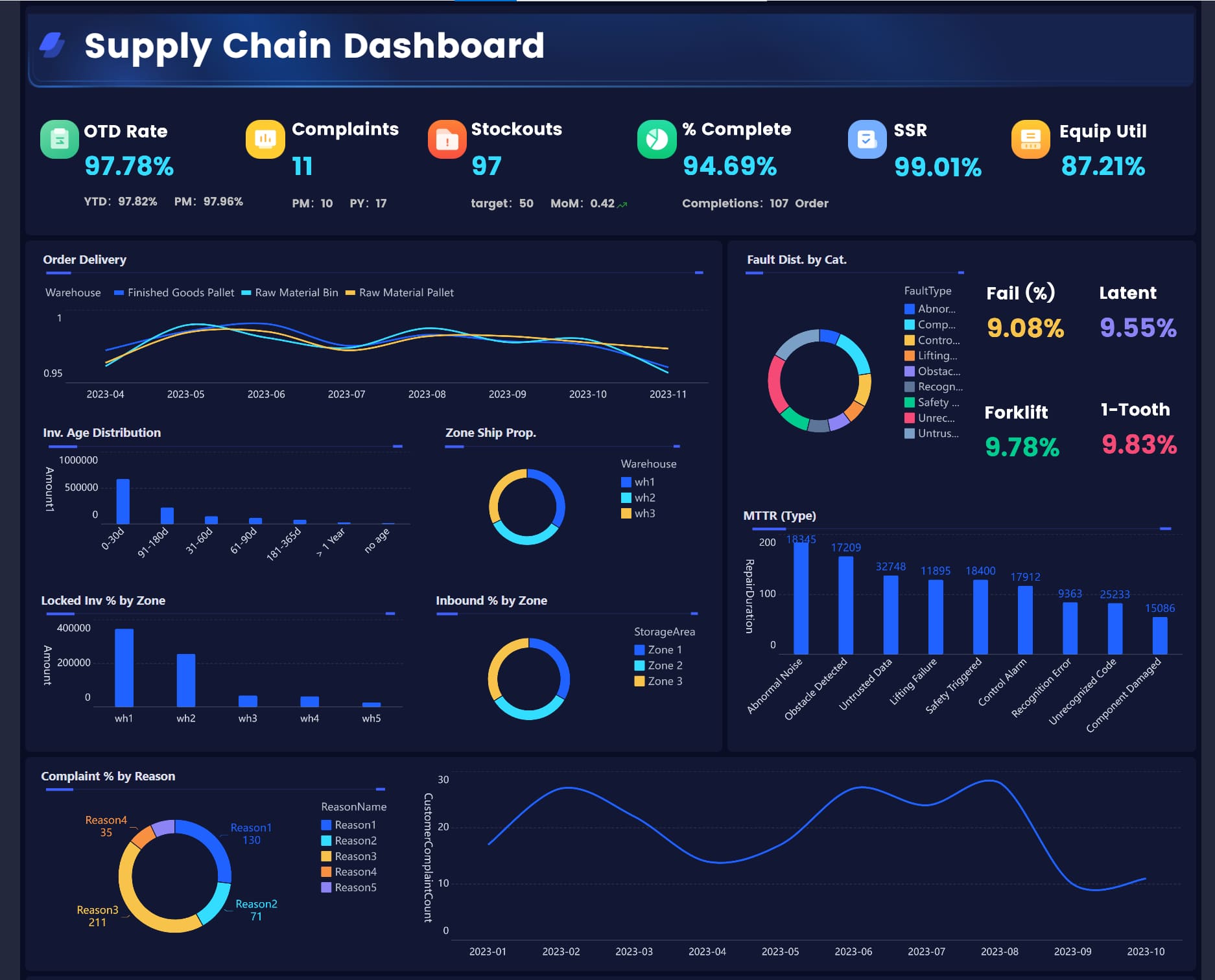
Gather all your information to make dashboards for order-to-delivery and inventory.
Use visual tools and AI alerts to find risks and problems fast.
Get your teams to work together on one platform. This helps everyone see the same facts and reach the same goals.
Organize your supply chain with the SCOR model. This gives you a clear plan for making better choices.
Best Practices for Adoption and Training
You want your team to use dashboards easily. If a dashboard is hard to use, it will not help. You should make dashboards simple and clear.
Make the layout clean and easy to use.
Use color to show what is important.
Put related numbers together and use clear names.
Ask your team for feedback. This keeps the dashboard helpful.
Change your dashboards when users ask for it.
Training is very important. You should show your team how to use the dashboard and answer alerts. Keep training so everyone knows what to do.
Training Component
Objective
Dashboard Navigation
Help staff learn to use the dashboard easily
Data Interpretation
Teach staff to read and understand the data
Response Protocols
Set clear steps for what to do when alerts show up
Good training helps your team use new tools. It also helps people stay interested and makes sure the dashboard fits their work. When you train your team, you help them use data to make quality better every day.
Future Trends in Quality Dashboards
AI and Predictive Analytics in Quality Monitoring
Factories are changing how they use technology to get better quality. AI and predictive analytics help you find problems before they start. These tools check data from machines and processes. They spot patterns that people might not see. If something strange happens, the system sends an alert right away. You can fix small issues before they become big ones.
AI-driven dashboards do more than just show numbers. They help you get ready for the future. For example, you can guess when a machine needs fixing or when a batch might not pass. This helps you stop downtime and waste. Some companies, like BMW, use predictive analytics to check quality as things are made. Their systems use cameras and sensors to watch every step. If something is wrong, the dashboard shows it before the product leaves.
You can see the benefits in the table below:
Improvement Type
Description
Defect reduction rates
Fewer defects in finished products
First-pass yield improvements
More products pass on the first try
Scrap reduction
Less wasted material
Customer complaint decreases
Fewer complaints from customers
Analysis speed improvements
Faster data analysis
Prediction accuracy rates
More accurate forecasts
System utilization levels
Better use of equipment
User adoption rates
More people use the system
Cost savings from prevented issues
Money saved by avoiding problems
ROI on analytics implementation
Better returns on your investment
Reduced quality control costs
Lower costs for checking quality
Improved resource allocation
Smarter use of resources
Mobile and Real-Time Access
You need to check your factory even when you are not there. Mobile access lets you see live data and alerts anywhere. If a number goes outside the safe range, your phone or tablet shows a warning. You can act fast and do not have to wait for a call or email.
This new way helps your team fix problems quickly. Operators see issues right away and solve them before they get worse. Managers can check progress from any place. Everyone works better together because they all see the same data at the same time.
Real-time dashboards let you watch quality all the time.
Everyone, from operators to bosses, can use the data to make good choices.
Dashboards work with automated systems, making your factory work better.
You can make your factory better by using FineBI from FanRuan. Real-time monitoring helps you see problems right away. Actionable insights help you make good choices every day. The table below shows how real-time data and digital tools help quality and decision-making:
Key Findings
Description
Real-time quality control
Lets you fix problems fast and get better results.
AI decision-support system
Makes your team quicker and more ready to act.
Process optimization
Helps you reach your goals for performance.
Quality improvement
Raises product standards and makes customers happier.
You create a data-driven culture and get helpful insights. This keeps your factory strong and competitive.
Product Trial
FineReport
Pixel-perfect reports · Interactive dashboards · Easy data entry · Digital twins
Access a wealth of case studies, industry insights, and solution guides to accelerate digital transformation.
FAQ
What is a quality dashboard?
A quality dashboard shows you important numbers and trends about your factory. You see real-time updates, spot problems early, and make better decisions. This tool helps you keep your products at a high standard.
How does FineBI help with real-time quality monitoring?
FineBI connects your data from many sources. You see live updates on your dashboard. You get alerts when something changes. This helps you fix issues fast and keep your factory running smoothly.
Can I customize dashboards for different teams?
Yes! You can build dashboards for each team or role. Managers see big trends. Operators see details for their machines. Everyone gets the information they need to do their job well.
FineBI uses strong security features. You control who can see each dashboard. Role-based access and audit logs keep your data safe and private.
Is my data safe in quality dashboards with FineBI?