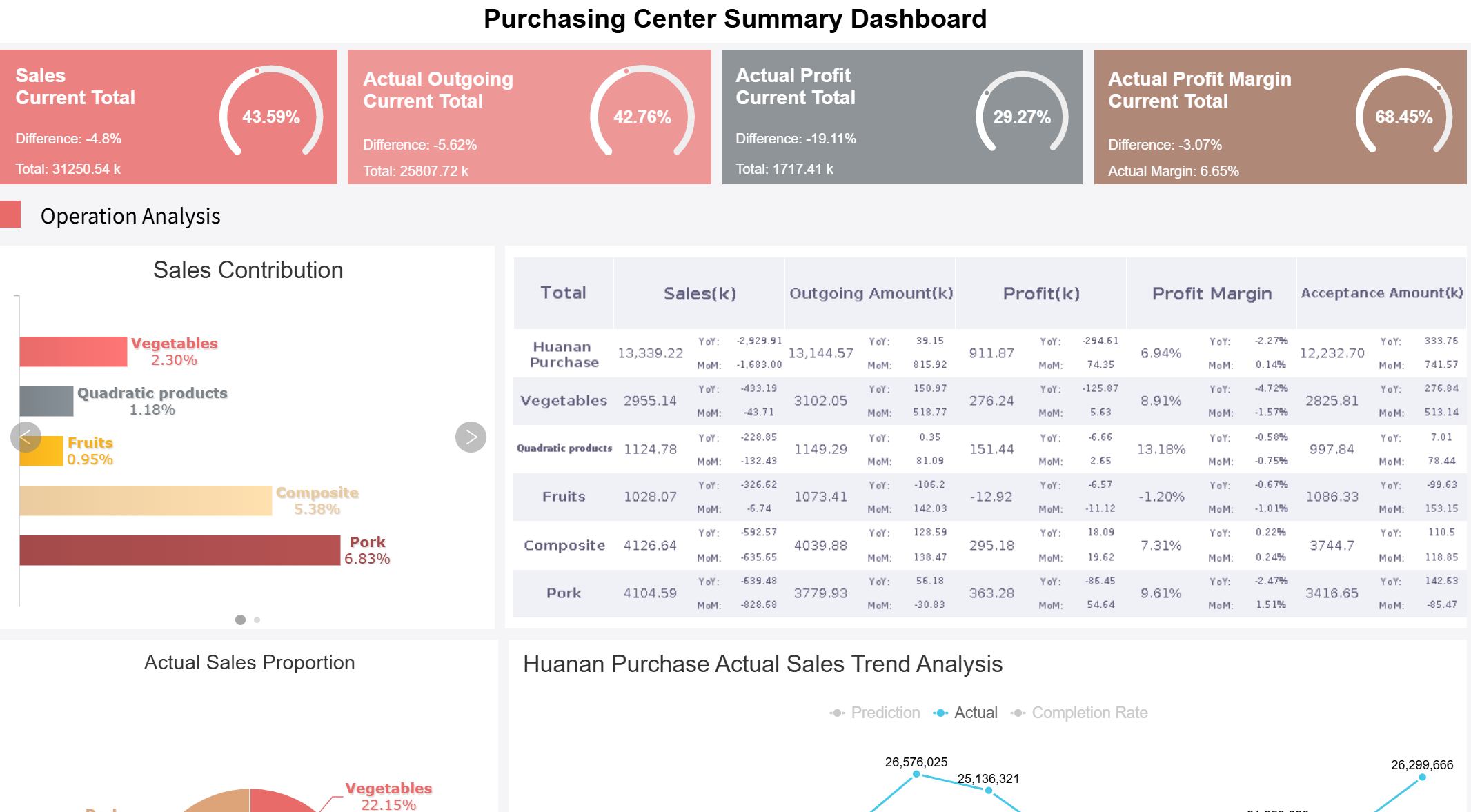
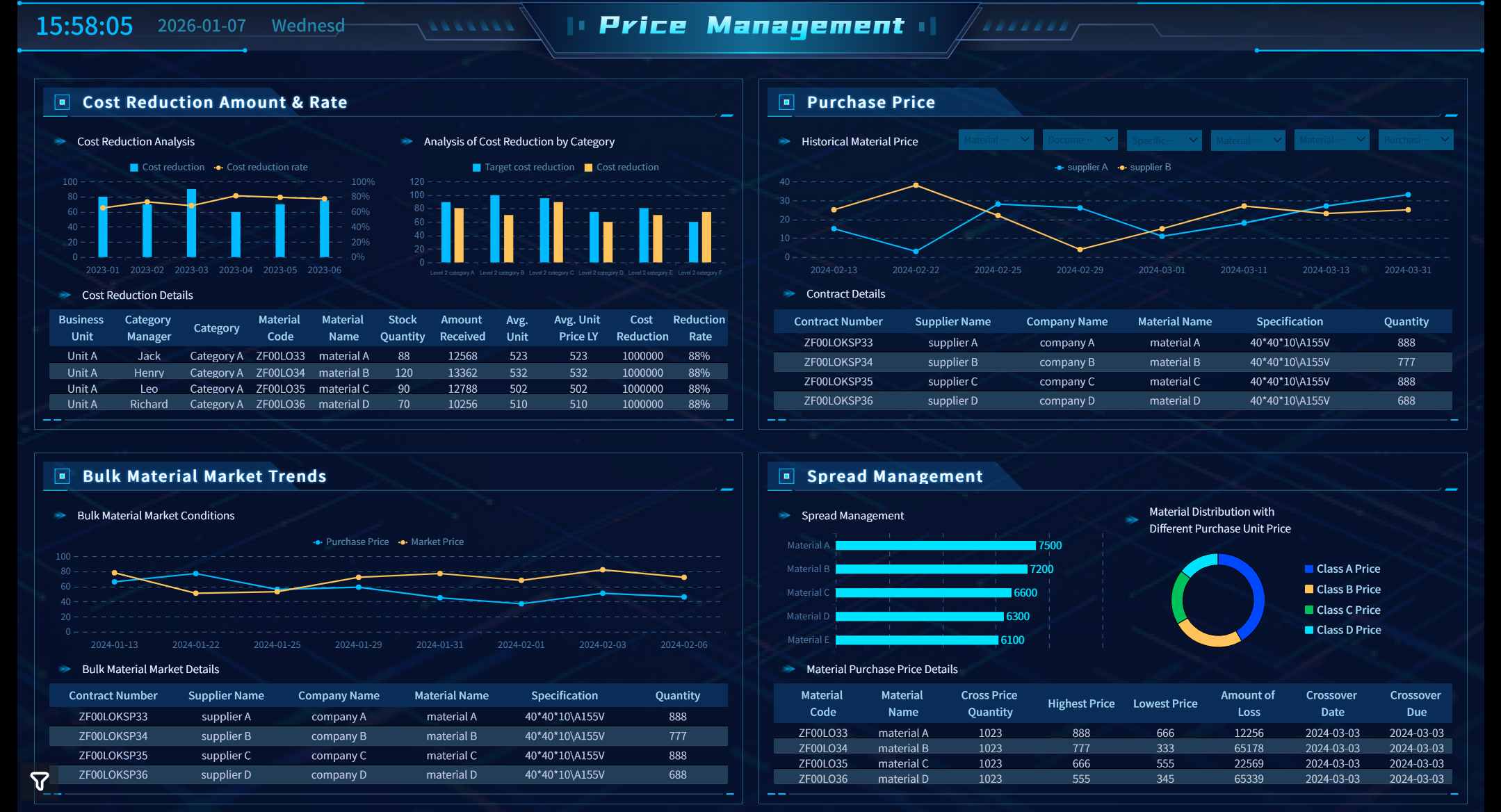
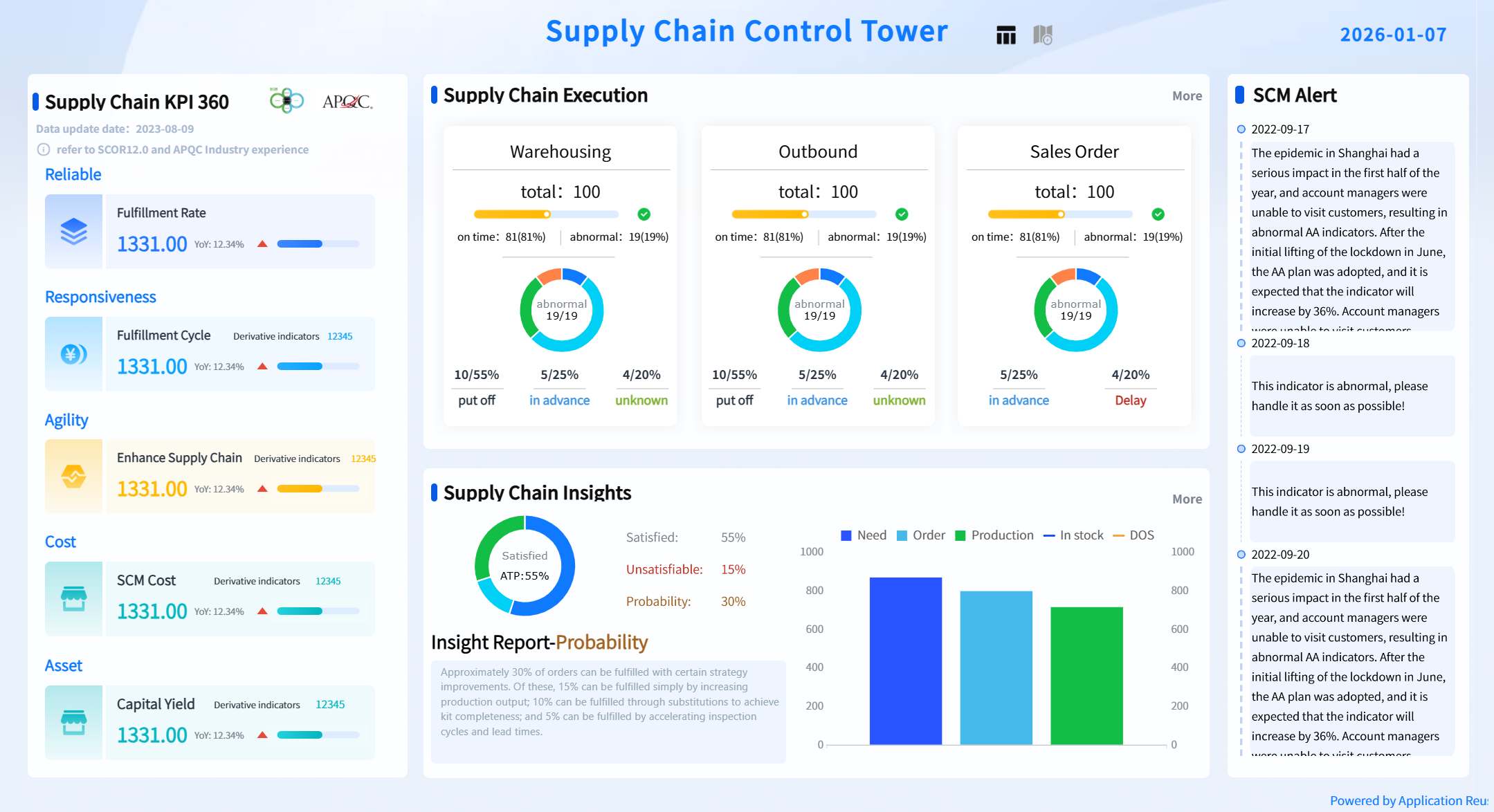
A procurement dashboard is a digital tool that brings together real-time procurement data, allowing you to monitor spending, supplier performance, and process efficiency from a single, interactive interface.
You need accurate information to manage procurement effectively. A dashboard gives you instant access to spending trends, supplier metrics, and procurement cycle time dashboard insights. With real-time reporting, you can spot issues early, make data-driven decisions, and optimize every step of your procurement process.
Benefit
How It Helps You
Unified view of spending and suppliers
Track KPIs and take quick action
Real-time KPI tracking
Respond immediately to deviations
Enhanced visibility
Anticipate needs and negotiate better contracts
Merged data from multiple sources
Support predictive decision-making
Advanced platforms like FineReport now transform procurement by merging data from multiple systems, streamlining your workflow, and empowering you to maximize cost savings.
Procurement Dashboard Overview
What Is a Procurement Dashboard?
You use a procurement dashboard to bring together all the important data from your procurement activities. This tool gives you a clear, interactive view of your spending, supplier performance, and process efficiency. You see everything in one place, which helps you make better decisions quickly.
A procurement dashboard serves as the control center for your procurement team. You track costs, monitor supplier reliability, and check compliance with company policies. The dashboard displays real-time information, so you always know what is happening in your procurement process.
FineReport stands out as a leading solution for dashboard creation and management. You can connect data from multiple sources, design custom dashboards, and access them on any device. FineReport helps you visualize procurement data with dynamic charts and tables, making it easier to spot trends and take action.
Here is a table showing the main functions of procurement dashboards for procurement teams:
Function
Description
Cost savings tracking
Monitors realized and projected savings in real time, ensuring alignment between finance and procurement.
Supplier performance monitoring
Consolidates KPIs like on-time delivery and defect rates to highlight strengths and weaknesses.
Risk mitigation
Provides visibility into spend and supplier dependencies to identify vulnerabilities early.
Compliance and audit readiness
Automates data capture and reporting for accurate record maintenance and quick audit responses.
Why Procurement Dashboards Matter
Procurement dashboards play a key role in helping you manage procurement efficiently. You get instant access to the data you need, which means you can respond quickly to changes or problems.
Procurement dashboards serve as a centralized platform that helps you make informed decisions.
You gain valuable insights that let you optimize your processes and reach your strategic goals.
You monitor key performance indicators (KPIs) in real time, which helps you evaluate supplier performance and improve procurement outcomes.
Procurement dashboards enhance visibility by bringing together spend, orders, and supplier data in one location.
You see multiple KPIs at once and understand how they connect, which is crucial for effective procurement management.
With a procurement dashboard, you avoid data silos and manual tracking. You see the big picture and the details at the same time. FineReport makes this possible by merging data from different systems and presenting it in a way that is easy to understand and act on.
A procurement dashboard gives you the tools to track savings, monitor suppliers, reduce risks, and stay ready for audits. You make smarter decisions and improve your procurement process every day.
Advanced Procurement Dashboard Features
Essential Features for Procurement
You need a dashboard that goes beyond basic reporting. Advanced procurement dashboard features help you manage procurement with greater accuracy and speed. You can customize your dashboard to fit your role and preferences. This means you see only the information that matters most to you. Customization options let you adjust layouts, choose key metrics, and set up alerts for important changes.
Integration is another critical feature. You want your dashboard to connect smoothly with other systems, such as ERP, finance, and supplier management platforms. This integration reduces errors and ensures that your data stays accurate and up to date. You can track procurement activities across multiple departments without manual data entry.
Mobile access gives you flexibility. You can view procurement data on your phone or tablet, making decisions wherever you are. This feature keeps you connected to your team and your suppliers, even when you are away from your desk.
Here is a table showing the most requested advanced features by procurement professionals:
Feature
Description
Holistic Spend Breakdown by Category
Displays spending across product categories and suppliers, helping teams understand financial impact.
Contract Tracking
Tracks contract compliance rates and utilization for efficient contract management.
Savings Tracker for Cost Reduction
Monitors cost savings percentage and identifies procurement cost avoidance opportunities.
You can use these features to improve your procurement process and achieve better results.
Tip: Personalize your dashboard view to focus on the key metrics that drive your procurement goals.
Customization options allow you to personalize your dashboard based on your role and preferences.
Integration capabilities ensure smooth data flow between systems, reducing errors and improving reporting accuracy.
Customizable KPI widgets enable you to focus on the most relevant key metrics, aligning procurement efforts with strategic goals.
Seamless integration with other systems minimizes data gaps and enhances real-time accuracy.
Key Procurement KPIs to Track
Tracking key metrics is essential for effective procurement management. You need to monitor the right KPIs to understand your spending, supplier performance, and process efficiency. Leading organizations use dashboards to track a wide range of procurement KPIs.
Total Spend
Spend by Supplier
Spend by Category
Spend Variance (Actual vs. Budget)
On-Time Delivery Rate
Order Accuracy
Supplier Quality Score
SLA Compliance
Raw Material Cost Trends
Lead Time by Supplier
Stock Availability
Purchase Order Status
Order Cycle Time
Supplier Risk Score
Budget vs. Actual Spend
Sustainable Suppliers Percentage
Carbon Footprint by Vendor
You can use these key metrics to identify areas for improvement and measure your success. Tracking KPIs enhances transparency in the procurement process. You can communicate results to stakeholders with quantifiable evidence.
Here is a table showing how tracking KPIs impacts procurement performance:
Metric
Improvement
Cost Savings
15% increase
Defect Rates
10% decrease
On-Time Delivery Rate
95%
Supplier Compliance Rate
High
You can see how monitoring key metrics leads to better procurement outcomes. You identify problems early and take action to improve results.
Note: KPIs help you measure progress and communicate with your team and stakeholders.
FineReport’s Unique Capabilities
FineReport gives you powerful tools to manage procurement data. You can connect to multiple data sources, including different databases and tables. This multi-datasource connection lets you retrieve and analyze data from across your organization.
Feature
Description
Multi-datasource Connection
Enables reports to retrieve data from various databases or tables and perform calculations across datasets.
You can use FineReport to create interactive dashboards with 3D and dynamic effects. These visualizations help you understand complex procurement data quickly. FineReport stands out by offering automated reporting. You can generate interactive reports with just a few clicks.
FineReport provides unique 3D and dynamic effects for data visualization, setting it apart from other dashboard tools.
You can automate report creation, saving time and reducing manual work.
FineReport offers strong data connectivity and an intuitive design mode, making it easy to build dashboards that fit your needs.
You can use FineReport to track key metrics, integrate data from multiple sources, and visualize procurement performance in new ways. These advanced procurement dashboard features help you make smarter decisions and improve your procurement process.
Procurement Savings Dashboard and Benefits
Cost Control and Spend Analysis
You need to control costs and understand where your money goes. A procurement savings dashboard gives you clear spend visibility, letting you track every dollar. You can use spend analysis to break down expenses by category, supplier, or project. This helps you spot trends and find areas to save. When you use a procurement dashboard, you see real-time metrics that show how your procurement activities affect your budget.
A procurement savings dashboard improves demand forecast accuracy by 55%. You gain stronger contract negotiation power because you can compare spending to market benchmarks. The odds of stock-outs drop as you anticipate needs and make informed decisions. Here is a table that shows the impact:
Metric
Impact
Demand forecast accuracy
Increased by 55%
Contract negotiation
Strengthened
Odds of stock-outs
Decreased
Spend analysis helps you understand spending patterns and anticipate costs. Well-visualized data lets you compare your spending to industry standards.
Supplier Performance Monitoring
You need to know which suppliers deliver on time and which ones cause delays. A supplier performance dashboard tracks key procurement performance metrics like on-time delivery, defect rates, and quality. You can use spend analysis to see which suppliers offer the best value and which ones need improvement. The dashboard gives you actionable insights to address issues quickly.
Metric
Description
On-time Delivery
Percentage of orders delivered as promised
Defect Rate
Number of defective items received
Cost
Monitors expenses and pricing consistency
Quality
Evaluates compliance with standards
Risk
Measures supplier stability
Responsiveness
Speed and effectiveness in solving problems
Organizations use supplier performance dashboards to identify top suppliers and address underperformance. For example, Company N improved supply chain reliability by using a dashboard to spot delivery issues and renegotiate contracts.
Real-Time Insights with FineReport
FineReport brings all your procurement data together. You can connect ERP, MES, and SRM systems to one platform. This integration removes data silos and gives you a single view for spend visibility and procurement performance. You interact with dynamic charts and dashboards that update instantly. FineReport’s AI-driven risk alerts forecast trends and provide actionable insights, helping you make quick decisions.
Real-time insights offer many benefits:
Enhanced visibility and transparency across the supply chain
Improved decision-making with up-to-date data
Cost reduction by identifying inefficiencies
Optimized inventory management and better collaboration
Procurement Dashboard created by FineReport (Click to Engage)
A procurement savings dashboard powered by FineReport gives you the actionable insights you need to drive procurement performance, control costs, and achieve better results.
Choosing the Right Procurement Dashboard Solution
Evaluation Criteria for Procurement Dashboards
When you select a procurement dashboard, you need to focus on features that support your goals. Start by making sure the dashboard tracks KPIs that matter to your procurement process. Reliable data is essential. You want to collect information from trusted sources and integrate data from multiple systems. This approach gives you a complete view of your procurement activities.
Criteria
Description
Tracking KPIs
Evaluate procurement efficiency and spot areas for improvement.
Data Relevance
Use data from reliable sources for accurate analysis.
Automation in Data Collection
Speed up data gathering for real-time insights.
You should also establish clear data governance and validation policies. This step ensures your procurement data remains accurate and trustworthy.
FineReport vs. Other Tools
FineReport stands out when you compare it to other procurement dashboard solutions. You can connect various data sources, which eliminates data silos and gives you a unified view of procurement metrics. FineReport offers advanced visualizations and customizable reports, so you can track procurement processes in real time. Automated reporting keeps your team updated with the latest operational insights. The mobile-friendly design lets you access procurement data wherever you are.
FineReport uses a licensing model that fits mid-size to large organizations. It works well as a BI layer for procurement, not just as a standalone tool.
Implementation Best Practices
Implementing a procurement dashboard can bring challenges. You need to plan system implementation and platform integration carefully. Change management is important, so invest in training your team. Data security should be a priority. Set clear procurement policies and standardize your processes.
Challenge
Solution
System Implementation
Careful planning and coordination
Platform Integration
Develop an integration roadmap
Change Management
Provide training for users
Data Security
Set clear procurement policies
Vendor Onboarding
Build strong supplier relationships
Cost
Use integrated procurement software
Contract Management
Standardize procurement processes
You can look at BOE’s experience for inspiration. BOE used FineReport to integrate procurement data from multiple sources. They built a unified dashboard that improved operational efficiency by 50% and reduced inventory costs by 5%. This real-world example shows how the right procurement dashboard can transform your business.
Tip: Involve your team in the selection and implementation process. Their feedback helps you address pain points and ensures a smoother transition.
Procurement dashboards give you a strategic edge by delivering real-time insights and helping you act quickly. You can:
Visualize spending and supplier data to spot inefficiencies.
Use advanced analytics for better decision-making and cost savings.
Track supplier performance and ensure transparency.
FineReport brings these benefits together with unified data integration and powerful features. As procurement analytics evolves, you will see trends like AI, real-time analytics, and sustainability reporting shape the future. Now is the time to explore smarter dashboards and lead your organization forward.
Trend
Description
AI and machine learning
Automates spend categorization and supplier-risk detection.
Real-time analytics
Provides instant alerts and continuous visibility.
Sustainability and ESG
Connects supplier data with corporate reporting for ESG standards.
Access a wealth of case studies, industry insights, and solution guides to accelerate digital transformation.
FAQ
What is a procurement dashboard?
A procurement dashboard is a digital tool. You use it to view, track, and analyze procurement data in real time. It helps you monitor spending, supplier performance, and process efficiency from one place.
How does FineReport connect to my existing systems?
You can connect FineReport to many data sources, including ERP, finance, and supplier management systems. The platform supports direct connections to databases, Excel files, and cloud services.
Can I access my procurement dashboard on mobile devices?
Yes, you can view and interact with your procurement dashboards on smartphones and tablets. FineReport offers responsive layouts and a dedicated mobile app for easy access anywhere.
What KPIs should I track on my procurement dashboard?
You should track total spend, supplier performance, on-time delivery, cost savings, and compliance rates. These KPIs help you measure procurement efficiency and identify areas for improvement.