A monthly expense report is not just a reimbursement form. It is a control document that helps finance teams close the books on time, gives department leaders visibility into spending, and gives approvers a reliable way to verify policy compliance before costs hit the general ledger. If your current process depends on email threads, inconsistent spreadsheets, and last-minute receipt chasing, you are already creating month-end risk: miscoded expenses, late accruals, duplicate claims, and delayed close cycles.
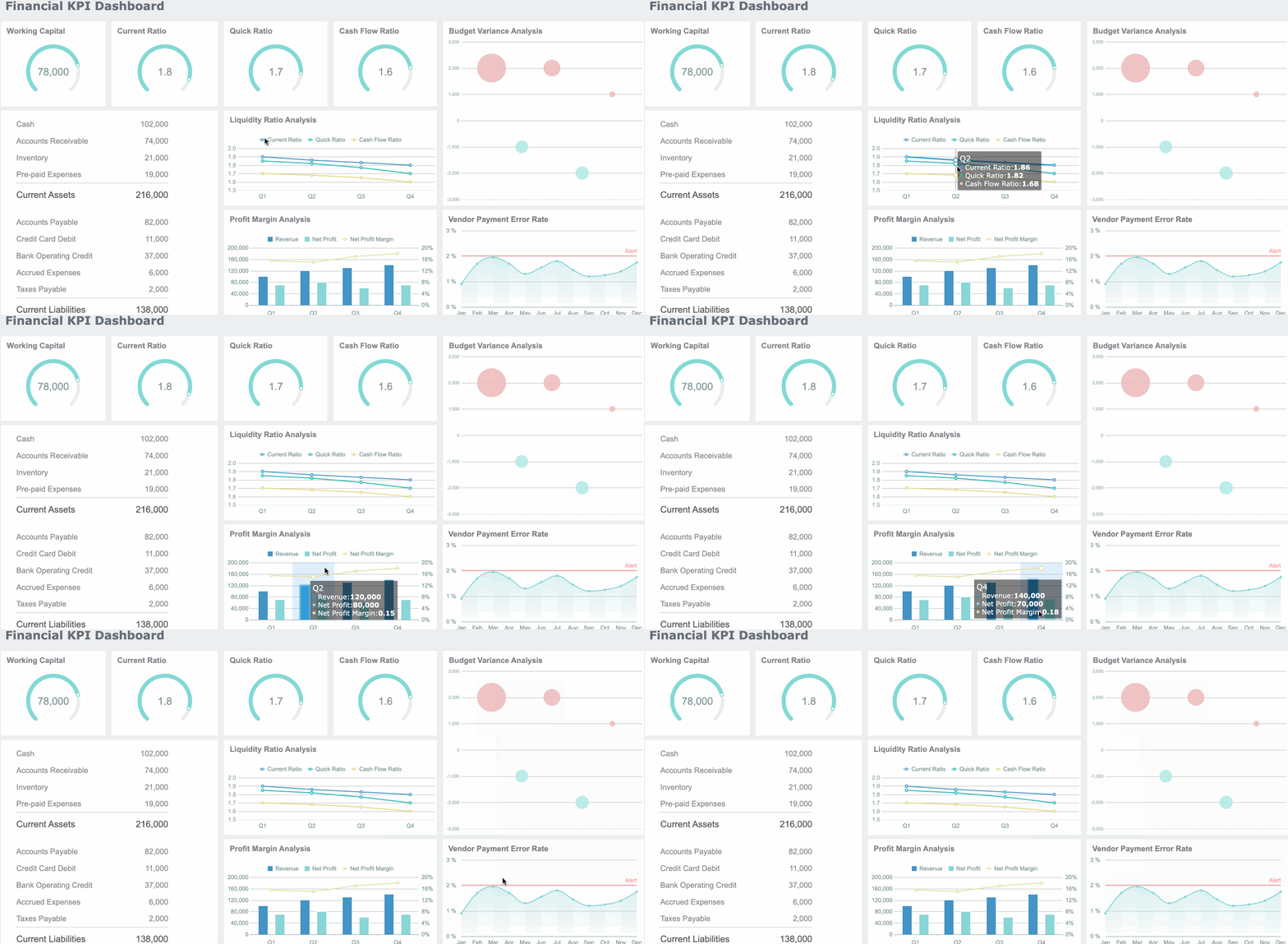
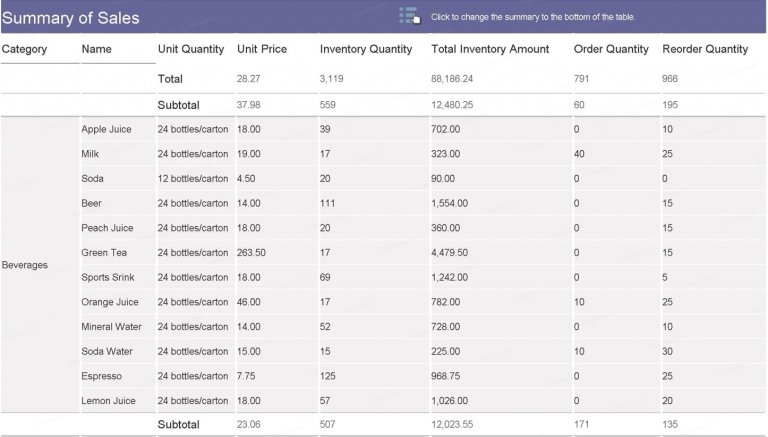
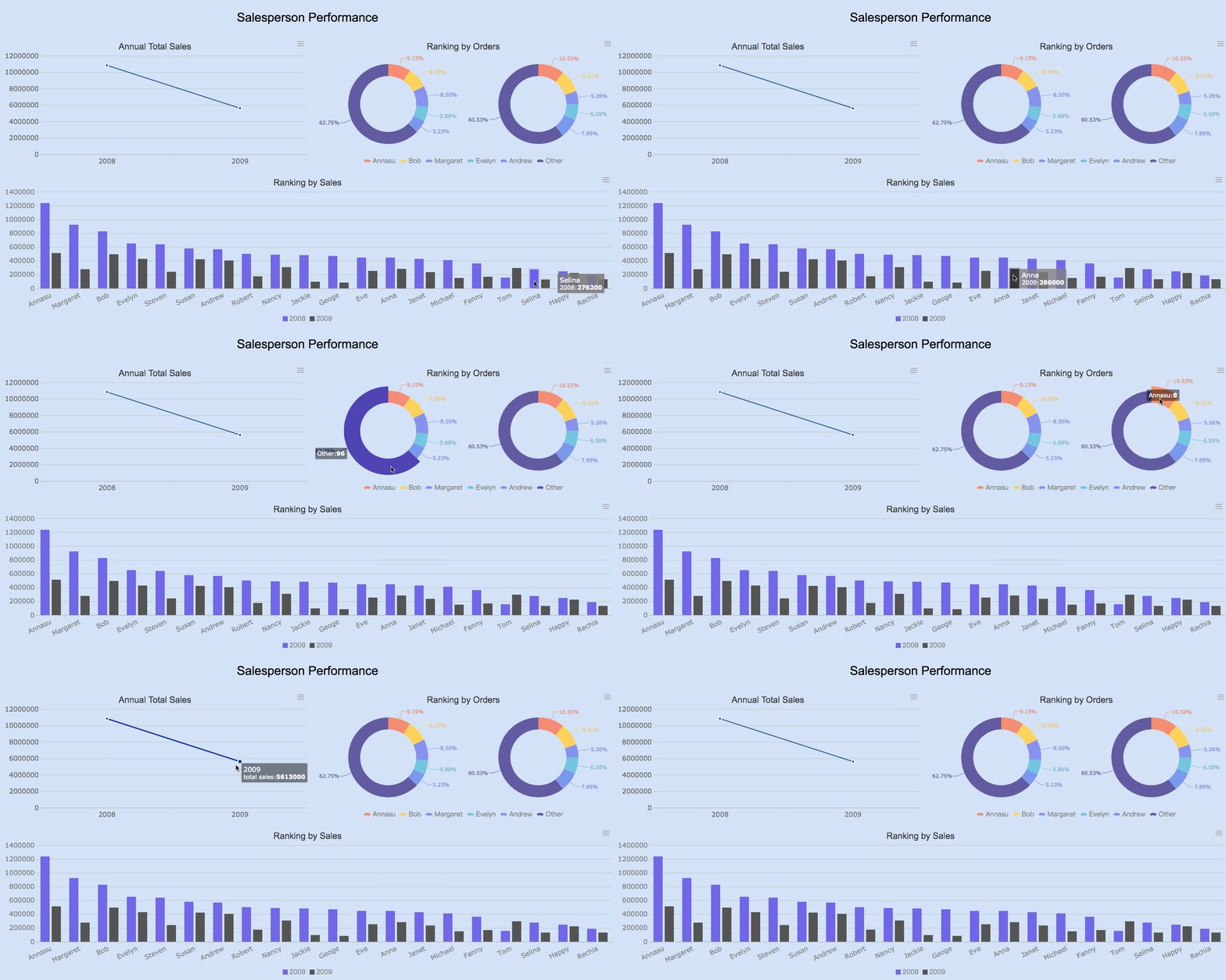
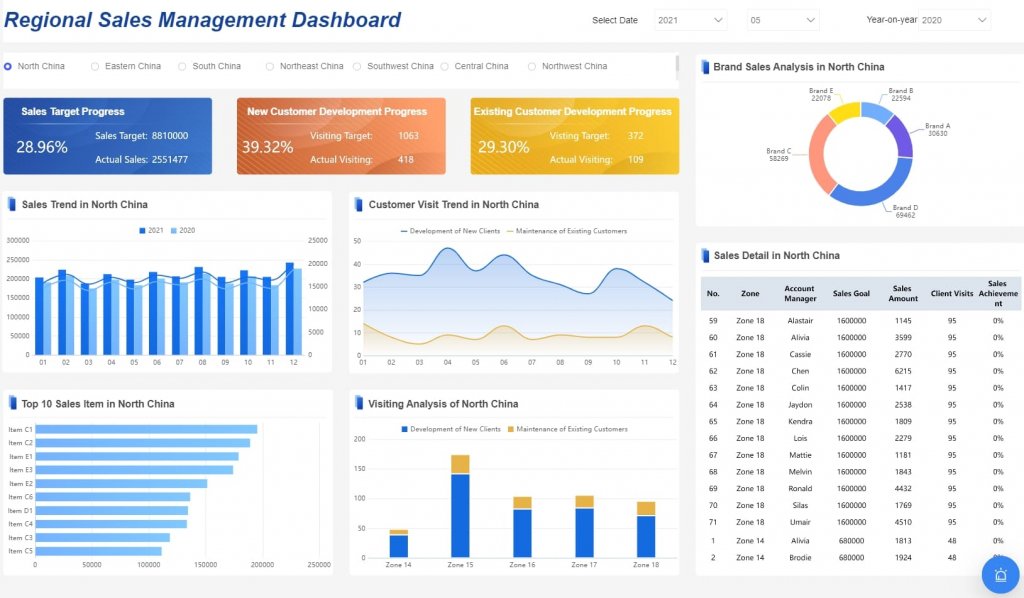
All reports in this article are built with FineReport
A strong monthly expense report gives three groups what they need at once: finance gets clean data for posting, department leads get spending visibility, and approvers get enough context to approve quickly without back-and-forth. The report should be standardized enough for control, but simple enough that employees and managers can complete it without friction.
At a minimum, define the report’s purpose clearly. Is it for employee reimbursements, department spend tracking, corporate card review, project cost allocation, or all three? That distinction matters because it affects required fields, approval routing, and reconciliation steps.
The reporting period must also be explicit. Most organizations use a calendar month, but some align expense reporting to accounting close calendars. Every report should state:
Reporting month
Submission deadline
Report owner
Department or cost center
Approval due date
Final finance review date
Key Metrics (KPIs)
For a monthly expense report to support both operations and accounting, track these KPIs consistently:
Total Monthly Expenses: The full value of expenses submitted for the reporting period.
Expenses by Category: Spending grouped into major buckets such as travel, meals, software, and contractors.
Expenses by Department: Total spend attributed to each business unit or cost center.
Reimbursable Amount: Costs owed back to employees after policy review.
Corporate Card Amount: Charges paid on company-issued cards and pending reconciliation.
Accrual-Required Expenses: Expenses incurred in the month but not yet submitted or invoiced.
Approval Cycle Time: Average number of days from submission to final approval.
Exception Rate: Percentage of line items flagged for missing receipts, miscoding, or policy violations.
Duplicate Claim Rate: Number of duplicate or potentially duplicate expenses detected.
Budget Variance: Difference between actual expense totals and approved budget for the month.
The core data fields should be consistent across all teams. A complete monthly expense report usually includes:
Employee name or department name
Expense date
Vendor or merchant
Expense category
Amount
Tax amount
Currency
Business purpose
Cost center or GL code
Project code or client reference, if applicable
Receipt reference or attachment ID
Reimbursement status
Approval status
It is also important to separate expense types. Too many finance teams mix everything into one list, which creates confusion during close. Your monthly expense report should distinguish between:
Reimbursable expenses: Employee-paid business expenses awaiting repayment
Corporate card charges: Business costs already paid by the company but still needing review and coding
Accrual-related items: Costs incurred this month that may be submitted later and require accounting treatment before close
That separation improves accuracy, reduces rework, and speeds up posting.
Set Up Clear Expense Categories and Coding Rules
The fastest way to damage a monthly expense report is to allow vague categories and inconsistent coding. If one team posts software subscriptions under office supplies and another books them under IT expenses, your monthly reporting loses credibility.
Build categories that match your chart of accounts
Expense categories should mirror the way finance actually posts transactions. That means category design must start with the chart of accounts, cost center structure, and reporting model used in the general ledger.
Typical categories include:
Travel
Meals and entertainment
Software and SaaS
Office supplies
Contractors
Utilities
Training
Marketing
Professional services
Equipment and small tools
Each category should map directly to one or more:
GL codes
Cost centers
Department IDs
Project codes
That mapping removes guesswork at month-end and reduces the number of manual reclassifications finance must perform.
A monthly expense report only works when every line item includes the details needed for approval and accounting treatment. Make required fields rule-based, not optional.
For example:
Require receipts above a spending threshold
Require memos for unusual or nonstandard purchases
Require project codes for client-billable work
Require client references for external-facing expenses
Require tax treatment selection where VAT, GST, or sales tax applies
You should also define simple rules for tricky cases:
How to record taxes separately from base amounts
How to convert foreign currency expenses
How to split one receipt across multiple departments or projects
How to handle tips, service charges, and non-reimbursable personal portions
When these rules are written once and embedded into the template, approval quality improves immediately.
Reduce miscoded or duplicate expenses
Most coding errors are predictable. They happen because users rely on free text, inconsistent naming, or memory. The fix is operational discipline plus validation.
Use controls such as:
Standard vendor naming conventions
Dropdown-based category selection
Duplicate transaction checks by date, amount, and vendor
Warnings for missing receipt IDs
Validation for out-of-policy categories
Flags for transactions posted to inactive cost centers
Also separate one-time purchases from recurring operating expenses. That small distinction makes monthly analysis far cleaner. Leaders can quickly see whether overspend came from a planned subscription base or an unusual one-off purchase.
Even a well-structured monthly expense report fails if approvals stall. In most companies, the bottleneck is not data entry. It is ambiguous ownership, unclear thresholds, and missed month-end deadlines.
Assign roles for submitters, managers, and finance reviewers
Approval workflows work best when every role is defined up front.
A practical structure looks like this:
Submitter: Prepares the report, enters line items, attaches receipts, and explains business purpose
Manager approver: Confirms business need, budget ownership, and policy compliance
Project manager approval for client-related expenses
Procurement review for vendor policy exceptions
Controller review for high-risk or high-value items
This prevents the common failure mode where managers approve business need but finance later rejects accounting treatment.
Set approval thresholds and exceptions
Not every expense deserves the same level of review. Approval routing should reflect materiality and risk.
Common threshold rules include:
Standard manager approval for routine expenses below a set amount
Additional director approval for high-value submissions
Finance escalation for late reports
Compliance review for policy exceptions
Controller review for accrual-sensitive or unusual items
This makes the workflow faster for low-risk items while preserving control where it matters.
Create a month-end submission calendar
A monthly expense report process should run on a calendar, not on memory. Finance cannot reconcile what has not been submitted.
Build a month-end schedule that includes:
Last date for employees to submit expenses
Manager approval deadline
Finance review and correction window
Accrual cut-off date
Final posting date before close
Also add automated reminders for:
Missing receipts
Incomplete coding
Rejected reports needing correction
Pending approvals
Final unsubmitted monthly reports
A visible submission calendar reduces fire drills and gives finance a realistic accrual picture before the books close.
Build the Monthly Expense Report Template
A template should make the right behavior easy. If users need to interpret instructions every month, the design is already failing.
Choose the right format for your team
The right format depends on expense volume, control requirements, and how many stakeholders touch the process.
Here is the practical comparison:
Spreadsheets: Flexible and low-cost, but weaker on controls, versioning, and workflow
Accounting software exports: Good for reconciliation, but often limited for submission and approvals
Shared workflow tools: Better for standardization, approvals, and audit trails
BI-driven reporting templates: Best when you need consolidated reporting, dashboards, and automated controls across departments
For small teams, a spreadsheet may work temporarily. For multi-department or multi-entity reporting, the monthly expense report should be centralized and workflow-enabled.
Header section for month, employee, department, and owner
Line-item table for all expense details
Category dropdown menus
Tax and currency fields
Receipt reference columns
Automatic subtotals by category
Total reimbursement calculation
Approval status fields
Notes section for exceptions or explanations
The goal is simple: reduce manual input where possible and standardize the rest.
A clean summary section is essential. Decision-makers do not want to scan raw transactions first. They want quick totals by:
Category
Department
Project
Reimbursement type
Approval status
Add controls that support review
Template controls are what turn a form into a reliable financial document. Without them, errors multiply during handoff.
Recommended controls include:
Locked formula cells
Protected headers
Required-field validation
Error flags for missing documentation
Version tracking
Submission timestamps
Approval audit trail
Conditional formatting for exceptions
These design choices dramatically reduce manual mistakes and make review far faster for finance.
Check Month-End Accuracy Before Closing the Books
A monthly expense report is only useful if the final numbers are accurate enough to post. Before close, finance should run a structured review to confirm completeness, classification, and timing.
Reconcile reported expenses to supporting records
Reconciliation should not depend on trust alone. Match the report against the underlying records that prove the expense occurred.
Typical reconciliation points include:
Receipts
Corporate card statements
Accounts payable entries
Bank transactions
Procurement records
Vendor invoices
This step helps identify unsubmitted card transactions, unsupported reimbursements, and timing gaps before posting.
One of the biggest month-end problems is timing. An expense may be incurred in the current month but submitted in the next one. If finance ignores that, the books understate expenses and distort departmental reporting.
Review for:
Expenses incurred this month but submitted late
Known vendor charges not yet invoiced
Travel completed before month-end but not reported
Corporate card transactions still pending final coding
Recurring services received but not yet billed
Document any needed accruals clearly, with category, amount, business owner, and reversal plan. This gives the accounting team a clean trail for close.
Analyze trends and exceptions
A monthly expense report should also support management insight, not just bookkeeping. Once the data is clean, analyze it for unusual patterns.
Focus on:
Actual vs. budget by category
Month-over-month changes
Department overspend
Recurring policy exceptions
Unusual vendor spikes
Duplicate claims
Missing support documentation
Trend analysis helps leadership act early. It turns expense reporting from an administrative task into an operational control system.
Improve Reporting Over Time With Templates and Automation
Once the basics are stable, the next step is improving speed, consistency, and visibility. This is where mature teams separate themselves from reactive teams.
Start with reusable templates
Do not rebuild the monthly expense report every cycle. Create a standard format that can be reused across:
Departments
Project teams
Regional offices
Small business units
Reimbursement scenarios
Corporate card reviews
Reusable templates reduce training time and improve comparability across the organization.
Customize budget and tracking views
Different stakeholders need different views of the same data. Finance may want GL-ready coding, while department heads want budget status and trend charts.
Here is the consultant’s practical advice for implementing a better monthly expense report process:
Lock down category logic first
Standardize categories, GL mappings, and mandatory fields before you automate anything. If your coding rules are inconsistent, automation will only speed up bad data.
Build approval routing around risk, not hierarchy alone
Use thresholds, policy exceptions, and timing triggers to route reports intelligently. This keeps routine approvals moving while escalating high-risk submissions.
Set a non-negotiable month-end calendar
Publish cutoffs, approval deadlines, and finance review windows. Then automate reminders so close does not depend on individual follow-up.
Reconcile before posting, not after
Match expense reports to receipts, card feeds, AP entries, and bank transactions before final close. This is where duplicate claims, missing support, and late accruals surface.
Track recurring errors and retrain the business
Measure where reports fail: missing receipts, wrong categories, late submissions, invalid cost centers. Use that data to improve policy guidance and manager accountability.
When you automate reminders, approval notifications, category rules, and exception checks, review cycles get shorter and accuracy improves at the same time.
Building this manually is complex; use FineReport to utilize ready-made templates and automate this entire workflow.
A modern monthly expense report process needs more than a spreadsheet. It needs structured templates, validation rules, approval visibility, reconciliation support, and dashboards that help both finance and business leaders act quickly. FineReport enables teams to build exactly that without depending on fragmented files and manual chasing.
Add dropdown categories, validation checks, and locked calculations
Build approval status tracking and submission dashboards
Consolidate expenses across departments, projects, and entities
Visualize budget vs. actual results in real time
Monitor missing receipts, duplicate claims, and exception trends
Support month-end reconciliation with connected reporting views
For enterprise teams, this matters because the cost of a weak process is not just slower reimbursement. It is delayed close, poor cost visibility, compliance exposure, and low confidence in monthly financials. FineReport helps replace manual coordination with a controlled, repeatable system that scales.
If you want a monthly expense report process that is faster to run, easier to audit, and more reliable at month-end, this is the point where templates and automation stop being optional and start becoming operational infrastructure.
A monthly expense report should include the reporting period, employee or department name, expense dates, vendors, categories, amounts, taxes, business purpose, cost center or GL code, receipt reference, and approval status. It should also clearly separate reimbursable expenses, corporate card charges, and accrual-related items.
Expense categories should align with your chart of accounts and map directly to GL codes, cost centers, departments, or project codes. This reduces miscoding, speeds reconciliation, and makes reporting more consistent across teams.
A clear approval workflow helps managers review policy compliance before expenses are posted to the general ledger. It also shortens approval cycle time, reduces back-and-forth, and lowers the risk of late close adjustments.
Finance teams can reduce errors by standardizing required fields, enforcing receipt and memo rules, and using consistent coding logic for taxes, currencies, and project allocations. Automated checks for duplicates and missing information also improve accuracy.
Useful KPIs include total monthly expenses, expenses by category and department, reimbursable amount, corporate card amount, accrual-required expenses, approval cycle time, exception rate, duplicate claim rate, and budget variance. These metrics help both finance and department leaders monitor spending and close the month more reliably.
Product Trial
FineReport
Pixel-perfect reports · Interactive dashboards · Easy data entry · Digital twins