Blog

Dashboard

15 Top Modern Dashboard Design Templates for 2026

fanruan blog avatar

Lewis

Feb 05, 2026

You want the best modern dashboard design for your business, right? This post lists 15 top-notch templates for 2026 that deliver clean ui, clean features, and clean results. Usability, clean design, and future-proof options matter most. FineReport stands out with real dashboard templates, clean enterprise solutions, and clean ui examples. Find clean templates—free or premium—fast. Clean dashboards make your workflow simple. You get clean template choices, clean design ideas, and clean ui for every need. Clean dashboard templates mean clean data, clean decisions, and clean results.

Modern Dashboard Design Overview

Modern dashboard design in 2026 means smarter, more interactive dashboards that help you make decisions faster. You get real-time insights, intuitive UI, and tools that adapt to your needs. FineReport leads the way with flexible templates and advanced features for every business.

Why Modern Dashboard Design Matters in 2026

You want dashboards that do more than just look good. In 2026, dashboards must deliver real value. They need to help you spot trends, act quickly, and stay ahead. The modern concept dashboard design puts you in control, making complex data simple and actionable.

Let’s look at the biggest trends shaping dashboard design for 2026:

TrendDescription
AI as the Core EngineAI powers automated insights and personalizes your dashboard experience.
Ubiquitous AnalyticsYou see analytics everywhere, right inside your business apps.
Human-Centric DesignDashboards focus on trust, privacy, and user needs.
Hyper-PersonalizationYour dashboard adapts to your habits and preferences.
Real-Time and Proactive IntelligenceDashboards alert you to issues and predict outcomes instantly.
Immersive Experiences3D and AR/VR dashboards let you interact with data in new ways.
Mobile-First DesignDashboards look great and work smoothly on any device.
Interactive DashboardsYou can explore and drill into data with ease.

FineReport stands out by embracing these trends. You get dashboards with AI-powered insights, real-time updates, and a UI that feels natural. FineReport’s templates support immersive 3D dashboards, mobile dashboards, and interactive features that keep you engaged.

Modern Dashboard Design

Key Features of Modern Dashboard Design

You need dashboards that are easy to use, fast, and flexible. Here’s what defines a top dashboard template in 2026:

FeatureDescription
Design & User-friendlinessClean UI and simple navigation make dashboards easy for everyone.
Customization & ResponsivenessDashboards adjust to any screen and let you tweak layouts and colors.
Built-in ComponentsYou get a wide range of charts, tables, and widgets for rich data visualization.
Performance OptimizationDashboards load quickly and run smoothly, even with big data.

FineReport brings all these features together. You can create dashboards with drag-and-drop design, responsive layouts, and a UI that works on any device. The platform supports advanced visualizations, including 3D and mobile dashboards, so you always have the right tools for your data.

mobile Modern Dashboard Design
FineReport's mobile dashboards

Tip: Choose a dashboard template that matches your workflow and lets you customize the UI. This way, you get a dashboard that grows with your business.

FineReport Modern Dashboard Design Template

Template Description

You want a dashboard template that feels modern, powerful, and easy to use. FineReport gives you just that. You can build dashboards with a clean UI, flexible layouts, and interactive features. The template supports everything from classic admin dashboard template setups to advanced 3D dashboards. You can create dashboards for any business scenario—sales, operations, HR, or manufacturing. FineReport’s templates let you drag and drop charts, tables, and widgets, so you get a dashboard that matches your workflow. You can even use react dashboard components and data entry forms to collect and manage information right inside your dashboard.

Key Features & Tech Stack

FineReport’s dashboard templates stand out because they combine design flexibility with robust technology. Here’s what you get:

  • Drag-and-drop interface for fast dashboard creation
  • Real-time reporting for up-to-date insights
  • Mobile accessibility for dashboards on any device
  • Customizable templates for unique UI and branding
  • Integration with react dashboard and data visualization libraries

Check out how FineReport compares to other solutions:

FeatureFineReport's Dashboard Templates
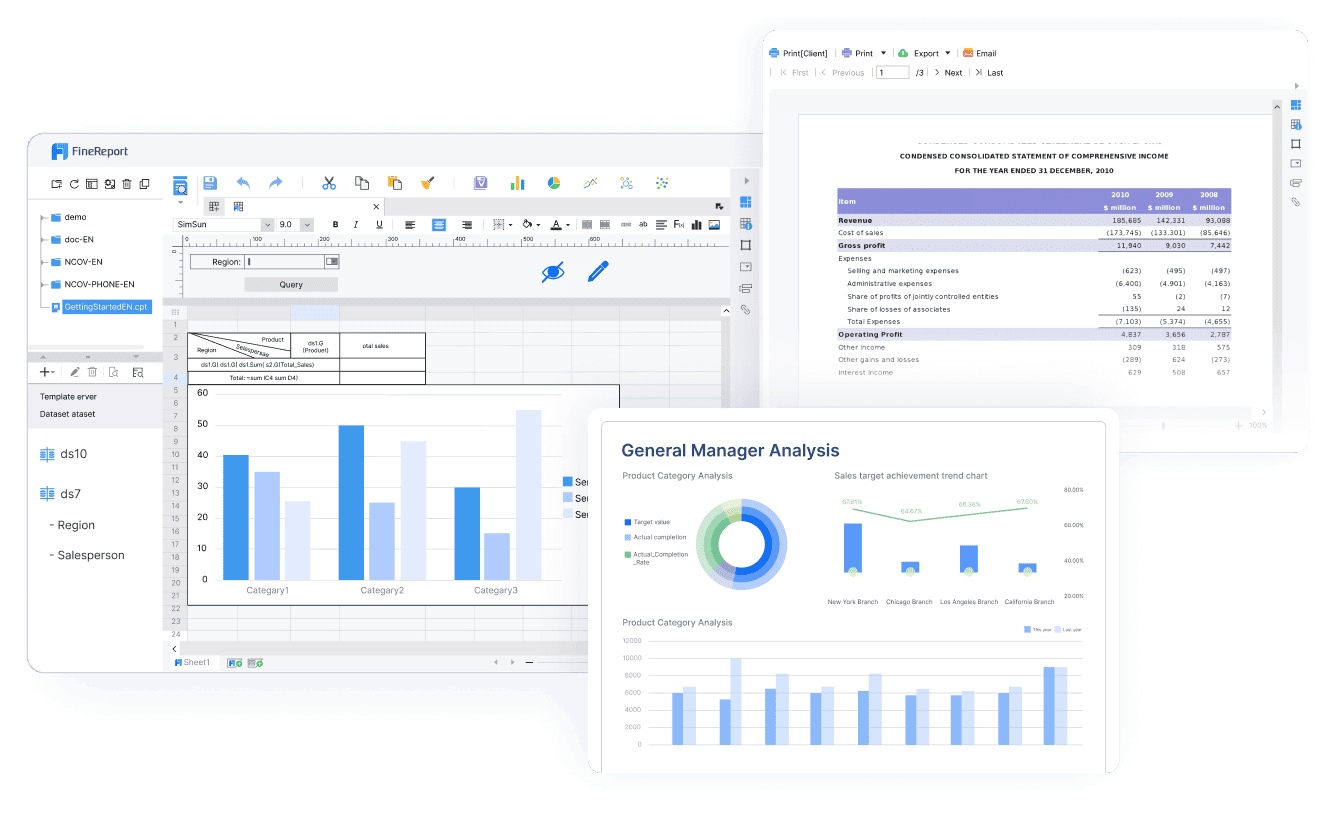
Drag-and-Drop FunctionalityIntuitive and easy to use for creating reports quickly
Database IntegrationOne-click integrations with mainstream databases
Stream-to-TV FeatureAllows tracking of KPIs on large screens
Pre-built HTML5 ChartsOver 50 styles with dynamic effects for visualization
Mobile App TechnologyUtilizes ReactNative for a seamless mobile experience
Modern Dashboard Design
FineReport's Drag-and-Drop Functionality

You can use these templates for any admin dashboard template or react dashboard project. The tech stack supports HTML5, ReactNative, and connects with all major databases.

Unique Advantages for Enterprises

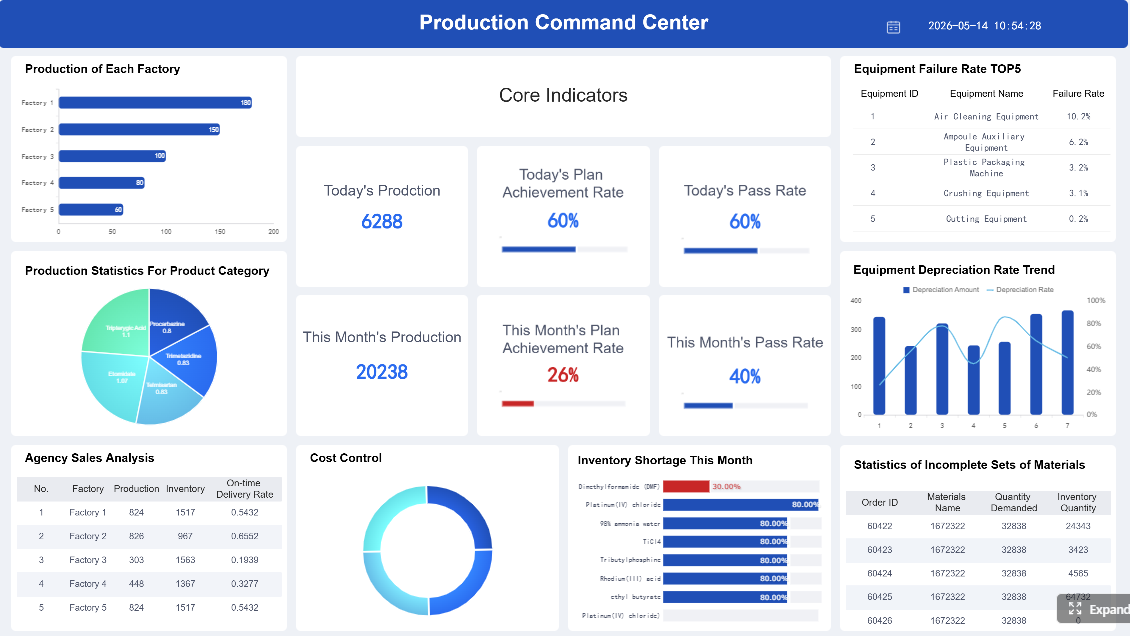
FineReport’s modern dashboard design template brings real value to your business. You get dashboards that scale with your needs. Enterprises like BOE use FineReport to unify data, standardize metrics, and boost operational efficiency. In manufacturing, you can monitor production, track KPIs, and visualize data in real time. The 3D dashboard lets you see factory operations or smart city data in a whole new way. Mobile dashboards keep your team connected anywhere. Data entry forms make it easy to collect and update information. You can customize every part of the UI, so your dashboard fits your brand and workflow. FineReport’s templates help you make smarter decisions, faster.

boe.png

Free Dashboard Templates for 2026

You want the best free dashboard templates for 2026. Here are the top picks that give you modern design, flexible UI, and easy integration—so you can start building dashboards right away.

Top Free Dashboard Template Picks

You have a lot of choices when it comes to free dashboard templates. Some stand out for their clean UI, responsive design, and focus on analytics. Here are the most popular options for 2026:

  • FanRuan’s FineReport: Offers a modern dashboard template with drag-and-drop design, customizable layouts, and advanced integration. You get a lightweight free analytics dashboard with real-time data and flexible UI.
  • Colorlib: Delivers free dashboard templates with customizable colors, fonts, and layouts. You can pick templates for profiles, tables, maps, and more. These templates work well for website analytics and e-commerce dashboards.
  • WrapPixel: Provides free HTML admin templates with seven-page layouts. You get templates for analytics, reporting, and e-commerce dashboards. The UI is user-friendly and easy to navigate.
  • Tailwind CSS: Features 10+ best free analytics dashboard templates. These templates are responsive and easy to customize for any project.
  • Free HTML dashboard templates: Great for website analytics, e-commerce, and admin dashboards. You can use these templates for different business needs.

Tip: Try different templates to find the one that matches your workflow and UI preferences.

Features and Usability

You want templates that make dashboard design simple. FanRuan’s FineReport stands out with its drag-and-drop interface and easy integration with many data sources. Colorlib lets you customize colors and fonts, so you can match your brand. WrapPixel focuses on user-friendly UI and offers multiple page options for different dashboard needs.

Here’s a quick comparison:

TemplateUsability FeaturesIntegration Capabilities
FanRuanDrag-and-drop design, customizable layoutsEasy integration with many data sources
ColorlibCustomizable colors and fontsFlexible, but not specified
WrapPixelSeven-page templates, user-friendly UINot specified, focus on usability

You can use these free dashboard templates for analytics, reporting, and project management. They support free project dashboard templates, so you can track tasks and visualize progress. If you want a lightweight free analytics dashboard, these options give you the flexibility and modern design you need. The UI stays clean and easy to use, making your dashboard experience smooth.

FineReport.png

Best Analytics Dashboard Templates

You want the best analytics dashboard templates for 2026. These templates give you powerful analytics, clean design, and a UI that makes data easy to understand. You can track KPIs, spot trends, and make smarter decisions with the right dashboard template.

Analytics-Focused Dashboard Designs

When you look for the best analytics dashboard templates, you want options that focus on data clarity and flexibility. Modern templates like TailAdmin - Analytics, NextAdmin - Next.js Analytics Template, and Tabler lead the way. Each template offers a unique approach to dashboard design and UI.

  • TailAdmin - Analytics gives you over 500 customizable components. You can build a modern dashboard for any project. The design supports multiple tech stacks and works well for finance saas dashboard needs.
  • NextAdmin - Next.js Analytics Template uses powerful tools like Prisma and Algolia. You get fast data handling and a dashboard that feels modern and responsive.
  • Tabler keeps things simple. The minimalist design makes your dashboard load fast and scale easily. This template works great for projects where performance matters most.
Modern Dashboard Design
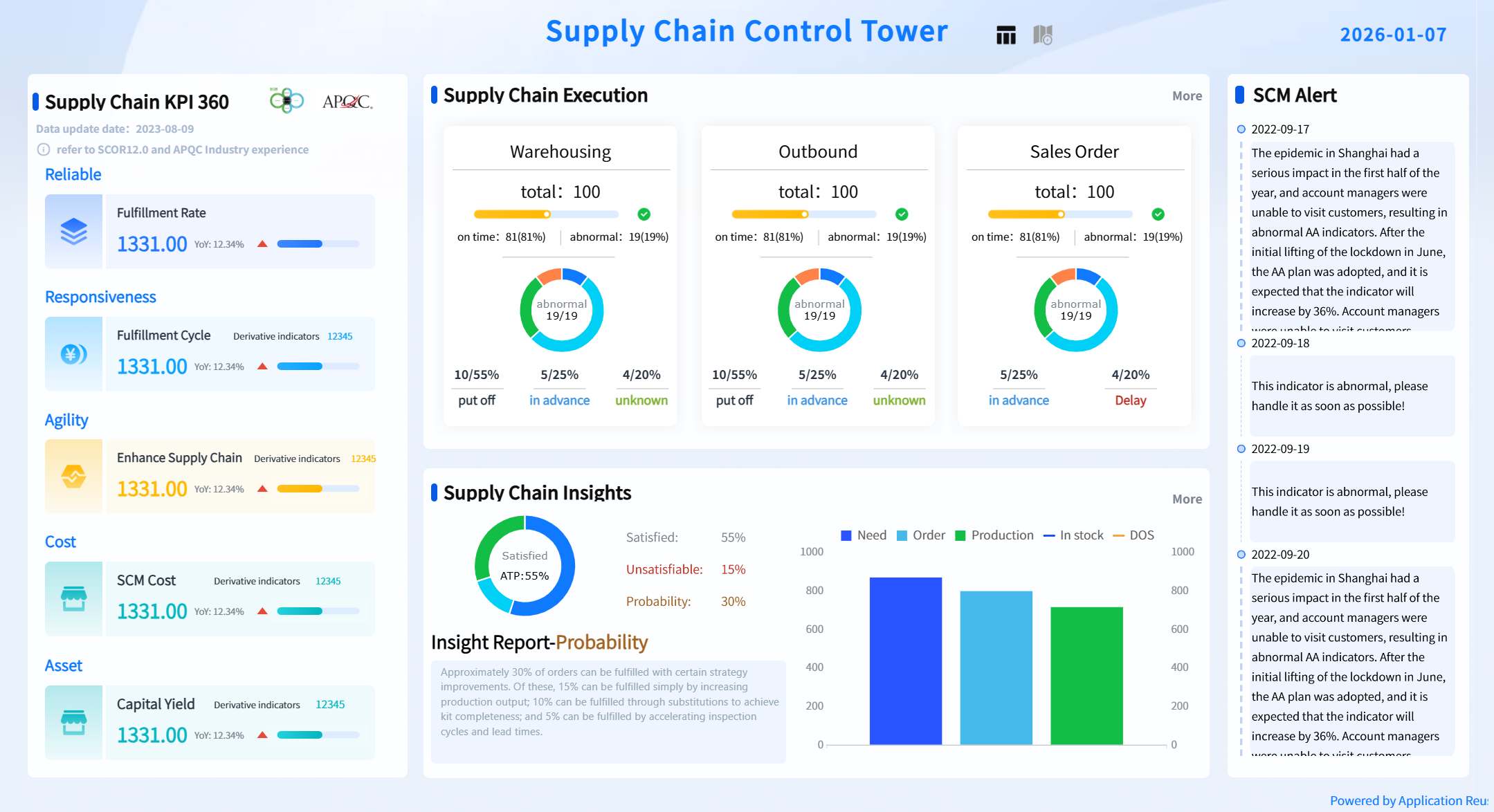
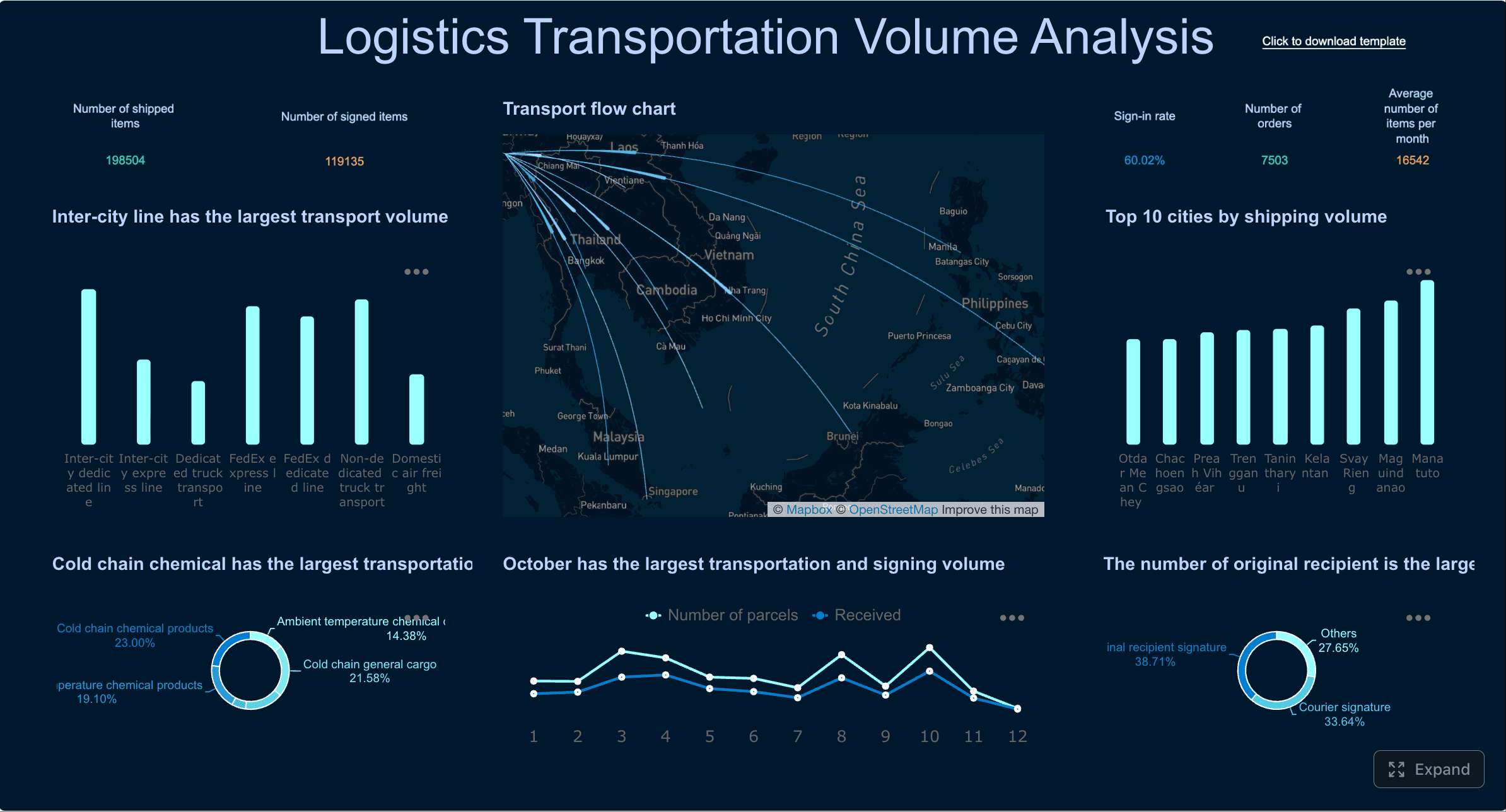
Modern Dashboard Design created by FineReport (Click to Engage)

You can use these templates for finance saas dashboard projects, sales analytics, or any business that needs a modern dashboard design. The UI stays clean and easy to use, so you can focus on your data.

Integration with FineReport

You want your analytics dashboard to connect with all your data sources. FineReport makes this easy. The template supports integration with databases, cloud services, and even Excel files. You can combine data from Google Analytics, ad platforms, and CRM systems in one dashboard.

FineReport’s templates automate data extraction and transformation. You spend less time on manual work. The dashboard design ensures your data is ready for analysis and reporting. You can use drag-and-drop tools to build a modern dashboard UI that matches your workflow.

Here’s a quick look at what you get with FineReport:

FeatureBenefit for Analytics Dashboards
Data IntegrationConnects to all major enterprise sources
AutomationReduces manual data handling
VisualizationPrepares data for clear reporting
Customizable DesignLets you match the dashboard to your brand
Responsive UIWorks on any device
Modern Dashboard Design
Modern Dashboard Design created by FineReport (Click to Engage)

With FineReport, you get the best analytics dashboard templates for any business need. The templates help you create dashboards that are modern, flexible, and ready for the future.

Project Dashboard Templates for Teams

You want project dashboard templates that help your team track progress, visualize tasks, and stay organized. The best templates for 2026 make collaboration easy and keep everyone on the same page.

Project Tracking and Visualization

Project dashboard templates give you a clear view of your team’s work. You can see tasks, deadlines, and updates in one place. The design focuses on simple navigation and a clean ui, so you never feel lost. Modern templates let you drag and drop tasks, customize layouts, and use widgets for real-time updates. You get dashboards that show project status, team workload, and key milestones. The ui helps you spot issues early and adjust plans fast.

Here’s a quick look at popular project dashboard templates for team collaboration:

Template NameKey FeaturesBenefits
NotionCustomization optionsFlexible workspace for notes, tasks, dashboards
TrelloKanban-style workflowVisual organization with drag-and-drop tasks
ClickUpCustomizable widgetsReal-time updates and workload monitoring
AirtableReal-time updatesCentralized project details for smooth teamwork
AsanaVisual boardsEasy tracking of tasks and deadlines
Monday.comColorful visualsUser-friendly dashboard with automation
WrikeCloud-based updatesInstant access to the latest project information

You can use these templates to design dashboards for any project. The ui stays clean, and the dashboard adapts to your workflow.

FineReport for Project Management

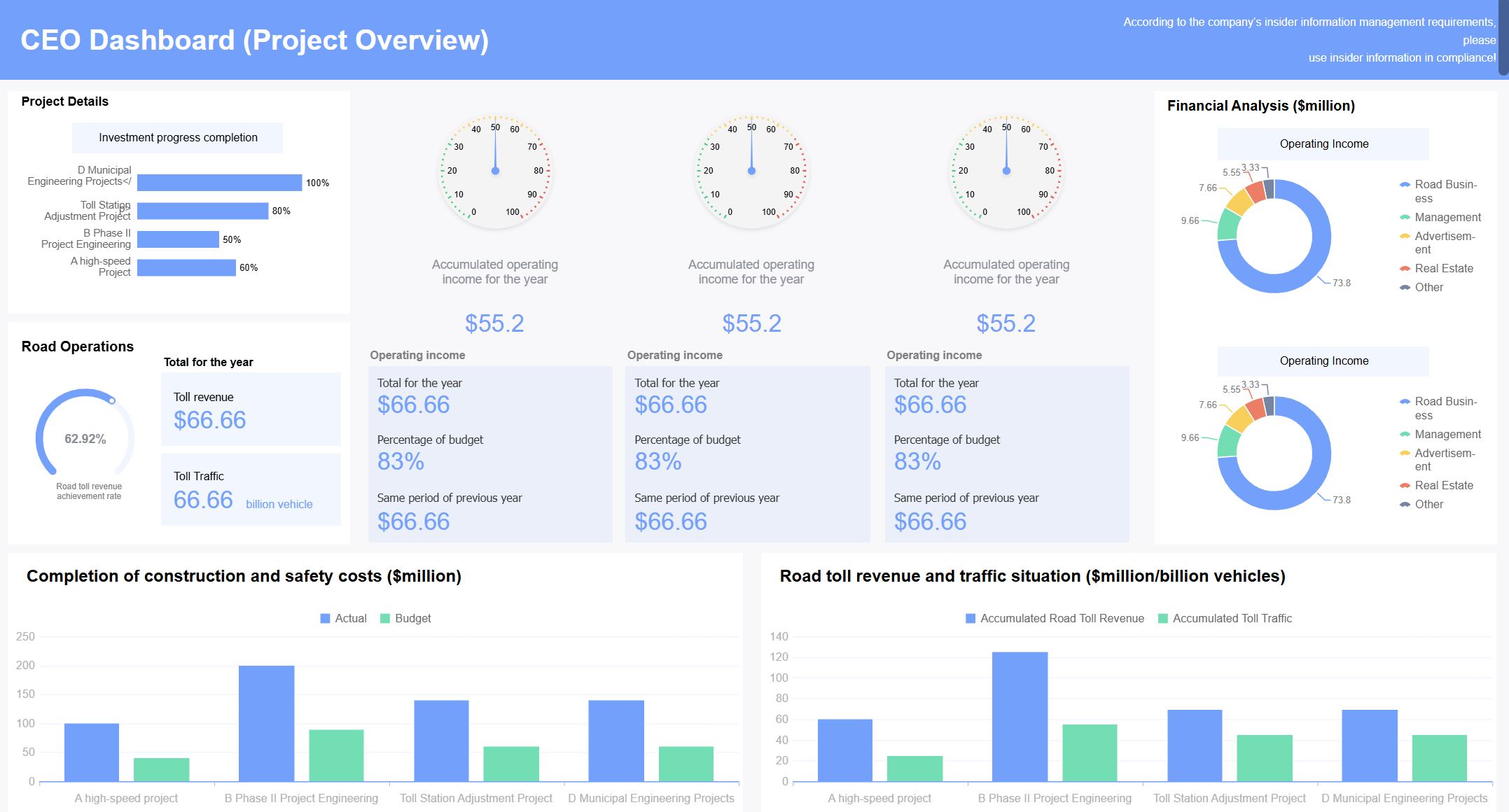
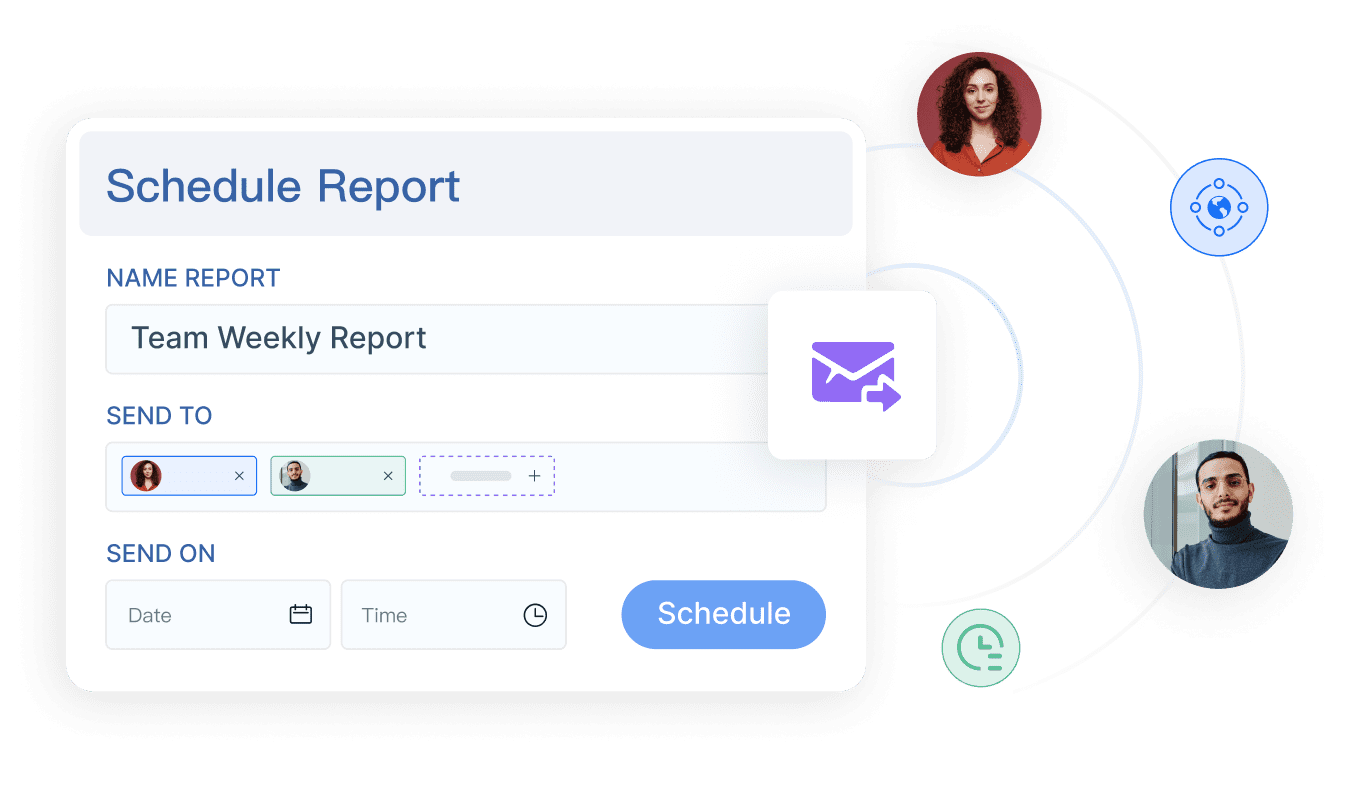
FineReport takes project dashboard templates to the next level. You get a dashboard that tracks every detail, from tasks to resources. The template design lets you build dashboards with drag-and-drop tools and real-time data. You can create dashboards for manufacturing, digital transformation, or any business project. FineReport’s ui makes it easy to monitor KPIs, visualize timelines, and manage team performance. You can set up automated reports, schedule updates, and share dashboards across devices. In manufacturing, you can track production, equipment status, and quality metrics. Digital teams use FineReport to manage sprints, monitor progress, and keep stakeholders informed. The dashboard templates help you make quick decisions and keep your projects moving forward.

Modern Dashboard Design
Modern Dashboard Design (Click to Engage)

Tip: Choose project dashboard templates that match your team’s workflow and let you customize the design. A clean ui keeps everyone focused and productive.

Mobile Dashboard Design Templates

Mobile Dashboard Design Templates

You need a modern dashboard design template that works everywhere. Mobile dashboards let you check data, track KPIs, and make decisions on the go. You get a responsive ui, fast access, and a design that fits any device.

Responsive and Mobile-First Dashboards

You want your dashboard to look great on every screen. A responsive dashboard design adapts to phones, tablets, and desktops. You never have to zoom or scroll awkwardly. The ui stays clean and easy to use. You can swipe, tap, and interact with charts or tables. Responsive dashboards help you stay productive, even when you leave your desk.

Here’s what makes a mobile-first dashboard stand out:

  • The ui adjusts automatically to any device size.
  • The design uses touch-friendly controls.
  • You get real-time updates, so your data is always fresh.
  • Navigation stays simple, so you find what you need fast.

Tip: Always test your dashboard on different devices to make sure the ui and design stay consistent.

FineReport Mobile Dashboard Features

FineReport gives you a powerful mobile dashboard experience. You can access dashboards on your phone, tablet, or PC. The responsive design means the ui looks sharp everywhere. You get real-time data, so you never miss important updates. FineReport lets you customize the dashboard layout for your workflow. You can use the FanRuan Data Analysis App or embed dashboards in your own app. The ui supports touch gestures, making it easy to drill down into details. You can even set up alerts and notifications, so you act fast when something changes.

FineReport’s mobile dashboard design helps you stay connected and make smart decisions, no matter where you are.

FineReport.png

3D Dashboard Design Templates

3D Dashboard Design Templates

You want to see your data come alive. 3D dashboard templates let you explore information in new ways. These designs help you spot trends, track operations, and make decisions faster.

Interactive 3D Visualizations

Imagine looking at your dashboard and seeing a factory floor or a city map in three dimensions. You can zoom in, rotate, and click on different parts. This interactive experience makes complex data easy to understand. You don’t just see numbers—you see how everything connects. 3D dashboard design gives you a clear view of your operations. You can check equipment status, monitor traffic, or track shipments. The ui feels smooth and modern. You can move through the dashboard with simple gestures or clicks. This design helps you find problems and act quickly.

Tip: Use interactive 3D dashboards when you need to monitor large spaces or lots of moving parts. It makes your job easier and your insights sharper.

FineReport 3D Dashboard Capabilities

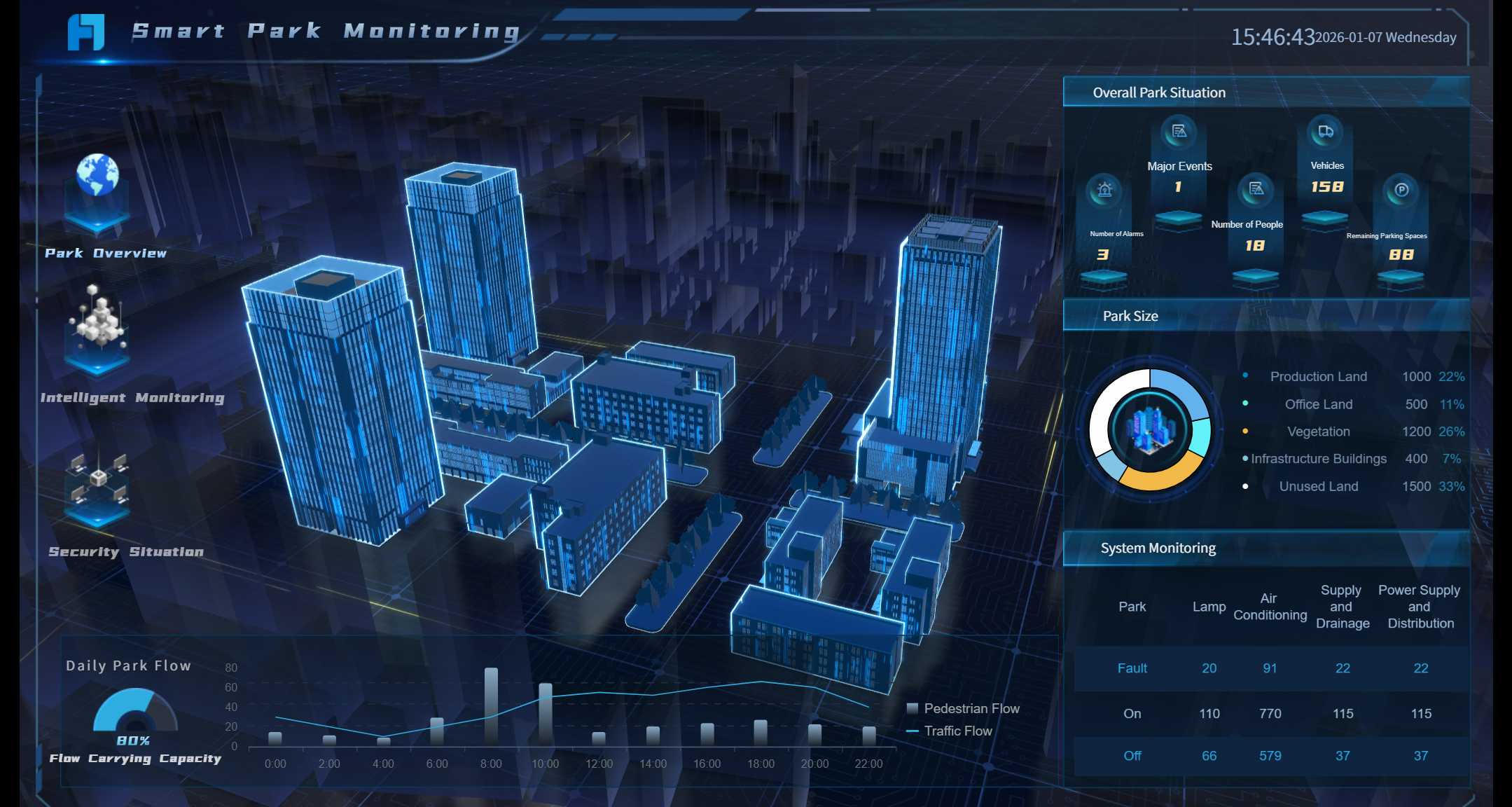
FineReport takes 3D dashboard design to the next level. With FineVis, you get powerful tools for building interactive dashboards. You can create a smart factory dashboard that shows machines, lines, and sensors in real time. In a smart city project, you can track traffic, water use, or safety alerts—all in one dashboard. The ui is flexible, so you can customize every part. FineReport supports animation and real-time updates. You can use these dashboards on big screens, tablets, or phones. Many companies use FineReport for smart manufacturing and city management. They get better control, faster decisions, and a modern dashboard design that grows with their needs.

Modern Dashboard Design
Modern Dashboard Design (Click to Engage)

Note: FineReport’s 3D dashboard templates help you turn data into action. You get a design that fits your workflow and a ui that everyone can use.

Dashboard Template Comparison Table

You want to pick the right dashboard template for your needs. This table makes it easy to compare features, tech stacks, and which templates fit different users. You can see at a glance which design or ui works best for your workflow.

Feature Summary

Let’s break down what sets each dashboard template apart. You’ll find options for marketing, analytics, business intelligence, and more. Each template brings something unique to the table.

ToolBest ForKey Differentiators
FineReportEnterprises, manufacturing, analyticsDrag-and-drop design, 3D dashboards, mobile ui, advanced data integration
FunnelMarketing teamsNo-code dashboards, automatic data normalization, many data connectors
Looker BITechnical enterprise usersStrong data modeling, LookML, advanced analytics
Looker StudioBeginners, Google usersEasy drag-and-drop builder, native Google integrations
DataboxFast setup for busy teamsLarge template library, KPI scorecards, quick deployment
KlipfolioCustom dashboards for teamsRole-based access, wide integration, flexible design
TableauData-heavy BI projectsPowerful visualization, AI analysis, deep reporting
WhatagraphAgencies and client reportingWhite label reports, live sharing, agency-focused features

Tip: Choose a template that matches your team’s skills and the type of data you want to visualize.

Tech Stack Overview

Modern dashboard templates use popular frameworks and libraries. You’ll see a lot of React, Angular, Vue, and Bootstrap in today’s dashboard design. These tools help you build a fast, responsive ui that works on any device.

  • React powers many dashboard templates for its flexibility and component-based design.
  • Angular and Vue offer strong options for building interactive dashboards.
  • Bootstrap helps you create a clean, mobile-friendly ui with ready-made components.
Modern Dashboard Design
Modern Dashboard Design (Click to Engage)

FineReport stands out with its pure Java backend, HTML5 front end, and seamless integration with these modern stacks. You can connect your dashboard to almost any data source and customize the ui for your brand.

Suitability for Different Users

Not every dashboard template fits every user. Here’s a quick guide to help you match the right template to your needs:

User TypeTemplate NameDescription
EnterprisesBusiness DashboardBrings all your business data together for executive insights
Small BusinessesRestaurant DashboardManages orders and customer feedback for small teams
Individual ProfessionalsDigital Marketing DashboardTracks campaigns and social media for marketing pros
Educational InstitutionsEducation Management DashboardHandles student performance and attendance
Healthcare ProvidersHealthcare DashboardShows patient data and hospital operations
Financial InstitutionsBanking DashboardAggregates transactions and risk metrics
Manufacturing SectorManufacturing DashboardMonitors production and inventory in real time
Logistics OperationsLogistics DashboardTracks shipments and inventory for supply chain management

You can see how each template and dashboard design fits a specific user group. Pick the one that matches your industry and workflow for the best results.

How to Choose a Modern Dashboard Design Template

To pick the right modern dashboard design template, focus on your project’s goals, your team’s needs, and how well the template fits your workflow. Look for options that offer flexibility, strong integration, and a UI that makes your data easy to understand.

Selection Criteria

You want a dashboard that works for your team, not against it. Start by checking if the template offers customization, so you can tweak layouts, colors, and components. Make sure it’s responsive and looks great on any device. Performance matters, especially if you handle lots of data or use complex UI elements. Good documentation saves you time and headaches. Security is key for user management dashboard projects, so look for features like role-based access. Integration is another big one—your template should connect easily with APIs and libraries. Don’t forget to check the license and costs, especially for next.js admin dashboard template options.

Here’s a quick table to help you compare:

CriteriaWhat to Look For
Customization FlexibilityCan you adjust colors, layouts, and styles?
Responsiveness & CompatibilityDoes it work on all devices and browsers?
PerformanceIs it optimized for speed and large datasets?
Documentation QualityAre the guides clear and helpful?
Security FeaturesDoes it support encryption and role-based access?
Integration CapabilitiesCan you connect it with APIs and libraries?
Licensing ConsiderationsAre there any costs or restrictions?

Matching Templates to Needs

You need a template that matches your business goals. Ask yourself what decisions your team will make with the dashboard. Figure out your KPIs and what data matters most. Do you need high-level overviews or detailed reports? Decide if you want real-time updates or if periodic data is enough. Think about how your team will use the dashboard—do they need to filter, drill down, or interact with the data? For a next.js dashboard or user management dashboard, make sure the template supports customizable components and fits your workflow.

Here’s a simple way to match templates to your needs:

  1. Identify the main decisions your dashboard will support.
  2. List your KPIs and business goals.
  3. Decide if you need summaries or detailed data.
  4. Choose between real-time or scheduled updates.
  5. Pick the best visualizations for your audience.
  6. Check if users need to interact with the dashboard.

Final Tips

Choosing the best modern dashboard design template doesn’t have to be hard. Define your objectives first. Know your audience and select metrics that matter. Use visualizations that make sense for your data. Organize information clearly and keep the UI simple. Add interactivity if your team needs it. Test your dashboard with real users and refine it based on feedback. Keep your dashboard updated as your business grows. FineReport gives you customizable dashboards, strong integration, and a UI that adapts to any device. You can build a next.js dashboard, next.js admin dashboard template, or user management dashboard with ease. If you need saas management tools or customizable components, FineReport has you covered.

Tip: Always choose templates that let you grow and adapt as your needs change. A flexible next.js dashboard or user management dashboard will save you time and effort down the road.

Choosing the right modern dashboard design template helps you turn data into clear decisions. You need a dashboard that matches your goals, uses the right visualizations, and stays easy to use. Test a demo dashboard with your team and talk with stakeholders. FineReport makes your dashboard journey simple.

FineReport.png

FAQ

What is a modern dashboard design template?
A modern dashboard design template gives you a ready-made layout for tracking data. You can use it to build dashboards fast, customize the look, and show key metrics in a clear way.
Can I use FineReport templates for mobile dashboards?
Yes, you can. FineReport templates work on phones, tablets, and PCs. You get a responsive design that looks sharp everywhere. You can check data, track KPIs, and make decisions on the go.
How do I connect my data to a dashboard template?
You just pick your data source and use the template’s integration tools. FineReport connects to databases, Excel files, and cloud services. You can see your data in real time without extra coding.
Are there free modern dashboard design templates available?
Yes! You can find free templates from FineReport, Colorlib, and WrapPixel. These options let you start building dashboards without spending money. You get clean layouts and easy customization.
What makes a dashboard template easy to use?
A good template has a simple UI, drag-and-drop features, and clear navigation. You can add charts, tables, and widgets without coding. The design helps you focus on your data and make smart decisions.

fanruan blog author avatar

The Author

Lewis

Senior Data Analyst at FanRuan