Automated compliance reporting helps organizations turn scattered evidence, recurring checks, and audit preparation into a more reliable, repeatable workflow. Instead of manually collecting screenshots, exporting logs, updating spreadsheets, and rewriting status summaries every reporting cycle, teams can use connected systems to pull evidence, map controls, monitor exceptions, and generate audit-ready outputs faster.
For security, compliance, and IT leaders, the need is no longer just to build a compliance dashboard. It is to make that dashboard operational: searchable, explainable, reviewable, and useful for follow-up. With FineReport + Dora, teams can ask for a report summary in chat, generate structured narratives from trusted report assets, receive scheduled briefings, and push exceptions to the right owner.
Automated compliance reporting is the use of software, connected data sources, and standardized workflows to collect compliance evidence, monitor control status, and generate reports with less manual work.
In plain language, it means your team does not start from scratch every time an audit, internal review, board update, or customer security questionnaire arrives. Instead, the reporting process pulls from trusted systems, applies predefined rules, and presents current status in a structured way.
Automated compliance reporting replaces much of that repetitive effort with a governed process:
evidence is pulled from connected systems
controls are mapped to frameworks in advance
status indicators update on a scheduled basis
exception lists can be monitored continuously
reports and summaries are generated from a trusted reporting layer
That does not mean all human effort disappears. Teams still need review, context, judgment, and sign-off. But the heavy operational burden shifts away from manual collection and toward oversight and improvement.
The relationship between compliance automation, evidence collection, and reporting workflows
Compliance automation is the broader operating model. It includes:
evidence collection
control testing
exception management
workflow routing
approvals
reporting
Automated compliance reporting is the reporting-facing outcome of that model. It depends on two things being done well upstream:
Evidence collection: pulling reliable data from systems such as cloud platforms, identity providers, ticketing tools, endpoints, and policy repositories.
Control mapping: connecting raw technical evidence to the frameworks, controls, and reporting requirements that matter to the business.
If those two layers are weak, the report may be fast but not trustworthy. That is why enterprises need a governed reporting foundation before adding AI assistance.
Which teams rely on automated compliance reporting
Security teams use it to monitor technical controls, failed checks, access issues, and remediation status.
Compliance and GRC teams use it to track framework coverage, evidence completeness, audit readiness, and reporting cadence.
IT teams use it to validate system configurations, ownership, policy enforcement, and operational follow-up.
Legal and privacy teams use it to support regulatory obligations, documentation consistency, and defensible reporting.
Leadership teams use it for risk visibility, summary reporting, and decision support.
For executives, the value is straightforward: this is not just a documentation upgrade. It is a way to reduce audit friction, improve accountability, and make compliance status easier to understand and act on.
Why Automated Compliance Reporting Has Become a Business Imperative
Compliance pressure has expanded on three fronts at once: more regulations, more audits, and more customer scrutiny. Many organizations are now expected to show evidence of control effectiveness not only during formal audits, but also during procurement reviews, board reporting cycles, vendor assessments, and internal governance reviews.
Organizations often need to report across multiple requirements at the same time, such as:
ISO-aligned controls
SOC-related evidence
privacy obligations
industry-specific security requirements
internal policy attestations
customer questionnaire responses
Even when the underlying controls overlap, the reporting format, audience, and timing can differ. This creates a major coordination burden if teams rely on manual reporting methods.
The operational risks of spreadsheet-based compliance processes
Spreadsheets still play a role in many compliance programs, but they become risky when used as the primary operating system for reporting. Common problems include:
duplicate evidence requests across teams
stale control status
version confusion
unclear ownership
limited audit trail
slow exception escalation
reporting delays near audit deadlines
Manual workflows also increase the chance of presenting inconsistent answers to auditors, customers, or leadership. In compliance, inconsistency is not just inefficient. It can weaken trust.
Faster and more accurate reporting supports trust and scale
When reporting becomes more automated and governed, organizations gain several advantages:
faster audit preparation
more consistent control narratives
better visibility into evidence gaps
lower reporting fatigue across teams
improved credibility with customers and stakeholders
For growing businesses, this matters because scaling compliance through headcount alone is rarely sustainable. A stronger reporting workflow supports growth without forcing teams into repeated fire drills.
How Automated Compliance Reporting Works in Practice
In practice, automated compliance reporting is a workflow, not a single feature. It connects technical systems, business rules, reporting templates, and review processes into one repeatable operating model.
Data collection and control mapping
The first layer is evidence collection. Compliance-related data often lives in many systems, including:
cloud infrastructure platforms
identity and access management tools
endpoint and device management tools
ticketing and workflow systems
HR or onboarding systems
policy repositories
vulnerability and security tooling
A practical reporting workflow pulls relevant evidence from these sources on a scheduled basis or according to defined triggers.
Then comes control mapping. This is where technical facts are translated into compliance meaning.
For example:
MFA configuration data may map to access control requirements.
Ticket closure and approval records may map to change management controls.
Policy review timestamps may map to governance obligations.
Device encryption status may map to endpoint security controls.
Without this mapping layer, raw evidence remains difficult to interpret. With it, teams can build reports that align technical checks to frameworks, internal standards, and stakeholder expectations.
Continuous monitoring and alerting
Automated compliance reporting becomes more valuable when it is not limited to point-in-time snapshots. Continuous monitoring helps detect:
control drift
missing evidence
overdue reviews
failed checks
unresolved exceptions
threshold breaches
This allows teams to act before an audit or management review exposes the issue.
A mature setup includes alerts that route to the right owners, such as:
IT for system configuration issues
security for failed control checks
compliance for evidence gaps
managers for overdue approvals
FineReport can present these issues through operational cockpits, exception tables, status indicators, and management reports. Dora can then turn those trusted reporting outputs into guided summaries, follow-up prompts, and scheduled exception pushes.
Report generation and stakeholder review
Once evidence and mappings are in place, the reporting layer can generate:
Human review still matters at this stage. Teams should validate:
whether exceptions need business context
whether compensating controls should be noted
whether certain findings are already under remediation
whether final sign-off language is appropriate for the audience
That is why the strongest operating model is not “fully automated compliance.” It is governed automation plus human review.
Core Framework for Automated Compliance Reporting
A useful compliance reporting cockpit should do more than show pass or fail. It should organize the KPIs and report elements that different stakeholders need to review, act on, and explain.
Control coverage status
Definition: The percentage or count of in-scope controls that have current evidence, valid ownership, and review status.
Business value: Helps leadership understand whether the compliance program has complete operational coverage or hidden gaps.
AI use: Dora can summarize which control domains are complete, which are lagging, and include this in a scheduled management briefing.
Evidence completeness
Definition: The status of required evidence by framework, control family, business unit, or audit period.
Business value: Reduces last-minute evidence collection and exposes bottlenecks before audit deadlines.
AI use: Dora can identify missing evidence, explain which control areas are affected, and push owner reminders.
Failed checks and control exceptions
Definition: Automated or semi-automated checks that did not meet the expected condition, plus approved exceptions.
Business value: Gives teams an operational view of compliance risk rather than a static audit checklist.
AI use: Dora can produce a structured exception summary, highlight priority issues, and route alerts to responsible teams.
Remediation aging
Definition: The time unresolved issues remain open, often grouped by severity, owner, or department.
Business value: Shows whether the organization is improving compliance posture or simply accumulating overdue risk.
AI use: Dora can generate weekly overdue-item summaries and recommend which owners need follow-up.
Framework readiness by audit period
Definition: Readiness status for a specific external audit, internal review, or customer assurance cycle.
Business value: Helps teams assess whether they are actually prepared, not just generally compliant.
AI use: Dora can produce an audit-readiness narrative from FineReport outputs, including open risks and pending approvals.
Policy review and approval status
Definition: Tracking of which required policies have been reviewed, updated, acknowledged, or approved on time.
Business value: Supports governance discipline and reduces one of the most common documentation gaps in audits.
AI use: Dora can monitor overdue policy items and include them in leadership or department summaries.
How an AI Data Agent Automates Report Consumption
Automated compliance reporting does not end when the dashboard is published. In many enterprises, the bigger problem is what happens next: people still need to read reports, interpret exceptions, prepare briefings, and chase owners.
This is where Dora, FanRuan’s enterprise Data Agent platform, adds a practical AI assistant layer on top of trusted reporting assets.
Why compliance teams need an AI assistant after report generation
A common bottleneck is not creating a compliance dashboard. It is making that dashboard consumable for different stakeholders:
executives need concise risk summaries
compliance managers need framework-level tracking
IT owners need specific exception lists
auditors need traceable report context
business leaders need action-oriented follow-up
FineReport provides the trusted reporting and semantic foundation. Dora turns that foundation into a scenario-specific AI assistant or digital employee that can retrieve reports, explain metrics, summarize exceptions, and push follow-up tasks in a governed way.
Daily Briefing Secretary for scheduled compliance summaries and audit preparation briefings
Risk Alert Officer for exception monitoring, alerting, and owner follow-up
Data Analyst digital employee for natural-language questions about metrics, trends, and status
Scenario-specific chat example
A compliance manager could ask:
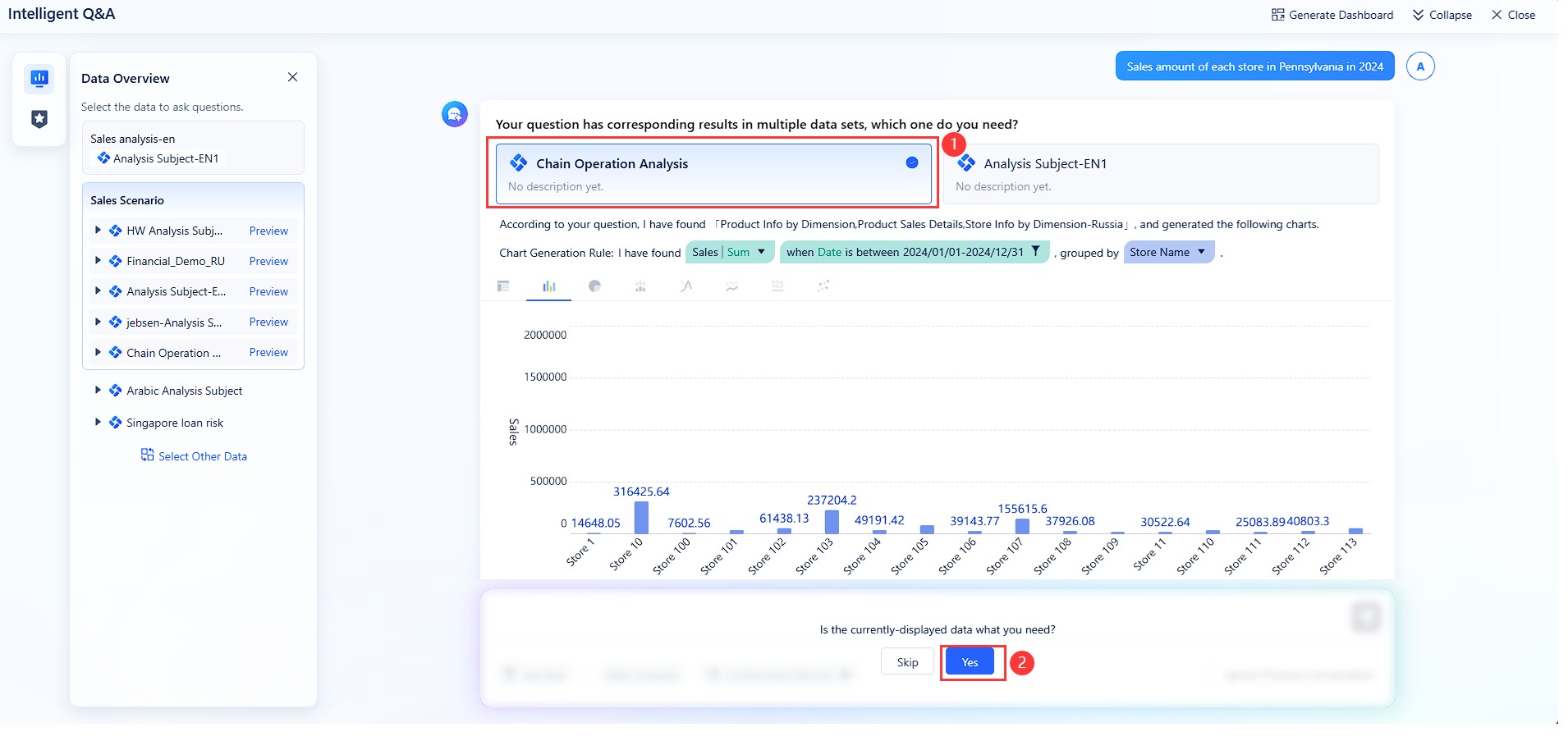
Summarize this week’s compliance reporting dashboard, highlight failed control checks, list missing evidence by owner, and show which items may affect next month’s audit readiness.
That request is more than a search. It requires the system to understand KPI definitions, retrieve trusted assets, explain exceptions, and organize the answer for action.
A 6-step AI workflow for compliance report consumption
Understand KPI definitions, report templates, filters, business terms, and semantic rules
Dora uses the governed semantic layer to distinguish, for example, between missing evidence, approved exceptions, failed checks, and overdue remediation.
Generate a structured report summary through chat
It produces a compliance-focused narrative such as framework status, top exceptions, owner exposure, and likely audit-impact areas.
Detect exceptions, abnormal changes, or overdue items
Dora can identify control drift, aging remediation items, missing evidence spikes, or departments with repeated compliance gaps.
Push summaries, alerts, or suggested actions to responsible users
A compliance lead may receive the executive summary, while IT or system owners receive exception-specific tasks or reminders.
Produce follow-up records or periodic summaries for review
Dora can support daily or weekly briefing workflows so teams do not need to recreate compliance status updates from scratch every cycle.
How FineReport provides the trusted reporting foundation
AI is useful in compliance only when it operates on governed, permission-aware assets. FineReport plays that role by providing:
standardized report templates
operational cockpits for control status and exceptions
permission governance
KPI definitions and report logic
reporting workflows and scheduled delivery
structured views for tables, trends, and owner-based action lists
This foundation matters because compliance teams cannot rely on a generic AI layer that improvises over ungoverned data.
chat-based report consumption for compliance and leadership users
structured report summaries instead of raw dashboard screenshots
chart explanations and management narratives for easier review
scheduled summaries and briefings for recurring governance meetings
exception alerts and push notifications to the right owners
follow-up records for repeatable compliance workflows
This is why Dora should be positioned as fourth-generation Agentic BI rather than a generic chatbot. It combines natural-language request, trusted semantics, governed query or Skill execution, and actionable reporting follow-up.
For IT teams, this changes the role of enablement. Instead of manually producing every last report variation, IT can focus on data connections, permissions, semantic rules, report templates, and reusable agent Skills that make compliance workflows scalable and auditable.
Key Benefits and Limits of Automated Compliance Reporting
Automation adds major value to compliance reporting, but the value is strongest when teams understand both the upside and the boundaries.
Major benefits
Reduce manual evidence gathering and repetitive documentation
That frees compliance and security teams to focus more on validation, remediation, and program improvement.
Improve consistency, visibility, and reporting speed
A standardized workflow improves consistency across:
control definitions
evidence status
reporting templates
business unit comparisons
audit-period readiness views
When paired with FineReport + Dora, teams also gain more usable visibility because reports can be consumed through dashboards, summaries, and AI-assisted explanations.
Strengthen readiness for audits and customer reviews
A stronger reporting workflow helps organizations respond faster to:
external audits
internal reviews
customer due diligence requests
leadership briefings
regulatory documentation demands
The result is not just faster output, but better preparedness.
Common limitations
Automation cannot replace judgment
Compliance still requires human judgment for:
policy interpretation
regulator-specific nuance
compensating controls
materiality assessment
final approval language
exception acceptance
AI assistance can support explanation and workflow execution, but it should not be treated as autonomous compliance decision-making.
Integration gaps and poor data quality remain common blockers
If systems are disconnected, ownership is unclear, or evidence sources are inconsistent, automated compliance reporting will expose those weaknesses rather than solve them automatically.
Common blockers include:
incomplete system integration
weak control mapping
inconsistent naming conventions
poor data quality
missing workflow ownership
fragmented approval processes
That is why the most successful programs treat reporting automation as a governance project, not only a software deployment.
6 Steps to Effective Automated Compliance Reporting
A practical rollout should focus on scenario value, control reliability, and stakeholder usability.
Step 1: Define scope, frameworks, and reporting goals
Start with a narrow and meaningful scope:
which regulations or frameworks matter most
which business units are in scope
which report audiences need to be served
which decisions the reports should support
Examples include audit readiness tracking, monthly control status review, customer assurance reporting, or overdue remediation management.
Step 2: Inventory systems and evidence sources
Document where compliance evidence lives, such as:
cloud environments
identity and access platforms
endpoint tools
ticketing systems
policy repositories
HR workflows
approval systems
Then determine which sources are reliable enough to support scheduled reporting and which still require cleanup.
Step 3: Map controls to automated checks
Not every control should be automated first. Prioritize:
high-volume checks
repeatable evidence requests
recurring access and configuration controls
time-sensitive status indicators
frequent audit pain points
This creates fast value while building confidence in the reporting model.
Step 4: Establish workflows for exceptions and approvals
Reports are useful only if someone owns the outcome. Define:
remediation owners
escalation rules
approval chains
review cadences
exception handling paths
This is also where a Risk Alert Officer workflow in Dora becomes valuable, because alerts and follow-up pushes can be tied to responsibility rules.
Step 5: Validate outputs with human review
Before scaling automation, confirm that:
the evidence is accurate
the control mapping is defensible
the report reflects business context
exceptions are represented correctly
role-based access is respected
Use human review for AI-generated narratives as well, especially in early deployment phases.
Step 6: Measure, refine, and scale
Track progress through operational outcomes such as:
time saved in report preparation
reduced audit scramble
evidence completeness improvement
fewer overdue remediation items
faster review cycles
broader framework coverage over time
Once a high-value use case works, expand to adjacent scenarios rather than automating everything at once.
Actionable Best Practices
1. Standardize report templates, KPI definitions, business terms, and exception rules
This is the foundation for trustworthy automated compliance reporting. If different teams define “failed check,” “missing evidence,” or “open exception” differently, no dashboard or AI assistant will create consistent output.
2. Build a semantic layer inside the reporting workflow
AI works better when it is grounded in business definitions, control logic, filters, and permission rules. FineReport helps standardize the reporting structure, while Dora uses that governed semantic layer for more controllable and auditable AI workflows.
3. Treat data quality as part of the AI implementation
Do not separate AI from data governance. Dora’s report summaries, explanations, alerts, and follow-up quality depend on the reliability of the FineReport assets and upstream evidence sources.
4. Start with high-value recurring reports
Focus first on recurring scenarios such as:
weekly compliance status summaries
monthly audit readiness reports
overdue remediation tracking
customer assurance support reporting
These are ideal landing points for a Daily Briefing Secretary or Report Researcher workflow.
5. Preserve permission governance and use staged human review
Compliance reporting often contains sensitive findings. AI outputs should respect FineReport access boundaries. Start with human-reviewed summaries, then gradually expand Dora Skills as confidence in the workflow grows.
Choosing Automated Compliance Reporting Tools and Preparing for the Future
Selecting the right toolset is not only about automation features. It is about whether the organization can build a trusted compliance reporting operating model that people will actually use.
What to look for in compliance automation software
Buyers should evaluate tools based on:
integration breadth across evidence sources
framework and control mapping support
evidence retention and traceability
workflow and approval features
reporting quality and flexibility
dashboard usability for different stakeholders
scalability across business units and frameworks
permission governance and auditability
For many enterprises, the decision should also include whether the platform supports not only evidence collection, but also high-quality report delivery and report consumption.
That is where FineReport + Dora becomes differentiated. FineReport provides the reporting foundation for formatted reports, complex reports, operational cockpits, management reports, and enterprise reporting automation. Dora adds the enterprise Data Agent layer that helps users query, summarize, push, alert, and follow up on those trusted reporting assets.
The future of security compliance reporting
The next phase of automated compliance reporting is moving beyond static report generation toward continuous, explainable, scenario-based execution.
Key trends include:
continuous controls monitoring
more operational compliance cockpits
scheduled stakeholder briefings
AI-assisted analysis of exceptions and changes
owner-based alerting and follow-up
dashboard-style analysis views with narrative explanation
Future-ready programs will not rely on AI alone. They will combine:
trusted reporting assets
semantic governance
permissions and quality controls
repeatable workflows
expert human oversight
FineReport + Dora Solution Pitch
Building this manually is complex. FineReport helps teams standardize trusted reports, operational cockpits, templates, and reporting workflows. Dora turns those assets into an AI assistant that can answer report questions in chat, generate structured summaries, push scheduled briefings, monitor exceptions, and follow up with responsible owners.
For compliance scenarios, that means an organization can build a trusted FineReport cockpit for control coverage, evidence completeness, exception tracking, remediation aging, and audit readiness, then use Dora to make that cockpit far easier to consume and operationalize.
This is especially valuable for enterprise decision-makers:
Executives get concise, scenario-based compliance summaries tied to concrete risk and owner follow-up.
IT teams move from manual report assembly to governed data connections, semantic rules, template optimization, and reusable AI Skills.
Business and compliance users get timely summaries, chart-based answers, periodic briefings, and exception pushes without chasing analysts for every update.
FineReport + Dora is not only a reporting upgrade; it is a practical fourth-generation Agentic BI path.FineReport provides governed reports and operational cockpits. Dora provides the AI assistant layer for scenario execution, with more controlled Skills, lower token waste, faster execution paths, and more stable workflows than prompt-only agents.
Get Ready-to-Use Dashboard Templates in Fine Gallery
The strongest Dora pitch is scenario + product + service: FineReport provides the trusted reporting foundation, Dora provides the AI digital employee, and implementation service connects data, governance, semantic setup, Skills, report templates, permissions, and rollout.
Automated compliance reporting uses connected software and predefined workflows to collect evidence, track control status, and generate compliance reports with less manual effort. It helps teams avoid rebuilding reports from scratch for every audit, review, or questionnaire.
Manual reporting often depends on spreadsheets, screenshots, email follow-ups, and last-minute consolidation. Automated reporting pulls data from trusted systems on a schedule, applies standard rules, and makes reporting more consistent and audit-ready.
The biggest benefits are faster evidence collection, fewer human errors, better visibility into exceptions, and smoother audit preparation. It also improves accountability by making ownership and follow-up easier to track.
Common sources include cloud platforms, identity providers, ticketing tools, endpoint systems, and policy repositories. The right setup depends on where your control evidence lives and which frameworks you need to report against.
No, automation reduces repetitive work but does not replace judgment, context, or formal sign-off. Teams still need to review exceptions, validate findings, and ensure reports accurately reflect the organization’s compliance posture.
Product Trial
FineReport
Pixel-perfect reports · Interactive dashboards · Easy data entry · Digital twins