Business intelligence as a service lets you turn your company’s data into clear, useful insights without buying expensive software or running complex systems yourself. You get all the benefits of business intelligence as a service through the cloud, making it easy to access dashboards and reports from anywhere.
Business intelligence as a service gives you tools to analyze sales, track performance, and discover trends. You do not need to be a data expert to use business intelligence as a service. In fact, many everyday companies rely on business intelligence as a service to make better decisions quickly.
20% of organizations use business intelligence software for decision-making, which may include business intelligence as a service.
With business intelligence as a service, you can get started quickly, save money, and focus on what matters most—understanding your business.
What Is Business Intelligence as a Service?
Business intelligence as a service is a way for you to access powerfulbusiness intelligence tools through the internet, without needing to install or manage any software on your own computers. You use business intelligence as a service to collect, analyze, and visualize your company’s data, helping you make smarter decisions every day. This approach gives you the same advanced features as traditional business intelligence, but with less hassle and lower costs.
When you choose business intelligence as a service, you get a complete solution for turning raw data into clear insights. You do not need to worry about buying servers, hiring IT experts, or waiting weeks for reports. Instead, you can log in from anywhere, connect your data, and start exploring trends, tracking performance, and sharing results with your team. This makes business intelligence as a service a smart choice for companies that want to move quickly and stay competitive.
Cloud-Based Business Intelligence
Business intelligence as a service uses thecloud to deliver all its features. The cloud means you access your dashboards, reports, and analytics through a web browser, just like you would check your email or use online banking. You do not need to install anything on your computer. This setup makes it easy for you to get started and scale up as your business grows.
Many leading platforms offer business intelligence as a service through the cloud. Some of the most popular options include:
Dotnet Report
Tableau Cloud
Microsoft Power BI (Cloud)
Google Looker
Qlik Sense Cloud
Amazon QuickSight
With business intelligence as a service, you can connect to many different data sources at once. You can pull in information from sales systems, marketing tools, spreadsheets, and more. This flexibility helps you see the full picture of your business in one place.
Security is a top priority for cloud-based business intelligence. You benefit from advanced protections such as:
Identity and access management (IAM)
Data loss prevention (DLP)
Security information and event management (SIEM)
Business continuity and disaster recovery
Data encryption for information in transit and at rest
Regular penetration testing and vulnerability assessments
Role-based access control and monitoring
These features keep your data safe, even as you share insights across your organization.
How BIaaS Differs from Traditional BI
Business intelligence as a service stands apart from traditional business intelligence in several important ways. You do not need to buy expensive hardware or wait months for setup. Instead, you get a ready-to-use platform that grows with your needs. You can see the main differences in the table below:
Feature
BIaaS (Modern)
Traditional BI
Ease of Use
Empowers users to be their own data scientists with instant insights
Often requires waiting for reports to be built
Multi-Cloud Support
Integrates multiple data sources seamlessly
Historically struggled with multi-cloud integration
AI Capabilities
Incorporates AI for automated insights and anomaly detection
Relies on pre-set or manually controlled insights
Voice Analytics
Supports natural language processing and voice search
Primarily text-based queries only
You can see that business intelligence as a service puts you in control. You can ask questions in plain language, use AI to spot trends, and connect data from many sources. Modern business intelligence platforms make it possible for you to get answers fast, without needing to be a technical expert.
Deployment and maintenance also look very different when you use business intelligence as a service. Here is a quick comparison:
Feature
Traditional BI
BIaaS
Infrastructure
On-premises infrastructure
Cloud-native infrastructure
Management
In-house expertise
Expert management by service providers
Deployment Speed
Slow deployment (months)
Rapid insights (days)
Scalability
Scaling pains (more hardware needed)
Elastic scalability (automatic scaling)
Cost Structure
High upfront costs
Predictable pay-as-you-go pricing
With business intelligence as a service, you avoid high upfront costs and long waits. You pay a subscription fee, which makes budgeting easier. You can add more users or data sources whenever you need, without buying new equipment.
Modern business intelligence as a service also brings advanced analytics to everyone. You can use AI to detect patterns, automate reports, and even ask questions using your voice. This is a big step forward from older systems, which often required IT teams to build every report by hand.
Cost is another major difference. Traditional business intelligence systems often come with high upfront costs and consulting fees. Business intelligence as a service uses a subscription model, so you pay only for what you use. This makes modern business intelligence more accessible for companies of all sizes.
Business intelligence as a servicegives you a simple way to turn raw data into valuable insights. You do not need to manage servers or install complicated software. You use a cloud-based platform that handles every step, from collecting data to sharing dashboards with your team. This approach makes business intelligence accessible to everyone, not just data experts.
You start by connecting your data sources. These can include sales records, marketing results, spreadsheets, or even information from web APIs. The platform brings all your data together in one place. You can then clean and prepare the data for analysis. The system helps you spot errors, fill in missing values, and organize the data so it is ready for deeper exploration.
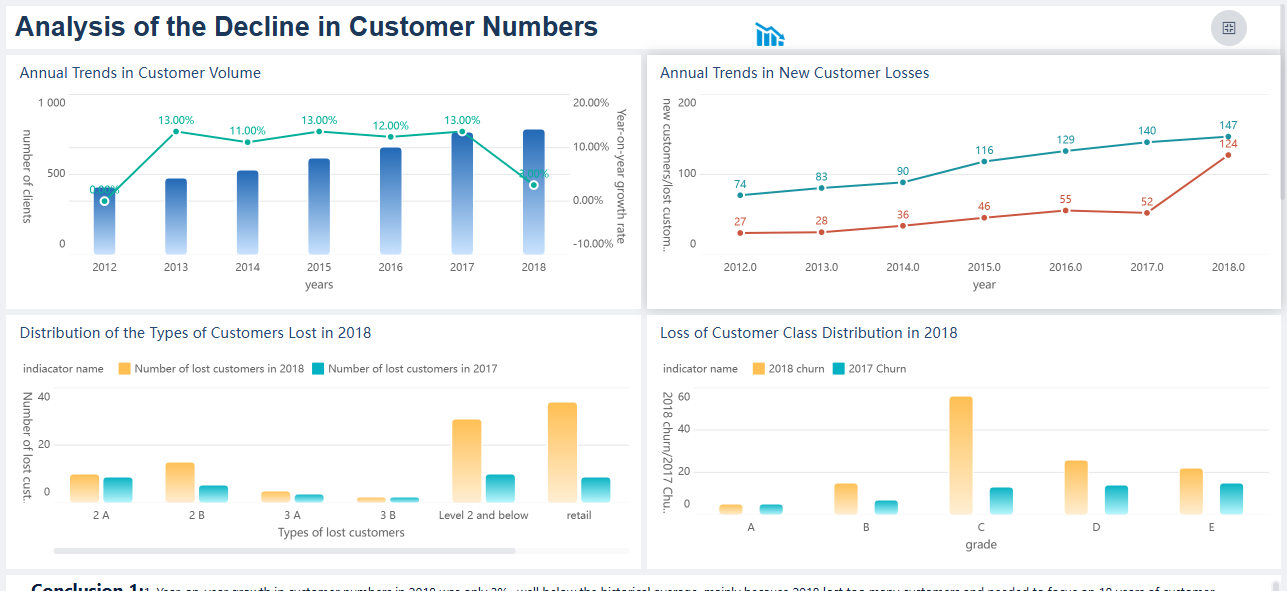
After preparation, you use analytics tools to explore trends and patterns. You can create dashboards that show key metrics, compare results over time, and highlight important changes. The platform uses AI to speed up analysis and even detect unusual shifts in your data. You can summarize complex information into easy-to-understand charts and reports.
Finally, you share your dashboards and insights with others. The cloud makes it easy for your team to view, comment, and collaborate on the same data, no matter where they are. You control who can see or edit each dashboard, keeping your information secure.
Data Integration and Preparation
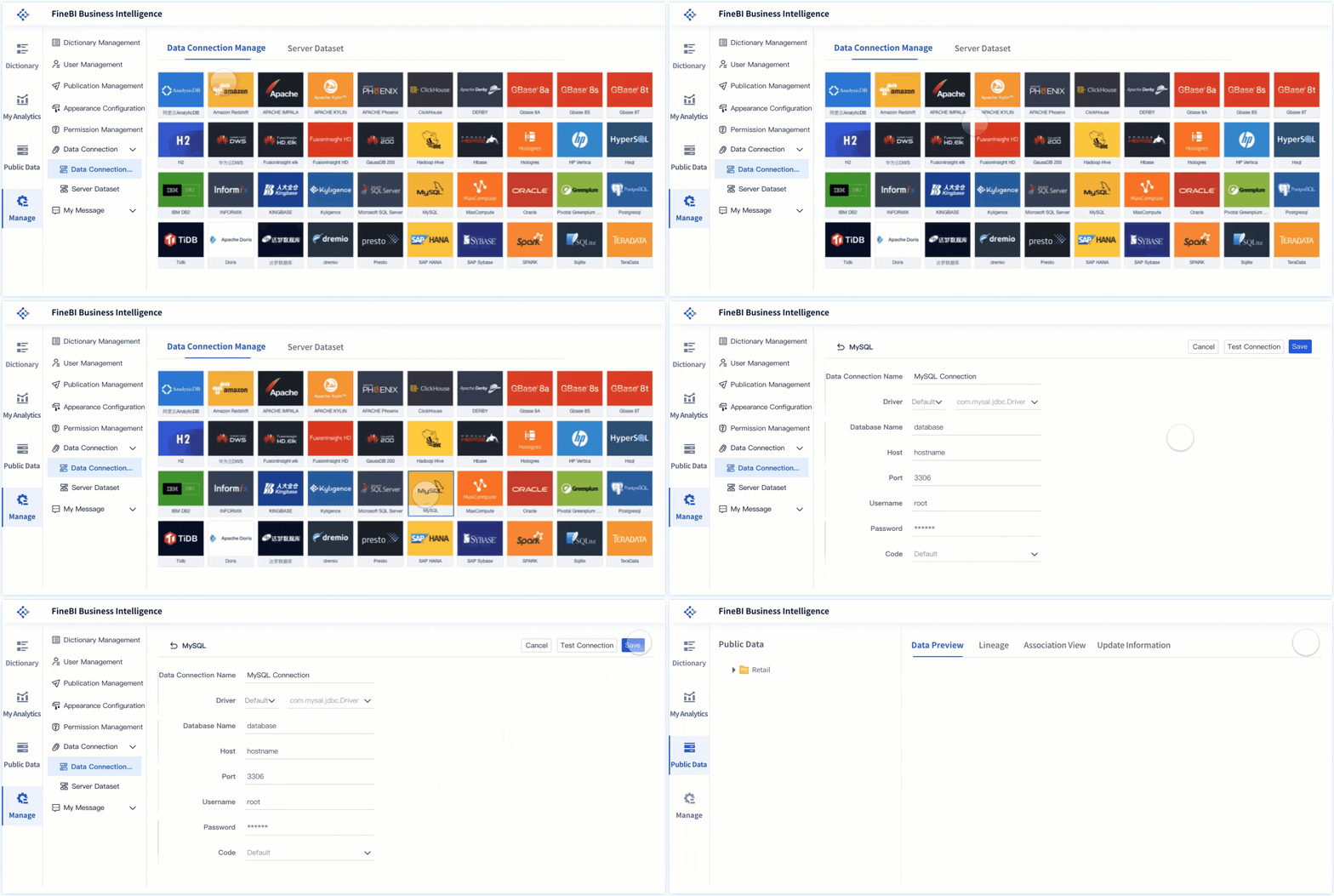
Data integration is the first step in business intelligence as a service. You connect all your different data sources to the platform. This can include databases, cloud storage, spreadsheets, and even real-time feeds from web APIs. The goal is to bring all your business data together for unified analysis.
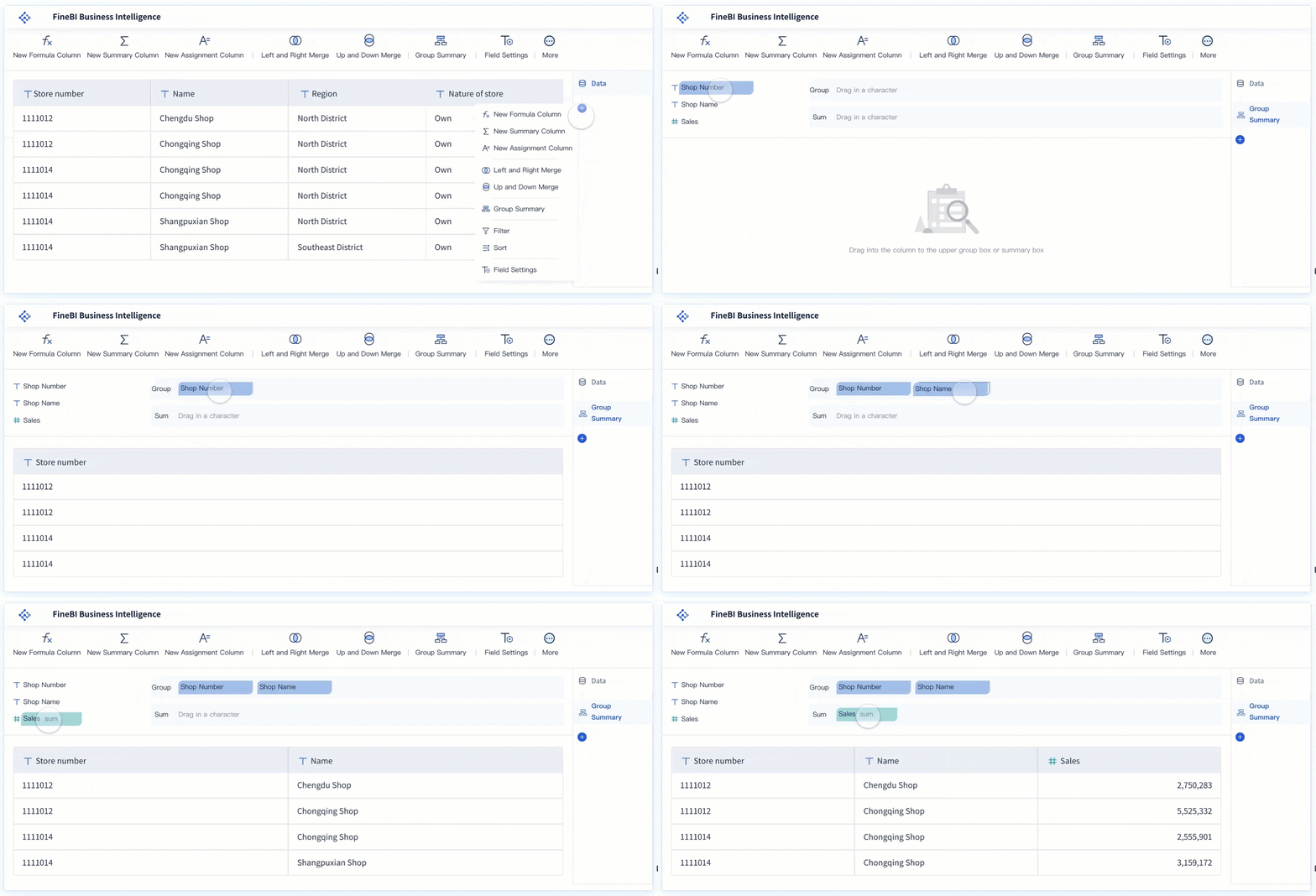
Most business intelligence as a service platforms use automated tools to clean and prepare your data. These tools check for errors, remove duplicates, and standardize formats. You do not need to write code or use complex scripts. The platform guides you through each step, making sure your data is accurate and consistent.
Here is a typical workflow for data integration and preparation:
Step Number
Step Description
1
Data Collection
2
Data Cleaning and Preparation
3
Exploratory Data Analysis (EDA)
4
Feature Engineering
5
Model Selection and Training
6
Model Evaluation
Business intelligence as a service providers use automated data pipelines. These pipelines help you keep your data up to date and track changes over time. The system also checks for data quality issues and alerts you if something needs attention. This ensures your analysis is always based on reliable information.
Many platforms support a wide range of data integration tools. Some of the most popular include:
Databricks
Qlik
Pentaho
Snowflake
Informatica
Oracle Data Integrator (ODI)
These tools help you connect, transform, and manage your data efficiently.
Let’s look at FineBIas an example. FineBI allows you to connect to over 60 types of data sources, including databases, cloud warehouses, and files like Excel or CSV. You can upload files, link to APIs, or use custom connectors for special systems. FineBI automates data cleaning and preparation, so you can focus on analysis instead of fixing errors.
Once your data is ready, business intelligence as a service gives you powerful analytics and data visualization tools in the cloud. You do not need to install anything on your computer. You log in through a web browser and start exploring your data right away.
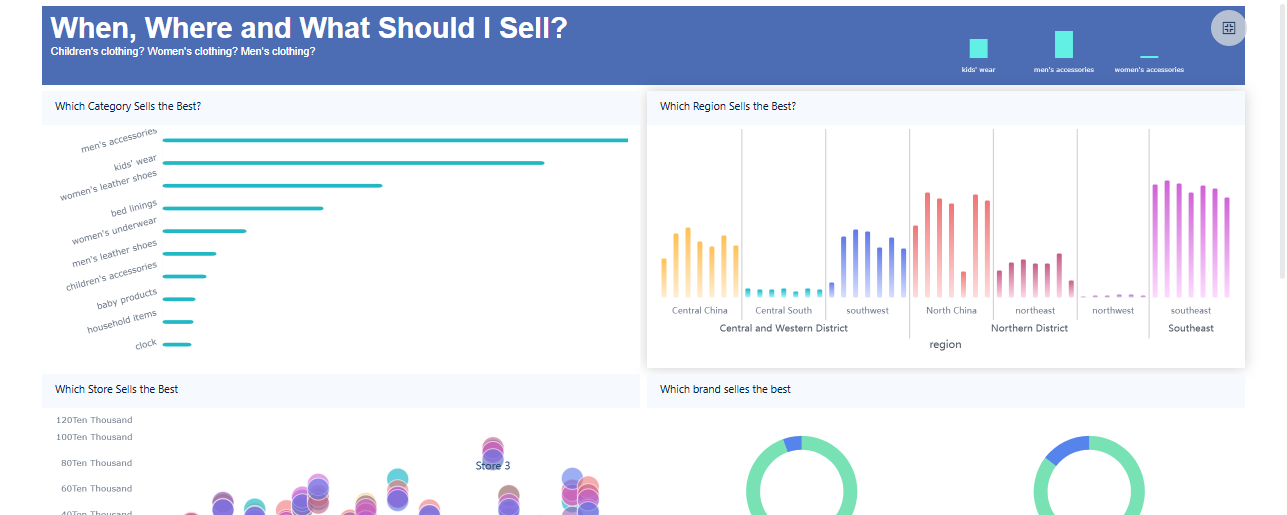
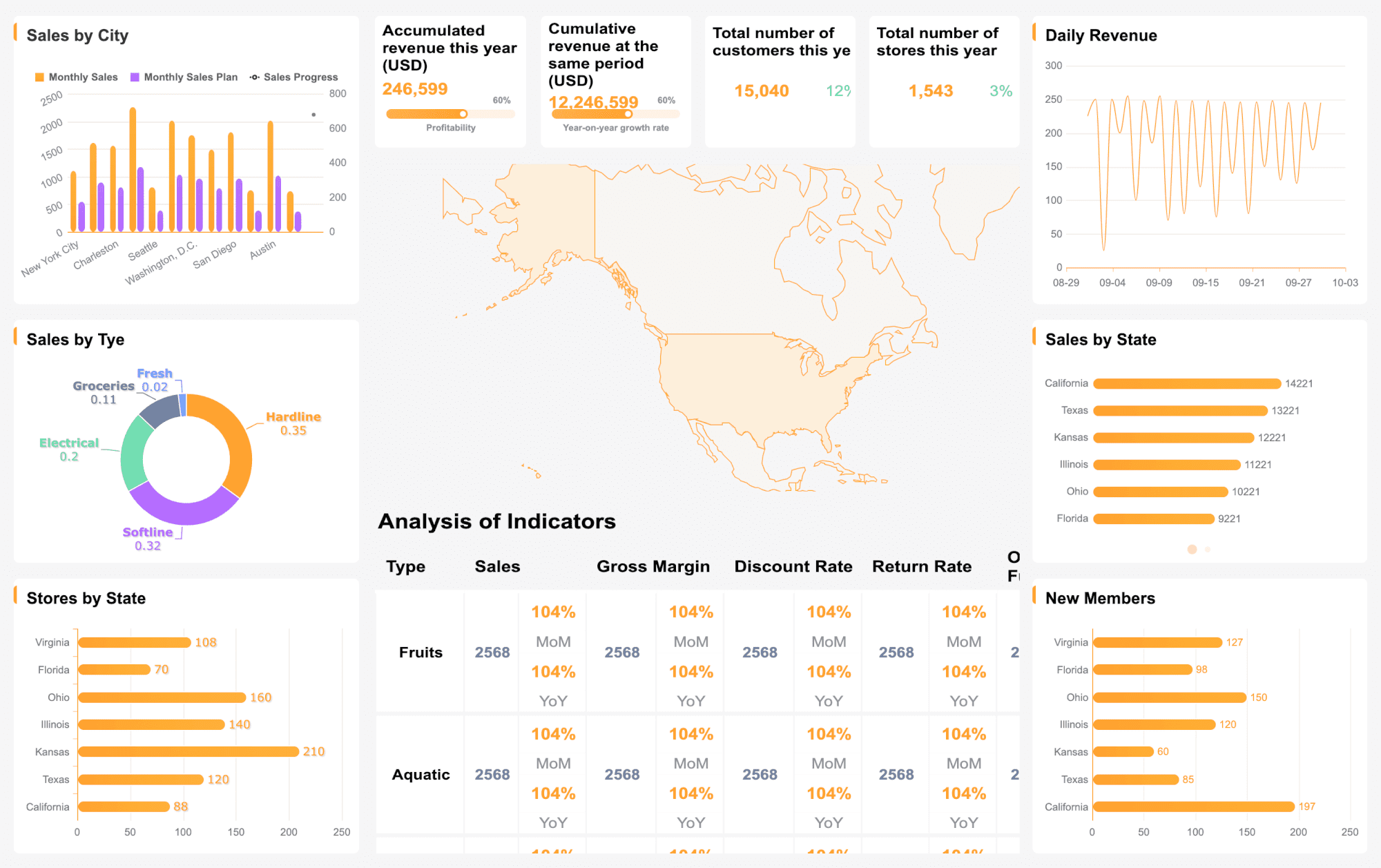
You can use drag-and-drop features to build dashboards. These dashboards show your key metrics, trends, and comparisons in real time. The platform uses AI to speed up analysis, detect unusual patterns, and even suggest the best charts for your data. You can summarize complex results into clear, narrative summaries that help everyone understand what is happening.
Here are some of the most valued features in data visualization:
Feature Type
Description
Acceleration and Scale
AI speeds up data processing and handles large datasets.
Proactive Anomaly Detection
Real-time alerts for metric changes help you act quickly.
Narrative Summaries
Complex data becomes easy to understand with simple summaries.
Auto-Charting
The system creates charts automatically, saving you time.
UX Best Practices
Good design makes dashboards easy to use and understand.
Compression of Complexity
Large datasets become clear and actionable through smart visualizations.
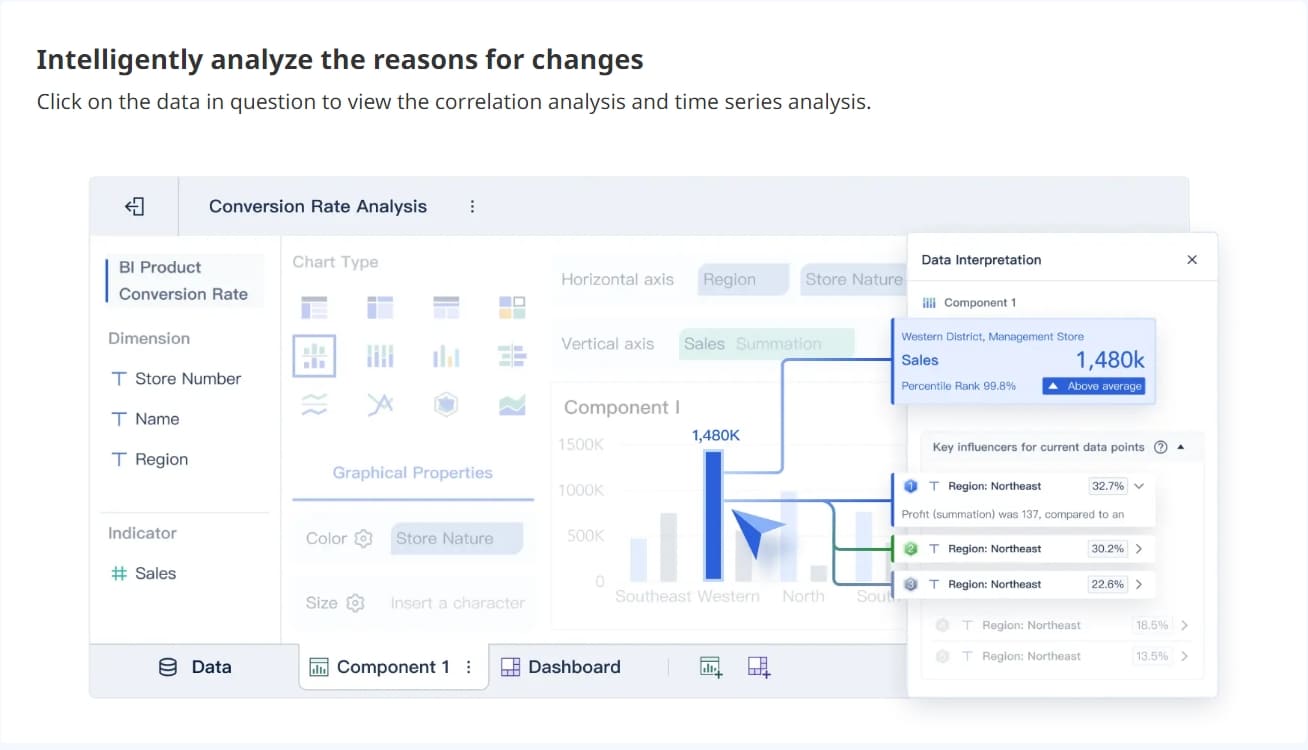
FineBI makes analysis and visualization simple. You can create dashboards by dragging and dropping charts, tables, and maps. You can apply filters, drill down into details, and save templates for future use. FineBI supports over 60 chart types and 70 styles, so you can choose the best way to present your data. The platform also uses AI to help you spot trends and explain unusual results.
You can access your dashboards from any device. FineBI's responsive design means your dashboards look great on desktops, tablets, and smartphones. This flexibility helps you make decisions wherever you are.
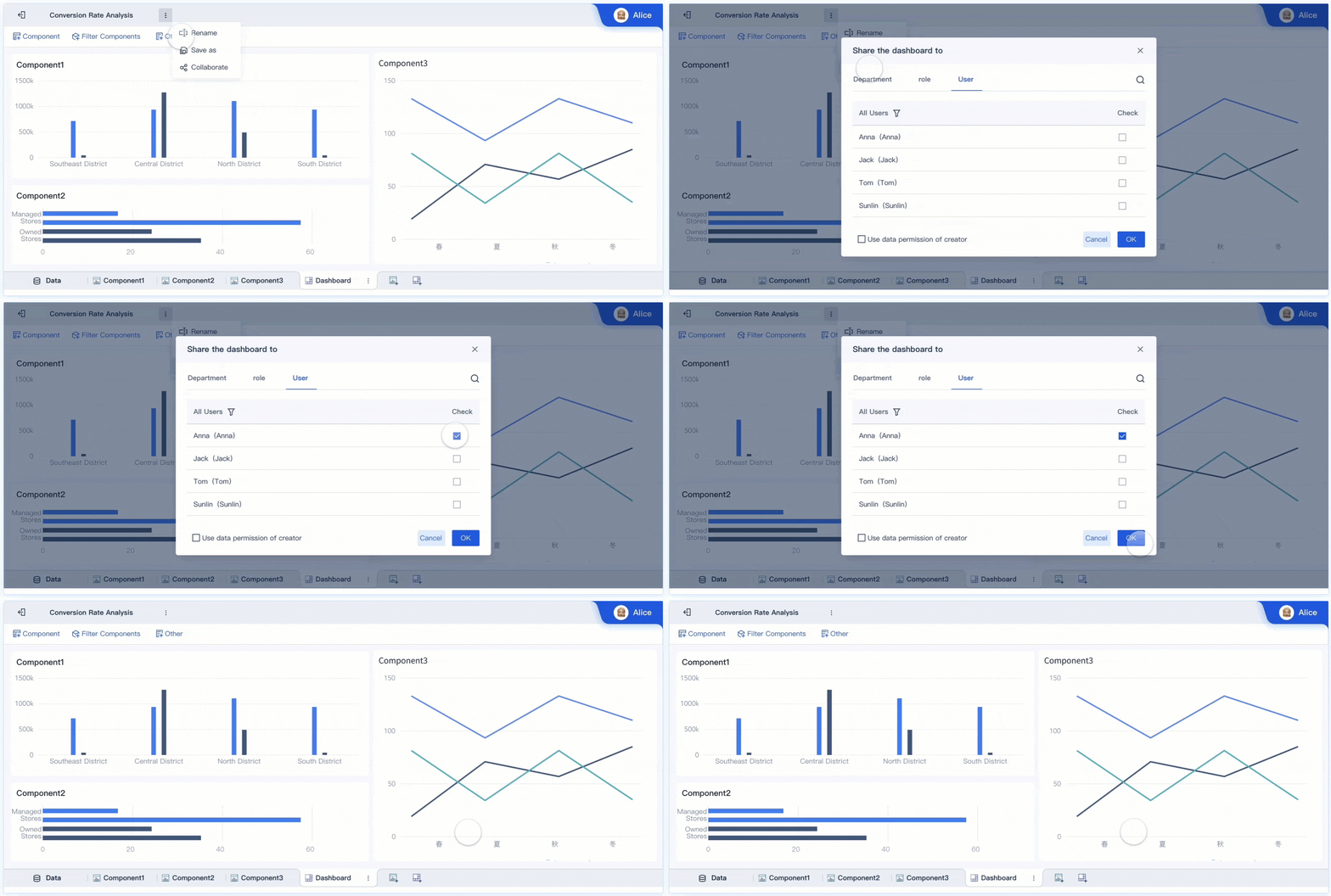
Business intelligence as a service makes sharing and collaboration easy. You can publish dashboards and reports to your team with just a few clicks. The platform controls who can view, edit, or comment on each dashboard, keeping your data secure.
You can set up role-based permissions. This means only the right people see sensitive information. The platform tracks user activity, so you know who accessed or changed a dashboard. You can also set up alerts for important changes or unusual activity.
FineBIsupports team collaboration in several ways. You can share dashboards with individuals or groups, add comments, and even work together on the same analysis. The platform supports real-time updates, so everyone sees the latest data. You can export results as Excel files or images, making it easy to share insights outside the platform.
With business intelligence as a service, you do not need to send files back and forth by email. Everyone works from the same source of truth. This improves teamwork and helps your organization make faster, better decisions.
Key Features and Benefits of Business Intelligence As A Service
Business intelligence as a service gives you a modern way to unlock the value of your data. You can use this approach to turn raw information intoactionable insights. With business intelligence as a service, you do not need to manage complex systems or hire a large IT team. You get a flexible platform that helps you build a strong business intelligence strategy and make better decisions every day.
Scalability and Flexibility
Business intelligence as a service grows with your needs. You can start small and add more users or data sources as your company expands. The cloud-based setup means you do not need to buy new hardware or worry about running out of space. You can connect to many types of data, from sales numbers to customer feedback. This flexibility supports your business analytics and lets you adjust your business intelligence strategy as your goals change.
Accessibility and Real-Time Data
You can access your analytics and dashboards from anywhere with business intelligence as a service. The platform gives you real-time data, so you always see the latest numbers. You do not have to wait for IT to build reports. You can explore live dashboards and get data insights on your own. This self-service approach helps you make quick decisions. You can also connect directly to your source data, which makes reporting and analysis faster. Modern business analytics tools let you interpret data with little help, so everyone in your company can use analytics to find insights.
Self-service BI reduces your reliance on IT for reports.
You get direct access to insights for faster decision-making.
Business intelligence as a service helps you save money. You pay a subscription fee instead of buying expensive software or hardware. This model can lower your total cost of ownership by 20-30% compared to traditional solutions. You do not need to hire extra staff or pay for consultants. The platform is easy to use, with drag-and-drop tools for building dashboards and reports. You can focus on business analytics and finding actionable insights, not on technical details.
You avoid high infrastructure and personnel costs.
You do not need to pay for extra training or consulting.
The platform makes analytics simple for everyone.
FineBI’s Unique Advantages
FineBI stands out among business intelligence as a service platforms. You get self-service analytics, enterprise-grade governance, and AI-driven insights. FineBI lets you connect to over 60 data sources, prepare data without coding, and create dashboards with simple drag-and-drop actions. You can share data insights securely with your team and control who sees what. FineBI’s AI features help you spot trends and explain unusual results. The platform supports real-time analytics, so you always work with the latest data.
A real-world example comes from BOE Technology Group. BOE used FineBI to solve data fragmentation and improve data quality. They built a unified analytics system, which led to a 5% reduction in inventory costs and a 50% increase in operational efficiency. FineBIhelped BOE turn data into actionable insights, supporting their digital transformation and business growth.
Tip: FineBI’s combination of self-service analytics, strong governance, and AI-powered features makes it a smart choice for companies that want to get the most from their data.
Who Should Use Business Intelligence As A Service?
Business intelligence as a service gives you the power to turn your company’s data into actionable insights. You do not need to be a large enterprise or a technical expert to benefit from business intelligence as a service. This approach makesadvanced analytics and reportingavailable to everyone, helping you make smarter decisions with your data.
Business intelligence as a service works for organizations of all sizes. You can use it to connect your data sources, analyze trends, and share results with your team. The cloud-based platform handles the technical details, so you can focus on using your data to improve your business.
Best Fit for Different Business Sizes
You can use business intelligence as a service whether you run a small business or manage a large corporation. Many small business owners now rely on AI-powered tools to analyze their data and gain insights.
About 68% of small business owners use AI, and another 9% plan to adopt it soon.
This number has grown from 51% just two years ago.
Medium-sized companies often use business intelligence as a service to unify data from different departments. Large enterprises benefit from scalable solutions that handle massive amounts of data and support thousands of users. You can start with a few users and expand as your needs grow.
Industry Use Cases
Business intelligence as a service supports a wide range of industries. You can use it to solve specific challenges and optimize your operations. Here are some examples:
Industry
Use Case Description
Manufacturing
Use AI-driven automation to improve product development and control. Predictive maintenance helps monitor equipment and schedule repairs. Forecast demand and reduce inventory costs with data analysis.
Food and Beverage
Predict consumer behavior and optimize stock levels. Automated quality control uses data from computer vision systems. Personalize customer experiences with recommendations and dynamic pricing.
Technology, Software, IT
Improve cybersecurity by detecting threats in real time. Optimize cloud infrastructure and reduce costs using data insights.
Pharmaceuticals & Healthcare
Use AI to support drug discovery, diagnostics, and automate administrative tasks. Improve patient outcomes with better data management.
You can apply business intelligence as a service to any industry that relies on data for decision-making.
Example: FineBI in Action
FineBI helps you build a complete data analysis platform quickly. You can use self-service analytics and interactive dashboards to explore your data in real time. The drag-and-drop interface makes it easy to create reports and visualize data without coding.
Description
Key Features
Impact
FineBI enables you to analyze data independently and make decisions faster.
Self-service analytics, interactive dashboards, real-time data analysis
You can improve business performance and act on insights quickly.
Certified professionals use FineBI to create dynamic visualizations.
Agile analytics, real-time insights
You can respond to changes in your data and drive better outcomes.
FineBI is designed for users who want to analyze data dynamically.
Business intelligence as a service gives you the power to turn your data into clear insights and make better decisions every day. You can access insights quickly, share them with your team, and support data-driven decisions without complex systems. FineBIshows how easy it is to use these tools for valuable insights and faster decisions. Many resources help you get started, including tailored BIaaS solutions, whitepapers, and case studies:
Resource Type
Description
Link
BIaaS Solutions
Business Intelligence as a Service for healthcare and dental needs
You can use these insights to guide your next steps. Anyone can use business intelligence as a service to make smarter decisions and unlock the full value of their data.
Access a wealth of case studies, industry insights, and solution guides to accelerate digital transformation.
FAQ
What does business intelligence as a service mean for your company?
Business intelligence as a service gives you cloud-based tools to analyze your data. You access dashboards and reports online. You do not need to install software or manage servers. This approach helps you make smarter decisions using real-time insights.
How do you connect your data to business intelligence as a service platforms?
You connect your data by linking databases, uploading files, or using APIs. Most business intelligence as a service platforms support many data sources. You can bring together sales, marketing, and financial data for unified analysis.
Is business intelligence as a service secure for sensitive business information?
Business intelligence as a service uses advanced security features. You get data encryption, role-based access control, and regular security audits. You control who can view or edit dashboards. This keeps your sensitive information safe.
Can small businesses benefit from business intelligence as a service?
Small businesses use business intelligence as a service to track sales, monitor trends, and improve performance. You do not need technical skills. The platform is easy to use and scales as your business grows.
How does business intelligence as a service help you make faster decisions?
Business intelligence as a service provides real-time dashboards and automated reports. You see the latest data instantly. You can explore trends and share insights with your team. This helps you respond quickly to changes in your business.