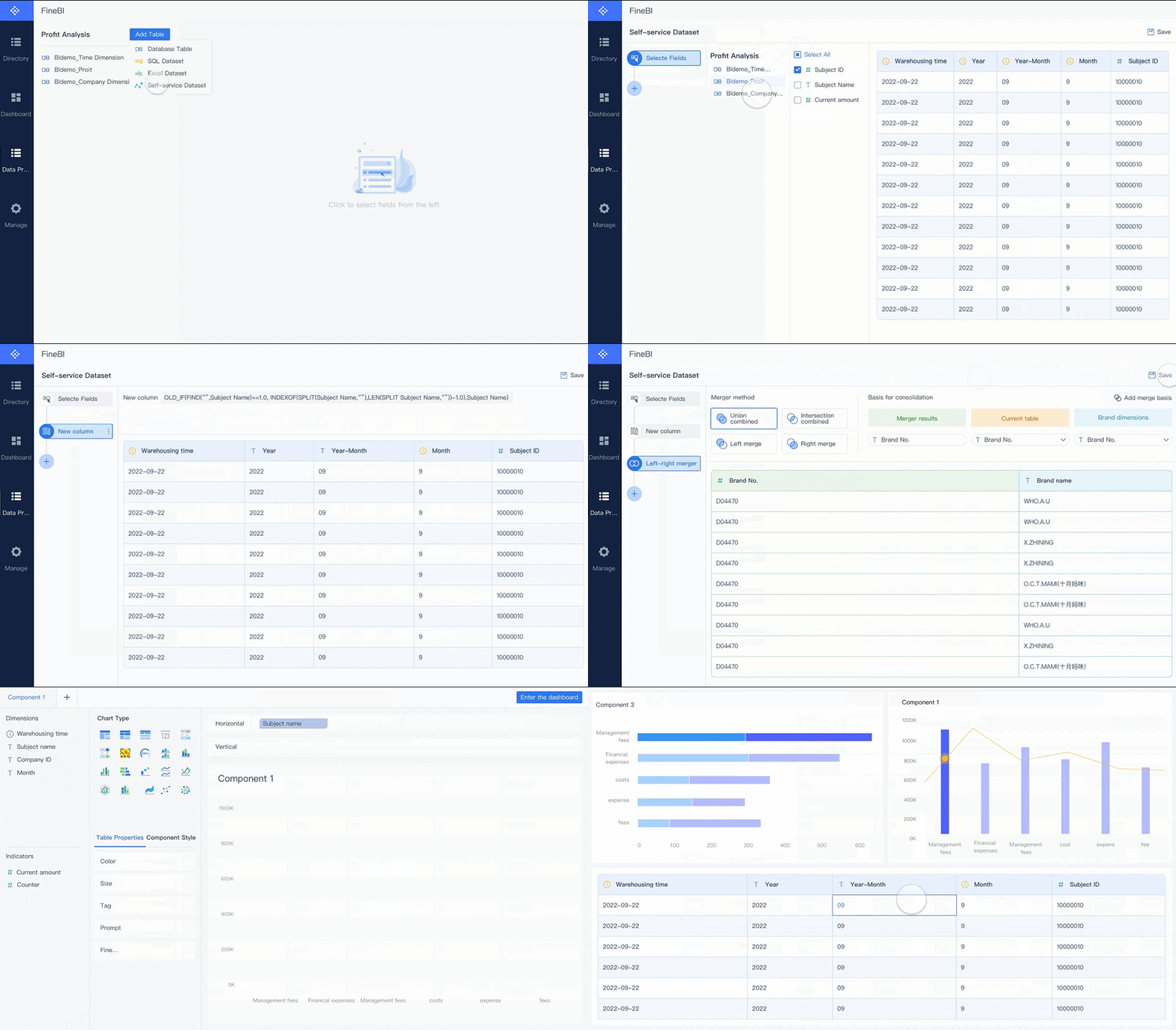
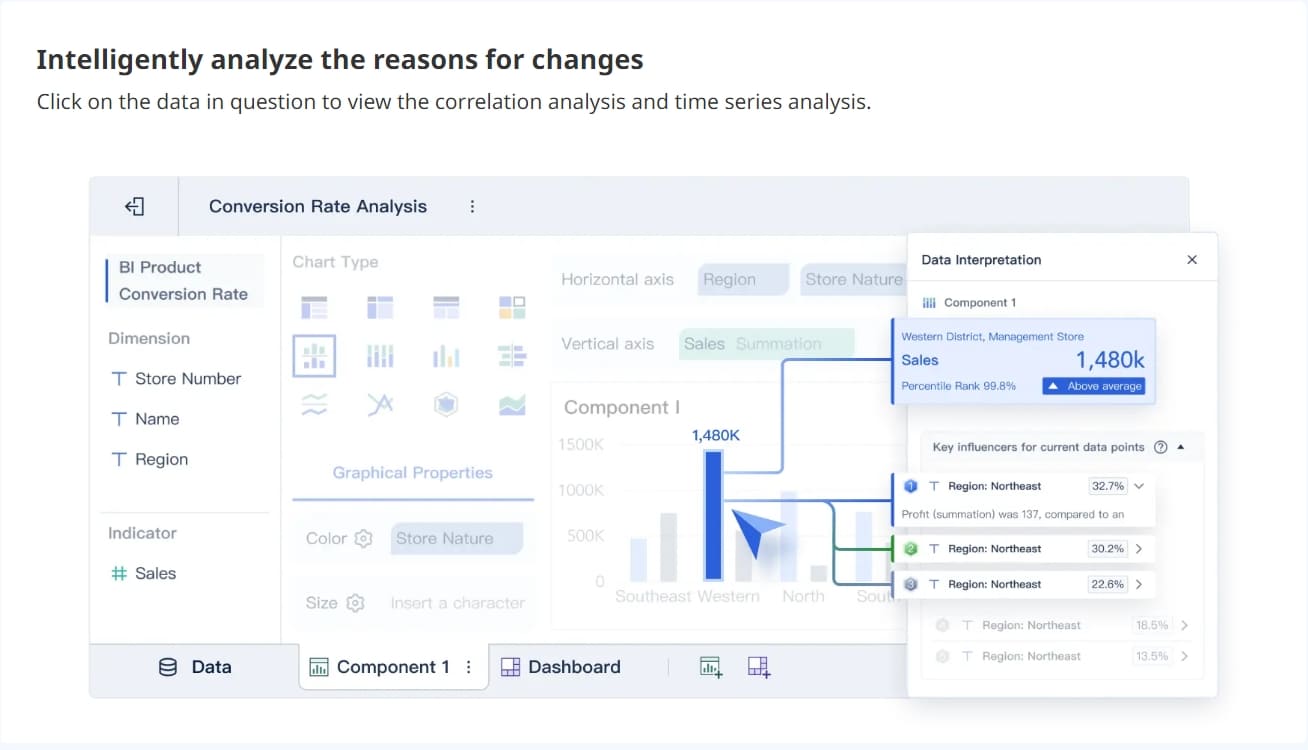
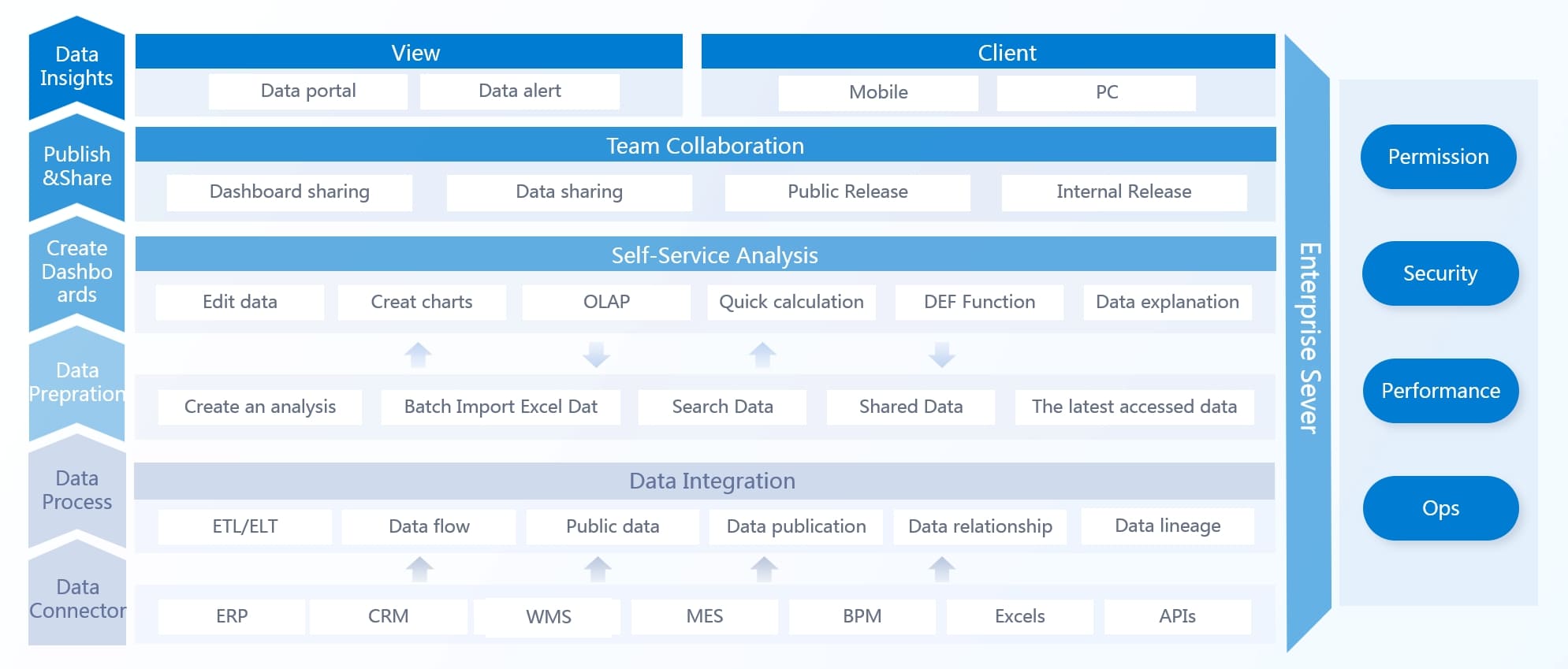
A cybersecurity metrics dashboard plays a vital role in executive oversight, letting you visualize data and simplify complex cyber risk management. Most companies struggle to make their cybersecurity metrics clear to top leadership, with only 23% succeeding. When you use a dashboard powered by FineBI, you transform technical details into actionable insights. Visual color coding and trend indicators help you track key performance indicators and maintain regular reporting. By focusing on metrics that drive cyber risk management, you protect your organization and align cybersecurity strategies with business objectives.
Incident Response Time on Cybersecurity Metrics Dashboard
What Is Incident Response Time?
Incident response time measures how quickly your team detects and reacts to security incidents. On a cyber security dashboard, you often see two key metrics: Mean Time to Detect (MTTD) and Mean Time to Respond (MTTR). MTTD tracks how long it takes to identify a threat. MTTR shows how fast your team contains and resolves the issue. These metrics help you understand the efficiency of your cybersecurity operations.
Why Fast Response Matters
A slow response to security incidents can lead to serious consequences. In 2024, companies took an average of 194 days to identify a data breach. This delay increases the risk of data loss, financial damage, and business disruption. When you reduce incident response time, you lower downtime and limit the impact of cyberattacks. Fast action preserves business continuity and protects your reputation. Monitoring these metrics on your cybersecurity metrics dashboard helps you spot trends and address gaps before they become costly problems.
Tip: Track both detection and response times on your cyber security dashboard. Look for spikes or delays that may signal process weaknesses or resource shortages.
Using FineBI for Real-Time Monitoring
FineBI empowers you to visualize incident response metrics in real time. You can set up your cybersecurity dashboard to display alerts when response times exceed acceptable thresholds. FineBI’s drag-and-drop interface lets you customize views for executives, highlighting critical incidents and trends. With real-time data integration, you receive instant updates on security incidents as they unfold. This proactive approach enables you to make informed decisions and allocate resources quickly. Integrating incident response metrics into your executive-level dashboard supports proactive risk management and strengthens your overall cybersecurity posture.
You need to know what types of cyber attacks target your organization most often. Tracking detected threats gives you a clear view of the risks you face. Many organizations see a rise in incidents each year, especially from insider threats and ransomware. The table below shows the most common types of threats found in enterprise environments:
Threat Type
Key Facts
Insider Threat
One-third of breaches predicted to be insider-related in 2021.
Frequency of insider incidents tripled since 2016.
59% of IT leaders expect insider risks to rise in the next two years.
Ransomware
Ransomware attacks increased 250% in the first half of 2021.
Average payout exceeded $233,000 per event in Q3 2020.
Ransomware attacks rose 485% in 2020 compared to 2019.
You should monitor these metrics on your cybersecurity dashboard to spot patterns in cyber attacks and incidents. This helps you understand where your defenses work and where you need to improve.
Analyzing Trends with FineBI
FineBI makes it easy to analyze trends in cyber attacks over time. You can connect data from multiple sources and visualize threat volumes with interactive charts. Use filters to break down incidents by type, time, or business unit. FineBI’s real-time updates let you see spikes in cyber attacks as they happen. You can set up alerts for sudden increases in incidents, so you act quickly. This approach helps you stay ahead of threats and keep your cybersecurity metrics up to date.
Tip: Use FineBI’s drag-and-drop features to create custom dashboards that highlight the most important metrics for your executive team.
Informing Executive Decisions
Tracking detected threats gives you the information you need to make smart decisions. When you monitor key metrics, you see how well your security measures protect against cyber attacks. You can:
Assess the effectiveness of your current defenses.
Identify areas that need more resources or attention.
Adjust your strategy to address new or rising threats.
A clear view of incidents and cyber attacks helps you align your cybersecurity strategy with business goals. FineBI supports this process by turning complex data into actionable insights for your leadership team.
Patch Compliance on Cybersecurity Metrics Dashboard
You need to know if your systems stay up to date with the latest security patches. Patch compliance shows the percentage of devices and applications that have received recent updates. On your dashboard, you can track this metric to see which assets remain vulnerable. High compliance means your team quickly addresses known weaknesses. Low compliance signals risk and requires immediate attention.
Tip: Set up automated alerts on your dashboard to notify you when patch compliance drops below your target level.
Reducing Risk with Timely Updates
Timely patching plays a key role in reducing the risk of successful cyberattacks. When you apply patches quickly, you close security loopholes that attackers often target. Delays in patching leave your systems open to known exploits, which increases the chance of breaches and data loss. You lower your exposure to threats by making patching a regular part of your cybersecurity routine.
Consider these important points:
Timely patching addresses vulnerabilities that cyber threat actors can exploit.
Applying patches promptly lowers exposure to known vulnerabilities, decreasing the likelihood of system compromises.
Delaying patches leaves systems vulnerable to known exploits, increasing the risk of breaches and data loss.
FineBI for Automated Patch Tracking
FineBI helps you automate patch tracking and visualize vulnerability trends with ease. You can connect FineBI to your IT asset inventory and vulnerability scanners. The platform pulls real-time data and displays patch status across all devices. Use interactive charts to spot trends, such as recurring vulnerabilities or departments with low compliance. FineBI’s automation reduces manual work and helps you focus on critical metrics.
Follow these best practices to ensure timely patching and reduce exposure to threats:
Maintain an up-to-date software inventory.
Automate patching to reduce human error and save time.
Prioritize patches based on severity and potential impact.
Regularly apply patches to avoid vulnerabilities.
Integrate patch management with vulnerability management for a complete view.
You can also set unified security goals across departments and coordinate remediation efforts between IT and security teams. Make security everyone’s responsibility by embedding it into daily workflows. With FineBI, you gain a clear view of your patch status and strengthen your overall cybersecurity posture.
User Access and Privilege Controls
Monitoring Privileged Accounts
You need to keep a close watch on privileged accounts. These accounts, such as admin or root users, have the highest level of access in your systems. If attackers compromise them, they can cause significant damage. You can monitor privileged account activity by:
Tracking the number of admin or root accounts in your environment
Monitoring how often these accounts are used
Observing attempts to escalate user privileges
These actions help you spot unusual patterns that may signal a security risk. Regular reviews of privileged account activity allow you to respond quickly to threats.
Preventing Unauthorized Access
Unauthorized access remains a leading cause of data breaches. You should enforce strict controls over who can access sensitive data and systems. Limit privileges to only those who need them for their roles. Use multi-factor authentication to add another layer of protection. Review access rights often and remove unnecessary permissions. By doing this, you reduce the risk of insider threats and external attacks.
Tip: Set up alerts on your dashboard to notify you of suspicious login attempts or privilege changes. Quick action can prevent a small issue from becoming a major incident.
FineBI Role-Based Access Control
FineBI gives you powerful tools to manage user access and protect sensitive information. With role-based access control, you assign permissions based on job roles and responsibilities. This feature ensures that users only see the data and metrics relevant to their work. FineBI also supports row-level and column-level security, so you can restrict access even further. You can audit user activity and track changes directly from your cybersecurity dashboard. These controls help you maintain compliance and strengthen your overall security posture.
You need to track how many employees complete security awareness training. This metric shows your organization’s commitment to building a strong security culture. High completion rates mean your team understands the latest threats and knows how to respond. You can measure training completion by department, location, or job role. This approach helps you identify gaps and target future training sessions. When you monitor training completion on your cybersecurity metrics dashboard, you ensure everyone stays prepared for new risks.
Impact on Human Error Reduction
Human error remains a leading cause of security incidents. Regular training helps your team turn good cybersecurity practices into habits. When you invest in ongoing security awareness programs, you see real results:
Companies with continuous training report up to a 70% drop in security incidents.
Organizations with formal training programs see a 70% reduction in security-related risks.
Employees who complete phishing awareness training are 30% less likely to fall for phishing attempts.
You lower your risk by making training a regular part of your cybersecurity strategy. This investment pays off by reducing mistakes and keeping your data safe.
Tip: Celebrate teams that reach 100% training completion. Recognition encourages others to stay engaged and take training seriously.
Visualizing Progress in FineBI
FineBI makes it easy to track and visualize your training metrics. You can connect training data from HR systems and display completion rates on interactive dashboards. Use charts to compare departments or highlight trends over time. FineBI’s real-time updates let you spot areas that need attention right away. You can set up alerts for overdue training or low participation. With FineBI, you turn raw data into clear insights, helping you build a stronger cybersecurity culture across your organization.
You rely on many vendors and partners to keep your business running. Each third-party connection introduces new risks. If a supplier suffers a breach, your organization may face consequences as well. Almost 98% of organizations have at least one third-party that experienced a breach in the last two years. You need to assess vendor risk before onboarding and continue monitoring it throughout the relationship. On your cyber security dashboard, you can track vendor security ratings, contract compliance, and incident history. These metrics help you identify weak links and prioritize your risk management efforts.
Strategy
Description
Managing Third-Party Risks
Evaluate vendor security policies, certifications, and incident history. Include security clauses in contracts and monitor activities post-onboarding.
Continuous Monitoring
Use third-party risk management platforms and monitoring services for ongoing visibility into supplier security posture.
Utilizing Cybersecurity Metrics
Track third-party risk metrics, such as security ratings, to assess the security posture of vendors and partners.
Monitoring Third-Party Incidents
You must keep a close watch on incidents involving your suppliers. Third-party security ratings work like a credit score, giving you an external view of a vendor’s security posture. When you track these ratings, you spot changes that may signal new risks. Set up alerts for vendor-related incidents, such as data breaches or compliance failures. Use your dashboard to monitor trends and respond quickly to threats that could impact your supply chain.
Tip: Regularly review vendor performance and incident logs. Early detection helps you prevent small issues from becoming major disruptions.
Third-party risk is a growing concern for every organization.
Most companies depend on external partners for critical services.
Continuous monitoring helps you stay ahead of emerging threats.
FineBI for Integrated Risk Analysis
FineBI gives you the tools to integrate third-party risk data from multiple sources. You can connect vendor management systems, incident logs, and external security ratings into one dashboard. FineBI’s visualizations help you compare vendors, track incident trends, and identify high-risk partners. You can set up automated alerts for changes in vendor risk scores or new incidents. With FineBI, you gain a unified view of your supply chain risks and make informed decisions to protect your business.
Compliance and Regulatory Status Tracking
Compliance Metrics in Cybersecurity Dashboard
You need to track compliance metrics to ensure your organization meets industry standards and legal requirements. Common frameworks you may monitor on your dashboard include:
NIST 800-171
CMMC
ISO 27001
SOC 2
These frameworks help you measure how well your security program aligns with best practices. You should also track the security policy compliance rate, monitor policy violations, and look for a downward trend in violations. These metrics show if your team follows internal rules and if your governance is improving.
Ensuring Regulatory Alignment
You must keep your cybersecurity program aligned with changing regulations. Organizations often measure and report regulatory alignment using several components:
Component
Description
Compliance Monitoring
Systematic procedures to ensure adherence to regulations and standards.
Reporting Coordination
Integration of reporting processes to maintain visibility and effectiveness in governance.
Regulatory Alignment
Ensuring that all compliance efforts are aligned with current regulations and standards.
Tracking these elements helps you avoid fines and reputational damage. You can also use metrics like security rating and patching cadence grade to show your compliance status.
FineBI for Audit and Reporting
FineBI gives you powerful tools to track compliance metrics and simplify audits. You can connect data from different systems to ensure consistency and accuracy. FineBI lets you choose the right indicators for your dashboard, set up alerts for compliance gaps, and customize views for different stakeholders. With FineBI, you reduce audit preparation time by up to 80%. You also get real-time updates on your compliance posture and can generate automated reports for regulators or executives. This approach keeps your organization ready for any audit and supports a strong cybersecurity program.
You gain a strategic advantage when you integrate these seven metrics into your cybersecurity metrics dashboard. This approach bridges the gap between technical and executive teams, aligns security with business goals, and transforms complex data into actionable intelligence.
You demonstrate the effectiveness of security investments.
You enhance accountability and improve communication across your organization.
Metric Type
Benefit to Executives
Patch Cycle Time
Assesses vulnerability management efficiency
Privileged Account Usage
Identifies insider threats
ROI on Security Investments
Informs budget decisions
Leverage FineBI to monitor your cybersecurity metrics dashboard in real time. Regular tracking supports proactive risk management and smarter decisions. Start embedding these metrics into your ongoing reporting and governance processes for lasting protection.
Continue Reading About Cybersecurity Metrics dashboard
Access a wealth of case studies, industry insights, and solution guides to accelerate digital transformation.
FAQ
What data sources can you connect to FineBI for cybersecurity metrics?
You can connect FineBI to databases, cloud platforms, Excel files, and APIs. FineBI supports over 60 connectors, making it easy to unify cybersecurity data from multiple systems.
How often does FineBI update cybersecurity dashboards?
FineBI supports real-time and scheduled updates. You can set automatic refresh intervals or trigger updates based on specific events, ensuring your dashboard always shows the latest metrics.
Can you customize cybersecurity dashboards for different executive roles?
Yes. FineBI lets you create role-based dashboards. You can control access to sensitive data and tailor views for executives, managers, or IT teams.
How does FineBI help with compliance reporting?
FineBI automates compliance tracking and reporting. You can generate audit-ready reports, set alerts for compliance gaps, and visualize regulatory status in real time.