

What Is an AI Agent Workflow?
AI Agent Workflow Meaning
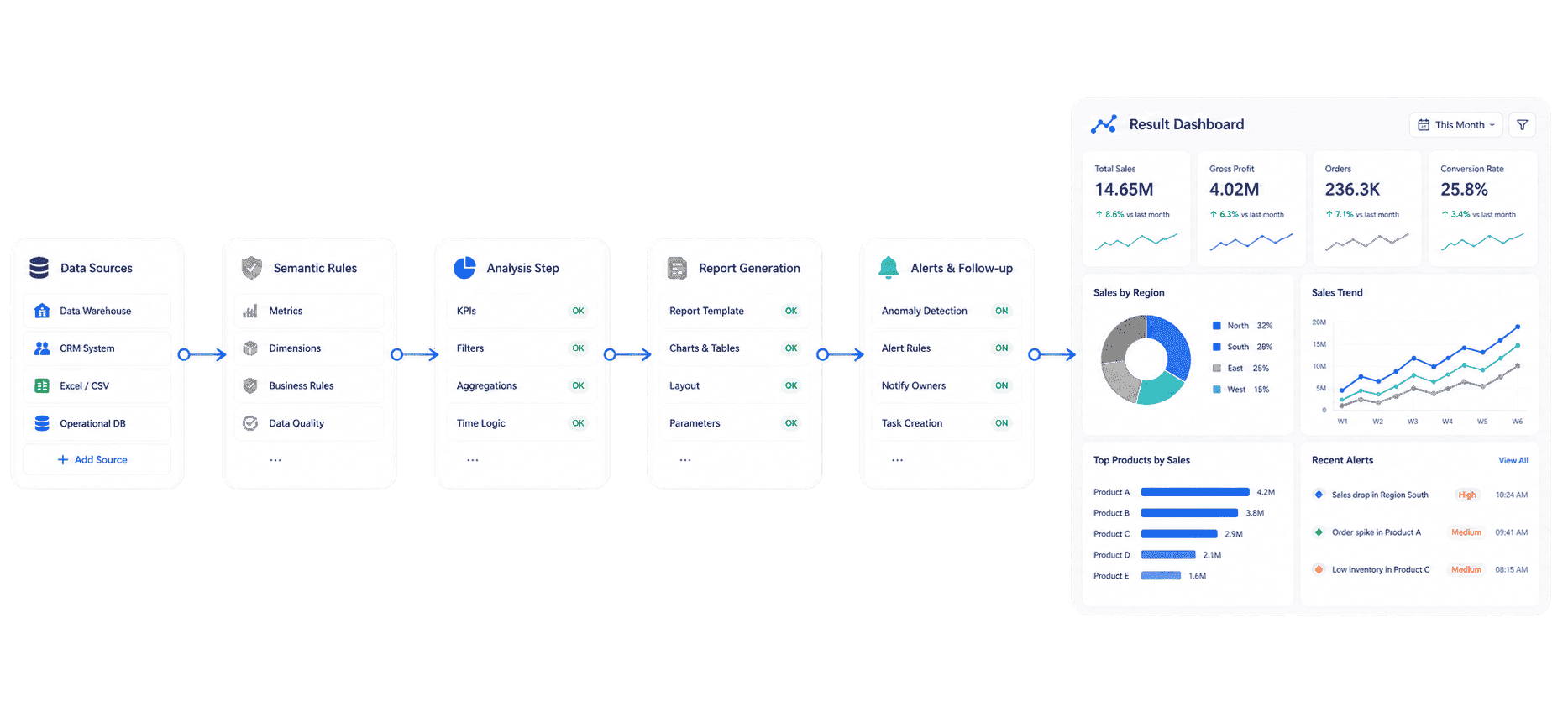
An AI agent workflow is a repeatable operating loop that uses an AI agent to complete a business task from request to result. The agent does not only answer a question. It can understand the goal, decide which steps are needed, retrieve information, use tools, generate an output, route the result, and continue follow-up.
For example, a sales leader might ask:
"Generate this week's revenue risk briefing, explain the biggest regional gaps, and send each regional manager a follow-up summary."
A simple AI assistant may draft a summary if the user provides the data. A well-designed AI agent workflow should retrieve the right trusted dashboard, apply approved KPI definitions, generate a chart-based answer, push the briefing to the right owners, and track whether the risk has been handled.
That is the practical meaning of an AI agent workflow: AI plus process, tools, data, rules, ownership, and follow-up.
Common AI agent workflow tasks include:
- Natural-language query over governed business data.
- Retrieval of approved dashboards, reports, datasets, templates, and knowledge assets.
- Generation of chart-based answers, structured summaries, and management briefings.
- Monitoring of thresholds, anomalies, overdue work, and risk signals.
- Routing of alerts, suggested actions, and follow-up summaries to responsible owners.
- Creation of recurring reports, weekly reviews, and exception lists.
- Human review for actions that affect finance, compliance, customers, or operations.
In short, an AI agent workflow is not just "AI that talks." It is AI that helps work move forward.
What does it take to build an AI agent workflow that actually works?
Download the Enterprise Data Agent Guide to learn:
- How AI agent workflows differ from chatbots and automation scripts
- What data foundation and governance they need to run reliably
- Real workflow examples across sales, finance, manufacturing, and retail

How an AI Agent Workflow Works
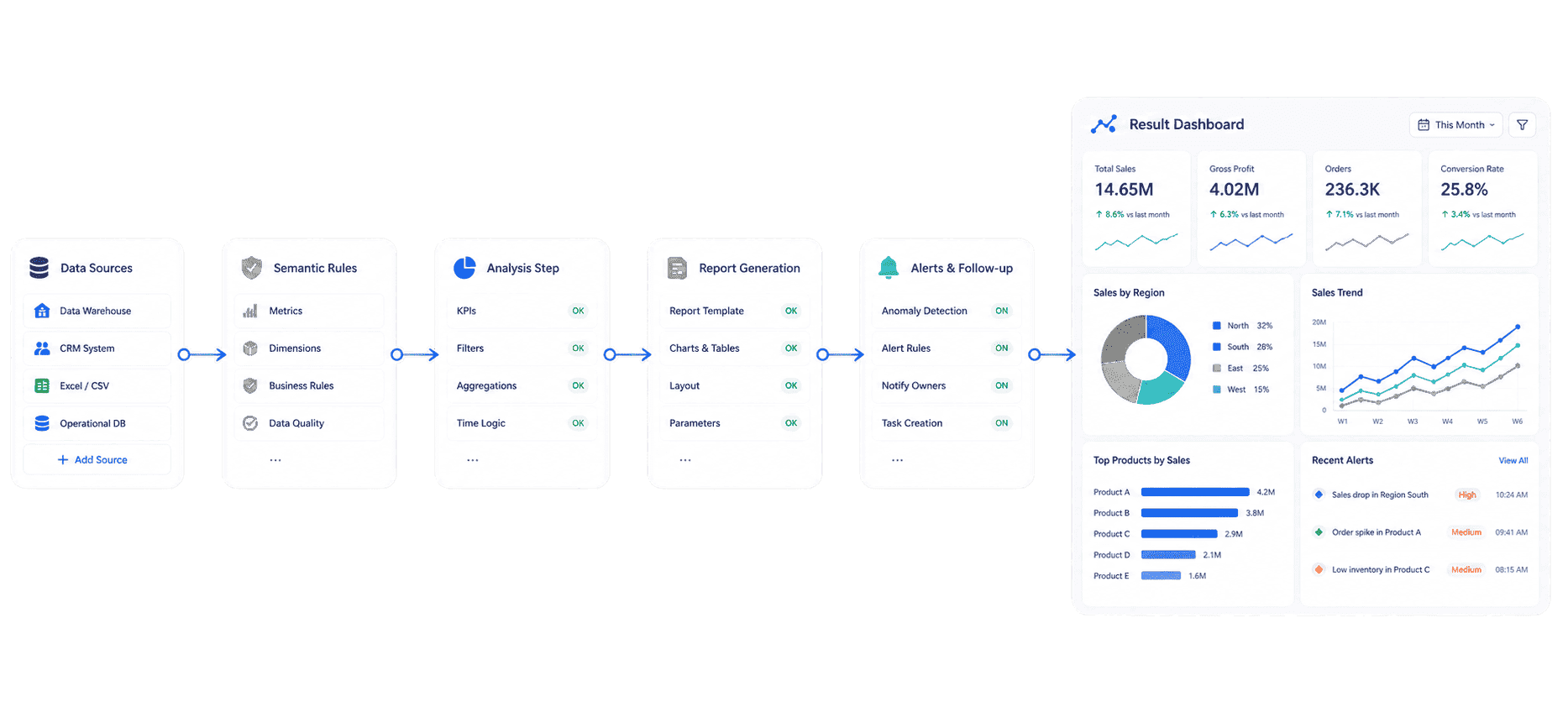
An AI agent workflow usually follows a closed-loop sequence. The exact architecture depends on the product and scenario, but enterprise workflows often include these steps:
-
Receive the goal
A user, system event, schedule, or threshold creates a goal such as "prepare a weekly sales briefing" or "scan delivery risk every morning." -
Interpret the business context
The agent maps the request to business terms, KPI definitions, time periods, filters, owners, and scenario rules. -
Retrieve trusted assets
The agent finds the right dataset, report, dashboard, template, knowledge base article, or prior workflow record. -
Plan and execute the task
The agent decides whether it needs a query, chart, summary, comparison, anomaly check, report narrative, or owner-specific action list. -
Generate the output
The result may be a short answer, table, chart, dashboard-style analysis view, structured report summary, alert, or briefing. -
Trigger the next step
The workflow sends the output to a person, team, channel, or downstream system, depending on permission and review rules. -
Track follow-up
For recurring scenarios, the agent checks unresolved items, summarizes progress, and prepares the next review.
This is where AI agent workflows go beyond AI data analysis. AI analysis explains data. An AI agent workflow uses analysis inside a business process.
AI Agent Workflow Architecture and Core Components
An AI agent workflow needs more than a model. It needs a controlled architecture that connects reasoning with trusted execution.
Core components usually include:
- Goal intake: A natural-language request, scheduled trigger, event trigger, alert condition, or workflow task.
- Planner: The logic that breaks a goal into steps and decides what data, tools, or Skills are needed.
- Memory and context: The current conversation, prior workflow state, business terms, user preferences, and historical outcomes.
- Tool layer: Approved connectors, APIs, BI assets, data queries, report templates, notification tools, and workflow systems.
- Knowledge and semantic layer: KPI definitions, synonyms, field meanings, filters, hierarchies, business rules, and responsibility mapping.
- Execution engine: The process that runs queries, generates outputs, checks results, and routes actions.
- Guardrails: Permissions, source traceability, action limits, validation rules, and human approval points.
- Monitoring: Logs, feedback, exception handling, retries, status tracking, and quality review.
For enterprise data work, the semantic layer is especially important. An AI agent cannot safely answer "Why did revenue drop?" unless it knows which revenue metric is approved, which business unit the user can access, which period is relevant, and which dashboard or report should be trusted.
That is why AI agent workflows work best with governed business intelligence, approved data visualization, and reusable automated reporting assets.
AI agent workflow inputs and outputs
Inputs can include:
- User prompts and follow-up questions.
- Scheduled tasks, such as weekly briefings or monthly report generation.
- KPI thresholds, anomaly triggers, and exception rules.
- Approved dashboards, reports, datasets, and knowledge libraries.
- Workflow state, owner lists, access rules, and prior actions.
Outputs can include:
- Answers, tables, charts, and dashboard-style analysis views.
- Structured report summaries and narrative explanations.
- Alerts, owner-specific action lists, and suggested next steps.
- Meeting briefings, follow-up summaries, and unresolved-risk reports.
- Audit records showing sources, actions, and review status.
The stronger the inputs and governance, the more reliable the outputs.
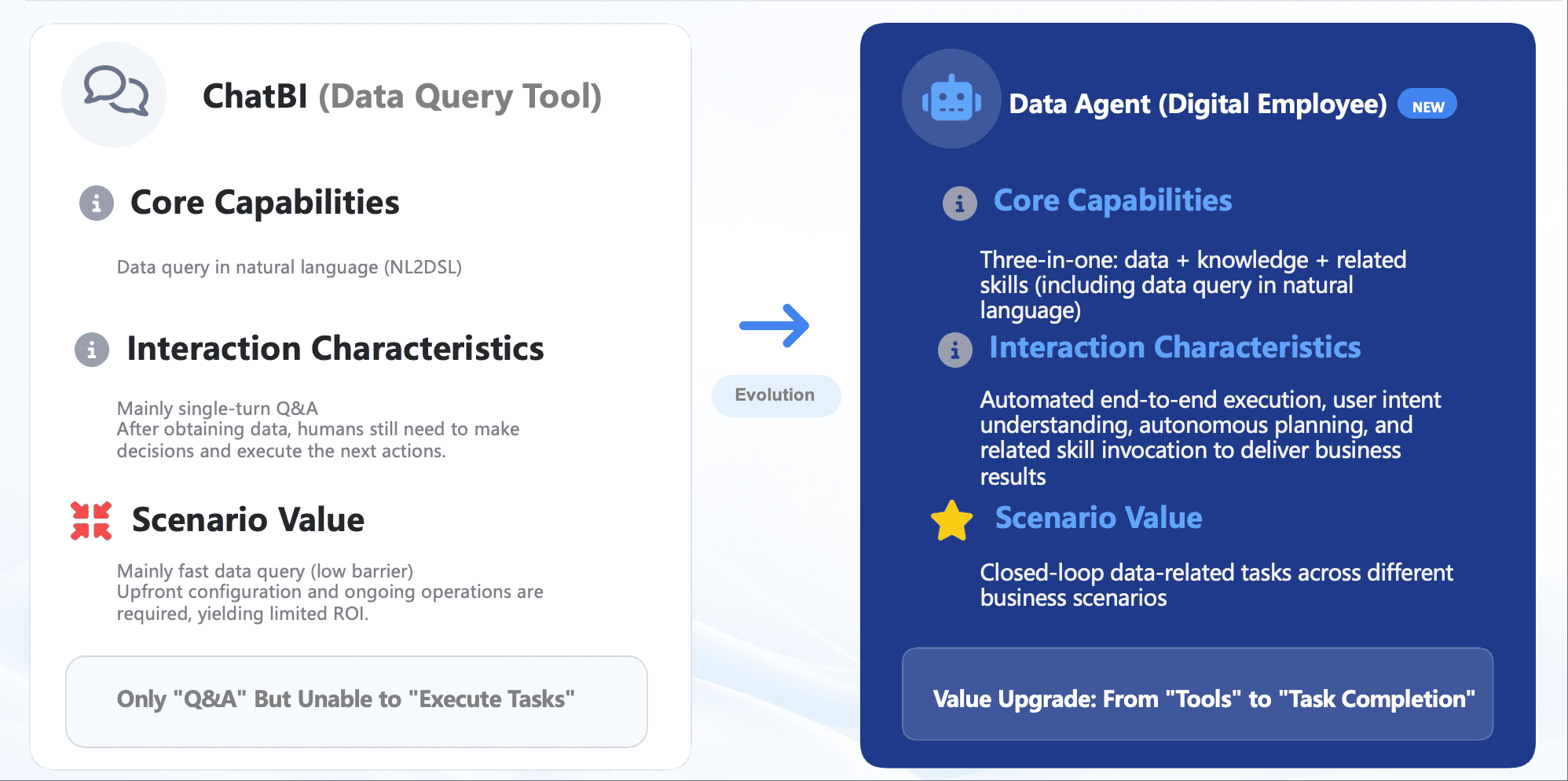
AI Agent Workflow vs. Chatbot, Automation, RPA, and Data Agent
AI agent workflow is often confused with chatbot automation or RPA. The differences matter because each tool solves a different class of problem.
An AI agent workflow may contain all of these pieces. It may use chatbot interaction for intake, automation for repetitive steps, RPA for legacy system actions, and a data agent for analytics. The difference is orchestration: the workflow connects the pieces into a controlled operating loop.
For example:
- A chatbot can answer, "What is our revenue this month?"
- An automation script can send the same report every Monday.
- A data agent can retrieve the approved revenue dashboard and explain changes.
- An AI agent workflow can generate the briefing, detect risk, notify owners, and summarize follow-up before the next meeting.
That is the move from isolated AI features to agentic execution.
 Evolution from Chatbot to Data Agent
Types and Enterprise Use Cases
The best AI agent workflow use cases are recurring tasks with clear data sources, known owners, and measurable follow-up. They should be specific enough to govern and valuable enough to repeat.
Data analysis workflow
A data analysis workflow helps business users ask questions in natural language and receive grounded answers from approved BI assets.
Example request:
Compare this week's sales performance by region, explain the top three gaps, and show the affected product lines.
The agent retrieves the right dashboard, applies metric definitions, generates a chart-based answer, and supports follow-up questions. This is the operational form of business data analytics.
Report generation workflow
A report generation workflow turns recurring reporting into a more controlled AI process. The agent can retrieve report data, apply a template, generate commentary, flag missing information, and send the draft for review.
Example request:
Generate the monthly management report summary and highlight abnormal expense changes by department.
This connects AI report generator value with enterprise reporting governance.
Risk alert workflow
A risk alert workflow monitors threshold breaches, abnormal metric changes, late tasks, inventory shortages, order delays, quality issues, or cost spikes.
Example request:
Scan orders at delivery risk today, identify likely causes, and push owner-specific action lists.
The agent checks business rules, compares data, explains likely causes, notifies owners, and follows up on unresolved items.
Daily briefing workflow
A daily briefing workflow prepares scheduled summaries for executives, regional managers, store managers, finance leaders, or operating teams.
Example request:
Prepare a Monday executive briefing with revenue, order risk, inventory pressure, and unresolved follow-up.
The agent retrieves KPIs, summarizes changes, highlights exceptions, and prepares a meeting-ready view similar to an executive dashboard.
Customer and operations workflow
In customer service, retail, manufacturing, logistics, and finance, AI agent workflows can classify issues, check status, retrieve related data, draft summaries, route tasks, and monitor closure.
The value is not only speed. The value is consistency: every repeated process follows the same data definitions, permission rules, owner mapping, and review requirements.
AI Agent Workflow Design Best Practices
An AI agent workflow should be designed like an enterprise process, not like a clever prompt. The strongest workflows are narrow, governed, and tied to business value.
-
Start with one recurring workflow
Choose a workflow that already wastes time or creates delay, such as weekly sales briefing, monthly report commentary, order delivery risk, quality anomaly follow-up, or finance variance analysis. -
Define the goal and stop condition
Clarify what the workflow must produce and when it is done. For example: "send each regional manager a weekly summary and list unresolved risks until next Monday." -
Map trusted data assets
Identify the approved dashboards, reports, datasets, templates, and knowledge libraries the agent is allowed to use. -
Standardize business language
Define KPI names, synonyms, filters, hierarchies, field aliases, time logic, and responsibility rules. This lets users ask in normal language without forcing the agent to guess. -
Set permissions and action boundaries
Decide who can ask questions, see answers, trigger workflows, receive alerts, approve outputs, or push actions. -
Use reusable Skills instead of prompt improvisation
Recurring tasks should run through controlled Skills with known inputs, outputs, review points, and source references. -
Keep humans in review for important decisions
AI can retrieve, summarize, suggest, push, and follow up. Humans should approve financial, compliance, customer-facing, and operational decisions. -
Measure adoption and output quality
Track usage, resolution rate, false alerts, response quality, time saved, review corrections, and follow-up closure.
These practices also make AI data quality and AI data management part of the workflow, not a separate afterthought.
How Dora Builds Governed AI Agent Workflow Execution
Dora is FanRuan's enterprise Data Agent platform. It turns trusted FineBI and FineReport assets, business rules, knowledge libraries, and reusable Skills into governed AI digital employees for data query, analysis, report generation, scheduled briefing, anomaly alert, action push, and follow-up.
For AI agent workflow adoption, Dora is designed for the enterprise middle ground: more capable than a chatbot, more governed than a prompt-only agent, and more practical than building every workflow from scratch.
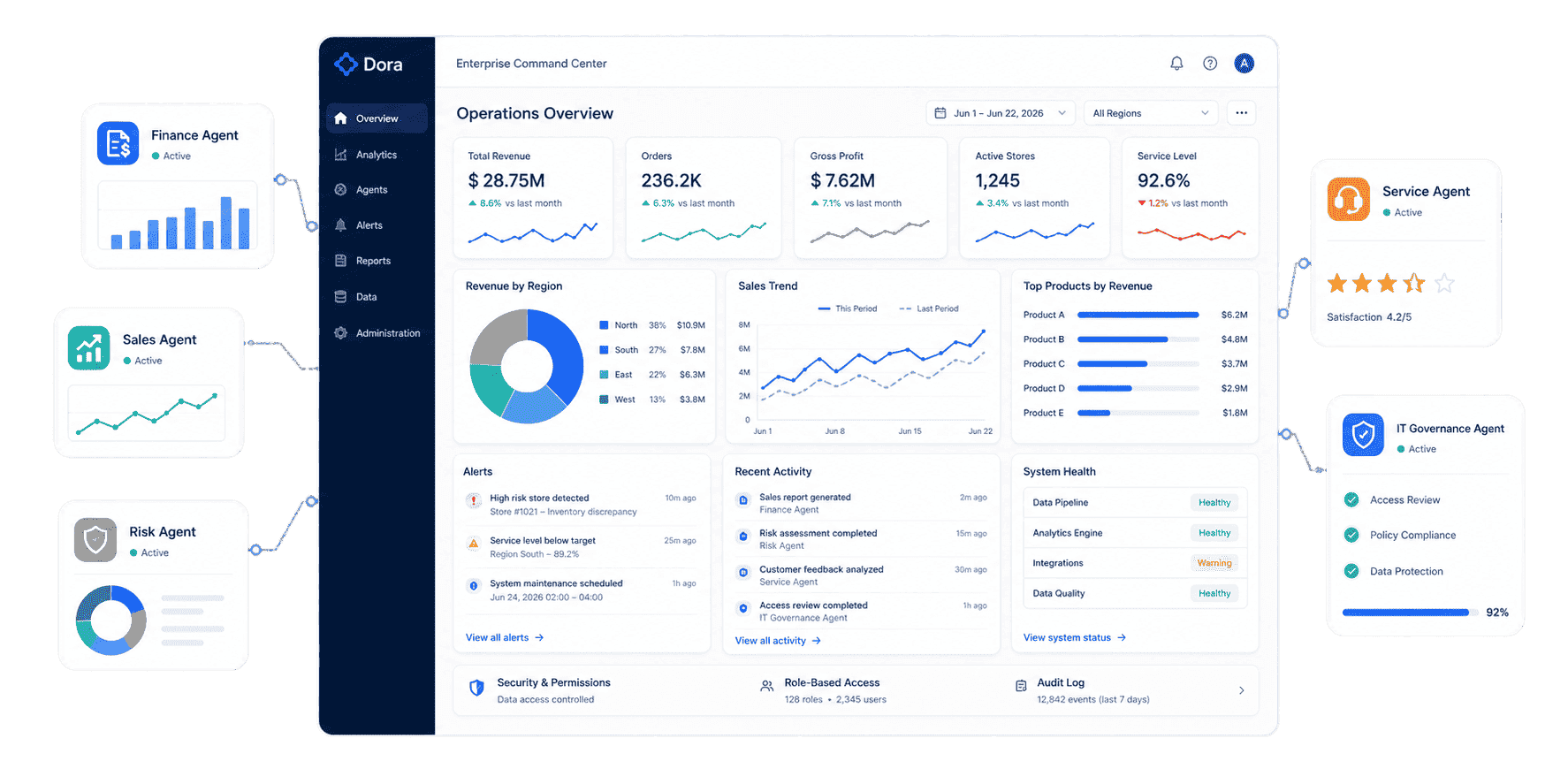
Dora can package work into role-based digital employees:
- Data Analyst: answers natural-language business questions, retrieves trusted BI assets, generates chart-based analysis, and supports follow-up questions.
- Report Researcher: creates structured reports from dashboards, datasets, templates, outlines, and business knowledge.
- Daily Briefing Secretary: prepares scheduled summaries for executives, managers, stores, regions, and operating teams.
- Risk Alert Officer: monitors thresholds, detects anomalies, explains likely causes, pushes alerts, and tracks handling progress.
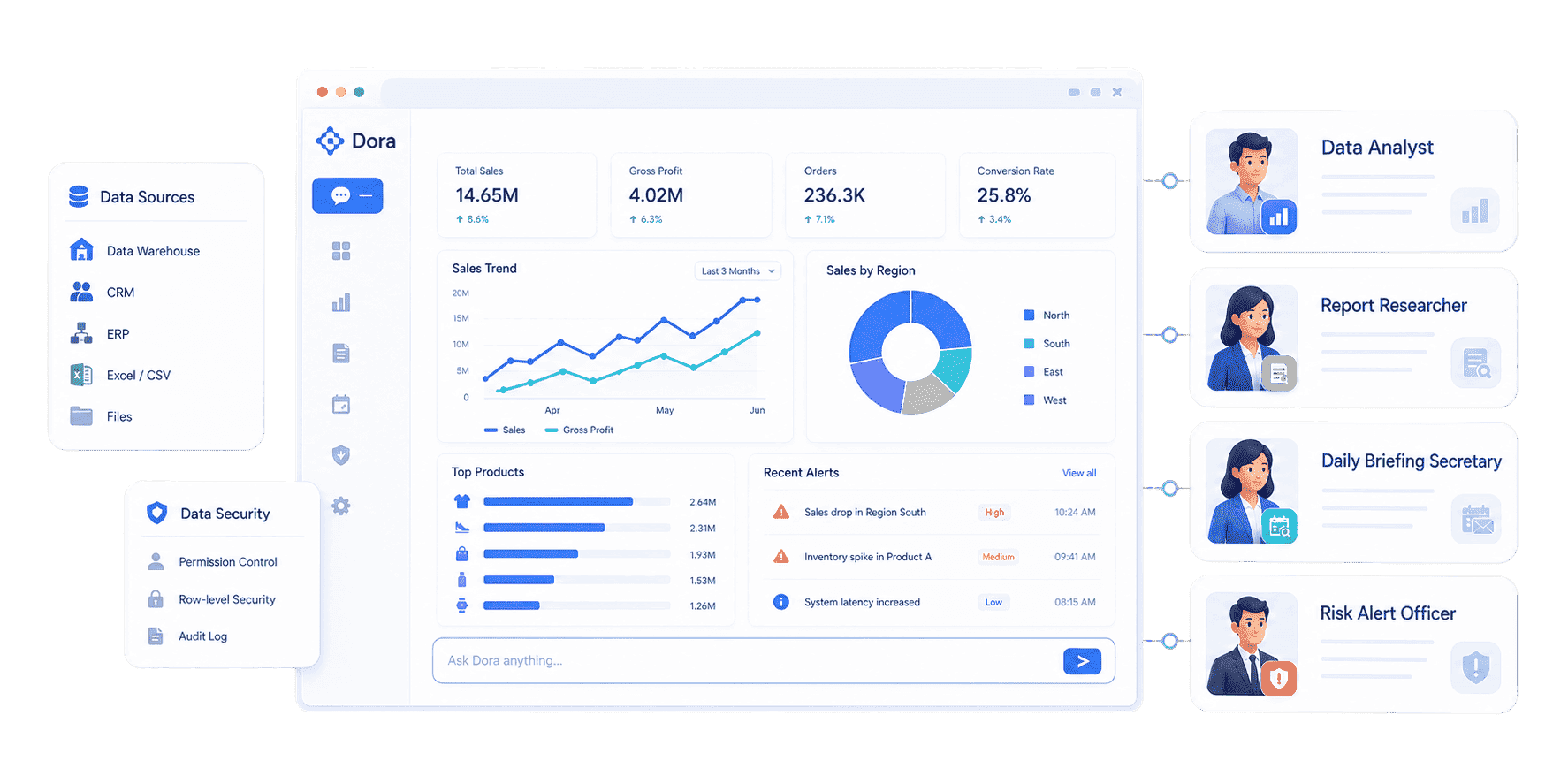 Role-based digital employees
Example Dora workflow:
Every Monday morning, generate a sales risk briefing from the approved FineBI dashboard, explain target gaps by region, identify owners, and summarize unresolved risks from last week.
Dora can run this as a closed-loop AI agent workflow:
- Retrieve trusted BI assets: Find the approved FineBI dashboard, FineReport report, metric model, or dataset.
- Apply business context: Use KPI definitions, semantic rules, field aliases, filters, permissions, and ownership rules.
- Generate an answer or artifact: Create a chart-based answer, dashboard-style analysis view, structured report summary, or briefing.
- Detect exceptions: Identify abnormal changes, threshold breaches, overdue items, or risk signals.
- Push to owners: Send summaries, alerts, or suggested actions to the right users or channels.
- Follow up: Track unresolved issues and prepare the next cycle's summary.
Dora does not replace FineBI or FineReport. FineBI and FineReport provide the trusted analytics and reporting foundation. Dora activates that foundation as fourth-generation Agentic BI: natural-language request, trusted semantic layer, governed query, answer, chart, summary, action push, and follow-up.
How to Build an Enterprise AI Agent Workflow Strategy
An enterprise AI agent workflow strategy should start with scenario selection, not a broad automation mandate. Agent products change quickly, but business pain points are stable: reporting delays, metric confusion, missed risks, slow follow-up, and manual coordination.
Here is a practical rollout path:
-
Pick a high-value scenario
Start with a workflow where data, owners, and decisions are already visible: sales briefing, order risk, finance variance, inventory shortage, customer service SLA, or executive KPI review. -
Audit the current workflow
Document who asks, who answers, which dashboards or reports are used, where delays happen, and what follow-up is required. -
Build the trusted BI foundation
Use FineBI for dashboards, metric modeling, self-service analysis, and visual exploration. Use FineReport for formatted reports, operational cockpits, data entry, and enterprise reporting workflows. -
Create the semantic and governance layer
Define KPI rules, business terms, permissions, source assets, owner mapping, escalation paths, review points, and audit requirements. -
Configure Dora Skills
Turn the workflow into a reusable Skill, such as "generate weekly sales briefing" or "scan manufacturing order risk." -
Pilot with one team
Measure answer quality, adoption, follow-up closure, review corrections, and time saved. -
Scale by scenario
Expand from one team to another only after the workflow is stable and trusted.
This is also the strongest commercial path: scenario + product + service. Use FineBI and FineReport to build trusted data assets. Use Dora to create AI digital employees. Use implementation service for data connection, semantic setup, KPI governance, Skills, permission design, and rollout.
Related concepts include agentic AI data engineering, AI dashboard, AI in analytics, augmented analytics, business intelligence architecture, business intelligence strategy, and closed loop reporting.
Want to explore more enterprise AI and data agent resources?
FAQs
An AI agent workflow is a structured process where an AI agent receives a goal, plans steps, retrieves trusted data, uses tools, applies rules, generates outputs, triggers actions, and follows up under governance.
A chatbot mainly replies to questions. An AI agent workflow connects conversation with planning, tool use, data retrieval, workflow execution, owner routing, alerts, and follow-up.
The main components are goal intake, planner, memory, tools, trusted data assets, semantic rules, permissions, execution engine, guardrails, monitoring, and human review points.
A sales AI agent workflow can retrieve the approved sales dashboard, compare revenue against target, explain regional gaps, generate a weekly briefing, push summaries to regional managers, and track unresolved risks.
No. AI agent workflows work best on top of trusted BI and reporting tools. Dashboards and reports provide governed data assets; the agent helps users query, explain, push, alert, and follow up.
It needs governed datasets, dashboards, reports, KPI definitions, business terms, permissions, source traceability, owner rules, and reusable Skills.
Dora turns FineBI and FineReport assets, business rules, knowledge libraries, permissions, and Skills into governed AI digital employees for data query, analysis, report generation, scheduled briefing, anomaly alert, action push, and follow-up.
