

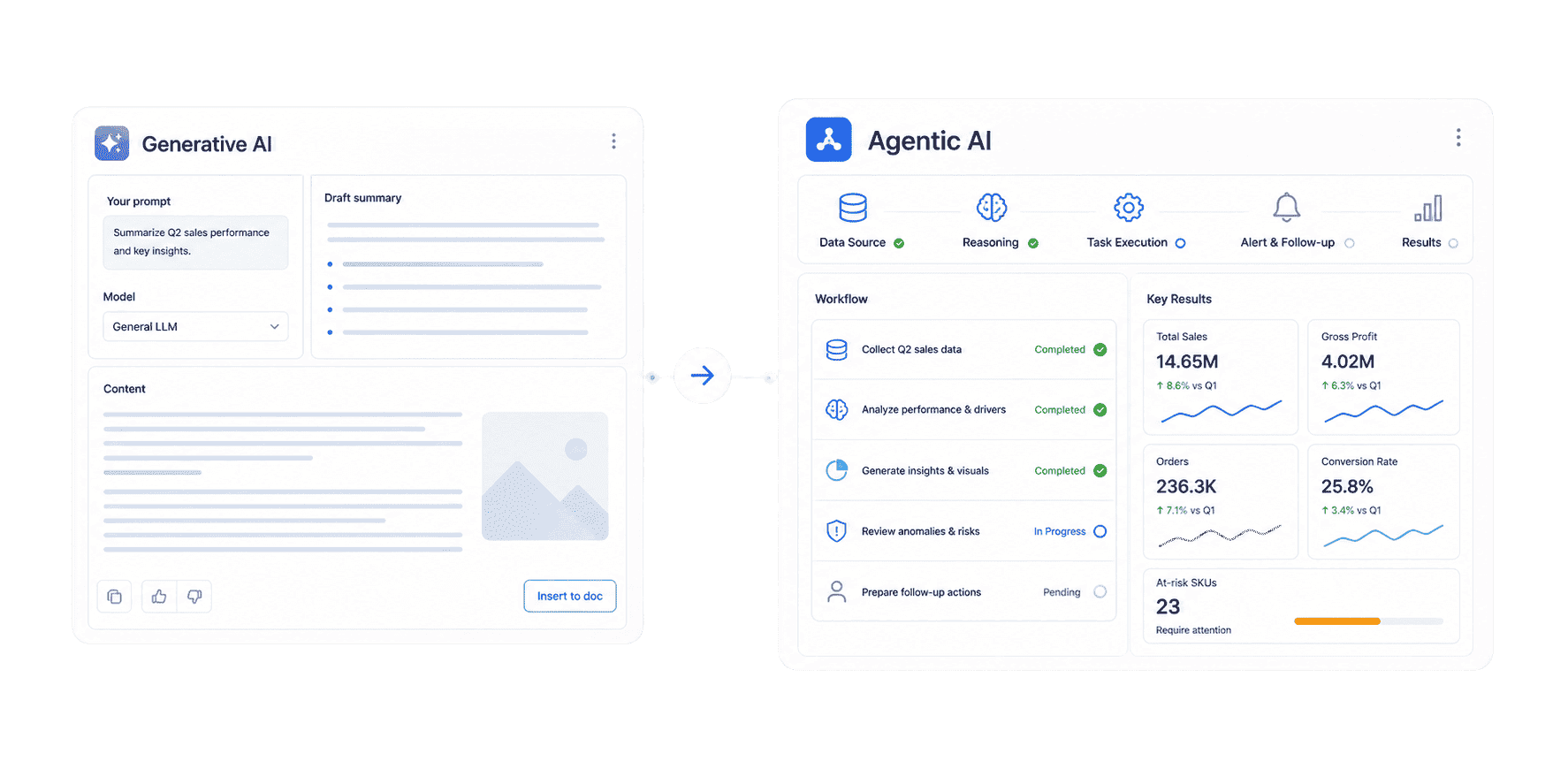
Generative AI vs Agentic AI: The Short Answer
Generative AI answers. Agentic AI acts. What does your team need?
Download the Enterprise Data Agent Guide to learn:
- How generative AI and agentic AI differ in practice
- What agentic AI needs to work safely in enterprise data workflows
- How teams across sales, finance, manufacturing, and retail use agentic AI to close the loop

How Each Works
Generative AI usually starts with a prompt and returns an output. The user provides a request, the model predicts a useful response, and the workflow often ends there unless the user asks another question.
Typical generative AI flow:
- Prompt: The user asks for a draft, summary, explanation, image, code snippet, or analysis.
- Context: The model uses the provided prompt, uploaded content, or retrieval context.
- Generation: The model creates text, code, image, chart explanation, or structured output.
- Review: The user checks the result, edits it, and decides the next step.
Agentic AI adds planning and execution around the model. It may still use a large language model, but the model becomes part of a larger system with memory, tools, data access, permissions, and workflow rules.
Typical agentic AI flow:
- Goal: The user gives an outcome, such as "prepare the weekly revenue risk briefing."
- Plan: The agent breaks the goal into steps and identifies required data, tools, and rules.
- Retrieve: The agent finds trusted data, dashboards, reports, templates, and knowledge assets.
- Execute: The agent generates answers, charts, summaries, alerts, or action lists.
- Push: The agent sends results to the right owner, team, or channel.
- Follow up: The agent tracks unresolved items and summarizes progress later.
In data scenarios, this distinction matters. A generative AI model can explain a table that a user provides. An agentic AI system can find the approved source, respect permissions, apply metric definitions, create a chart-based answer, and send the result into a business workflow.
That is the path from prompt output to governed execution.
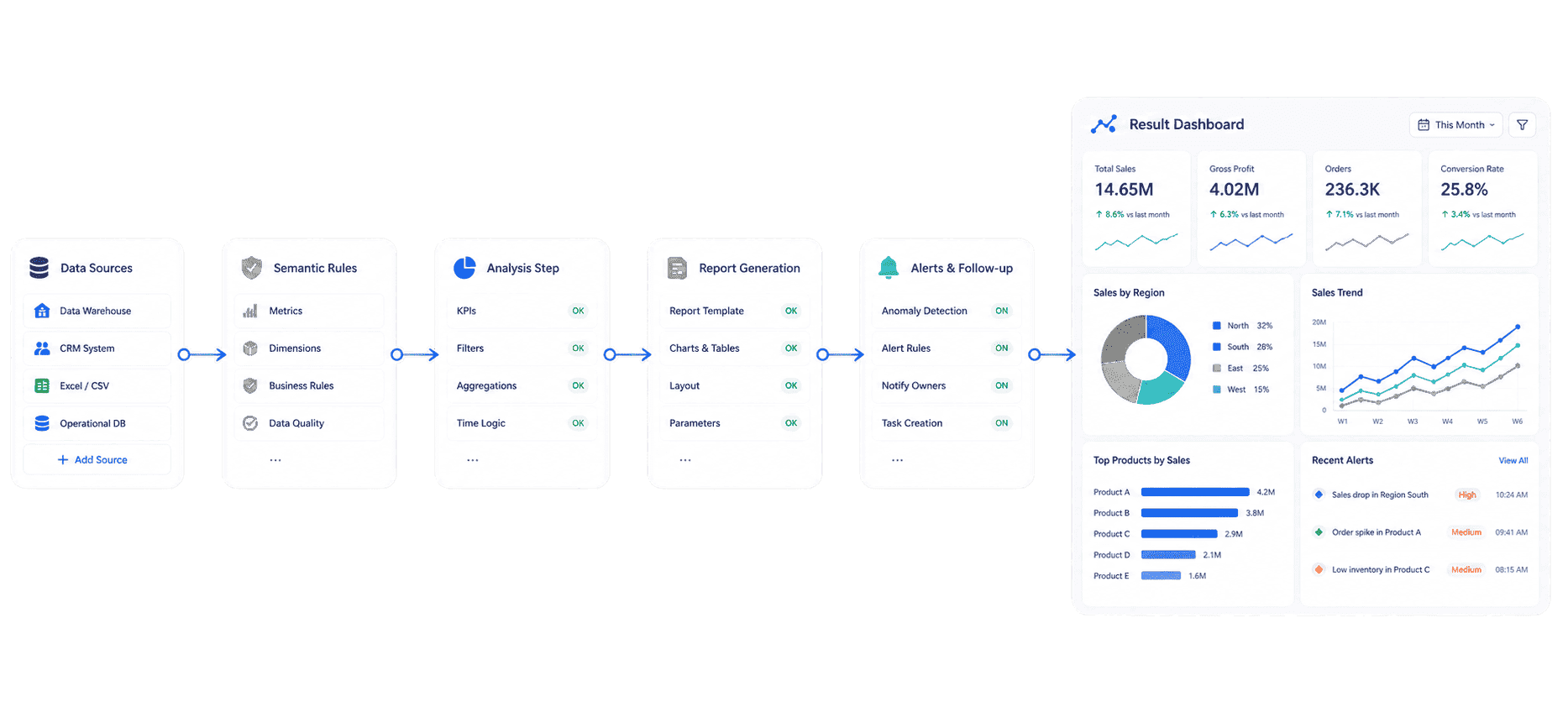 AI Agent Workflow
Generative AI vs Agentic AI: Capability Comparison
The clearest way to compare generative AI vs agentic AI is by looking at what each system is expected to do in production.
Generative AI is not worse than agentic AI. It is a different layer. Most agentic AI systems use generative AI inside them. The question is whether the business needs a single generated answer or a repeatable operating loop.
Use generative AI when:
- The task is mostly content creation, summarization, editing, coding, or ideation.
- A human will review the output before using it.
- The task does not require system actions or workflow ownership.
- The data needed is already provided in the prompt or approved context.
Use agentic AI when:
- The task requires multiple steps across systems.
- The AI needs to retrieve data, use tools, or trigger actions.
- The workflow repeats daily, weekly, or monthly.
- The result must be routed to owners, channels, or downstream systems.
- The business needs monitoring, alerting, follow-up, or escalation.
This is also why AI data analysis and AI in analytics are moving toward agentic workflows. The value is not only that AI explains what happened. The value is that AI helps the organization decide what happens next.
Where Each Fits in Enterprise Work
Generative AI vs agentic AI is not only a technical distinction. It changes how teams design enterprise work.
Content and knowledge work
Generative AI is a strong fit for first drafts, knowledge summaries, policy explanations, training content, email copy, meeting notes, and document translation. It reduces blank-page work and helps people move faster.
Agentic AI becomes useful when content work connects to systems. For example, an agent can collect meeting notes, identify unresolved action items, assign owners, check status later, and prepare a progress summary.
Reporting and analytics
Generative AI can write a narrative summary for a report or explain why a metric changed. But if users must manually export data, paste tables, verify definitions, and send summaries, the workflow still depends on manual effort.
Agentic AI can retrieve governed data, generate a structured summary, detect threshold breaches, and push a briefing to the right person. This is where automated reporting and agentic AI start to converge.
Business operations
Generative AI can help write a response to a customer issue. Agentic AI can classify the issue, check the customer's history, identify the right policy, draft the response, route it for approval, and update the case record.
Sales and management
Generative AI can draft a sales update. Agentic AI can monitor pipeline data, identify stalled opportunities, generate an owner-specific follow-up note, and push reminders before the weekly review.
IT and data teams
Generative AI can explain SQL, document a data model, or draft a governance policy. Agentic AI can help enforce repeatable workflows: checking data quality signals, monitoring metric anomalies, routing exceptions, and generating audit-ready summaries.
For enterprise teams, the decision is practical: if the task stops at content, generative AI may be enough. If the task continues into data retrieval, decision support, owner routing, and follow-up, agentic AI is the better design.
Why Data and BI Change the Answer
Generative AI vs agentic AI becomes especially important in data and business intelligence. Business users rarely need a generic answer. They need an answer based on the right data, the right metric definition, the right permission boundary, and the right business context.
That is why enterprise agentic AI needs a trusted data foundation:
- Governed data assets: approved datasets, dashboards, reports, and analysis subjects.
- Metric definitions: consistent rules for revenue, gross margin, conversion, delivery rate, inventory turnover, defect rate, and other KPIs.
- Semantic context: business terms, synonyms, field meanings, filters, hierarchies, time logic, and scenario rules.
- Permissions: user, role, department, region, agent, dashboard, report, and data access boundaries.
- Workflow Skills: reusable procedures for recurring tasks such as weekly sales briefings, order risk scans, monthly reports, and anomaly alerts.
- Traceability: source links, query paths, report references, and human review rules.
Without that foundation, agentic AI can become a risky automation layer. It may generate confident answers from the wrong metric, push alerts to the wrong owner, or expose data beyond the user's access rights.
With the right foundation, agentic AI becomes practical. A data agent can operate on trusted data visualization, business intelligence platform, and reporting assets instead of improvising from raw tables.
This is the shift from self-service BI to Agentic BI:
- Static reports showed what happened.
- Self-service BI helped analysts explore why.
- Augmented analytics helped systems surface patterns and explain anomalies.
- Agentic BI lets users ask in natural language, then maps the request to trusted metrics, semantic rules, BI assets, Skills, answers, alerts, and follow-up workflows.
In this context, the better question is not "Which is more advanced?" The better question is "Where does the work need to end?" If it ends with a draft, use generative AI. If it ends with a governed action loop, use agentic AI.
Governance, Risk, and Human Review
Generative AI vs agentic AI also changes the risk model. A bad generated answer is a quality problem. A bad agentic action can become an operational problem.
Generative AI risks include:
- Hallucinated facts, citations, calculations, or explanations.
- Inconsistent wording, structure, and business terminology.
- Data exposure through uncontrolled prompts or uploads.
- Overreliance on AI-generated content without review.
Agentic AI adds more risks:
- The agent may use the wrong data source, tool, or workflow.
- The agent may take an action before a human approves it.
- The agent may push a summary to the wrong user or channel.
- The agent may repeat a flawed workflow at scale.
- The agent may blur responsibility if owners and escalation paths are unclear.
Enterprise agentic AI therefore needs stronger controls than a simple chatbot:
- Permission governance: AI outputs must respect the same access boundaries as BI and reporting assets.
- Tool boundaries: agents should only use approved tools and actions for the scenario.
- Source grounding: answers should connect back to trusted dashboards, reports, datasets, or knowledge libraries.
- Skill design: repeated tasks should run through controlled Skills instead of free-form prompt improvisation.
- Human review: decisions with financial, compliance, customer, or operational impact should stay under human control.
- Auditability: teams need to know what the agent retrieved, generated, pushed, and followed up on.
This is why agentic AI should not be treated as "AI with more autonomy." It should be treated as a governed workflow system that uses AI.
How Dora Turns BI Into Agentic Workflows
Dora is FanRuan's enterprise Data Agent platform. It turns trusted FineBI and FineReport assets, business rules, knowledge libraries, and reusable Skills into governed AI digital employees for data query, analysis, report generation, scheduled briefing, anomaly alert, action push, and follow-up.
In the generative AI vs agentic AI conversation, Dora belongs on the agentic side. It does not simply generate text from prompts. It helps teams turn BI and reporting assets into repeatable AI-powered work.
Dora can support role-based digital employees such as:
- Data Analyst: answers business questions, retrieves the right BI assets, generates chart-based analysis, and supports follow-up questions.
- Report Researcher: generates structured reports from dashboards, datasets, templates, outlines, and business knowledge.
- Daily Briefing Secretary: prepares scheduled summaries for executives, regional managers, store managers, and operating teams.
- Risk Alert Officer: monitors thresholds, detects anomalies, explains likely causes, pushes alerts, and tracks handling progress.
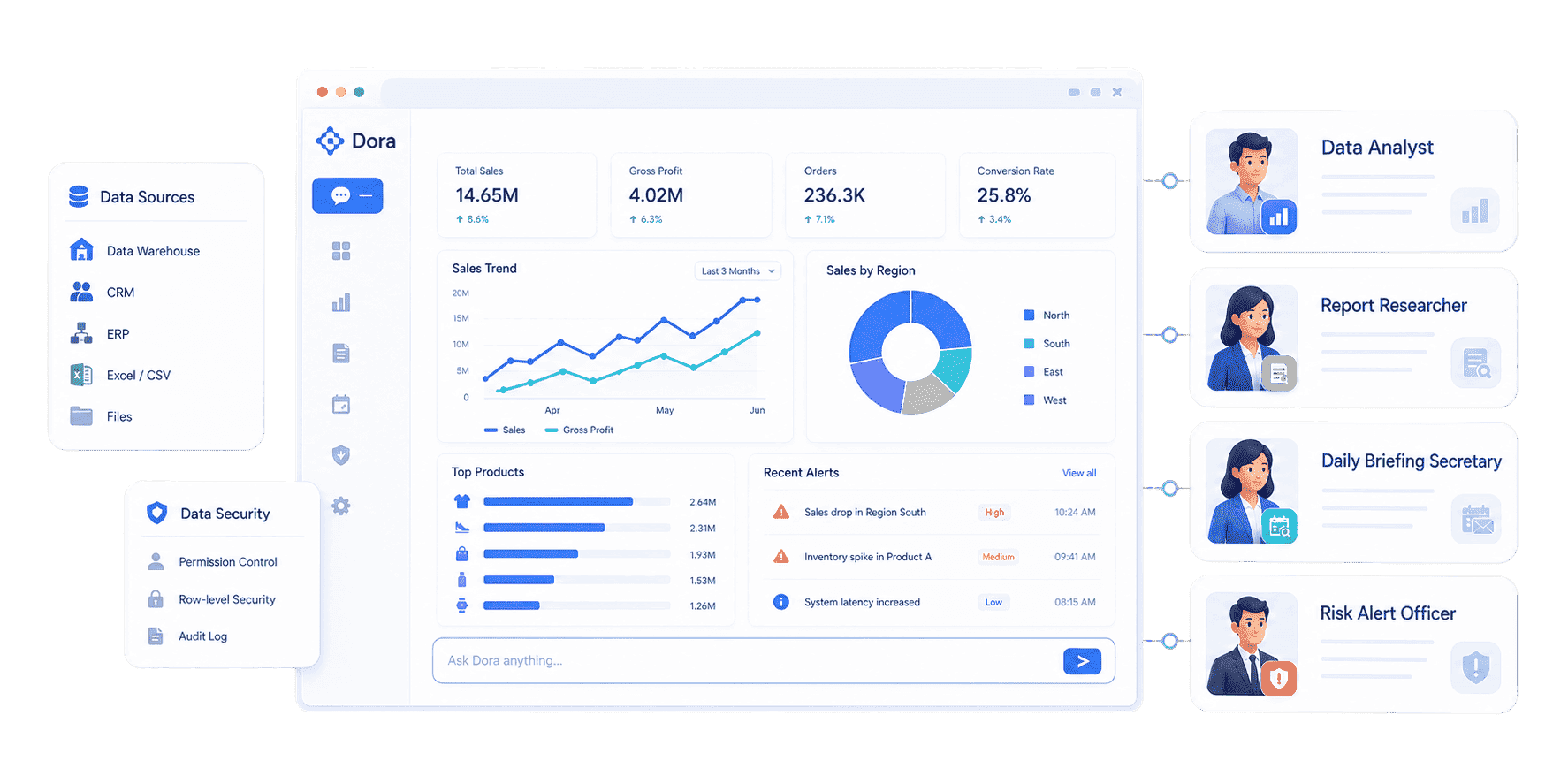 Dora's role-based digital employee
Example Dora request:
Generate a weekly sales performance briefing by region, explain the largest target gaps, create a dashboard-style analysis view, and push the summary to each regional manager.
Dora can handle this as a governed agentic workflow:
- Retrieve trusted assets: Find the approved FineBI dashboard, FineReport report, dataset, or metric model.
- Apply business context: Use KPI definitions, field aliases, filters, permissions, and responsibility rules.
- Generate output: Produce a chart-based answer, structured report summary, or dashboard-style analysis view.
- Detect exceptions: Identify abnormal changes, threshold breaches, overdue items, or risk signals.
- Push to owners: Send summaries, alerts, or suggested actions to the right users or channels.
- Follow up: Track unresolved issues and prepare the next briefing.
Dora's value is not that it replaces FineBI or FineReport. FineBI and FineReport provide the trusted analytics and reporting foundation. Dora activates that foundation through Agentic BI, where AI can query, explain, summarize, alert, push, and follow up inside governed enterprise boundaries.
How to Build an Enterprise Strategy
A practical generative AI vs agentic AI strategy should start with the work, not the technology label.
-
Separate content tasks from workflow tasks
Use generative AI for drafting, summarizing, explaining, and ideation. Use agentic AI when the task needs data retrieval, tool use, routing, monitoring, or follow-up. -
Start with one high-value recurring workflow
Good candidates include sales briefings, monthly management reporting, order delivery risk, inventory shortage alerts, finance variance analysis, quality anomaly follow-up, or executive KPI reviews. -
Build the trusted BI foundation first
Use FineBI for dashboards, metric modeling, visual analysis, and reusable analytics assets. Use FineReport for formatted reports, operational cockpits, and enterprise reporting workflows. -
Define the semantic layer
Map KPI definitions, business terms, synonyms, filters, hierarchies, time logic, owners, thresholds, and exception rules. This reduces ambiguity when the AI interprets natural-language requests. -
Design governed Skills for repeated work
Do not ask the model to improvise every recurring task. Turn workflows into reusable Skills with known inputs, outputs, permissions, review points, and escalation rules. -
Keep humans in the decision loop
Let AI retrieve, explain, summarize, push, and follow up. Keep important approvals, external actions, and policy decisions under human review. -
Scale by scenario, not by hype
After one workflow proves useful, expand to another department or use case. The strongest package is scenario + product + service: trusted BI assets, Dora digital employees, implementation support, governance, Skills, and rollout.
This is where Dora fits commercially. It helps enterprises move beyond prompt experiments and toward landed agentic workflows. FineBI and FineReport make the data trustworthy. Dora makes the workflow actionable.
Related AI and data concepts include agentic AI data engineering, AI dashboard, AI report generator, AI data quality, AI data management, business intelligence architecture, business intelligence strategy, and closed loop reporting.
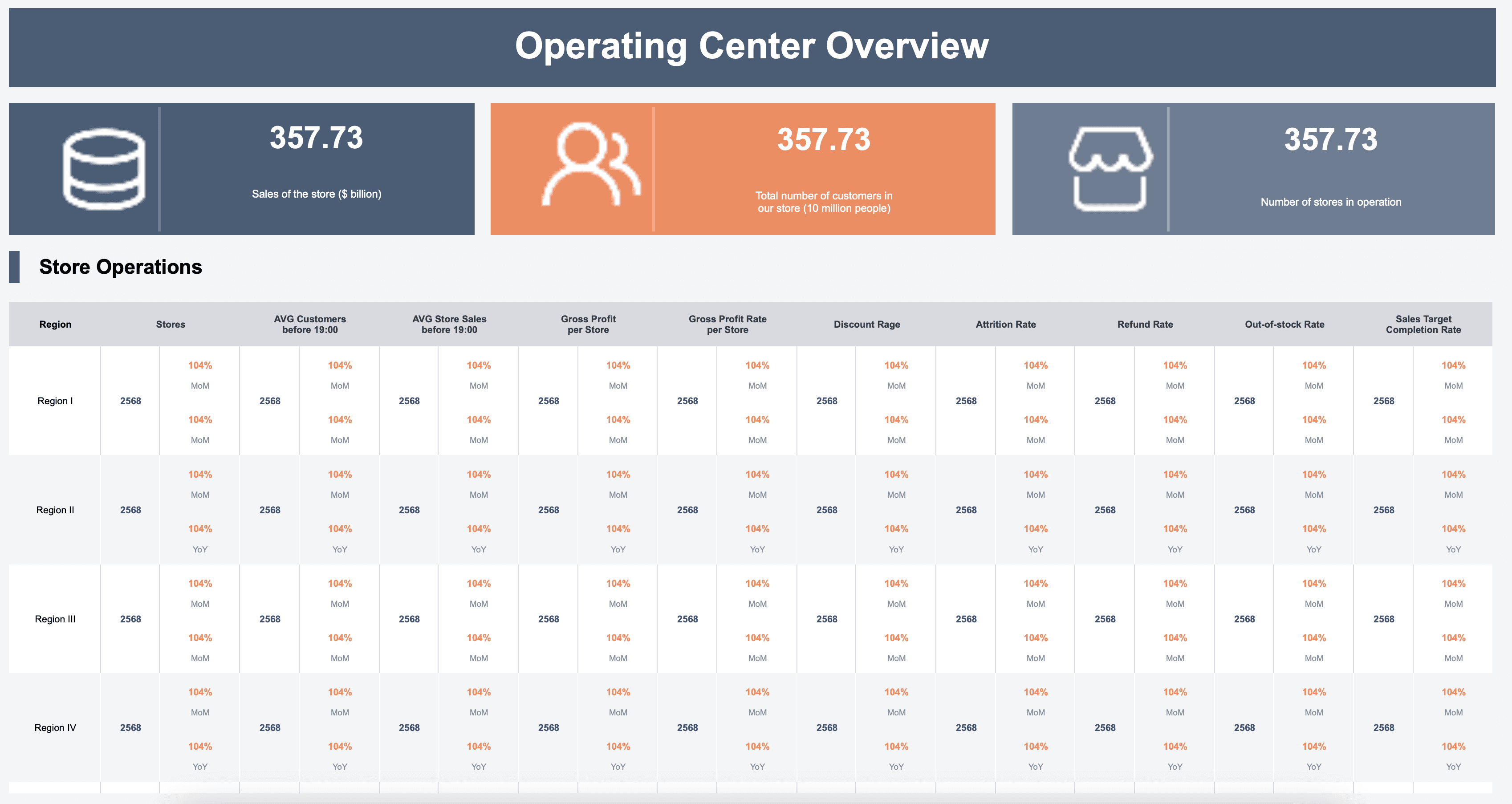
Want to explore more enterprise AI and data agent resources?
FAQs
Generative AI creates content or answers from prompts. Agentic AI uses AI inside a goal-driven workflow: it can plan steps, retrieve data, use tools, generate outputs, push results, and follow up under configured rules.
No. Agentic AI often uses generative AI models, but it adds planning, tool use, memory, workflow execution, and governance. Generative AI is usually the content engine; agentic AI is the operating loop around it.
Not always. Generative AI is better for drafting, summarizing, explaining, and creating. Agentic AI is better for repeatable workflows that require data access, tool use, routing, alerts, and follow-up.
Generative AI can summarize a table or explain a chart. Agentic AI can retrieve the approved dashboard, apply KPI definitions, generate a chart-based answer, detect exceptions, push the summary to owners, and follow up before the next meeting.
It needs governed datasets, trusted dashboards and reports, KPI definitions, semantic rules, permissions, reusable Skills, source traceability, and human review points.
No. Agentic AI works best on top of trusted BI and reporting assets. BI tools provide governed metrics, dashboards, reports, and visual analysis. Agentic AI helps users query, explain, push, alert, and follow up on those assets.
Dora turns FineBI and FineReport assets, business rules, knowledge libraries, permissions, and Skills into governed AI digital employees for data query, analysis, report generation, scheduled briefing, anomaly alert, action push, and follow-up.
