A digital format is any standardized method of encoding information so that digital devices can store, transmit, and process it. In enterprise environments, the term extends far beyond consumer media — it encompasses the structured and unstructured file types that flow between ERP systems, CRM platforms, databases, APIs, spreadsheets, and reporting tools.
Understanding digital formats in a business context is not an academic exercise. When data is trapped in incompatible formats across siloed systems, teams face manual imports, inconsistent fields, duplicate records, and delayed reporting. This guide covers the definition, common types, business examples, key distinctions, and how tools like FineDataLink help enterprises manage data across diverse digital formats.

A digital format defines how information is encoded for storage, transmission, or processing by digital systems. Every file on a computer — whether a PDF contract, a CSV export, a JSON API response, or an MP4 training video — exists in a specific digital format that determines how software reads and interprets its contents.
In business, digital formats fall into two broad categories:
- Human-readable formats: Designed for people to view and interact with directly (PDF reports, DOCX documents, PNG images, MP4 videos).
- Machine-readable formats: Designed for systems to exchange and process data programmatically (CSV, JSON, XML, SQL tables, API payloads).
Most enterprise data workflows involve both. A sales order originates as structured data in an ERP database (machine-readable), gets exported as a CSV for integration (machine-readable), and is rendered as a PDF invoice for the customer (human-readable). Managing the transitions between these formats is a core data integration challenge.
Document formats encode text, layout, and formatting for human consumption. In business, they serve as the primary vehicle for formal communication, record-keeping, and regulatory compliance.
- PDF: Platform-independent; preserves exact layout. Used for contracts, invoices, regulatory filings, and archived records.
- DOCX: Editable word processing format. Used for drafting proposals, internal memos, and collaborative document creation.
- XLSX: Spreadsheet format supporting formulas, pivot tables, and structured data. Widely used for financial models, ad-hoc analysis, and data exports from business systems.
The challenge with document formats in enterprise contexts is that they often contain business-critical data locked inside unstructured layouts. Extracting tabular data from PDFs or reconciling spreadsheet versions across departments requires dedicated processing or integration tooling.
Image formats encode visual information. In business, they appear in product catalogs, marketing assets, scanned documents, and dashboard exports.
- PNG: Lossless compression; supports transparency. Used for logos, icons, UI elements, and high-fidelity graphics.
- JPG/JPEG: Lossy compression; optimized for photographs. Used for product photos, event images, and web content where file size matters.
- SVG: Vector-based; infinitely scalable. Used for charts, diagrams, and responsive web graphics.
- TIFF: High-resolution; lossless. Used for professional printing, archival scans, and medical/legal document imaging.
Scanned documents (often TIFF or PDF) represent a significant data integration challenge: the information they contain is visually present but structurally inaccessible without OCR or manual re-entry.
Audio and video formats encode time-based media. In enterprise settings, their primary uses are training, compliance recording, meeting documentation, and internal communications — not consumer entertainment.
- MP4: Universal compatibility; efficient compression. Standard for training videos, recorded meetings, and product demos.
- WAV: Uncompressed audio; high fidelity. Used for voice recordings, compliance call logs, and professional audio production.
- MP3: Compressed audio; small file size. Used for podcast-style internal communications and audio training modules.
These formats are typically managed through digital asset management (DAM) systems rather than data integration platforms. Their relevance to enterprise data workflows is primarily as metadata sources (e.g., transcription text extracted from meeting recordings fed into analytics).
Data formats are the backbone of enterprise system interoperability. They encode structured information for machine-to-machine exchange, transformation, and loading.
- CSV: Simple tabular format; universally supported. Used for data exports, batch imports, and lightweight interchange between systems.
- JSON: Hierarchical key-value format; native to web APIs. Used for REST API responses, configuration files, and NoSQL document stores.
- XML: Tag-based hierarchical format; schema-validatable. Used for legacy system integration, EDI transactions, and industry-standard data exchange (HL7, FpML).
- SQL tables / Parquet / Avro: Columnar or row-based formats optimized for analytical processing. Used in data warehouses, data lakes, and big data pipelines.
Data formats are where most enterprise integration friction occurs. Systems use different schemas, field naming conventions, encoding standards, and update frequencies. Reconciling these differences is the core function of data integration platforms.
Abstract definitions become concrete through real-world application. These examples illustrate how digital formats operate across typical enterprise workflows.
Each scenario involves multiple digital formats crossing system boundaries. The value is not in any single format — it is in the reliable, automated flow between them.
Sales Order Processing
A single sales order touches at least three systems and four distinct digital formats before fulfillment is complete. The order originates as a structured record in the ERP database (SQL tables). If the customer uses EDI, the same order arrives as an XML transaction set (e.g., X12 850) that must be parsed and mapped to the ERP schema. Once confirmed, the system generates a PDF invoice for the customer and a ZPL-formatted shipping label for the warehouse printer. Meanwhile, CRM records are updated via JSON API to reflect the new opportunity stage.
The integration challenge is twofold: schema mapping between the EDI XML structure and the ERP relational model must handle field-level transformations (date formats, unit codes, address parsing), and the PDF/ZPL generation must pull accurate data from the same source of truth that feeds the CRM update. When any of these format translations fails silently, the result is mis-shipped orders, incorrect invoices, or stale pipeline forecasts.
Financial Reporting
Financial close processes aggregate data from fundamentally different format families. The general ledger lives in a relational database (SQL). Bank statements arrive as CSV downloads or scanned PDFs requiring OCR extraction. Expense reports are submitted as XLSX attachments with embedded receipts. Tax filings may require XBRL-tagged output conforming to regulatory schemas.
The finance team must ingest all these formats, reconcile them against each other (e.g., matching bank CSV transactions to GL entries), apply currency conversions and period adjustments, and produce consolidated statements in both human-readable (PDF) and machine-readable (XBRL) formats. Manual handling of this format diversity is the primary driver of extended close cycles and restatement risk. Automated pipelines that normalize multi-format inputs into a unified data model reduce close time and improve audit readiness.
Customer Onboarding
Modern customer onboarding combines structured digital inputs with unstructured document verification. A web form submits customer data as a JSON payload. Identity verification requires processing scanned IDs or passport photos (PDF/JPG) through OCR or document AI services. Credit checks return responses from third-party APIs in XML or JSON. All of this must converge into a single CRM customer record and a compliant archival package (typically PDF).
The format challenge here is heterogeneity within a single workflow: structured JSON fields must be validated and normalized, unstructured image content must be extracted and mapped to structured fields, and external API responses must be parsed according to vendor-specific schemas. Failures at any format boundary — a malformed JSON submission, an unreadable scan, an unexpected XML namespace — can stall onboarding entirely. Integration pipelines that handle all three format types within a single orchestrated workflow prevent bottlenecks and maintain compliance audit trails.
Supply Chain Visibility
Real-time supply chain visibility depends on correlating events from suppliers, warehouses, and carriers — each using different digital formats. Suppliers send Advance Ship Notices (ASNs) via EDI/XML. Warehouse management systems (WMS) track inventory movements in SQL databases. Carriers expose tracking updates through REST APIs returning JSON. Downstream dashboards and exception alerts must synthesize all three into a unified shipment timeline.
This scenario demands real-time multi-format synchronization with event correlation logic. An ASN (XML) declares expected quantities; a WMS receipt (SQL) confirms actual quantities; a carrier scan (JSON) provides transit status. When these arrive asynchronously in different formats, the integration layer must match them by shipment ID, detect discrepancies (e.g., short shipment), and trigger alerts — all within minutes, not hours. Batch file transfers cannot support this latency requirement; CDC-based synchronization and streaming integration are necessary.
Employee Training Completion
Compliance-driven industries must maintain auditable records of employee training completion across multiple systems. The Learning Management System (LMS) stores enrollment and completion records in SQL tables. Video-based training platforms emit completion events as JSON webhooks. Assessment results are often exported as CSV files. HR needs a consolidated compliance report (PDF/XLSX) and individual certification records for audit purposes.
The format challenge is cross-system aggregation with audit trail integrity. Data must be joined across SQL, JSON, and CSV sources using employee identifiers that may be formatted differently in each system. The output must be generated in regulator-accepted formats (often PDF with specific metadata requirements) while maintaining traceability back to source records. Manual compilation of these reports introduces both compliance risk and administrative overhead. Automated pipelines that aggregate, validate, and format training data ensure audit readiness without recurring manual effort.
Each scenario illustrates the same principle: the value is not in any single digital format, but in the reliable, automated flow between them. When format transitions are manual, brittle, or undocumented, they become the hidden bottleneck in otherwise well-designed business processes.
These terms are frequently used interchangeably but have distinct meanings. Clarity prevents miscommunication between business stakeholders and technical teams.
All file formats and data formats are digital formats, but not all digital formats are data formats. An MP4 video is a digital format and a file format, but it is not a data format in the enterprise integration sense. A SQL table is a data format but may not correspond to a discrete file. Understanding this hierarchy helps teams select appropriate tooling: file converters handle file format translation; data integration platforms handle data format reconciliation and synchronization.
Digital format diversity is not inherently problematic — it reflects legitimate differences in how systems are designed and how users consume information. Problems arise when format diversity creates manual work, data inconsistency, or reporting delays.
These are not technology problems in isolation. They are business problems caused by insufficient investment in the data integration layer that sits between format-diverse systems.
Even well-intentioned organizations encounter predictable format-related challenges:
Most of these problems are solvable — not by eliminating format diversity, but by automating the translation, validation, and synchronization between formats.
When business data is stored in different digital formats, teams often struggle with manual import, inconsistent fields, duplicate records, and delayed reporting. FineDataLink helps connect databases, files, APIs, and enterprise systems so data can be synchronized, transformed, and prepared for reporting or AI analysis.
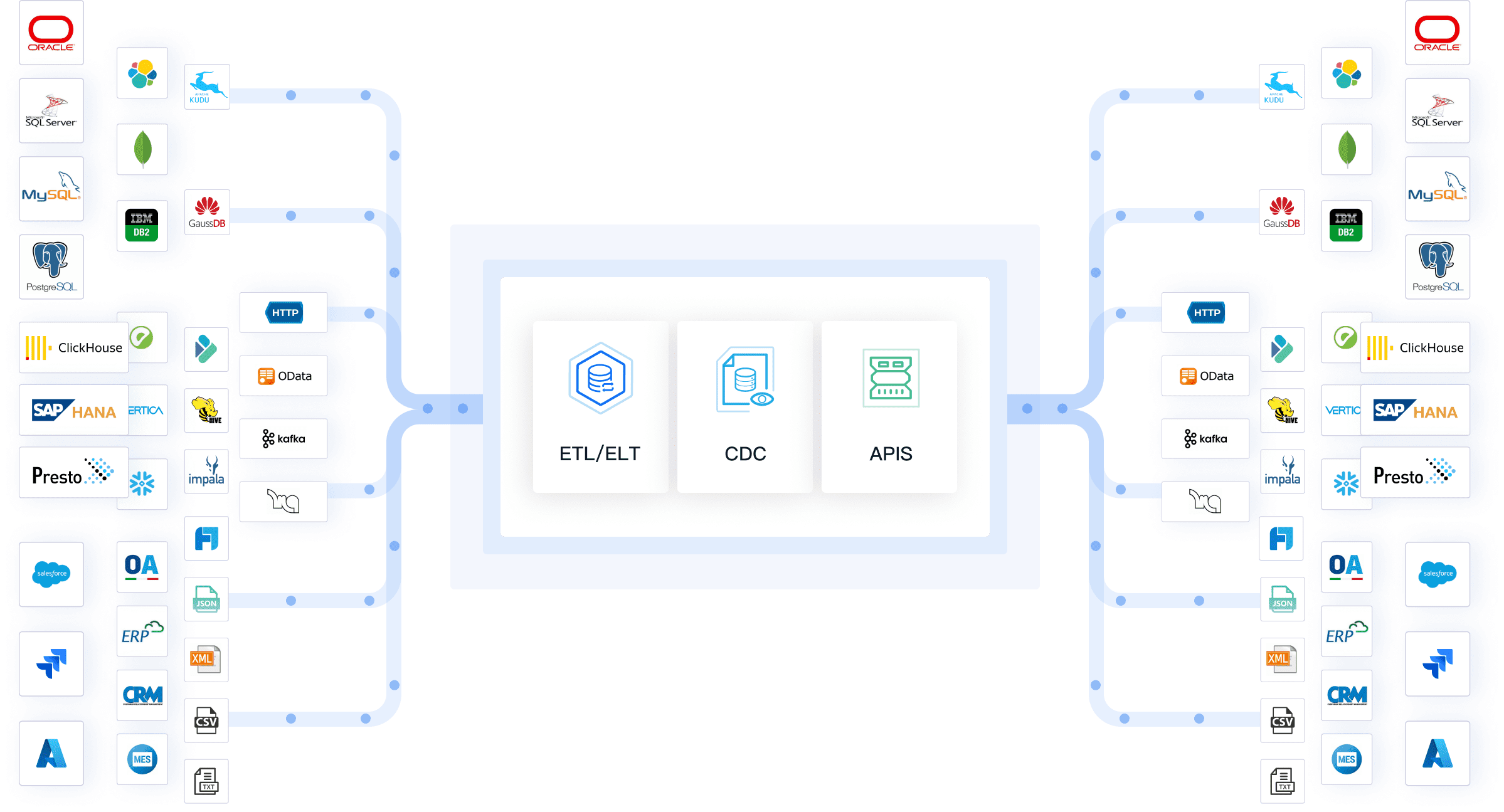
FineDataLink addresses format-related integration challenges through:
- 100+ native connectors: Direct support for relational databases (MySQL, PostgreSQL, Oracle, SQL Server), NoSQL stores, cloud data warehouses, REST/SOAP APIs, ERP/CRM systems, spreadsheets (XLSX, CSV), and file-based formats (JSON, XML, Parquet). Connectors handle format-specific parsing, encoding, and schema interpretation natively.
- Visual ETL/ELT pipeline design: Low-code interface for defining format transformations — field mapping, type conversion, date standardization, nested JSON flattening, XML-to-table conversion — without custom scripting. Complex format reconciliation logic is documented, version-controlled, and reusable.
- Real-time CDC synchronization: Change Data Capture enables near-real-time replication from source databases to target warehouses or analytics platforms, replacing stale batch file exports with continuous data flow.
- Data quality validation inline: Format-level checks (required fields, type validation, referential integrity, deduplication) execute within the pipeline, preventing malformed or inconsistent data from reaching downstream consumers.
- Monitoring and error handling: End-to-end visibility into pipeline execution, row counts, error rates, and format-specific failure reasons. Automated alerts surface issues before they impact reports or decisions.
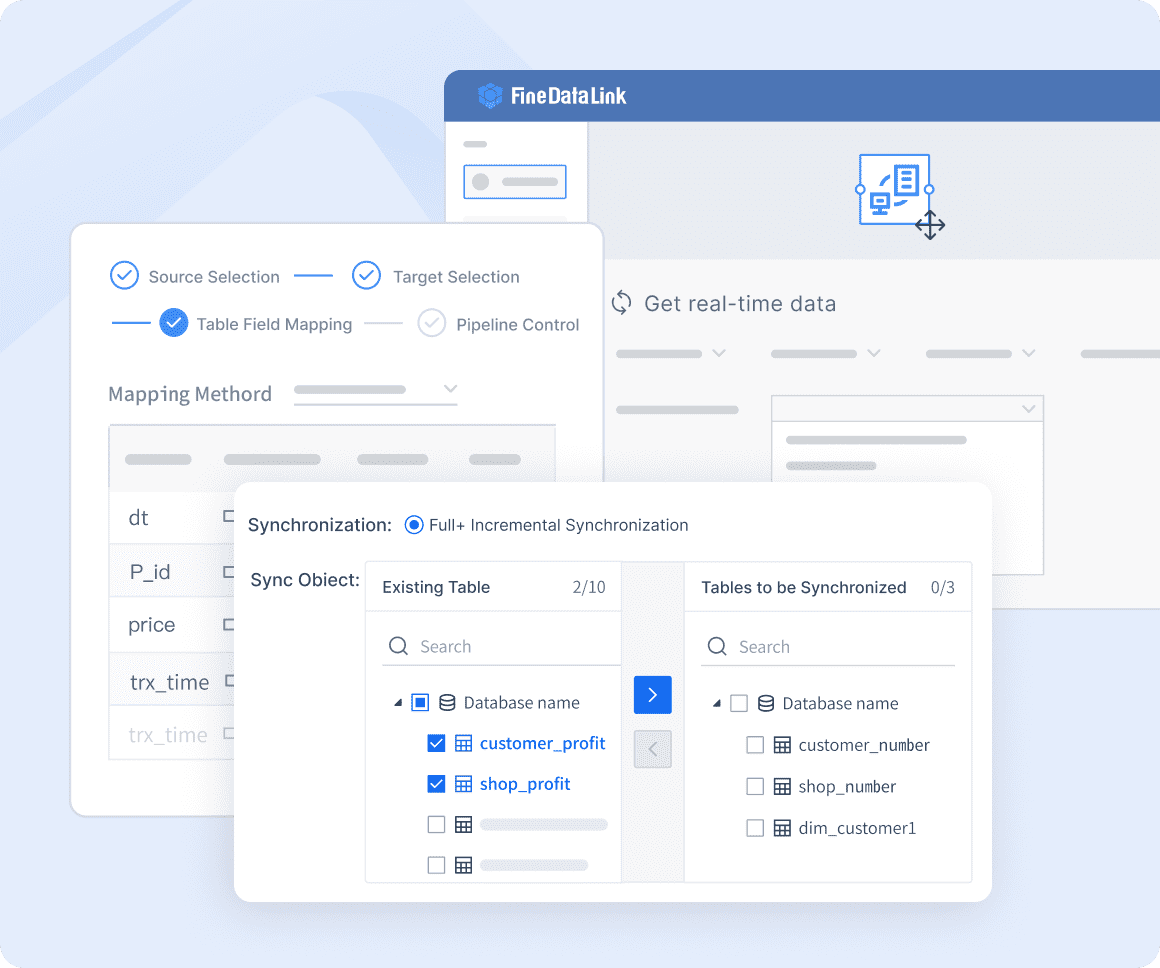
FineDataLink does not convert consumer media files or replace document management systems. It focuses on the enterprise data formats that feed reporting, analytics, and AI workflows — ensuring those downstream systems always operate on fresh, consistent, trusted data regardless of source format diversity.
Try FineDataLink Now →
From Structured Digital Data to Dora AI Analysis
After data from different formats is integrated and standardized, Dora can help business users ask questions, summarize changes, and generate follow-up analysis from trusted enterprise data.
Dora operates on governed, integrated data assets — not raw, unprocessed files. When FineDataLink handles format reconciliation and synchronization, and downstream BI or reporting platforms provide structured access, Dora adds a conversational intelligence layer that makes integrated data accessible through natural language. This completes the value chain from format-diverse sources to actionable business insight.