If you are evaluating a Power BI Pro license in 2026, you are probably trying to answer a practical buying question: Is Pro enough, or do we actually need Premium Per User or Fabric Capacity? For most teams, the decision comes down to four things: who builds reports, who only views them, which advanced features matter, and how widely content must be shared across the organization.
A Power BI Pro license is the standard paid per-user option for creating, publishing, sharing, and collaborating in the Power BI Service. PPU adds advanced capabilities on a per-user basis. Fabric Capacity shifts the model toward shared compute and broader enterprise distribution, especially for larger viewer populations and Fabric-aligned analytics programs.
This guide breaks down the differences in plain language so BI leaders, procurement teams, IT admins, and analytics managers can make a cleaner 2026 decision without overbuying.

Quick Comparison Table
| Criteria | Power BI Pro | Power BI Premium Per User (PPU) | Fabric Capacity |
|---|---|---|---|
| Best for | Small to mid-sized teams that need standard sharing and collaboration | Teams needing advanced Power BI features without full capacity commitment | Larger deployments, broader content consumption, and Fabric-first analytics programs |
| Pricing model | Per user | Per user | Capacity-based compute |
| Typical users | Analysts, report authors, department teams | Advanced BI teams, data professionals, governed enterprise BI groups | Enterprise BI programs, centralized analytics teams, broad viewer audiences |
| Dashboard sharing | Shared with other licensed users in standard scenarios | Shared within PPU licensing rules unless content is moved to qualifying capacity | Broad distribution from qualifying capacity workspaces |
| Advanced features | Core Power BI collaboration and publishing | Includes Pro plus many premium capabilities | Supports premium-style scale and Fabric workloads |
| Viewer access model | Paid user collaboration model | Paid user model for PPU workspaces | Better suited for large-scale consumption scenarios |
| Learning curve | Moderate | Moderate to advanced | Higher, because capacity planning and governance matter more |
| Governance fit | Good for departmental BI | Good for advanced governed BI | Best for centralized enterprise governance and scale |
| Recommended when | You need standard self-service BI and collaboration | You need advanced features but are not ready for capacity | You need large-scale distribution, enterprise rollout, or broader Fabric usage |
Power BI Pro License vs PPU vs Fabric Capacity at a Glance
A 2026 buyer should think of these options as three different operating models, not just three price points.
- Power BI Pro is the baseline collaboration license.
- PPU is the advanced per-user license for teams that need more premium functionality.
- Fabric Capacity is the shared infrastructure model for organizations that need scale, broader distribution, and alignment with Microsoft Fabric workloads.
What each option includes and who it is designed for
Power BI Pro is designed for users who need to:
- publish reports to shared workspaces
- collaborate with teammates
- share dashboards and apps
- participate in standard self-service BI workflows
This is usually the right starting point for smaller teams, departmental analytics, and organizations that are still building out their BI operating model.
Power BI Premium Per User is designed for:
- advanced report authors
- BI developers
- enterprise analytics teams that need premium-style capabilities
- organizations that want more than Pro offers, but are not ready for full capacity-based buying
PPU is useful when only a limited group needs advanced features.
Fabric Capacity is designed for:
- enterprise-scale deployments
- broader report consumption
- centralized governance
- organizations investing in the wider Fabric ecosystem
It changes the conversation from “how many named users do we license?” to “how much shared compute and organizational scale do we need?”
The biggest differences in pricing, collaboration, scale, and deployment fit
The most important differences are:
- Pricing model: Pro and PPU are per-user; Fabric Capacity is capacity-based.
- Collaboration rules: Pro is for standard collaboration; PPU unlocks more capabilities but often requires matching access conditions; Fabric Capacity is more suitable for larger distribution models.
- Scale: Pro works well for smaller groups; PPU works for advanced but limited audiences; capacity works better when viewer counts or workload demands increase.
- Deployment fit: Pro supports everyday BI collaboration, PPU supports more mature BI teams, and Fabric Capacity fits enterprise-wide analytics programs.
How the 2026 buying decision differs by organization type
In 2026, the buying decision is less about a simple “cheap vs expensive” choice and more about workload design.
- Small teams usually start with Pro because it covers standard authoring and sharing needs.
- Maturing BI teams may move to PPU if they need advanced functionality without committing to capacity.
- Fabric-first organizations often evaluate capacity earlier because Power BI is only one part of a broader analytics architecture.
For many buyers, the mistake is jumping to premium-style licensing before they have enough authors, viewers, governance maturity, or workload complexity to justify it.
Pricing and Cost Structure: What You Pay and What You Actually Get
Pricing decisions for Power BI often look simple at first, then become more complicated once sharing rules, advanced features, viewer scale, and governance overhead are added.
Per-user licensing costs
Microsoft’s current public pricing commonly presents:
- Power BI Pro: around $14 per user/month
- Power BI Premium Per User: around $24 per user/month
These are the numbers most buyers use for initial budgeting, though actual commercial terms can vary by region, agreement type, and enterprise contract structure.
Compare Pro and PPU as user-based licensing models
With Pro, each licensed user gets the core ability to collaborate in the Power BI Service. This is why Pro is often considered the operational baseline for any user who actively creates, publishes, or shares content.
With PPU, you still pay per named user, but you unlock a broader set of advanced capabilities. The model makes sense when only a relatively small subset of users needs those features.
A simple way to think about it:
- Choose Pro when standard dashboard creation and sharing are enough.
- Choose PPU when advanced development, larger models, premium-style reporting, or more sophisticated deployment workflows are needed by specific users.
When per-user pricing stays cost-effective and when it becomes limiting
Per-user pricing stays cost-effective when:
- the user base is relatively small
- most users actively collaborate
- advanced enterprise features are not critical
- content distribution is limited to defined internal teams
Per-user pricing becomes limiting when:
- viewer counts grow faster than creator counts
- many users only consume reports
- multiple departments need access
- premium features are required by more users over time
- cost scales linearly with headcount
This is the core inflection point: if you are licensing a large audience primarily to view content, the economics and operating model may push you toward capacity thinking.
Capacity-based pricing for larger deployments
Fabric Capacity changes the buying model from named users to pooled infrastructure.
Instead of asking, “How many Pro licenses do we need?” buyers start asking:
- how many users will consume content?
- how intensive are our workloads?
- do we need shared compute for enterprise BI and broader Fabric scenarios?
- do we want centralized governance and shared platform operations?
How Fabric Capacity shifts the decision from named users to shared compute
A capacity-based model is attractive when:
- many users consume dashboards but do not author them
- analytics usage is spread across teams
- enterprise IT wants a more centralized deployment pattern
- Power BI is being evaluated alongside Fabric workloads
However, buyers should remember that capacity does not automatically erase all per-user licensing considerations. In many real deployments, authors and publishers still need appropriate per-user licensing for certain activities. That is one reason why Fabric Capacity is usually not a replacement for user licensing across the board, but part of a combined operating model.
Common buyer questions around enterprise pricing expectations and monthly budget thresholds
Most enterprise buyers want to know:
- At what viewer volume does capacity become more economical?
- How much monthly budget should we reserve for a serious rollout?
- Should we buy annual reserved capacity or stay flexible?
- Are we paying for Power BI only, or for a broader Fabric strategy?
There is no universal threshold because:
- usage intensity differs
- geographic pricing differs
- workload concurrency differs
- governance and administration models differ
Still, one practical rule holds: capacity is usually justified by scale, not curiosity. If your rollout is still a pilot, department-level collaboration, or a contained analytics program, Pro or limited PPU usage is often easier to manage.
Hidden costs and budget planning factors
The visible license cost is only part of total cost of ownership.
Sharing needs, viewer access, premium features, governance overhead, and growth planning
Buyers often underestimate:
- the number of users who need collaboration rights
- how many viewers will eventually need access
- the admin effort required for workspaces, permissions, and governance
- the cost of moving from ad hoc BI to enterprise BI
- support overhead when more business teams adopt dashboards
Advanced features also create indirect costs:
- more sophisticated deployment processes
- higher model complexity
- stronger governance requirements
- additional training needs
How trial usage, pilot projects, and phased rollouts affect total cost of ownership
A smart rollout usually starts with a pilot, but the pilot should mirror future operating conditions.
For example:
- A Pro-only pilot can validate collaboration patterns.
- A small PPU pilot can test advanced feature needs.
- A capacity evaluation can help estimate viewer scale and governance needs.
The mistake is using a trial setup as if it reflects final production cost. A pilot may hide future licensing complexity, admin overhead, data engineering dependencies, and enterprise support demands.
Power BI Service Features by License Type
Licensing confusion often comes from mixing three different things:
- Power BI Desktop
- Power BI Service
- Capacity infrastructure
These are related, but they are not the same.
Collaboration, sharing, and app distribution
This is the area where the Power BI Pro license matters most for everyday buyers.
Who can create, publish, share, and consume content under each option
In general terms:
- Desktop lets users build reports locally.
- Pro lets users publish, share, and collaborate in the cloud service.
- PPU adds premium-level capabilities for users who need them.
- Fabric Capacity supports broader enterprise hosting and consumption scenarios.
A common source of confusion is assuming report creation is the same as report distribution. It is not. A user may be able to create a report in Desktop, but cloud publishing and collaborative sharing usually require the right service license.
Practical limits that affect internal reporting and external distribution scenarios
Important practical considerations include:
- whether consumers need paid licenses
- whether authors need Pro or PPU
- whether content sits in shared or capacity-backed workspaces
- whether external sharing or guest access is part of the requirement
- whether app distribution is internal, partner-facing, or embedded in another environment
For internal reporting, Pro is often enough at smaller scale. For broader distribution, the licensing design becomes more sensitive to workspace architecture and capacity decisions.
Advanced capabilities and premium-only functionality
This is where PPU and Fabric Capacity become more relevant.
AI features, larger model support, deployment pipelines, paginated reporting, and other advanced capabilities
Common advanced capabilities associated with higher licensing tiers include:
- larger model support
- more frequent refreshes
- paginated reporting
- deployment pipelines
- XMLA read/write scenarios
- more advanced AI-assisted features
- enterprise-grade modeling and administration options
These are meaningful if your BI team is doing more than standard dashboarding. They matter less if your primary need is straightforward KPI tracking and report sharing.
Which features matter only for mature BI teams versus everyday business reporting
For everyday business reporting, the most valuable capabilities are usually:
- reliable refresh
- easy dashboard publishing
- controlled sharing
- standard self-service analysis
- consistent metrics
Advanced features matter more when teams are:
- managing complex semantic models
- supporting formal release workflows
- building paginated or operational reports
- coordinating analytics across multiple departments
- integrating BI into broader enterprise data architecture
If your business users mainly need dashboards, scorecards, and drill-down analysis, buying advanced licensing for everyone is often unnecessary.
Desktop, service, and capacity roles in the ecosystem
This distinction prevents many licensing mistakes.
What Power BI Desktop can do on its own
Power BI Desktop is primarily for:
- building reports
- connecting to data
- modeling data locally
- testing visuals and layouts
Desktop is useful even without paid service licensing, but it does not solve organization-wide sharing by itself.
What requires Pro, PPU, or Fabric Capacity
You typically need service or capacity licensing for:
- publishing to shared workspaces
- cloud collaboration
- secure distribution
- enterprise refresh and access patterns
- broader organizational consumption
Why buyers confuse authoring tools, cloud services, and dedicated capacity
Many teams assume:
- “Desktop is free, so Power BI is basically free.”
- “Capacity means no user licensing matters.”
- “PPU is just a bigger Pro plan.”
All three assumptions are incomplete.
The real licensing decision should separate:
- who authors,
- who publishes,
- who views,
- where content is hosted,
- which advanced features are truly needed.
Best Fit by Team Size, Use Case, and Growth Stage
The right answer depends less on vendor packaging and more on how your BI program operates.
When Pro is the right choice
A Power BI Pro license is typically the right fit when you need:
- straightforward collaboration
- dashboard sharing across a defined internal team
- standard self-service BI
- manageable report complexity
- a low-friction starting point
Pro is especially practical for:
- small analytics teams
- department-level reporting
- finance, sales, operations, or HR dashboards
- early-stage BI programs
- organizations still proving adoption before scaling
If your reports are mostly interactive dashboards and your user base is not massive, Pro is usually the simplest answer.
When PPU makes sense
PPU makes sense when:
- a subset of users needs advanced capabilities
- your team is building more complex or more governed analytics assets
- paginated reports or deployment workflows matter
- larger model support is becoming important
- you need premium-style functionality without jumping immediately to capacity
This tier is often attractive for:
- analytics centers of excellence
- advanced reporting teams
- enterprise BI developers
- organizations in an in-between stage of growth
PPU is not automatically better for everyone. It is best when advanced functionality is needed by specific roles, not by the entire business.
When Fabric Capacity is the better long-term model
Fabric Capacity becomes the stronger long-term model when:
- your viewer population is broad
- your BI environment is becoming centralized
- you need stronger enterprise governance
- you are aligning BI with wider Fabric workloads
- you want to support analytics at larger scale
It is often the right model for:
- enterprise-wide reporting hubs
- large multi-department deployments
- organizations with many consumers and fewer authors
- teams standardizing data and analytics at platform level
Capacity is usually less about “getting extra features” and more about changing the economics and architecture of delivery.
Quick decision framework for 2026 buyers
Use this practical framework:
- Choose Pro if your team is small to mid-sized, your reporting needs are standard, and most licensed users actively collaborate.
- Choose PPU if you need advanced Power BI functionality for a limited set of authors or developers.
- Choose Fabric Capacity if you need broad organizational consumption, centralized governance, and a more scalable long-term analytics platform.
A buyer should also map each option to:
- team size
- report complexity
- audience scale
- compliance requirements
- budget flexibility
- future data platform direction
Pros, Cons, and Real-World Buying Mistakes to Avoid
Strengths and tradeoffs of each licensing path
Power BI Pro
Strengths
- straightforward starting point
- supports standard collaboration and sharing
- good for self-service BI across smaller teams
- easier to justify for departmental deployments
Tradeoffs
- cost scales with user count
- not ideal for large passive viewer populations
- advanced enterprise features are limited compared with higher tiers
Power BI Premium Per User
Strengths
- brings advanced capabilities to named users
- useful for mature BI teams
- avoids immediate commitment to full capacity
Tradeoffs
- still scales per user
- can become expensive if many users need access
- not always necessary for standard dashboard consumers
Fabric Capacity
Strengths
- better suited for broad distribution and scale
- supports enterprise operating models
- aligns with wider Fabric analytics strategy
Tradeoffs
- more complex to size and govern
- harder to justify for smaller teams
- usually requires stronger admin discipline and architectural planning
Common misconceptions buyers still have
Confusion around Premium-era pricing assumptions
Some buyers still use old Premium-era thinking and assume:
- capacity is only for very large enterprises
- premium features are always required for serious BI
- per-user licensing remains the cleanest model at any scale
In reality, 2026 decisions depend more on actual usage patterns and Fabric alignment than on legacy SKU habits.
Confusion around feature access and who actually needs capacity
Another misconception is that every user needs the same license. In most environments:
- some users are authors
- some are advanced developers
- many are just viewers
Treating all three groups the same usually leads to overspending.
Buying mistakes that increase costs later
The most common mistakes are:
-
Under-licensing collaboration users
Teams assume viewers and publishers have the same needs, then discover sharing rules later. -
Overbuying premium features too early
Organizations purchase advanced functionality before they have a mature BI process to use it well. -
Ignoring viewer scale
Per-user models look fine early, then become expensive when hundreds of business users need access. -
Failing to plan governance
Licensing alone does not create a manageable BI environment. Workspace structure, semantic consistency, and admin ownership matter. -
Separating license choice from platform strategy
If your organization is also evaluating broader analytics modernization, the Power BI license decision should not happen in isolation.
Practical Recommendations for Buyers
Here are five recommendations I would give any BI leader or procurement team evaluating a Power BI Pro license in 2026:
-
Audit users by role before pricing anything
Separate authors, advanced developers, and viewers. This will improve both licensing and governance decisions. -
Start with your sharing model, not your feature wishlist
Many licensing problems come from misunderstanding who needs to publish, who needs to consume, and where content will live. -
Do not pay premium rates for standard dashboarding unless the workflow truly requires it
If business teams mainly need interactive dashboards and filtered views, Pro may be enough. -
Model 12-month growth, not just current headcount
A licensing choice that works for 40 users may not work for 400 viewers six months later. -
Evaluate BI tools based on business adoption, not only technical checklists
The best platform is not just the one with more features. It is the one your analysts and business users can actually use consistently.
A Practical Alternative for Teams That Need Easier Self-Service BI
Tools like Power BI are widely used in the BI market, but teams that need a more business-user-friendly, self-service BI platform may also consider FineBI.
Power BI is a strong choice for organizations already aligned with the Microsoft ecosystem. But not every team wants a licensing model and operating structure that grows more complex as reporting demand spreads across departments. In many BI programs, the bigger challenge is not building one more dashboard. It is helping business teams explore data, ask follow-up questions, and act faster without depending on specialists for every change.
Where FineBI fits
FineBI is positioned as a self-service BI platform for business users and analysts who need:
- interactive dashboards
- drag-and-drop analysis
- drill-down and data exploration
- enterprise data connectivity
- dashboard sharing and collaboration
- faster dashboard iteration across departments
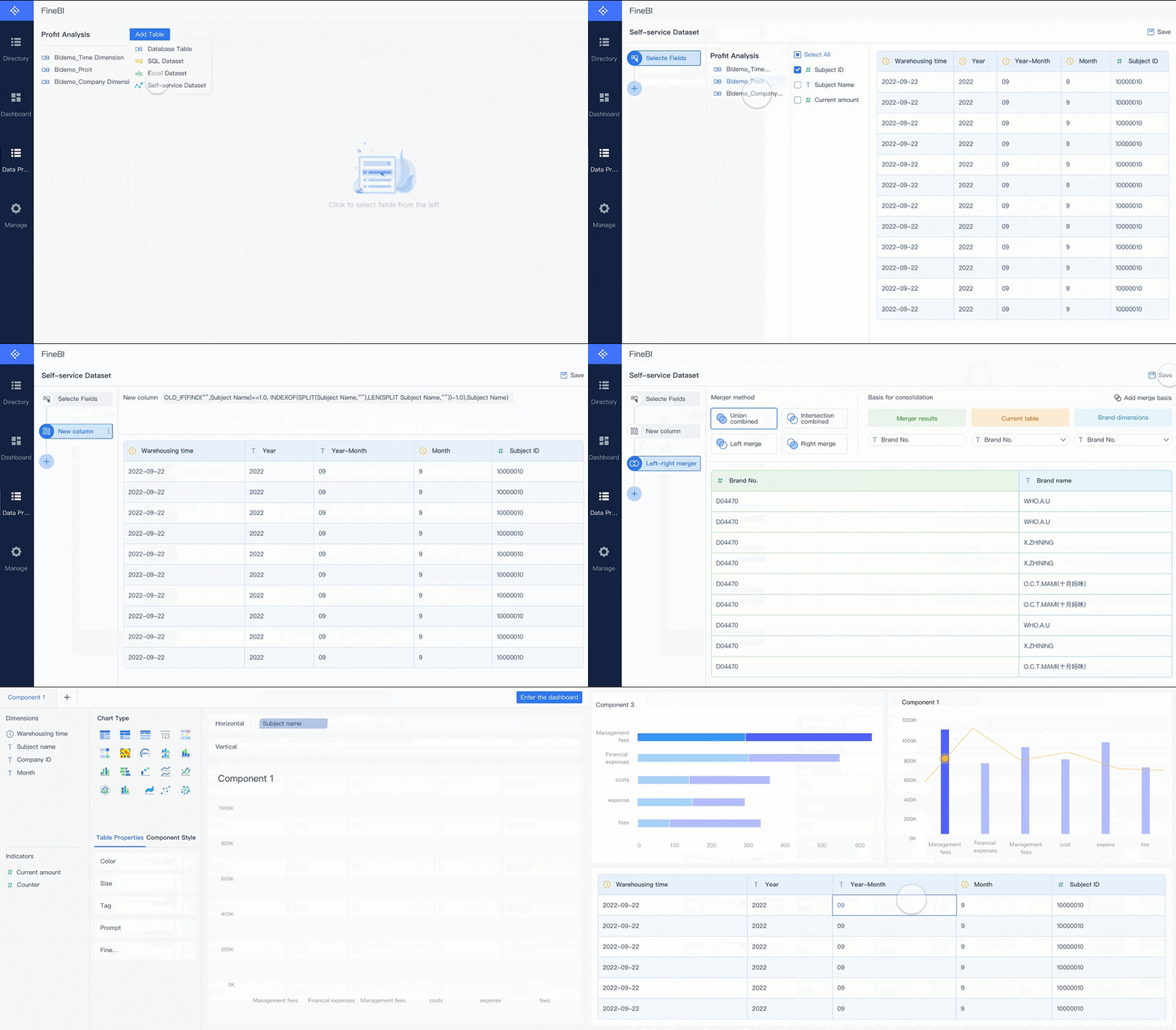 Drag-and-drop Analysis
This can be especially relevant for organizations that want:
- broader business-user adoption
- easier dashboard creation outside heavy specialist workflows
- a governed but accessible BI environment
- a practical path from reporting to day-to-day business analysis
Why FineBI can be a strong fit for business-led analytics
For teams comparing BI options beyond Power BI licensing alone, FineBI is worth considering when the main goal is to help business teams analyze data more directly.
Typical fit scenarios include:
- sales and regional performance dashboards
- operational monitoring
- finance analysis
- retail and channel reporting
- manufacturing and supply chain analytics
- management dashboards that require fast iteration
Rather than centering the entire conversation on license type, many organizations evaluate FineBI around usability, self-service adoption, dashboard responsiveness, and the ability to standardize analytics across business units.
FineBI + Dora: from dashboards to Agentic BI
Where the conversation becomes more strategic is with FineBI + Dora.
Dora is FanRuan’s enterprise Data Agent platform. It works as an AI assistant and AI digital employee layer on top of FineBI and existing enterprise data assets. Instead of replacing dashboards, Dora helps organizations move from static dashboard consumption toward Agentic BI.
That means:
- users can make natural-language requests
- the system works on top of a trusted semantic and metric foundation
- governed workflows help ensure analysis is controlled and relevant
- outputs can include answers, charts, summaries, actions, and follow-up
In this model:
- FineBI builds the trusted dashboard, metric, and semantic foundation
- Dora turns that foundation into a scenario-specific enterprise Data Agent
This is useful for enterprises that want more than visual reporting. For example, a Dora-based workflow can support roles such as:
- Data Analyst digital employee
- Report Researcher
- Daily Briefing Secretary
- Risk Alert Officer
That positioning is important: Dora should not be viewed as a generic chatbot. It is better understood as a governed AI workflow layer for enterprise analytics.

Get Ready-to-Use Dashboard Templates in Fine Gallery
Final Recommendation: How to Choose the Right Power BI License in 2026
For most buyers, the simplest path looks like this:
- Start with Power BI Pro if your team needs standard collaboration, dashboard sharing, and self-service BI across a relatively contained user base.
- Upgrade specific users to PPU when advanced capabilities become genuinely necessary for BI developers, advanced analysts, or governed enterprise reporting teams.
- Move toward Fabric Capacity when broad viewer scale, centralized governance, and Fabric-aligned analytics architecture justify a capacity-based operating model.
If you are still uncertain, ask these questions before purchasing:
- Who creates reports, and how many of them truly need publishing rights?
- How many users only consume content?
- Which advanced features are essential now, not just theoretically useful later?
- Will reporting stay departmental, or expand to enterprise scale?
- Is this only a Power BI decision, or part of a broader analytics platform strategy?
- How much governance, semantic consistency, and admin control do we need as adoption grows?
A Power BI Pro license remains the right starting point for many organizations in 2026. But if your long-term challenge is not just licensing, but making analytics easier for business teams and more actionable through governed AI workflows, it is worth evaluating alternatives such as FineBI + Dora as part of the decision.
FAQs
Power BI Pro is the standard per-user license for publishing, sharing, and collaborating. PPU adds advanced premium-style features per user, while Fabric Capacity is a shared compute model built for larger-scale distribution and broader Fabric workloads.