If you are searching for Power BI Pro, you are probably trying to answer a practical question: Do I need the free Desktop app, a Pro license, or Premium capacity to build, share, and scale reports? That confusion is common because Microsoft uses similar product names for different parts of the Power BI ecosystem.
In simple terms, Power BI Desktop is mainly for building reports locally, Power BI Pro is the standard per-user license for publishing and collaborating in the Power BI Service, and Power BI Premium is for larger-scale distribution and heavier enterprise workloads.
For analysts, BI managers, and IT teams, the real decision usually comes down to four things:
- Are you only creating reports, or also sharing them?
- How many people need to consume content?
- Do all users need paid licenses, or only report authors?
- Will your data volume and usage patterns stay small, or grow quickly?
Quick Comparison Table
| Option | Best for | Ease of use | Dashboard design | Data preparation | Enterprise reporting | Collaboration | Deployment | Learning curve | Recommended users |
|---|---|---|---|---|---|---|---|---|---|
| Power BI Desktop | Local report creation and personal analysis | Moderate | Strong report authoring | Strong with Power Query and modeling | Limited on its own | Minimal | Local desktop app | Moderate | Individual analysts, learners, prototype builders |
| Power BI Pro | Team publishing, sharing, and collaboration | Moderate | Strong | Strong | Good for standard team reporting | Strong for shared workspaces and apps | Cloud service plus desktop authoring | Moderate | Small teams, business analysts, department reporting |
| Power BI Premium / Fabric capacity | Broader organizational distribution and larger workloads | More complex | Strong | Strong | Stronger for enterprise scale | Strong | Capacity-based cloud deployment | Higher | Enterprises, larger audiences, centralized BI teams |
What Is Power BI Pro and Who Is It For?
Power BI Pro is Microsoft’s standard per-user collaboration license for Power BI. It sits between the free report-building experience and higher-end Premium options.
A simple way to think about it is this:
- Desktop helps you build
- Pro helps you publish and collaborate
- Premium helps you distribute at larger scale
Power BI Pro is designed for users who need to move beyond personal analysis. If you want to publish reports to the Power BI Service, share dashboards with teammates, work in shared workspaces, or distribute apps inside the organization, Pro is usually the first serious license to consider.
Typical users include:
- Business analysts building and publishing department dashboards
- Finance teams sharing monthly performance reports
- Operations leaders monitoring KPIs across teams
- BI teams collaborating on shared datasets and reports
- Managers and stakeholders who need access to shared interactive content
Common scenarios where Pro makes sense include:
- A small team wants to collaborate on sales or finance reports
- An analyst needs to publish dashboards for business users
- A department wants scheduled refresh and cloud access
- Teams need shared workspaces instead of isolated local files
Why do beginners compare Pro with Desktop and Premium so often? Because the names suggest product editions, but the real difference is about workflow and consumption. Many new users assume Desktop is the free version, Pro is the “better app,” and Premium is the “best plan.” In practice, these options solve different needs.
Power BI Desktop vs Pro vs Premium: The Core Differences
The clearest way to compare them is by what each one is designed to do:
- Power BI Desktop: Create reports and models locally
- Power BI Pro: Publish, share, and collaborate in the service
- Premium: Support larger-scale deployment, broader distribution, and more advanced capacity needs
The confusion usually starts when users build a report in Desktop and then realize that sharing it is a separate issue. Report authoring happens largely in Desktop, but collaboration happens in the Power BI Service, where licensing rules matter.
The biggest differences usually involve:
- Where content is created
- Where content is published
- Who can access shared reports
- How licensing is assigned
- How scale and capacity are handled
What Power BI Desktop Can Do on Its Own
Power BI Desktop is the free Windows application used for report creation. On its own, it is very capable for development and personal analysis.
With Desktop, users can typically:
- Connect to many data sources
- Clean and transform data
- Build data models and relationships
- Create calculations and measures
- Design interactive report pages
- Analyze data locally before publishing
This makes Desktop a strong option for:
- Learning Power BI
- Testing report ideas
- Building prototypes
- Creating personal reports that do not need cloud sharing
What Desktop does not do well by itself is organization-wide collaboration. You can create the .pbix file and review it locally, but once you need governed sharing, cloud access, app distribution, or team workspace workflows, Desktop alone is not enough.
What Pro Adds Beyond Desktop
Power BI Pro adds the collaboration layer that many teams actually need.
With Pro, users can generally:
- Publish reports to the Power BI Service
- Share reports and dashboards with others
- Use shared workspaces for team development
- Distribute content through apps
- Set up scheduled refresh
- Collaborate around cloud-hosted BI content
This is why Power BI Pro is often the practical starting point for small teams. It supports the everyday reporting lifecycle: build in Desktop, publish to the service, share with stakeholders, and keep content updated.
For many businesses, this is the point where Power BI becomes a real team platform rather than a personal analytics tool.
When Premium Becomes the Better Fit
Premium becomes more relevant when an organization outgrows the standard per-user sharing model or needs broader internal distribution.
Typical reasons to look at Premium or capacity-based deployment include:
- A much larger audience needs to consume reports
- The organization wants broader content distribution
- Workloads are heavier and require more dedicated capacity
- Teams need premium-only or capacity-based capabilities
- The business wants to reduce the friction of licensing every consumer individually in certain deployment scenarios
This is also where the budgeting model changes. With Pro, you are generally paying per user. With Premium or Fabric capacity, you are increasingly paying for organizational capacity, which can make more sense at larger scale.
Key Features and Limits of Power BI Pro
Power BI Pro is often the most relevant license for day-to-day business reporting because it enables the workflows most teams care about: publish, share, refresh, and collaborate.
Useful Pro capabilities typically include:
- Publishing reports to the Power BI Service
- Sharing dashboards and reports with teammates
- Collaborating in app workspaces
- Consuming shared interactive BI content
- Using scheduled refresh for business reporting
- Accessing Power BI content across devices
For self-service analytics and team reporting, Pro is usually enough when:
- Your team is still relatively small
- Most users are active collaborators
- Report distribution is internal and controlled
- Your data models and refresh needs are not yet pushing higher-end limits
But Power BI Pro does have practical limits that matter. The most important ones are not always visual design limits. They are usually about licensing, audience scale, and capacity boundaries.
Sharing, Collaboration, and Workspace Access
This is where many beginners get tripped up.
In simple terms, Power BI Pro is the standard license for users who publish and collaborate with shared Power BI content. If content is stored in a standard shared environment rather than a qualifying Premium-capacity setup, the people interacting with that content commonly need the right paid licensing as well.
What that means in practice:
- Report authors usually need Pro or above
- Users sharing and collaborating in workspaces usually need Pro or above
- Consumers may also need paid access depending on how the workspace is licensed and deployed
So when evaluating Power BI Pro, do not only ask, “How much is one license?” Ask:
- How many people will publish?
- How many people will edit?
- How many people just need to view?
- Will content live in shared Pro workspaces or capacity-backed workspaces?
This is often the real driver of cost and architecture decisions.
Refresh, Storage, and Usage Considerations
Beginners often worry first about visuals, but operational limits matter earlier than expected.
For Pro users, common considerations include:
- Scheduled refresh frequency
- Model size constraints
- Per-user storage expectations
- Total usage across collaborative workspaces
- Routine performance under growing demand
In real-world use, the first limits that usually matter are:
- How often reports need to refresh
- How large the underlying models become
- How many users are opening and interacting with reports
- How many people need licensed access
If your dashboards are still departmental, refreshed on a normal business cadence, and consumed by a manageable number of users, Pro is often sufficient. If usage grows beyond that, capacity-backed options become easier to justify.
Power BI Pro: Pricing, Licensing, and Cost Considerations
Power BI pricing can look simple at first, but the cost impact depends on how your organization uses BI, not just the list price of one plan.
At a high level:
- Free / Desktop-based use is best for local or personal work
- Pro is the standard per-user collaboration model
- Premium or Fabric capacity is more suitable when scale, broader consumption, or advanced capacity needs justify organization-level investment
For budgeting, the main question is whether your situation is better served by:
- Paying per user, or
- Paying for capacity
Per-user licensing often makes sense when:
- The BI program is still growing
- Only a limited number of users need collaboration access
- Most consumers are also active contributors
- The organization wants a predictable seat-based model
Capacity-based deployment tends to make more sense when:
- Consumer audiences become much larger
- Many users only need to view and interact
- Workloads are heavier
- Centralized enterprise BI is becoming standard
Pro, Free, and Premium Licensing in Simple Terms
Here is the beginner-friendly version:
- Free / Desktop: You can build reports and analyze data locally, but sharing is limited.
- Pro: You can publish, share, collaborate, and work in the Power BI Service.
- Premium: You get a larger-scale deployment model better suited to enterprise distribution and heavier workloads.
The most common licensing misunderstandings are:
-
“If I have Desktop, I can share everything for free.”
Not usually in a collaborative business setting. -
“Pro is only for report creators.”
In many scenarios, users interacting with shared content also need the right licensing unless capacity-based rules apply. -
“Premium means every individual gets a premium user license.”
Not necessarily. Some Premium approaches are about capacity for the organization rather than upgrading every person the same way.
When readers ask whether Power BI Pro is “worth it,” the answer usually depends on whether collaboration is now part of the workflow. If yes, Pro is often the first logical step.
When to Choose Desktop, Pro, or Premium
Choosing between Power BI Desktop, Pro, and Premium becomes much easier if you use a simple decision framework based on four factors:
- Are you only building, or also sharing?
- How many people need access?
- How many of those people are active collaborators?
- Are your scale and performance needs still modest, or clearly growing?
A practical rule of thumb:
- Choose Desktop for local development
- Choose Pro for team collaboration
- Choose Premium for larger-scale distribution and enterprise requirements
Choose Desktop If You Are Just Building Locally
Power BI Desktop is the right fit if you are:
- Learning Power BI
- Creating personal reports
- Prototyping dashboards
- Building proof-of-concept models
- Not yet sharing through the service
This is the lowest-friction place to start. It lets analysts and learners get comfortable with data shaping, modeling, and visual design before worrying about organizational licensing.
Choose Pro If You Need Team Collaboration
Choose Power BI Pro if you need to:
- Publish reports to the Power BI Service
- Share dashboards with teammates
- Collaborate in workspaces
- Keep reports refreshed in the cloud
- Distribute internal BI content on a per-user basis
For many small and midsize teams, this is the best first production license because it supports the workflows that turn BI into a repeatable team process.
Choose Premium If You Need Scale or Broader Distribution
Choose Premium when:
- Report audiences are much larger
- Broader internal distribution is required
- Workloads exceed normal shared usage patterns
- Enterprise reporting is becoming more centralized
- Capacity-based deployment is more cost-effective than licensing many consumers individually
Premium is less about “better visuals” and more about scale, deployment model, and operational headroom.
Common Beginner Questions About Power BI Pro
After comparing plans, most readers still have a few practical questions. Here are the ones that usually matter most.
Do I Need Pro to Share Reports?
In most standard team collaboration scenarios, yes, Power BI Pro is the normal starting point for sharing reports through the Power BI Service.
The beginner-friendly rule is:
- If you are building only for yourself, Desktop may be enough.
- If you want to publish and share with a team, Pro is usually required.
- If your organization uses qualifying Premium or Fabric capacity arrangements, consumption rules can differ.
That is why licensing should always be evaluated together with workspace setup and audience size.
Can I Start with Desktop and Upgrade Later?
Yes. In fact, many users do exactly that.
A common adoption path looks like this:
- Build and test in Desktop
- Start publishing and sharing with Pro
- Move toward Premium or capacity-based deployment if audience size or workload grows
This staged approach is often more cost-effective and less risky than overcommitting to enterprise-scale licensing too early.
Which Plan Is Best for a Small Team?
For a small team, Power BI Pro is usually the most practical first choice.
It tends to fit well when:
- A few analysts or managers need to collaborate
- Reports are shared internally
- Department-level dashboards are the main use case
- You want cloud publishing without moving immediately to enterprise capacity
A simple rule of thumb: if only a limited number of people need to build, share, and consume reports inside an active team environment, start by pricing Pro for the real group of users involved. Only jump to Premium when scale or architecture clearly justifies it.
Practical Recommendations Before You Choose
From a BI consulting perspective, these are the most useful steps to take before choosing between Desktop, Pro, and Premium:
-
Map users by role, not just headcount.
Separate report authors, editors, and viewers. This prevents overpaying or under-planning. -
Estimate your first 12 months of report consumption.
A department dashboard for 20 users is very different from executive reporting for 2,000 users. -
Evaluate refresh and model needs early.
Teams often focus on visuals first, but refresh frequency and data volume drive upgrades sooner than expected. -
Start with the simplest workable licensing model.
If your workflow is still team-based, Pro is often easier to manage than jumping directly to capacity. -
Plan for governance, not just publishing.
As adoption grows, workspace structure, permissions, semantic consistency, and dashboard standards matter as much as the license itself.
Beyond Power BI Pro: When Teams Also Consider FineBI + Dora
Tools like Power BI are widely used in the BI market, but teams that need a more business-user-friendly, self-service BI platform may also consider FineBI.
This is especially relevant when organizations are asking questions such as:
- How do we let more business users explore data without heavy technical dependence?
- How do we speed up dashboard iteration across departments?
- How do we support governed self-service analytics beyond a small analyst group?
- How do we move from static dashboard consumption to guided, AI-assisted business actions?
FineBI is positioned as a self-service BI platform that helps business teams build and explore dashboards with a drag-and-drop experience, interactive analysis, drill-down, and enterprise data connectivity. It is often a practical fit for organizations that want broader business adoption of analytics rather than limiting BI to specialist users.
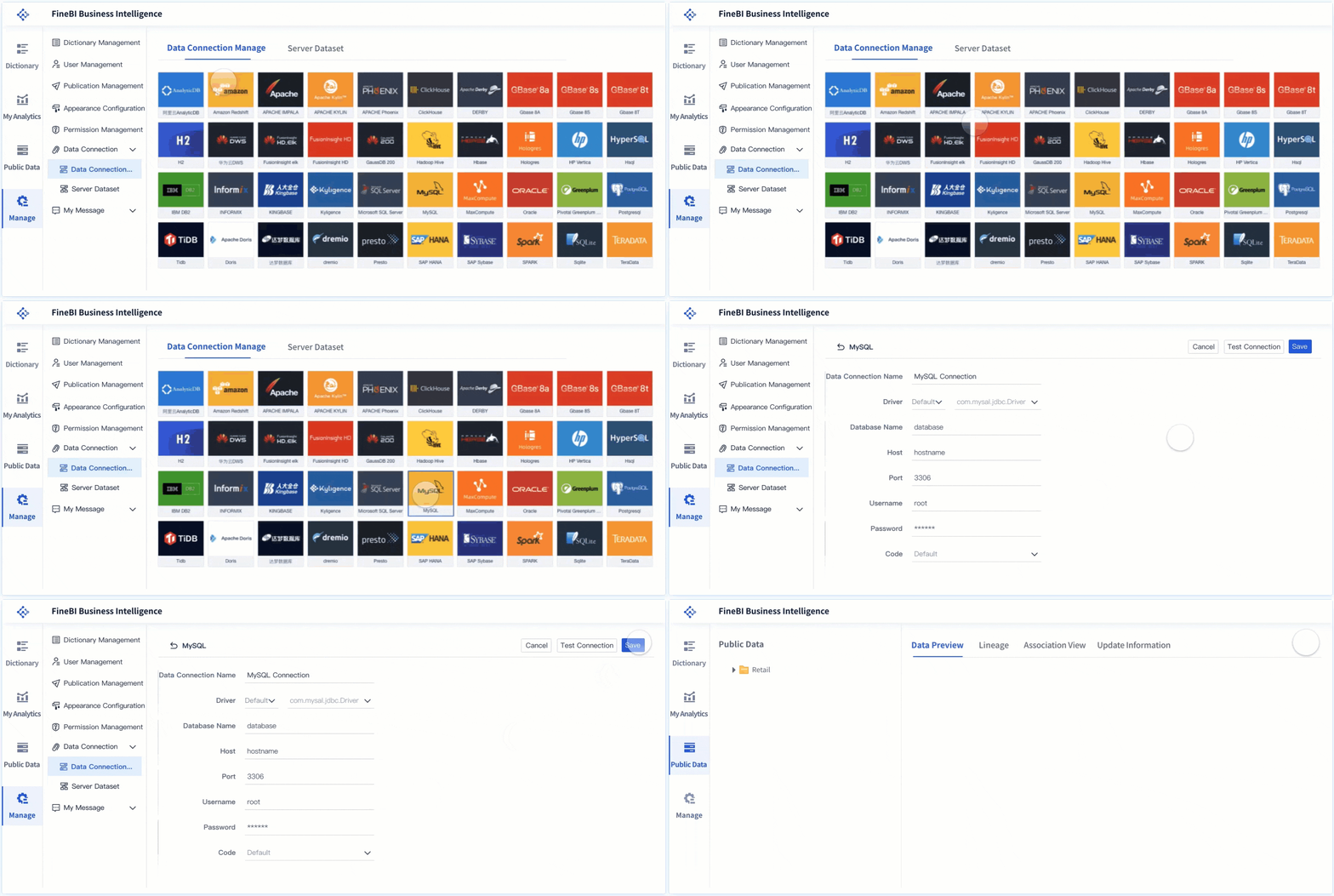
Relevant strengths for this kind of use case include:
- Self-service dashboard creation for business users
- Interactive analysis and drill-down
- Drag-and-drop exploration
- Dashboard sharing and collaboration
- Faster dashboard iteration across departments
- Support for enterprise analytics scenarios
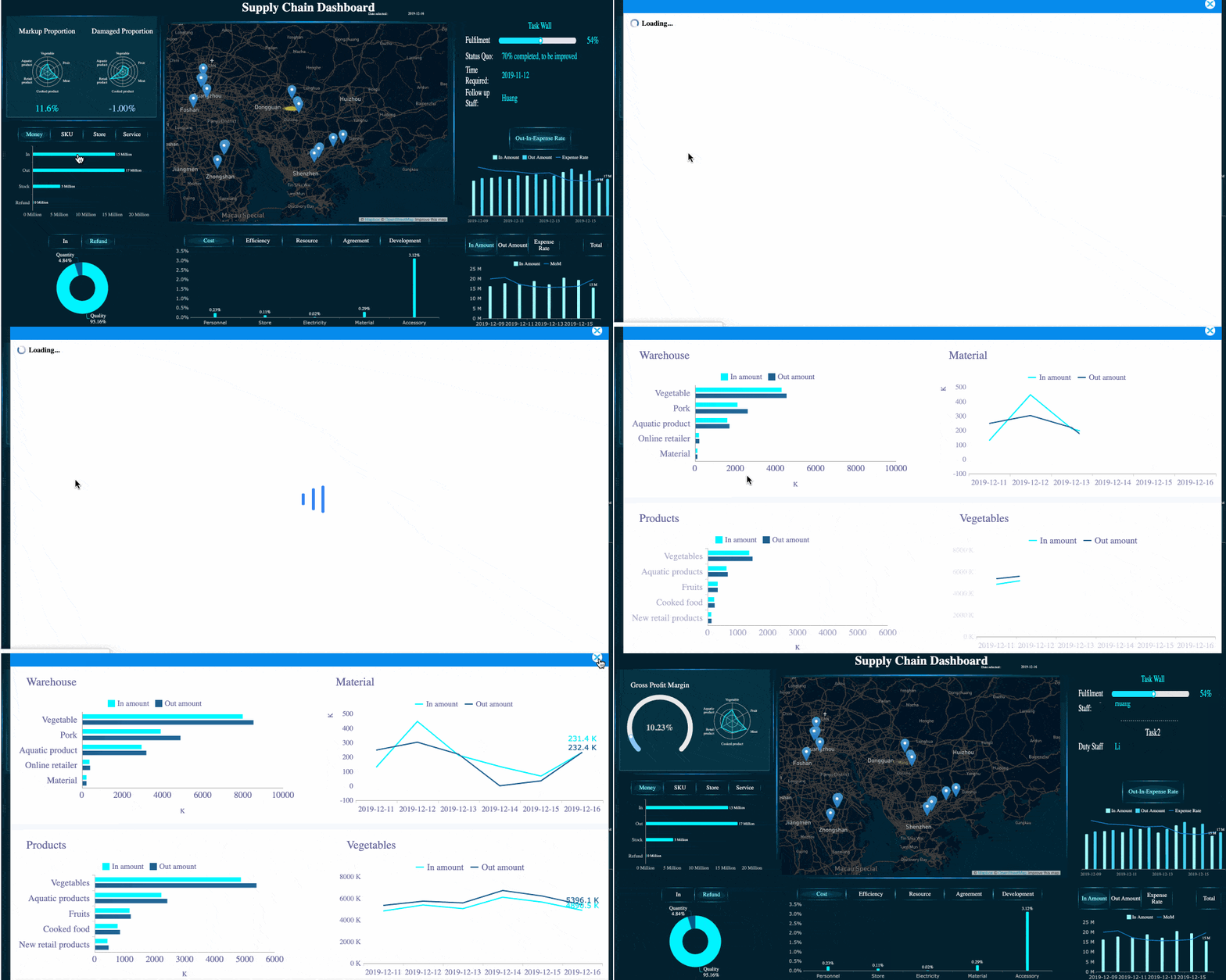 FineBI's Interactive Analysis
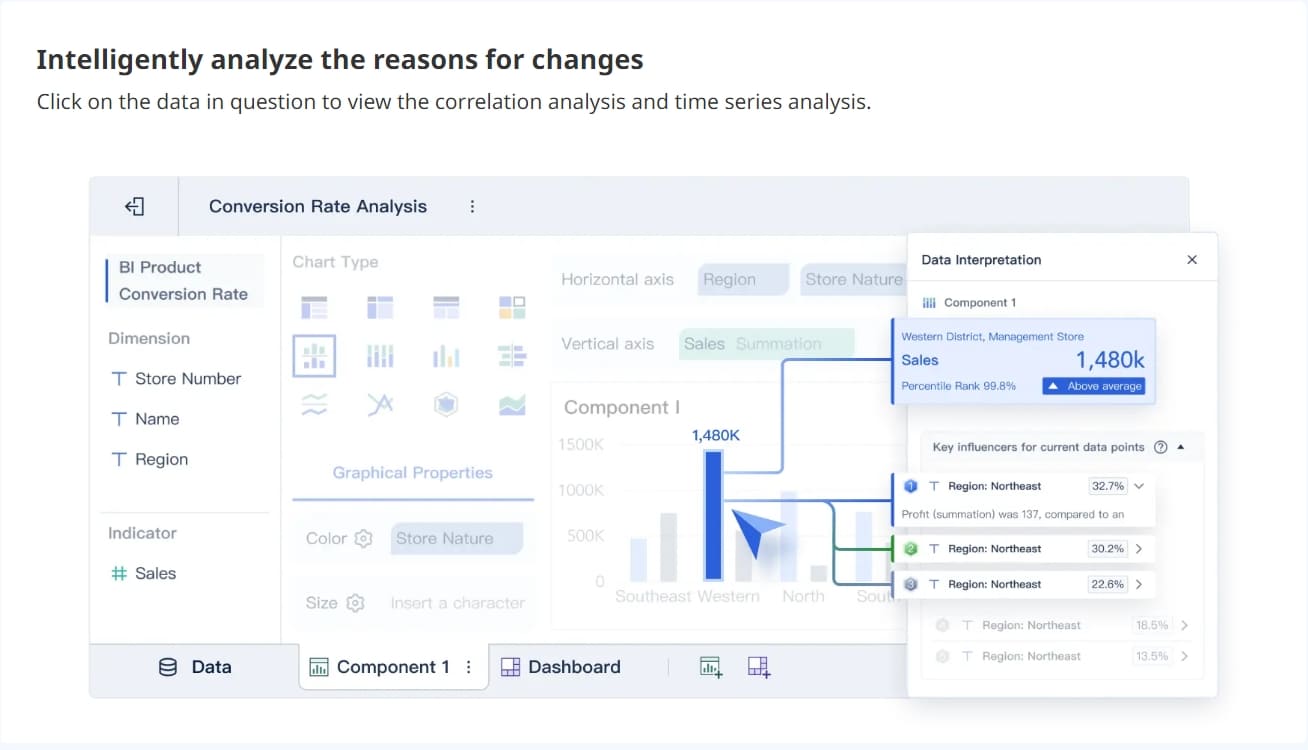 FineBI's Real-time Analysis
Dora adds another layer to this conversation. Dora is FanRuan’s enterprise Data Agent platform. It is not a replacement for BI dashboards. Instead, it acts as an AI assistant / AI digital employee layer on top of FineBI and existing enterprise data assets.
Together, FineBI + Dora helps enterprises move from simply viewing dashboards to enabling Agentic BI workflows such as:
- natural-language requests
- trusted semantic understanding
- governed query or skill execution
- answers, charts, summaries, actions, and follow-up
 Ask Dora in Natural Language
That matters for organizations that want trusted dashboards as the foundation, but also want AI to help people ask better questions, generate insights faster, push alerts, and support follow-up actions.
A helpful way to frame the relationship:
- FineBI builds the dashboard, metric, and semantic foundation
- Dora turns that foundation into a scenario-specific enterprise Data Agent
- Dora can support roles such as a Data Analyst digital employee, Report Researcher, Daily Briefing Secretary, or Risk Alert Officer

Get Ready-to-Use Dashboard Templates in Fine Gallery
Final Takeaway
If you are deciding between Power BI Desktop vs Pro vs Premium, the simplest answer is this:
- Use Desktop if you are only building locally
- Use Pro if you need publishing and team collaboration
- Use Premium if you need larger-scale distribution or enterprise capacity
For many organizations, Power BI Pro is the most practical starting point because it unlocks the core collaboration features people actually need. But licensing choices should always be tied to audience size, workspace model, refresh needs, and long-term BI governance.
And if your broader goal is not just publishing dashboards, but enabling more business users to explore data and eventually support AI-assisted analysis workflows, FineBI + Dora is also worth evaluating as part of your BI strategy.
FAQs
Power BI Desktop is mainly for creating reports locally, Pro adds cloud publishing and collaboration, and Premium is built for larger-scale distribution and higher-capacity workloads. The best choice depends on whether you only build reports or also need to share them broadly.