

Choosing the right report generator is not just a software decision. It directly affects how fast your team delivers insights, how polished your reports look, and how reliably recurring documents get produced at scale. For operations leaders, analysts, finance teams, and IT managers, the wrong choice creates bottlenecks: slow drafting, inconsistent formatting, weak data presentation, and too much manual rework. The right tool removes friction from reporting workflows and improves decision-making across the business.
How to Choose the Best Report Generator for Your Needs
A report generator can solve very different problems depending on your workflow. Some tools are built to write faster. Others focus on visual design and executive-ready presentation. Others automate recurring document production from templates and live business data. The best choice depends on what slows your reporting process down today.
If your team spends too much time turning notes into readable drafts, an AI writer may be the best fit. If stakeholders expect polished charts, dashboards, and branded presentation materials, a visual report maker is usually stronger. If you generate the same operational, financial, or compliance reports every week or month, template automation often delivers the highest efficiency.
Key Metrics (KPIs) to Evaluate Any Report Generator
When comparing tools, use a structured evaluation framework instead of relying on feature lists alone.
- Time to First Draft: How quickly the tool creates a usable initial report.
- Formatting Consistency: How reliably layouts, fonts, tables, and branding stay standardized.
- Visualization Quality: The quality of charts, dashboards, and presentation-ready visuals.
- Customization Depth: How easily users can modify sections, templates, fields, and report logic.
- Data Integration Capability: Whether the tool connects to spreadsheets, databases, ERP, CRM, or BI systems.
- Collaboration Support: Support for comments, permissions, version control, and shared editing.
- Export Flexibility: Availability of PDF, Excel, Word, HTML, image, or dashboard publishing formats.
- Scalability: How well the tool handles growing report volume, user count, and business complexity.
- Governance and Security: Role-based access, auditability, and support for controlled reporting environments.
- Maintenance Effort: The time needed to update templates, data mappings, and reporting workflows.
What enterprise teams should compare first
Before selecting a report generator, compare these practical factors:
- Ease of use for business users versus technical users
- Output quality for internal reviews and external sharing
- Customization for branded reporting and special formats
- Collaboration features for multi-team workflows
- Export and delivery options for stakeholder distribution
- Integration readiness with existing systems
- Cost over time, not just entry pricing
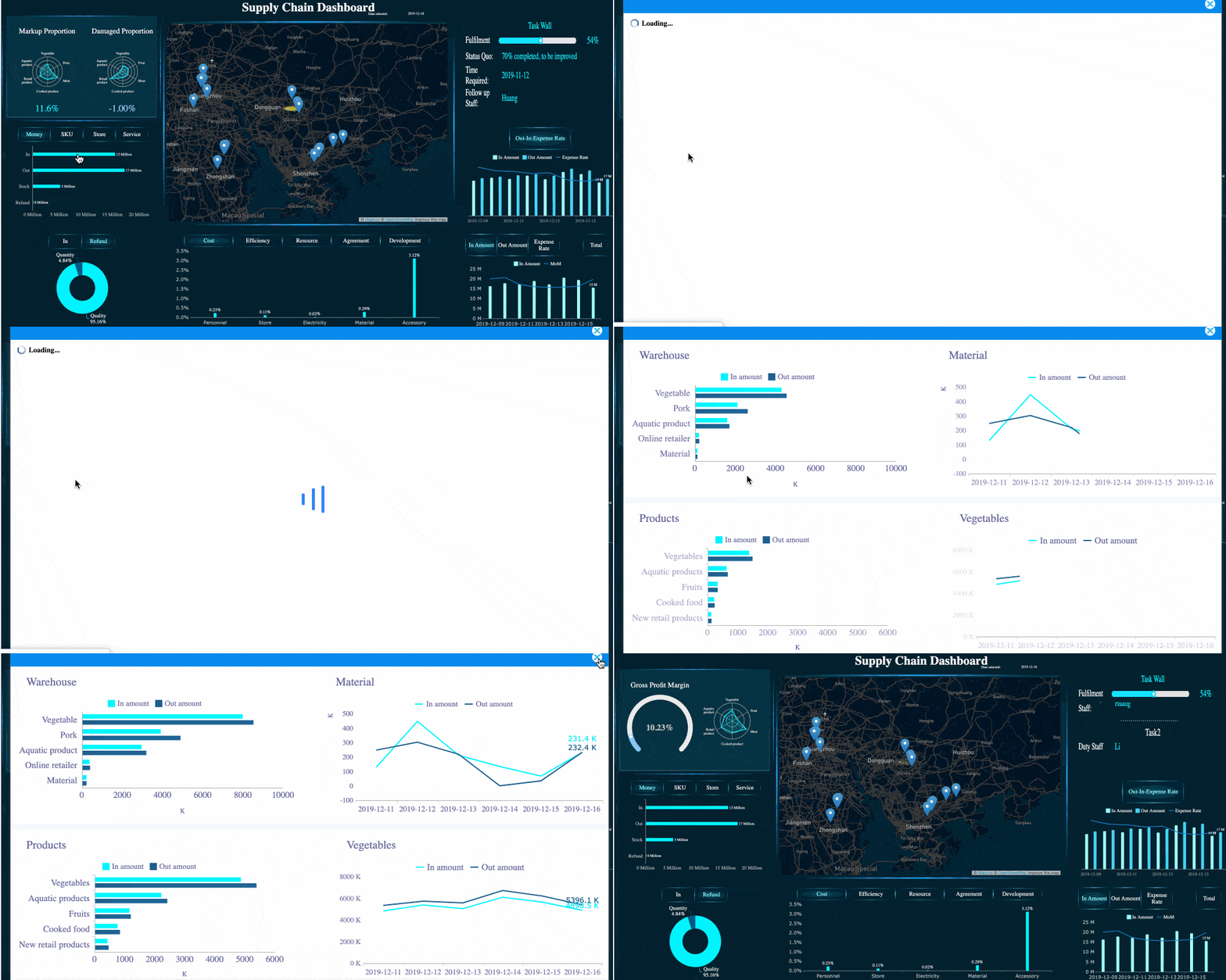
In many enterprise environments, a hybrid need emerges. Teams want fast drafting, strong visual presentation, and repeatable automation in one ecosystem. That is where a platform like FineReport becomes especially relevant, because it helps organizations build dashboards, pixel-perfect reports, and automated scheduled outputs without forcing teams to compromise on data structure or delivery quality.
AI Writer Report Generator: Fast Drafts and Smarter Writing
An AI writer report generator is best for teams that struggle with writing speed. It turns prompts, notes, spreadsheet summaries, and unstructured inputs into readable first drafts much faster than manual writing.
What AI writing tools do best
AI writing tools are effective when your main bottleneck is getting started. They help turn rough inputs into a usable narrative quickly, especially for recurring summaries, executive overviews, and standard findings.
Their strongest use cases include:
- Turning prompts, notes, and raw data into first drafts in minutes
- Structuring summaries, findings, and recommendations
- Reducing repetitive report writing tasks
- Standardizing general narrative flow
- Helping junior staff produce better baseline drafts
For example, a marketing analyst may feed campaign performance notes into an AI writer and receive a draft report with summary sections, trend commentary, and recommendation headings. A project manager may use it to create weekly status updates from bullet points. In both cases, the AI reduces blank-page delay and speeds up the drafting phase.
 FineChatBI: AI-assisted Report Writing
Where AI writers may fall short
AI writers are fast, but speed does not equal production readiness. In business reporting, generated text often needs verification and editing before it can be trusted.
Common limitations include:
- Need for fact-checking and numerical validation
- Tone adjustment for executive audiences or external clients
- Formatting cleanup for tables, charts, and layout consistency
- Difficulty maintaining strict brand voice across departments
- Weakness in highly regulated, audited, or compliance-sensitive content
This matters for finance, legal, healthcare, and enterprise operations teams. If a report requires strict formatting logic, governed metrics, or data lineage, AI writing alone is rarely enough. Human review remains essential.
Consultant view: when to choose an AI writer
Choose an AI-focused report generator if:
- Your reports are text-heavy
- Your biggest pain point is writing speed
- You need first drafts, not final polished output
- Your team can review and edit before publishing
- Report volumes are moderate, not highly automated
AI writers are productivity tools, not complete reporting systems. They work best as drafting assistants inside a broader reporting workflow.
Visual Report Generator: Better Layouts, Charts, and Presentation
A visual report generator is the better option when the report itself must persuade, present, and communicate clearly at a glance. These tools prioritize layout, charting, branding, and design quality.
When a visual-first tool is the better fit
Visual-first tools are ideal when stakeholders care as much about presentation as they do about content. This applies to executive dashboards, board reports, investor updates, client-facing deliverables, and performance scorecards.
They are particularly useful for:
- Dashboards and management cockpits
- Client-facing reports
- Presentation-ready business reviews
- Branded reports with custom layouts
- Reports where charts and visuals carry most of the message
A sales director, for instance, may need a monthly performance pack with pipeline trends, regional breakdowns, target attainment gauges, and brand-consistent summaries. A visual report generator helps produce that output more effectively than a text-first AI tool.

This is where FineReport stands out for enterprise reporting teams. It is not just a design tool. It combines dashboarding, data connectivity, report building, and distribution controls in a way that supports both operational reporting and executive presentation. For organizations that need polished visuals tied to real-time business data, that balance is critical.
Common trade-offs of visual report makers
Visual quality usually comes with trade-offs. Teams should understand them before committing.
Typical limitations include:
- More manual effort than AI drafting tools
- Less support for long-form narrative writing
- Learning curve for advanced layouts and chart design
- Design-heavy workflows that can slow high-volume reporting
- Potential inconsistency if templates are not governed properly
Visual report generators work best when users know what they want to communicate and need the tool to package that information clearly.
Best-fit scenarios for visual reporting
A visual-first tool is usually the right choice when:
- Reports are presented to executives, clients, or external stakeholders
- Design quality affects trust and readability
- Dashboards and charts matter more than long prose
- You need custom layouts or on-brand reporting assets
- Teams want interactive views in addition to static exports
Template-Based Document Automation: Repeatable Reports at Scale
If your business produces recurring reports with similar structure, template-based automation is often the most efficient category of report generator. It focuses less on creativity and more on repeatability, accuracy, and scale.
How template automation works
Template automation uses predefined report structures and merges them with live or uploaded data. Instead of writing and formatting from scratch each cycle, teams maintain templates once and generate output repeatedly.
Typical automation flow:
- Build a standard report template
- Map fields to spreadsheets, databases, or business systems
- Apply logic for calculations, sections, and formatting
- Schedule or trigger report generation
- Export and distribute automatically
This approach is widely used for monthly operating reviews, financial statements, invoices, compliance packs, and departmental summaries.
Best use cases for template automation
Template-based report generators are best for:
- Monthly business reports
- Invoices and customer statements
- Compliance documents
- Operational summaries
- High-volume departmental reporting
- Standardized multi-branch reporting
These are environments where accuracy and consistency matter more than creative drafting. A retail chain generating store-level performance reports each week does not want every manager formatting reports manually. An operations team producing plant summaries across multiple facilities needs the same logic every time. Template automation solves that.
Why enterprises favor automation for recurring reporting
From a consulting perspective, recurring reporting is where hidden labor costs grow fastest. Copy-paste workflows seem manageable at first, but they break down as report counts increase. Manual processes create version confusion, missed updates, inconsistent definitions, and audit risks.
Template automation reduces:
- Manual copy-and-paste work
- Formatting errors
- Delays in recurring cycles
- Dependency on individual report owners
- Inconsistency across teams and regions
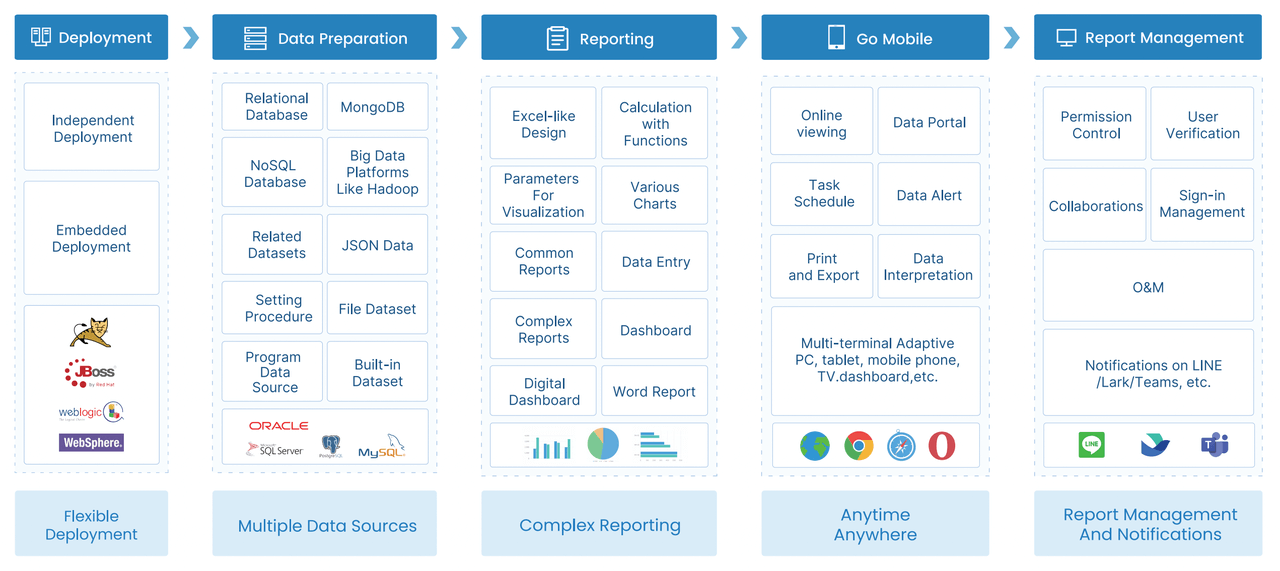
Platforms like FineReport are particularly strong here because they support both structured report design and enterprise data integration. That means organizations can automate repeatable reporting without sacrificing formatting control or dashboard visibility.
Comparing Different Types of Report Generator
The best report generator depends on which trade-off matters most: speed, design, or repeatability.
Speed, flexibility, and control
Here is the practical comparison:
| Report Generator Type | Main Strength | Best For | Main Limitation |
|---|---|---|---|
| AI Writer | Fast first drafts | Text-heavy summaries and recommendations | Needs review, weak on visual polish |
| Visual Report Maker | Strong presentation and charts | Dashboards, client reports, executive reviews | More manual effort |
| Template Automation | Repeatable structured output | Recurring high-volume reports | Less flexible for unique one-off content |
AI writers are strongest for fast drafting. Visual report makers are strongest for polished presentation. Template automation is strongest for repeatable output with consistent formatting and governed logic.
Cost, scalability, and maintenance
Decision-makers should also compare total cost of ownership, not just subscription price.
Questions to ask during evaluation
- Does the free or low-cost plan support business use at scale?
- What premium features are locked behind higher tiers?
- How much setup is required before the tool delivers value?
- Can the platform scale to more users and more report types?
- How difficult is long-term maintenance?
- What integrations are available out of the box?
- Does IT need to support every change?
A cheap tool becomes expensive when it creates rework. A visually appealing tool becomes inefficient if every monthly cycle requires manual updates. An AI writer becomes risky if teams spend too much time correcting output. The right investment is the one that reduces total reporting friction across the full lifecycle.
Which Type of Report Generator Is Right for You?
The decision becomes simpler when you anchor it to your primary business goal.
Choose based on your primary goal
Use this framework:
- Choose an AI tool if your biggest problem is writing speed
- Choose a visual maker if your reports must look polished and presentation-ready
- Choose automation if you generate similar reports repeatedly
- Choose an enterprise reporting platform like FineReport if you need to combine data integration, dashboarding, visual reports, and scalable automation in one governed environment
For many growing organizations, the real need is not one isolated feature. It is a connected reporting workflow that supports drafting, visualization, standardization, and controlled distribution. That is why all-in-one reporting platforms often outperform single-purpose tools over time.
Actionable Best Practices for Implementing a Report Generator
If you want a report generator to produce measurable business value, implementation matters as much as selection. Here are the practices I recommend most often to enterprise teams.
1. Start with one high-impact reporting scenario
Do not begin with every report in the business. Start with one painful, repeatable workflow such as:
- Monthly sales reporting
- Operations dashboard updates
- Financial summary packs
- Regional performance reviews
Pick a process with visible inefficiency and clear stakeholders. Prove value fast.
2. Define standard KPIs before building anything
A report generator cannot fix metric confusion. Before rollout, lock down:
- KPI definitions
- Data sources
- Update frequency
- Ownership
- Approval process
If different teams define revenue, utilization, or conversion differently, the reporting tool will only expose that inconsistency faster.
3. Test with real data, not sample templates
Demo templates are useful for inspiration but poor for evaluation. Always test using:
- Your real data structure
- Your actual report audience
- Your export requirements
- Your approval workflow
This reveals integration problems, formatting gaps, and governance risks early.
4. Separate drafting, design, and automation needs
Many teams fail because they expect one tool to excel at every reporting task. Be explicit about what you need most:
- Drafting support
- Visual polish
- Scheduled automation
- Dashboard interactivity
- Multi-format publishing
If one platform can unify these needs, that is ideal. If not, design a workflow with clear handoffs.
5. Build governance from day one
As report volume grows, governance becomes non-negotiable. Set policies for:
- Template ownership
- Version control
- Data access permissions
- Brand consistency
- Publishing approval
This is especially important in large organizations where reports influence operational and financial decisions.
Final checklist before deciding which report generator to choose
Before choosing any report generator, run through this checklist:
- Test the tool using a real reporting task
- Confirm export formats meet stakeholder needs
- Review collaboration and permission settings
- Validate data security and governance controls
- Check how easily the tool integrates with your systems
- Estimate maintenance effort over the next 12 months
- Ensure it can scale with your team and reporting volume
A good report generator saves time. A great one improves decision speed, reporting consistency, and stakeholder confidence.
If your needs are simple, a lightweight AI writer or visual report maker may be enough. If your business depends on operational dashboards, pixel-perfect reports, and recurring data-driven documents, a more robust platform is the smarter choice. FineReport is worth serious consideration for teams that need enterprise-grade reporting across dashboards, formatted reports, and automated output in one solution.
FAQs
The best option depends on your bottleneck. AI writers are best for fast drafting, visual report makers are strongest for polished presentation, and template automation is ideal for recurring reports at scale.




