A business expense report template is the operational backbone for tracking employee spending, reimbursing valid costs, enforcing policy, and keeping finance records audit-ready. If you are an operations director, finance manager, or team lead, the pain points are familiar: missing receipts, inconsistent categories, slow approvals, month-end cleanup, and spreadsheets that become harder to trust as transaction volume rises. A solid template solves the basics. A scalable process turns expense reporting into a controlled, repeatable workflow instead of an administrative bottleneck.
Click To Try The Dashboard
All reports in this article are built with FineReport
Business Expense Report Template: the core sections every report should include
A business expense report exists to document business-related spending in a consistent format. Employees use it to request reimbursement. Managers use it to review legitimacy and business purpose. Finance teams use it to reconcile transactions, enforce policy, close the books faster, and maintain records for tax and audit purposes.
For occasional claims, a basic form may be enough. For recurring operations across departments, projects, or locations, you need a standardized business expense report template that captures the same fields every time.
The must-have fields in every template
At minimum, your template should include these fields:
Employee name: Identifies who incurred the expense.
Submission date: Shows when the report was filed.
Expense date: Records when the transaction occurred.
Merchant or vendor: Specifies who was paid.
Expense category: Classifies the cost, such as travel, meals, lodging, office supplies, or software.
Amount: Captures the exact spend value.
Currency: Essential for companies operating across regions.
Payment method: Indicates whether the expense was paid by personal card, company card, cash, or bank transfer.
Business purpose: Explains why the expense was necessary.
Project, client, or department: Allocates spend to the correct cost center.
Approval status: Tracks whether the expense is pending, approved, rejected, or returned.
How receipts, mileage, taxes, and reimbursements should be documented
The difference between a usable template and a finance-ready one is documentation quality.
Receipts should be attached or referenced for each line item that requires proof of purchase.
Mileage should include trip date, origin, destination, purpose, miles driven, and reimbursement rate.
Taxes should be recorded separately where needed, especially if your team reclaims VAT, GST, or similar input tax.
Reimbursements should clearly show whether the employee is owed money, whether part of the expense was prepaid, and whether payment has already been issued.
Key Metrics (KPIs) for expense reporting
If you want the process to be manageable at scale, track these KPIs:
Total claimed amount: The full value of submitted expenses in a period.
Reimbursable amount: The portion eligible for repayment after policy review.
Average reimbursement cycle time: Time from submission to employee repayment.
Approval turnaround time: Time managers and finance take to approve or reject reports.
Missing receipt rate: Percentage of expense lines submitted without required proof.
Policy violation rate: Share of expenses flagged as out-of-policy.
Duplicate claim rate: Frequency of repeated or overlapping submissions.
Spend by category: Total expenses grouped by travel, meals, supplies, software, and other categories.
Spend by department or project: Helps allocate costs and control budgets.
Tax-recoverable amount: Portion of expense tax that may be reclaimed.
Manual correction rate: How often finance must edit employee submissions.
Late submission rate: Percentage of reports filed after the internal deadline.
These metrics help finance leaders move beyond reimbursement administration and into spend governance.
A simple report works for a freelancer, founder, or very small team with only occasional claims. It usually includes just date, description, amount, and receipt.
A standardized business expense report template is different. It is built for ongoing operations and should support:
If more than a handful of employees submit expenses every month, standardization stops being optional.
How to use an expense report template step by step
A template only works when the reporting discipline around it is clear. Below is the practical workflow I recommend to clients who want fewer errors and faster approvals.
Collect and organize expenses before filling out the report
Before anyone fills in the template, they should gather supporting records:
Receipts
Invoices
Card statements
Travel confirmations
Mileage logs
Then group expenses logically. The best grouping method depends on how your business reviews costs:
By date for chronological audits
By project for client billing or job costing
By client for reimbursable external work
By category for internal budget tracking
This simple pre-sorting step reduces duplicate entries, missing lines, and misclassified costs.
Fill in the template accurately and consistently
Once records are organized, fill in each line item with precision. This is where most spreadsheet-based errors start.
Use clear and fixed categories. For example:
Travel
Meals
Lodging
Ground transportation
Office supplies
Subscriptions
Client entertainment
Training
Miscellaneous
Avoid vague labels like “Other” unless you require an explanation field.
For each entry, record:
Date
Merchant
Category
Amount
Payment method
Business purpose
Tax amount if applicable
Reimbursement status
Consistency matters. If one employee uses “Taxi” and another uses “Transport,” your reporting becomes fragmented. Set category rules and naming conventions once, then keep them uniform.
Review, submit, and approve the report
Before submission, run a review check:
Verify totals
Check for duplicate entries
Confirm receipts are attached
Flag missing business purpose descriptions
Identify policy violations
Confirm tax fields are complete
Reconcile against company card activity if needed
A basic approval workflow should look like this:
Employee submits the completed report with supporting documents.
Manager reviews for business relevance, reasonableness, and budget alignment.
Finance verifies policy compliance, tax treatment, duplicates, and coding.
Accounts payable or payroll processes reimbursement.
Finance archives the approved report for audit and reporting.
This structure is simple enough for lean teams and disciplined enough for growing organizations.
Free expense report templates to consider for different business needs
Free templates are useful starting points, especially when the goal is to standardize quickly without adding new software immediately. But not all template formats perform equally well in practice.
Easy data entry: Employees should be able to complete it without training.
Built-in calculations: Totals and subtotals should calculate automatically.
Clear category structure: Avoid open-ended fields that create messy data.
Space for policy notes: Include instructions on receipts, limits, and approvals.
Receipt reference area: Make supporting documentation easy to match.
Approval section: Add reviewer names, dates, and status.
Tax and reimbursement fields: Important for finance processing.
Common formats include:
Spreadsheet templates: Best for editable calculations and ongoing updates.
PDF forms: Better for fixed formatting, but weaker for analysis.
Editable digital forms: Better for consistency, but often limited without workflow logic.
Template options for small businesses and lean teams
For small businesses, the best templates are usually simple and practical. They should track:
Reimbursement due
Project-related costs
Common recurring categories
Notes for business purpose
Manager approval
If your operation is tiny and the same person handles both spending and bookkeeping, an income-and-expense spreadsheet may still work. But that is not the same thing as a dedicated expense report template. One is for overall bookkeeping. The other is for controlled employee expense submission and reimbursement.
Google Sheets and Google Drive template considerations
Google Sheets is popular because it is easy to share and update. For many lean teams, it is the first real improvement over paper forms.
Benefits include:
Shared access
Basic version control
Real-time editing
Easy duplication for monthly reporting
Simple collaboration between employees and reviewers
Google Sheets is useful as a stepping stone. It is rarely the end-state for companies with growing reimbursement volume.
When spreadsheets stop scaling for expense reporting
Spreadsheets usually fail gradually, not suddenly. The process works until finance starts spending too much time validating basic inputs instead of controlling spend.
Warning signs your current process is breaking down
Watch for these signals:
Too many manual checks before approval
Late submissions becoming routine
Managers sitting on reports in inboxes
Frequent back-and-forth about missing receipts
Finance correcting category errors every cycle
Limited visibility into current period spend
Delayed reimbursements frustrating employees
These issues are not just administrative annoyances. They increase operational friction and weaken financial control.
Location inconsistency: Local teams often customize templates, reducing standardization.
At that point, the problem is no longer the template. The problem is the workflow around it.
How automation improves expense reporting and what to do next
Templates are excellent for getting organized. But eventually, mature teams need more than a well-designed sheet.
Where automation adds value beyond templates
Automation improves expense reporting by reducing the repetitive work that causes delays and inconsistencies.
Key gains include:
Automatic receipt capture
Policy checks before submission
Standardized approval routing
Faster duplicate detection
Better reimbursement status tracking
Accounting or ERP sync
Real-time reporting by category, team, or project
In practice, this means less chasing, fewer errors, cleaner books, and more reliable spend visibility.
Actionable best practices for implementing a stronger process
Here are the 5 best practices I recommend most often:
Standardize categories and policy rules first
Do not automate chaos. Define approved categories, receipt requirements, mileage rules, and spending limits before changing tools.
Design the workflow around approval responsibility
Map who reviews for business need, who checks compliance, and who releases reimbursement. This prevents approval overlap and delays.
Create exception reporting, not just submission forms
Build visibility into missing receipts, duplicate claims, late reports, and policy breaches. This is where finance gains real control.
Start with the highest-volume use case
If travel or project expenses create the most friction, automate that workflow first. Quick wins build internal support.
Connect expense data to finance reporting
Expense reporting should feed budget tracking, cost center analysis, tax review, and month-end close. If it stays isolated, the business value remains limited.
How to choose the right next step for your business
Use this simple decision logic:
Keep using a template if your business is small, expense volume is low, and approvals are simple.
Upgrade your spreadsheet process if you only need better structure, fixed fields, and cleaner formulas.
Move to expense automation or reporting software if you have growing volume, multiple approvers, compliance demands, or limited spend visibility.
The right answer depends on:
Business size
Number of monthly expense reports
Reimbursement frequency
Tax and audit requirements
Number of approvers
Number of departments or locations
Reporting complexity
Build a scalable expense reporting workflow with FineReport
Building this manually is complex; use FineReport to utilize ready-made templates and automate this entire workflow.
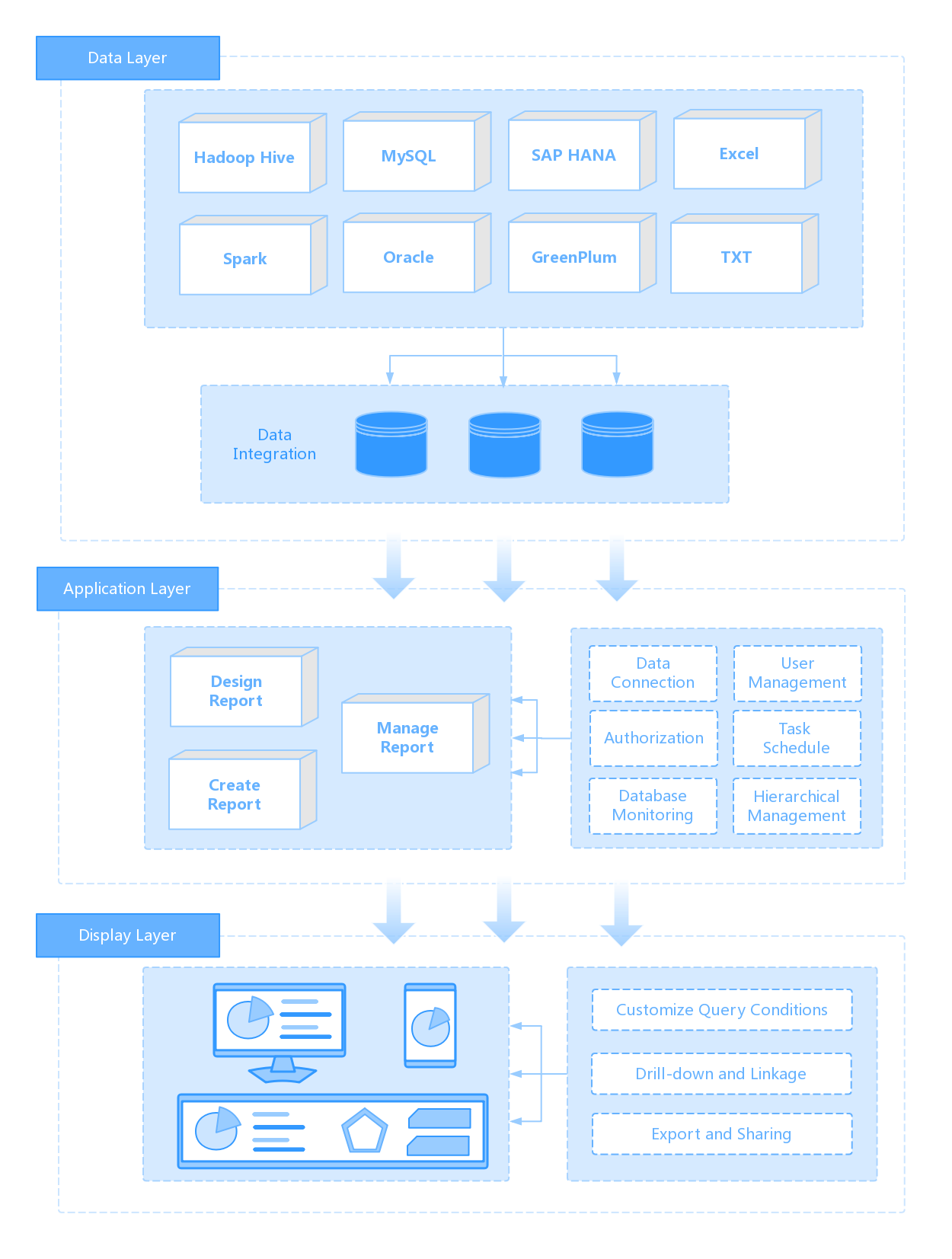
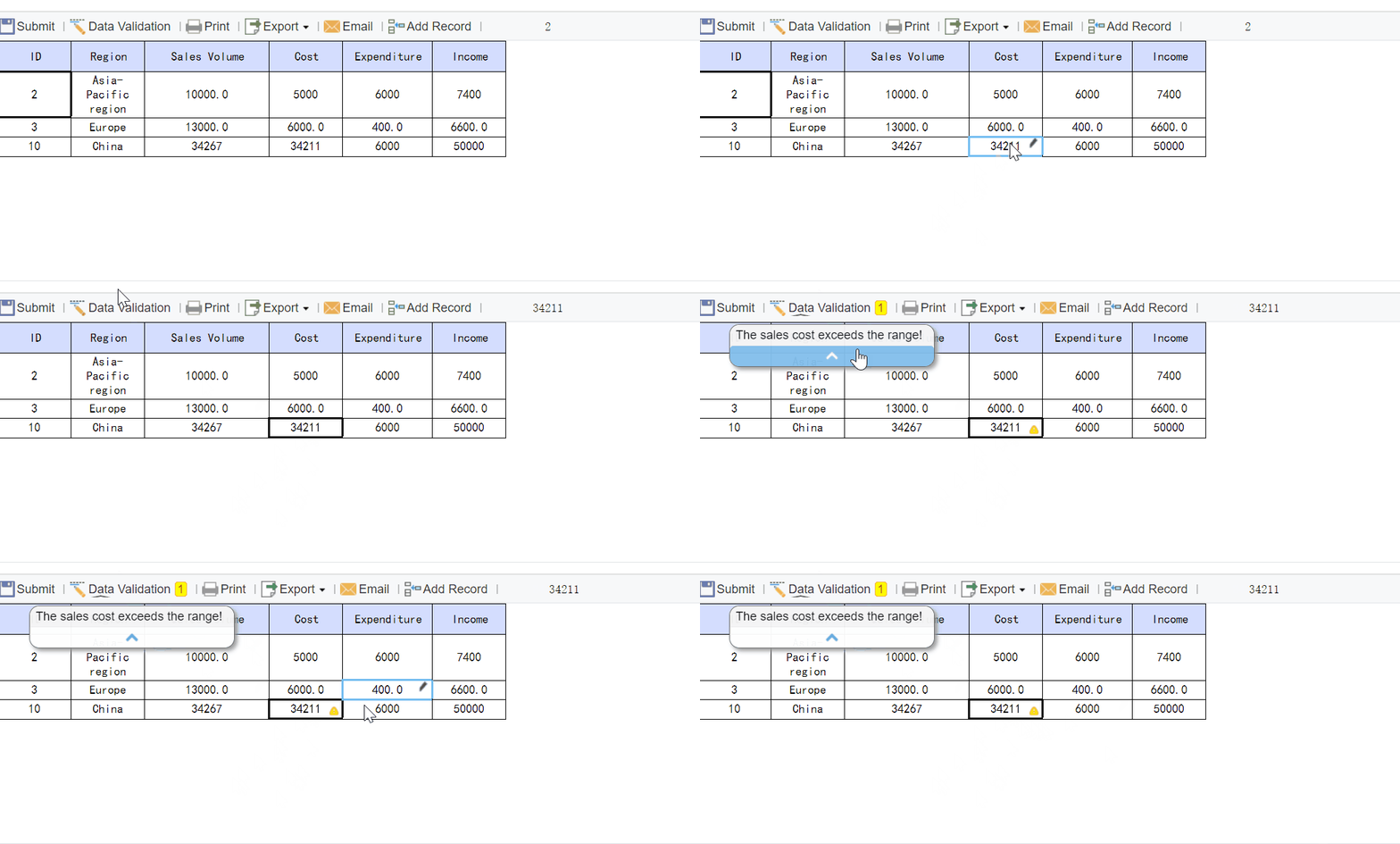
FineReport helps organizations turn a static business expense report template into a controlled reporting system with dashboards, approval visibility, exception tracking, and standardized data collection across teams. Instead of relying on disconnected spreadsheets, finance and operations leaders can create unified expense reporting workflows that improve transparency and reduce manual review effort.
Create dashboards for reimbursement status and spend trends
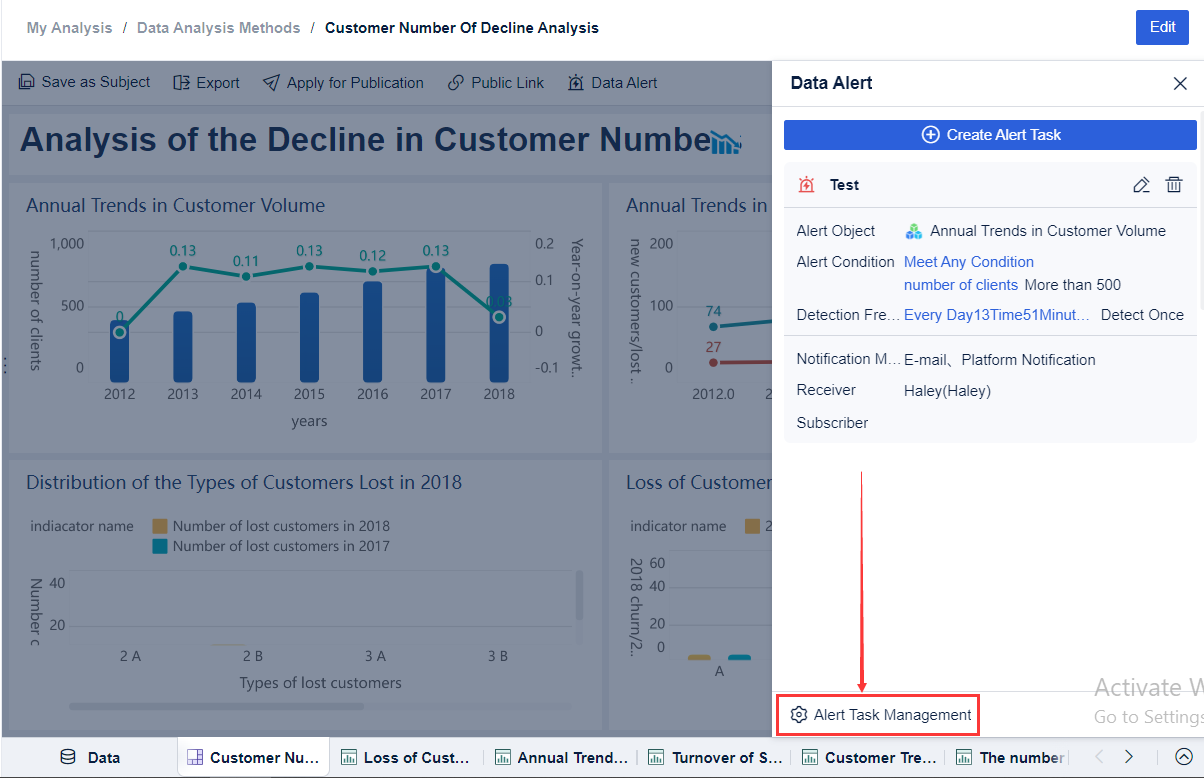
Monitor missing receipts and policy exceptions
Track approval progress across teams
Consolidate expense data by department, project, or location
Support operational reporting with ready-made dashboard structures
Get Ready-to-Use Dashboard Templates in Fine Gallery
If your current process still depends on email chains, formula-heavy sheets, and manual reconciliation, this is the point to modernize. Start with a template if you must. But if expense reporting is already affecting accuracy, control, or close speed, move to a system designed for scale.
A solid template should capture the employee name, expense date, vendor, category, amount, payment method, business purpose, cost center, receipt reference, and approval details. These fields help finance teams review claims consistently and keep records audit-ready.
Employees should gather receipts first, enter each expense line with the correct date and category, explain the business purpose, and attach supporting documents before submitting. Reviewing the report for missing details helps avoid approval delays.
Receipts should be linked to the matching expense line and kept clear enough for finance review. Mileage entries should include the trip date, starting point, destination, business purpose, miles driven, and the reimbursement rate used.
Spreadsheets usually stop working well when multiple employees submit expenses regularly and finance teams spend too much time chasing receipts, fixing errors, and managing approvals manually. At that point, standardization and automation become more reliable than manual tracking.
Key metrics include total claimed amount, reimbursable amount, approval turnaround time, reimbursement cycle time, missing receipt rate, policy violation rate, and duplicate claim rate. These numbers show where the process is slowing down or creating risk.
Product Trial
FineReport
Pixel-perfect reports · Interactive dashboards · Easy data entry · Digital twins